
Windows 7 main os dual boot XP

sotorious

New member
Power User
Local time
1:27 AM
Messages
512
Location
Houston
I don't know if there is a guide out there to be able to have 7 as your main os and then dual boot xp as your secondary. If there is can someone please link me to a link or a video that would be so helpful thank you.

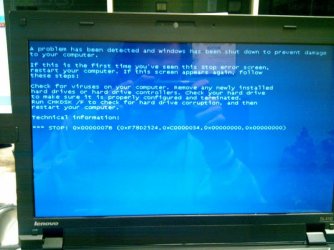
Ive already created the disk partition on windows 7 and then i tried to install xp by restarting and having it run, it got to the screen it was loading files.... then all of a sudden the laptop got a bluescreen so i have a feeling i am doing something wrong.
 

My Computer My Computer

OS
windows 7 professional 64 bit
CPU
intel core i7 920 (1366)
Motherboard
Asus P6T Deluxe V2
Memory
Corsair Dominators (TR3X6G1600C8D)
Graphics Card(s)
Sapphire 5970
Sound Card
on board / Asus Xonar D2
Monitor(s) Displays
lg flatron wide 22" 2x
Hard Drives
caviar black 1tb
caviar green 1tb

external western digital my book 1tb
external western my book digital 500gb
PSU
corsair 750w
Case
antec 1200
Cooling
sythek mugen - 2
Keyboard
flico maje
Mouse
g500
Internet Speed
comcast houstont x, 16mb down with boost. 2mb up

My Computer My Computer

Computer Manufacturer/Model Number
Blue Shards 1.0
OS
Windows 7 Ultimate 64bit
CPU
AMD Phenom II 555 Black Edition Quad Core OC'd to 4.0GHz
Motherboard
ASUS M4A88T-M
Memory
G Skill RipJaw 1333MHz 4GB
Graphics Card(s)
ATI raideon 4250 HD/XFX ATI Radeon 1GB HD4650
Sound Card
Realteck HD Audio
Monitor(s) Displays
2x 22" Widescreen HD Monitors
Hard Drives
500GB Sata 7500RPM
80GB IDE
PSU
850W OCUK Modular
Case
Antec Dark Fleet DF-30
Cooling
Titan Fenrir Pro (CPU)
Keyboard
Logitech Wireless
Mouse
Logitech Wireless
Internet Speed
24Meg
Other Info
Getting soon-
2TB 7200RPM HDD
+8GB RAM
30GB SSD
HD6950/70
Ok i've done so far everything in that guide but i keep bluescreening when xp is at its installation point before i can choose what i want to do. where it is loading the kernells and stuff.

Help?

This laptop is brand new just bought it a couple hours ago.
 

My Computer My Computer

OS
windows 7 professional 64 bit
CPU
intel core i7 920 (1366)
Motherboard
Asus P6T Deluxe V2
Memory
Corsair Dominators (TR3X6G1600C8D)
Graphics Card(s)
Sapphire 5970
Sound Card
on board / Asus Xonar D2
Monitor(s) Displays
lg flatron wide 22" 2x
Hard Drives
caviar black 1tb
caviar green 1tb

external western digital my book 1tb
external western my book digital 500gb
PSU
corsair 750w
Case
antec 1200
Cooling
sythek mugen - 2
Keyboard
flico maje
Mouse
g500
Internet Speed
comcast houstont x, 16mb down with boost. 2mb up
Ok i've done so far everything in that guide but i keep bluescreening when xp is at its installation point before i can choose what i want to do. where it is loading the kernells and stuff.

Help?
Bad disc?
Can you post a screenshot of your drive map via Win7 as to how you have the partitons set up?
 

My Computer My Computer

Computer Manufacturer/Model Number
Blue Shards 1.0
OS
Windows 7 Ultimate 64bit
CPU
AMD Phenom II 555 Black Edition Quad Core OC'd to 4.0GHz
Motherboard
ASUS M4A88T-M
Memory
G Skill RipJaw 1333MHz 4GB
Graphics Card(s)
ATI raideon 4250 HD/XFX ATI Radeon 1GB HD4650
Sound Card
Realteck HD Audio
Monitor(s) Displays
2x 22" Widescreen HD Monitors
Hard Drives
500GB Sata 7500RPM
80GB IDE
PSU
850W OCUK Modular
Case
Antec Dark Fleet DF-30
Cooling
Titan Fenrir Pro (CPU)
Keyboard
Logitech Wireless
Mouse
Logitech Wireless
Internet Speed
24Meg
Other Info
Getting soon-
2TB 7200RPM HDD
+8GB RAM
30GB SSD
HD6950/70
I dont think its a bad disk as i used this cd last week i could be wrong

ok here is a screen shot of the blue screen and also a screen shot of the disk management i think that is what you were looking for.

I went ahead and named the drive already to windows xp

mail.google.com.jpeg
 

Attachments

  • mail.google.com2.jpeg
    mail.google.com2.jpeg
    55.3 KB · Views: 62

My Computer My Computer

OS
windows 7 professional 64 bit
CPU
intel core i7 920 (1366)
Motherboard
Asus P6T Deluxe V2
Memory
Corsair Dominators (TR3X6G1600C8D)
Graphics Card(s)
Sapphire 5970
Sound Card
on board / Asus Xonar D2
Monitor(s) Displays
lg flatron wide 22" 2x
Hard Drives
caviar black 1tb
caviar green 1tb

external western digital my book 1tb
external western my book digital 500gb
PSU
corsair 750w
Case
antec 1200
Cooling
sythek mugen - 2
Keyboard
flico maje
Mouse
g500
Internet Speed
comcast houstont x, 16mb down with boost. 2mb up
Make your xp partiton primary and active;)

Right click in the disc management and set as primary and active:)
 

My Computer My Computer

Computer Manufacturer/Model Number
Blue Shards 1.0
OS
Windows 7 Ultimate 64bit
CPU
AMD Phenom II 555 Black Edition Quad Core OC'd to 4.0GHz
Motherboard
ASUS M4A88T-M
Memory
G Skill RipJaw 1333MHz 4GB
Graphics Card(s)
ATI raideon 4250 HD/XFX ATI Radeon 1GB HD4650
Sound Card
Realteck HD Audio
Monitor(s) Displays
2x 22" Widescreen HD Monitors
Hard Drives
500GB Sata 7500RPM
80GB IDE
PSU
850W OCUK Modular
Case
Antec Dark Fleet DF-30
Cooling
Titan Fenrir Pro (CPU)
Keyboard
Logitech Wireless
Mouse
Logitech Wireless
Internet Speed
24Meg
Other Info
Getting soon-
2TB 7200RPM HDD
+8GB RAM
30GB SSD
HD6950/70
Make your xp partiton primary and active;)

Right click in the disc management and set as primary and active:)

where do i find that i right clicked on the drive and i dont see where it says set as primary active. i do that to the windows xp one.
 

My Computer My Computer

OS
windows 7 professional 64 bit
CPU
intel core i7 920 (1366)
Motherboard
Asus P6T Deluxe V2
Memory
Corsair Dominators (TR3X6G1600C8D)
Graphics Card(s)
Sapphire 5970
Sound Card
on board / Asus Xonar D2
Monitor(s) Displays
lg flatron wide 22" 2x
Hard Drives
caviar black 1tb
caviar green 1tb

external western digital my book 1tb
external western my book digital 500gb
PSU
corsair 750w
Case
antec 1200
Cooling
sythek mugen - 2
Keyboard
flico maje
Mouse
g500
Internet Speed
comcast houstont x, 16mb down with boost. 2mb up
It gives me the option highlighted on the main drive and the other ones its blanked out. but the partition that i made its not even showing that option when i right click it. is that what is causing it to bluescreen
 

My Computer My Computer

OS
windows 7 professional 64 bit
CPU
intel core i7 920 (1366)
Motherboard
Asus P6T Deluxe V2
Memory
Corsair Dominators (TR3X6G1600C8D)
Graphics Card(s)
Sapphire 5970
Sound Card
on board / Asus Xonar D2
Monitor(s) Displays
lg flatron wide 22" 2x
Hard Drives
caviar black 1tb
caviar green 1tb

external western digital my book 1tb
external western my book digital 500gb
PSU
corsair 750w
Case
antec 1200
Cooling
sythek mugen - 2
Keyboard
flico maje
Mouse
g500
Internet Speed
comcast houstont x, 16mb down with boost. 2mb up
Make your xp partiton primary and active;)

Right click in the disc management and set as primary and active:)

where do i find that i right clicked on the drive and i dont see where it says set as primary active. i do that to the windows xp one.
You can do it with Partition Wizard Free Download Partition Wizard
If you wish to,i can guide you through it.

I use it instead of Windows Disc Management. With Disc Management you will have to re format as Primary and NTFS.

Sorry about the confusion.
 

My Computer My Computer

Computer Manufacturer/Model Number
Blue Shards 1.0
OS
Windows 7 Ultimate 64bit
CPU
AMD Phenom II 555 Black Edition Quad Core OC'd to 4.0GHz
Motherboard
ASUS M4A88T-M
Memory
G Skill RipJaw 1333MHz 4GB
Graphics Card(s)
ATI raideon 4250 HD/XFX ATI Radeon 1GB HD4650
Sound Card
Realteck HD Audio
Monitor(s) Displays
2x 22" Widescreen HD Monitors
Hard Drives
500GB Sata 7500RPM
80GB IDE
PSU
850W OCUK Modular
Case
Antec Dark Fleet DF-30
Cooling
Titan Fenrir Pro (CPU)
Keyboard
Logitech Wireless
Mouse
Logitech Wireless
Internet Speed
24Meg
Other Info
Getting soon-
2TB 7200RPM HDD
+8GB RAM
30GB SSD
HD6950/70
So what do you mean i would have to reformat it as primary basically do a clean install on the whole laptop? Because 7 came booted on this laptop and i dont have another 7 disk for the laptop and i was trying to get an xp as a dual boot as it needs to have xp for a certain thing. this is for a business.

If you want you can guide me threw it if you have aim or something or if you would like to continue threw this forum. It would be better threw im ill be home in 20 mins
 

My Computer My Computer

OS
windows 7 professional 64 bit
CPU
intel core i7 920 (1366)
Motherboard
Asus P6T Deluxe V2
Memory
Corsair Dominators (TR3X6G1600C8D)
Graphics Card(s)
Sapphire 5970
Sound Card
on board / Asus Xonar D2
Monitor(s) Displays
lg flatron wide 22" 2x
Hard Drives
caviar black 1tb
caviar green 1tb

external western digital my book 1tb
external western my book digital 500gb
PSU
corsair 750w
Case
antec 1200
Cooling
sythek mugen - 2
Keyboard
flico maje
Mouse
g500
Internet Speed
comcast houstont x, 16mb down with boost. 2mb up
So what do you mean i would have to reformat it as primary basically do a clean install on the whole laptop? Because 7 came booted on this laptop and i dont have another 7 disk for the laptop and i was trying to get an xp as a dual boot as it needs to have xp for a certain thing. this is for a business.

If you want you can guide me threw it if you have aim or something or if you would like to continue threw this forum. It would be better threw im ill be home in 20 mins
Edit- No,you do not have to format the Windows 7 partition,do not format this partiton.
I can use msn if you would like but i dont think there is any need.
Im more familar with Partition Wizard so if you download the above i will guige you through it.

Download both the home edition program for Win7 and the bootable disc (burn and keep the bootable disc,its always handy to have)

Now open the PW program.
Right click the partition labeled as XP and click Modify>Set Partition as Primary>click Apply in the bottom left of the screen.
Right click the XP partition again>Modify>Set as Active>click Apply.

Now it should work.
Just make sure you click apply as per the instrusctions above.
 
Last edited:

My Computer My Computer

Computer Manufacturer/Model Number
Blue Shards 1.0
OS
Windows 7 Ultimate 64bit
CPU
AMD Phenom II 555 Black Edition Quad Core OC'd to 4.0GHz
Motherboard
ASUS M4A88T-M
Memory
G Skill RipJaw 1333MHz 4GB
Graphics Card(s)
ATI raideon 4250 HD/XFX ATI Radeon 1GB HD4650
Sound Card
Realteck HD Audio
Monitor(s) Displays
2x 22" Widescreen HD Monitors
Hard Drives
500GB Sata 7500RPM
80GB IDE
PSU
850W OCUK Modular
Case
Antec Dark Fleet DF-30
Cooling
Titan Fenrir Pro (CPU)
Keyboard
Logitech Wireless
Mouse
Logitech Wireless
Internet Speed
24Meg
Other Info
Getting soon-
2TB 7200RPM HDD
+8GB RAM
30GB SSD
HD6950/70
  • Like
Reactions: JMH
It's the other way round.

Make Primary first, then Set Active.

Do you have a backup image?

If not, get a free imaging app. and back up your o/s partitions regularly.

What is the 1.7gb system partition for?
 

My Computers My Computers

System One System Two

  • Computer type
    PC/Desktop
    OS
    7 X64
    CPU
    i5 8400
    Motherboard
    gigabyte b365m ds3h
    Memory
    2x8gb 3200mhz
    Hard Drives
    various
    PSU
    pure power 11 400w cm
    Case
    Coolermaster
    Cooling
    cryorig m9i
  • Computer type
    PC/Desktop
    OS
    7x64
    CPU
    g5400
    Motherboard
    ga b365m ds3h
    Memory
    8gb ddr4 2400
    PSU
    xfx pro 450w
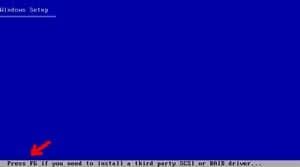
Are loading your SATA Controller drivers at F6?
 

Attachments

  • winxp2.jpg
    winxp2.jpg
    1.8 KB · Views: 377

My Computer My Computer

OS
ME/XP/Vista/Win7
It's the other way round.

Make Primary first, then Set Active.

Do you have a backup image?

If not, get a free imaging app. and back up your o/s partitions regularly.

What is the 1.7gb system partition for?
My mistake,sorry.

Thanks for spotting the mistake,ill edit the post and remember it for later use.
 

My Computer My Computer

Computer Manufacturer/Model Number
Blue Shards 1.0
OS
Windows 7 Ultimate 64bit
CPU
AMD Phenom II 555 Black Edition Quad Core OC'd to 4.0GHz
Motherboard
ASUS M4A88T-M
Memory
G Skill RipJaw 1333MHz 4GB
Graphics Card(s)
ATI raideon 4250 HD/XFX ATI Radeon 1GB HD4650
Sound Card
Realteck HD Audio
Monitor(s) Displays
2x 22" Widescreen HD Monitors
Hard Drives
500GB Sata 7500RPM
80GB IDE
PSU
850W OCUK Modular
Case
Antec Dark Fleet DF-30
Cooling
Titan Fenrir Pro (CPU)
Keyboard
Logitech Wireless
Mouse
Logitech Wireless
Internet Speed
24Meg
Other Info
Getting soon-
2TB 7200RPM HDD
+8GB RAM
30GB SSD
HD6950/70
I dont have eitther of those ok lets back up before i begin. How do i fully get rid of the partition i made with windows 7. I tried to delete it then it went to unallocated how do i get my 100 gigs back?

Can someone also recomend a good backup imaging program.
 

My Computer My Computer

OS
windows 7 professional 64 bit
CPU
intel core i7 920 (1366)
Motherboard
Asus P6T Deluxe V2
Memory
Corsair Dominators (TR3X6G1600C8D)
Graphics Card(s)
Sapphire 5970
Sound Card
on board / Asus Xonar D2
Monitor(s) Displays
lg flatron wide 22" 2x
Hard Drives
caviar black 1tb
caviar green 1tb

external western digital my book 1tb
external western my book digital 500gb
PSU
corsair 750w
Case
antec 1200
Cooling
sythek mugen - 2
Keyboard
flico maje
Mouse
g500
Internet Speed
comcast houstont x, 16mb down with boost. 2mb up
Where did your System_DRV Partition come from? Installed by Lenovo? Have you tried putting a letter on it?

I was testing installing XP after Win 7 on the same drive with the Win 7 System Reserved Partition (with letter) present and have decided it cannot be done. I could never get XP past the first reboot. I never got a blue screen, but did get error messages.

The same install worked fine without the System Reserve Partition.

Your partition is much larger than the Win 7 one, but I bet that could be causing problems.
 

My Computer My Computer

Computer Manufacturer/Model Number
Homebuilt
OS
Windows 7 x64
CPU
i7-2600K
Motherboard
Asus P8Z77-v Pro
Memory
8 G
Graphics Card(s)
GTX 480
Sound Card
Onboard
Monitor(s) Displays
LG W2753V
Screen Resolution
1920x1080
Hard Drives
Crucial M4 128 G SSD

My Computer My Computer

Computer Manufacturer/Model Number
Blue Shards 1.0
OS
Windows 7 Ultimate 64bit
CPU
AMD Phenom II 555 Black Edition Quad Core OC'd to 4.0GHz
Motherboard
ASUS M4A88T-M
Memory
G Skill RipJaw 1333MHz 4GB
Graphics Card(s)
ATI raideon 4250 HD/XFX ATI Radeon 1GB HD4650
Sound Card
Realteck HD Audio
Monitor(s) Displays
2x 22" Widescreen HD Monitors
Hard Drives
500GB Sata 7500RPM
80GB IDE
PSU
850W OCUK Modular
Case
Antec Dark Fleet DF-30
Cooling
Titan Fenrir Pro (CPU)
Keyboard
Logitech Wireless
Mouse
Logitech Wireless
Internet Speed
24Meg
Other Info
Getting soon-
2TB 7200RPM HDD
+8GB RAM
30GB SSD
HD6950/70
Where did your System_DRV Partition come from? Installed by Lenovo? Have you tried putting a letter on it?

I was testing installing XP after Win 7 on the same drive with the Win 7 System Reserved Partition (with letter) present and have decided it cannot be done. I could never get XP past the first reboot. I never got a blue screen, but did get error messages.

The same install worked fine without the System Reserve Partition.

Your partition is much larger than the Win 7 one, but I bet that could be causing problems.


The one labled windows xp i did it everything else is levono. This is windows 7 first and im trying to get xp as the dual boot. This machine needs xp for a CAR PROGRAM to run so thats why its kind of important i get xp on this machine as they dont sell laptops with xp on them anymore.
 

My Computer My Computer

OS
windows 7 professional 64 bit
CPU
intel core i7 920 (1366)
Motherboard
Asus P6T Deluxe V2
Memory
Corsair Dominators (TR3X6G1600C8D)
Graphics Card(s)
Sapphire 5970
Sound Card
on board / Asus Xonar D2
Monitor(s) Displays
lg flatron wide 22" 2x
Hard Drives
caviar black 1tb
caviar green 1tb

external western digital my book 1tb
external western my book digital 500gb
PSU
corsair 750w
Case
antec 1200
Cooling
sythek mugen - 2
Keyboard
flico maje
Mouse
g500
Internet Speed
comcast houstont x, 16mb down with boost. 2mb up
ok they are downloading now in the mean while is there anyway to delete that partition i just made. So i can get my 100gb back and use it for this next partition.
 

My Computer My Computer

OS
windows 7 professional 64 bit
CPU
intel core i7 920 (1366)
Motherboard
Asus P6T Deluxe V2
Memory
Corsair Dominators (TR3X6G1600C8D)
Graphics Card(s)
Sapphire 5970
Sound Card
on board / Asus Xonar D2
Monitor(s) Displays
lg flatron wide 22" 2x
Hard Drives
caviar black 1tb
caviar green 1tb

external western digital my book 1tb
external western my book digital 500gb
PSU
corsair 750w
Case
antec 1200
Cooling
sythek mugen - 2
Keyboard
flico maje
Mouse
g500
Internet Speed
comcast houstont x, 16mb down with boost. 2mb up
ok they are downloading now in the mean while is there anyway to delete that partition i just made. So i can get my 100gb back and use it for this next partition.
You simply edit your existing partiton with Partiton Wizard,no need to delete it.
First format it (as NTFS)to get rid of the XP data then mark as Primary>then Mark as Active.

Then try reinstalling.
 

My Computer My Computer

Computer Manufacturer/Model Number
Blue Shards 1.0
OS
Windows 7 Ultimate 64bit
CPU
AMD Phenom II 555 Black Edition Quad Core OC'd to 4.0GHz
Motherboard
ASUS M4A88T-M
Memory
G Skill RipJaw 1333MHz 4GB
Graphics Card(s)
ATI raideon 4250 HD/XFX ATI Radeon 1GB HD4650
Sound Card
Realteck HD Audio
Monitor(s) Displays
2x 22" Widescreen HD Monitors
Hard Drives
500GB Sata 7500RPM
80GB IDE
PSU
850W OCUK Modular
Case
Antec Dark Fleet DF-30
Cooling
Titan Fenrir Pro (CPU)
Keyboard
Logitech Wireless
Mouse
Logitech Wireless
Internet Speed
24Meg
Other Info
Getting soon-
2TB 7200RPM HDD
+8GB RAM
30GB SSD
HD6950/70
Back
Top