Windows 7 not starting at all

May be that your 960 isn't a UEFI-GPT disk and is a Legacy-MBR.
Try to boot as legacy and see if it able to do the repair.
 

My Computers My Computers

System One System Two

  • Computer type
    PC/Desktop
    Computer Manufacturer/Model Number
    custom build
    OS
    Windows 7 HP 64
    CPU
    i5 6600K - 800MHz to 4200MHz
    Motherboard
    GA-Z170-HD3P
    Memory
    4+4G GSkill DDR4 3000
    Graphics Card(s)
    IG - Intel 530
    Monitor(s) Displays
    Samsung 226BW
    Screen Resolution
    1680x1050
    Hard Drives
    (1) -1 SM951 – 128GB M.2 AHCI PCIe SSD drive for Windows 7 and Lubuntu
    (2) -1 WD SATA 3 - 1T for Data
    (3) -1 WD SATA 3 - 1T for backup
    PSU
    Thermaltake 450W TR2 gold
    Keyboard
    Old and good Chicony mechanical keyboard
    Mouse
    Logitech mX performance - 9 buttons (had to disable some)
    Internet Speed
    500Mb/s
    Browser
    Firefox 64
    Other Info
    TinyWall firewall
  • Computer type
    Laptop
    System Manufacturer/Model Number
    Asus Q550LF
    OS
    Windows 7 Pro
    CPU
    i7-4500U 800MHz to 3.0GHz
    Motherboard
    Asus Q550LF
    Memory
    (4+4)G DDR3 1600
    Graphics Card(s)
    IG intel 4400 + NVIDIA GeForce GT 745M
    Sound Card
    Realtek
    Monitor(s) Displays
    LG Display LP156WF4-SPH1
    Screen Resolution
    1920 x 1080
    Hard Drives
    BX500 120G SSD for Windows and programs +
    1T HDD for data
    Internet Speed
    500 Mb/s
    Browser
    Firefox
    Other Info
    TinyWall firewall
I checked in Disk Management and I was sure it said that disk was "GUID Partition Table".

But, I booted from the USB stick without UEFI and got to the screen where it wants me to choose a drive. But, it is still showing no drives. I am assuming that means the NVMe drivers didn't load. Is that correct? I had put the Samsung_NVM_Express_Driver_3.0.exe file into the drivers/Bootx64 and drivers/Installx64 folders of the working folder for SIW2's tool when I ran the tool. Does that EXE file need to be extracted before I run the tool?

There is an option to load drivers. But it doesn't recognize Samsung_NVM_Express_Driver_3.0.exe as a driver. Is there any way I can extract the actual drivers from the Samsung_NVM_Express_Driver_3.0.exe file, so that I can continue?
 

My Computer My Computer

Computer type
PC/Desktop
Computer Manufacturer/Model Number
custom
OS
Windows 7 Home Premium 64bit SP 1 (Version 6.1.7601)
CPU
Intel i7-5820K
Motherboard
ASUS X99-A (BIOS 3505)
Memory
16 GB
Graphics Card(s)
NVidia GeForce GTX 970
Sound Card
MB default (Crystal Sound 2)
Monitor(s) Displays
Dell 2408 WFP
Screen Resolution
1920x1280
Hard Drives
C:
Samsung 960 PRO 2 TB SSD
D:
Crucial M4 512GB SSD
PSU
Thermaltake Toughpower 750 W
I'm 99.9% sure your 960 isn't GPT.
You're making things difficult as you don't follow my instructions.
Drivers can't be an executable file. They must be *.inf, *.sys *.cat.
I gave you the files on post#10.

Start over using the files from post#10. Unzip and place the files into the drivers/Bootx64 and drivers/Installx64 folders.
 
Last edited:

My Computers My Computers

System One System Two

  • Computer type
    PC/Desktop
    Computer Manufacturer/Model Number
    custom build
    OS
    Windows 7 HP 64
    CPU
    i5 6600K - 800MHz to 4200MHz
    Motherboard
    GA-Z170-HD3P
    Memory
    4+4G GSkill DDR4 3000
    Graphics Card(s)
    IG - Intel 530
    Monitor(s) Displays
    Samsung 226BW
    Screen Resolution
    1680x1050
    Hard Drives
    (1) -1 SM951 – 128GB M.2 AHCI PCIe SSD drive for Windows 7 and Lubuntu
    (2) -1 WD SATA 3 - 1T for Data
    (3) -1 WD SATA 3 - 1T for backup
    PSU
    Thermaltake 450W TR2 gold
    Keyboard
    Old and good Chicony mechanical keyboard
    Mouse
    Logitech mX performance - 9 buttons (had to disable some)
    Internet Speed
    500Mb/s
    Browser
    Firefox 64
    Other Info
    TinyWall firewall
  • Computer type
    Laptop
    System Manufacturer/Model Number
    Asus Q550LF
    OS
    Windows 7 Pro
    CPU
    i7-4500U 800MHz to 3.0GHz
    Motherboard
    Asus Q550LF
    Memory
    (4+4)G DDR3 1600
    Graphics Card(s)
    IG intel 4400 + NVIDIA GeForce GT 745M
    Sound Card
    Realtek
    Monitor(s) Displays
    LG Display LP156WF4-SPH1
    Screen Resolution
    1920 x 1080
    Hard Drives
    BX500 120G SSD for Windows and programs +
    1T HDD for data
    Internet Speed
    500 Mb/s
    Browser
    Firefox
    Other Info
    TinyWall firewall
Thank you for that link. I am away from my stricken PC for the evening. I will rebuild the installation USB and report back tomorrow when I test it.
 

My Computer My Computer

Computer type
PC/Desktop
Computer Manufacturer/Model Number
custom
OS
Windows 7 Home Premium 64bit SP 1 (Version 6.1.7601)
CPU
Intel i7-5820K
Motherboard
ASUS X99-A (BIOS 3505)
Memory
16 GB
Graphics Card(s)
NVidia GeForce GTX 970
Sound Card
MB default (Crystal Sound 2)
Monitor(s) Displays
Dell 2408 WFP
Screen Resolution
1920x1280
Hard Drives
C:
Samsung 960 PRO 2 TB SSD
D:
Crucial M4 512GB SSD
PSU
Thermaltake Toughpower 750 W
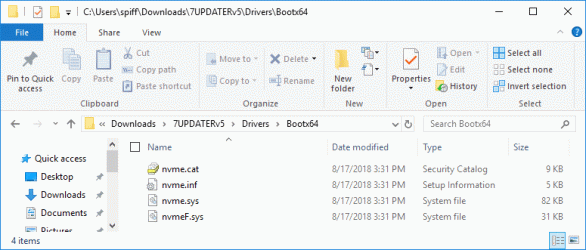
Sorry I am so thick about this. I have added the four files from 64bit-Sams.zip to SIW2's two 64 bit folders for drivers. Here's the Boot64 folder (and Installx64 has the same 4 driver files):
7UPDATERv5_AddedDriverFiles.gif

(I have already eliminated [3] and [4] from install.wim to save space.)

Then I run the 7UPDATEv5.cmd file and go through that process. I was thinking that the tool would add those driver files to the appropriate places in the installation distro created.

But, when I boot (non-EUFI) from the created USB stick and choose the "Repair your PC" option, it is still not seeing the Samsung SSD.

Megahertz07, you mentioned adding those files to the WIM files in the distro.
Just added the MVMe drivers to boot.wim (index 1 and 2) and to Install.wim (index 2 = HP)
I guess I should do the same thing. I can open boot.wim and install.wim in 7zip and see [1] and [2] (and [2]). But, there are lots of sub folders. Where in [1] and [2] (and [2]) should I put those 4 driver files?
 

My Computer My Computer

Computer type
PC/Desktop
Computer Manufacturer/Model Number
custom
OS
Windows 7 Home Premium 64bit SP 1 (Version 6.1.7601)
CPU
Intel i7-5820K
Motherboard
ASUS X99-A (BIOS 3505)
Memory
16 GB
Graphics Card(s)
NVidia GeForce GTX 970
Sound Card
MB default (Crystal Sound 2)
Monitor(s) Displays
Dell 2408 WFP
Screen Resolution
1920x1280
Hard Drives
C:
Samsung 960 PRO 2 TB SSD
D:
Crucial M4 512GB SSD
PSU
Thermaltake Toughpower 750 W
Hi MrZork,

The drivers you added are fine and in the correct format of .inf, .sys and .cat [as they can't be .exe files].

Extract the files from the iso with 7zip to a Win7 folder. Don't use spaces or special characters on the folder name. Just Win7
Put the MVMe driver files on 7UPDATERv5\Drivers\Bootx64 and 7UPDATERv5\Drivers\Installx64
Run SIW2 tool. Browse to Win7 folder. Follow the instructions. Skip the updater.
It will take some time. Be patient.
Did you skip the 7UPDATER like Megahertz07 suggested in post #47?

I hope this helps!
 

My Computer My Computer

Computer type
Laptop
Computer Manufacturer/Model Number
Fujitsu LIFEBOOK
OS
Win 7 HP SP1 64-bit Vista HB SP2 32-bit Linux Mint 18.3
CPU
Intel(R) Pentium(R) CPU P6200 @ 2.13GHz
Motherboard
FUJITSU FJNBB06
Memory
4.00 GB
Graphics Card(s)
Intel(R) Graphics Media Accelerator HD
Sound Card
[1] Realtek High Definition Audio [2] Intel(R) Display Audio
Screen Resolution
1366 x 768 x 32 bits (4294967296 colors) @ 59 Hz
Hard Drives
TOSHIBA MK5076GSX
Antivirus
AVG FREE
SIW2 has updated his tool to V6 https://www.sevenforums.com/attachm...-your-win-7-installation-media-7updaterv6.zip
Let's see if you did it right
- Extract the Win 7 installation files to a folder (for ex \downloads\7updaterV6\Win7hp) - The folder must have a short name without spaces.
- Add the four files from 64bit-Sams.zip to SIW2's two 64 bit folders for drivers (as you did).
- Run the tool, browse to \downloads\7updaterV6\Win7hp. Let it update boot.wim and install.wim. Skip the updates.
- Create an iso file.
- Transfer the iso to USB using MS tool or Rufus.
- Boot the USB as Legacy-MBR (not UEFI)
 

My Computers My Computers

System One System Two

  • Computer type
    PC/Desktop
    Computer Manufacturer/Model Number
    custom build
    OS
    Windows 7 HP 64
    CPU
    i5 6600K - 800MHz to 4200MHz
    Motherboard
    GA-Z170-HD3P
    Memory
    4+4G GSkill DDR4 3000
    Graphics Card(s)
    IG - Intel 530
    Monitor(s) Displays
    Samsung 226BW
    Screen Resolution
    1680x1050
    Hard Drives
    (1) -1 SM951 – 128GB M.2 AHCI PCIe SSD drive for Windows 7 and Lubuntu
    (2) -1 WD SATA 3 - 1T for Data
    (3) -1 WD SATA 3 - 1T for backup
    PSU
    Thermaltake 450W TR2 gold
    Keyboard
    Old and good Chicony mechanical keyboard
    Mouse
    Logitech mX performance - 9 buttons (had to disable some)
    Internet Speed
    500Mb/s
    Browser
    Firefox 64
    Other Info
    TinyWall firewall
  • Computer type
    Laptop
    System Manufacturer/Model Number
    Asus Q550LF
    OS
    Windows 7 Pro
    CPU
    i7-4500U 800MHz to 3.0GHz
    Motherboard
    Asus Q550LF
    Memory
    (4+4)G DDR3 1600
    Graphics Card(s)
    IG intel 4400 + NVIDIA GeForce GT 745M
    Sound Card
    Realtek
    Monitor(s) Displays
    LG Display LP156WF4-SPH1
    Screen Resolution
    1920 x 1080
    Hard Drives
    BX500 120G SSD for Windows and programs +
    1T HDD for data
    Internet Speed
    500 Mb/s
    Browser
    Firefox
    Other Info
    TinyWall firewall
The folder must have a short name without spaces.

Spaces issue has ( hopefully) been fixed in v6.
 

My Computers My Computers

System One System Two

  • Computer type
    PC/Desktop
    OS
    7 X64
    CPU
    i5 8400
    Motherboard
    gigabyte b365m ds3h
    Memory
    2x8gb 3200mhz
    Hard Drives
    various
    PSU
    pure power 11 400w cm
    Case
    Coolermaster
    Cooling
    cryorig m9i
  • Computer type
    PC/Desktop
    OS
    7x64
    CPU
    g5400
    Motherboard
    ga b365m ds3h
    Memory
    8gb ddr4 2400
    PSU
    xfx pro 450w
Last edited:

My Computer My Computer

Computer type
Laptop
Computer Manufacturer/Model Number
Fujitsu LIFEBOOK
OS
Win 7 HP SP1 64-bit Vista HB SP2 32-bit Linux Mint 18.3
CPU
Intel(R) Pentium(R) CPU P6200 @ 2.13GHz
Motherboard
FUJITSU FJNBB06
Memory
4.00 GB
Graphics Card(s)
Intel(R) Graphics Media Accelerator HD
Sound Card
[1] Realtek High Definition Audio [2] Intel(R) Display Audio
Screen Resolution
1366 x 768 x 32 bits (4294967296 colors) @ 59 Hz
Hard Drives
TOSHIBA MK5076GSX
Antivirus
AVG FREE

My Computers My Computers

System One System Two

  • Computer type
    PC/Desktop
    OS
    7 X64
    CPU
    i5 8400
    Motherboard
    gigabyte b365m ds3h
    Memory
    2x8gb 3200mhz
    Hard Drives
    various
    PSU
    pure power 11 400w cm
    Case
    Coolermaster
    Cooling
    cryorig m9i
  • Computer type
    PC/Desktop
    OS
    7x64
    CPU
    g5400
    Motherboard
    ga b365m ds3h
    Memory
    8gb ddr4 2400
    PSU
    xfx pro 450w
The OP might not have the correct drivers. I suggest he add all these to the bootx64 and installx64 folders:

View attachment 404932

View attachment 404933

View attachment 404934

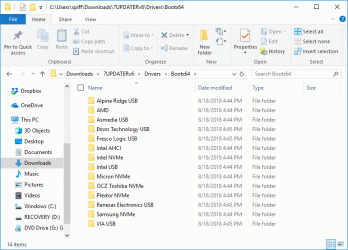
Thank you. To the bootx64 and installx64 folders, should I add those ZIP files themselves, or the folders in those ZIP files, or all of the files in the folders in those ZIP files? In other words, should my C:\Users\spiff\Downloads\7UPDATERv6\Drivers\Bootx64 folder look like it does below?

7UPDATERv6_AddedDriverFiles.gif
 

My Computer My Computer

Computer type
PC/Desktop
Computer Manufacturer/Model Number
custom
OS
Windows 7 Home Premium 64bit SP 1 (Version 6.1.7601)
CPU
Intel i7-5820K
Motherboard
ASUS X99-A (BIOS 3505)
Memory
16 GB
Graphics Card(s)
NVidia GeForce GTX 970
Sound Card
MB default (Crystal Sound 2)
Monitor(s) Displays
Dell 2408 WFP
Screen Resolution
1920x1280
Hard Drives
C:
Samsung 960 PRO 2 TB SSD
D:
Crucial M4 512GB SSD
PSU
Thermaltake Toughpower 750 W
SIW2 has updated his tool to V6 https://www.sevenforums.com/attachm...-your-win-7-installation-media-7updaterv6.zip
Let's see if you did it right
- Extract the Win 7 installation files to a folder (for ex \downloads\7updaterV6\Win7hp) - The folder must have a short name without spaces.
- Add the four files from 64bit-Sams.zip to SIW2's two 64 bit folders for drivers (as you did).
- Run the tool, browse to \downloads\7updaterV6\Win7hp. Let it update boot.wim and install.wim. Skip the updates.
- Create an iso file.
- Transfer the iso to USB using MS tool or Rufus.
- Boot the USB as Legacy-MBR (not UEFI)
I am modifying two steps.

  • I have added the drivers files linked by SIW2 in his post.
  • Before running the tool, I have edited install.wim to remove the [3] and [4] folders, to reduce space.
 

My Computer My Computer

Computer type
PC/Desktop
Computer Manufacturer/Model Number
custom
OS
Windows 7 Home Premium 64bit SP 1 (Version 6.1.7601)
CPU
Intel i7-5820K
Motherboard
ASUS X99-A (BIOS 3505)
Memory
16 GB
Graphics Card(s)
NVidia GeForce GTX 970
Sound Card
MB default (Crystal Sound 2)
Monitor(s) Displays
Dell 2408 WFP
Screen Resolution
1920x1280
Hard Drives
C:
Samsung 960 PRO 2 TB SSD
D:
Crucial M4 512GB SSD
PSU
Thermaltake Toughpower 750 W
Answering my own question from post #71, it looks like adding the driver folders from those zip files to bootx64 and installx64 works fine. I am running the updater now and it is telling me that it is "Installing 29 of 29 - C:\Users\spiff\Downloads\7UPDATERv6\DRIVERS\Bootx64\VIA USB\xhcdrv.inf: The driver package was successfully installed." (And 28 similar messages.)
 

My Computer My Computer

Computer type
PC/Desktop
Computer Manufacturer/Model Number
custom
OS
Windows 7 Home Premium 64bit SP 1 (Version 6.1.7601)
CPU
Intel i7-5820K
Motherboard
ASUS X99-A (BIOS 3505)
Memory
16 GB
Graphics Card(s)
NVidia GeForce GTX 970
Sound Card
MB default (Crystal Sound 2)
Monitor(s) Displays
Dell 2408 WFP
Screen Resolution
1920x1280
Hard Drives
C:
Samsung 960 PRO 2 TB SSD
D:
Crucial M4 512GB SSD
PSU
Thermaltake Toughpower 750 W
should my C:\Users\spiff\Downloads\7UPDATERv6\Drivers\Bootx64 folder look like it does below?


Yes. It seems you already figured that out.

C:\Users\spiff\Downloads\7UPDATERv6\Drivers\Bootx64 is quite a long path.Shouldn't be a problem in your case, but some people have ridiculously long usernames with spaces, etc.

Tip for the future - when doing this kind of thing, I normally keep it short e.g by extracting the 7updaterv6.zip directly to the root of the drive, so the path is like this:

C:\7UPDATERv6
 

My Computers My Computers

System One System Two

  • Computer type
    PC/Desktop
    OS
    7 X64
    CPU
    i5 8400
    Motherboard
    gigabyte b365m ds3h
    Memory
    2x8gb 3200mhz
    Hard Drives
    various
    PSU
    pure power 11 400w cm
    Case
    Coolermaster
    Cooling
    cryorig m9i
  • Computer type
    PC/Desktop
    OS
    7x64
    CPU
    g5400
    Motherboard
    ga b365m ds3h
    Memory
    8gb ddr4 2400
    PSU
    xfx pro 450w
Okay, recreated the install distro USB two ways. Both came after creating the distro files as above.

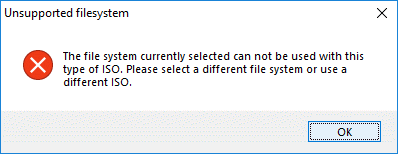
First, I used SIW2's CreateIso.cmd tool to create an ISO. Then I used Rufus to burn the ISO to the USB key. Rufus would not let me burn the created ISO as FAT32 with the partition scheme set to "MBR partition scheme for BIOS or UEFI-CSM" (as opposed to the other choices "MBR partition scheme for EUFI" and "GPT partition scheme for EUFI").
Rufus_Fat32_error.gif
Since I was looking for a non-UEFI option, the one I chose was the only one that seemed applicable. That was "MBR partition scheme for BIOS or UEFI-CSM" and NTFS. Maybe there is a combination that I didn't consider. I didn't expect this to end up working, since Megahertz07 has said I will need FAT32. But, I tried, since the ISO that the tool created didn't seem to work with FAT32. It didn't (see below).


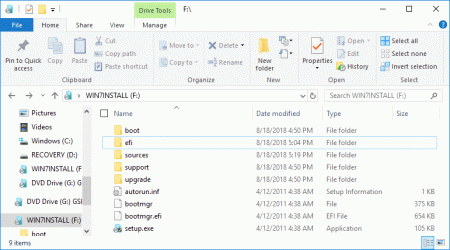
Second, I just formatted the USB stick as FAT32 and copied the distro files to it (not the ISO, the files, as shown below).
InstallDistroFiles.gif


In both cases, I was able to boot the USB from BIOS (non-UEFI) and I got to the screen where I can choose "Repair your PC". In both cases, it failed with the incompatible error "This version of System Recovery Options is not compatible with the version of Windows you are trying to repair. Try using a recovery disc that is compatible with this version of Windows."


Is there a definitive way for me to check whether my M.2 SSD is low formatted as legacy - MBR or UEFI - GPT? I'd like to nail that down for certain. I do not have another PC that I can pop the drive into.
 

My Computer My Computer

Computer type
PC/Desktop
Computer Manufacturer/Model Number
custom
OS
Windows 7 Home Premium 64bit SP 1 (Version 6.1.7601)
CPU
Intel i7-5820K
Motherboard
ASUS X99-A (BIOS 3505)
Memory
16 GB
Graphics Card(s)
NVidia GeForce GTX 970
Sound Card
MB default (Crystal Sound 2)
Monitor(s) Displays
Dell 2408 WFP
Screen Resolution
1920x1280
Hard Drives
C:
Samsung 960 PRO 2 TB SSD
D:
Crucial M4 512GB SSD
PSU
Thermaltake Toughpower 750 W

My Computers My Computers

System One System Two

  • Computer type
    PC/Desktop
    Computer Manufacturer/Model Number
    custom build
    OS
    Windows 7 HP 64
    CPU
    i5 6600K - 800MHz to 4200MHz
    Motherboard
    GA-Z170-HD3P
    Memory
    4+4G GSkill DDR4 3000
    Graphics Card(s)
    IG - Intel 530
    Monitor(s) Displays
    Samsung 226BW
    Screen Resolution
    1680x1050
    Hard Drives
    (1) -1 SM951 – 128GB M.2 AHCI PCIe SSD drive for Windows 7 and Lubuntu
    (2) -1 WD SATA 3 - 1T for Data
    (3) -1 WD SATA 3 - 1T for backup
    PSU
    Thermaltake 450W TR2 gold
    Keyboard
    Old and good Chicony mechanical keyboard
    Mouse
    Logitech mX performance - 9 buttons (had to disable some)
    Internet Speed
    500Mb/s
    Browser
    Firefox 64
    Other Info
    TinyWall firewall
  • Computer type
    Laptop
    System Manufacturer/Model Number
    Asus Q550LF
    OS
    Windows 7 Pro
    CPU
    i7-4500U 800MHz to 3.0GHz
    Motherboard
    Asus Q550LF
    Memory
    (4+4)G DDR3 1600
    Graphics Card(s)
    IG intel 4400 + NVIDIA GeForce GT 745M
    Sound Card
    Realtek
    Monitor(s) Displays
    LG Display LP156WF4-SPH1
    Screen Resolution
    1920 x 1080
    Hard Drives
    BX500 120G SSD for Windows and programs +
    1T HDD for data
    Internet Speed
    500 Mb/s
    Browser
    Firefox
    Other Info
    TinyWall firewall
Is there a definitive way for me to check whether my M.2 SSD is low formatted as legacy - MBR or UEFI - GPT?
Instead of running startup repair, open command prompt.

Type diskpart (then press enter)
In a few seconds the diskpart prompt appears
Diskpart>

Type
Diskpart>lis dis (then press enter)

There will appear a list. See is there is a star in the GPT column.

to exit diskpart, type exi
 

My Computers My Computers

System One System Two

  • Computer type
    PC/Desktop
    OS
    7 X64
    CPU
    i5 8400
    Motherboard
    gigabyte b365m ds3h
    Memory
    2x8gb 3200mhz
    Hard Drives
    various
    PSU
    pure power 11 400w cm
    Case
    Coolermaster
    Cooling
    cryorig m9i
  • Computer type
    PC/Desktop
    OS
    7x64
    CPU
    g5400
    Motherboard
    ga b365m ds3h
    Memory
    8gb ddr4 2400
    PSU
    xfx pro 450w
If you just copied the files to the FAT32 USB disk, it booted as UEFI, NOT Legacy-MBR.
Fat32 is mandatory for UEFI, not MBR.
As I wrote before, I'm 99.9% sure your 960 M.2 drive is Legacy-MBR
Did you tried the MS toll to create the USB?
https://www.microsoft.com/en-us/download/details.aspx?id=56485
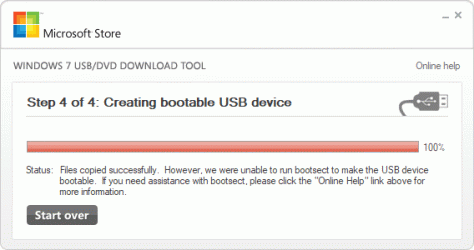
I tried using the MS Tool for creating the USB drive from the ISO. I got the following error at the end.
MSToolResult.gif

I tried booting (non-UEFI) using that USB stick. It boots, but I get the same compatibility error.
 

My Computer My Computer

Computer type
PC/Desktop
Computer Manufacturer/Model Number
custom
OS
Windows 7 Home Premium 64bit SP 1 (Version 6.1.7601)
CPU
Intel i7-5820K
Motherboard
ASUS X99-A (BIOS 3505)
Memory
16 GB
Graphics Card(s)
NVidia GeForce GTX 970
Sound Card
MB default (Crystal Sound 2)
Monitor(s) Displays
Dell 2408 WFP
Screen Resolution
1920x1280
Hard Drives
C:
Samsung 960 PRO 2 TB SSD
D:
Crucial M4 512GB SSD
PSU
Thermaltake Toughpower 750 W
SIW2, the PC isn't booting at the moment, except from the install USB stick. Is there a way to boot to the command prompt so that I can use diskpart?
 

My Computer My Computer

Computer type
PC/Desktop
Computer Manufacturer/Model Number
custom
OS
Windows 7 Home Premium 64bit SP 1 (Version 6.1.7601)
CPU
Intel i7-5820K
Motherboard
ASUS X99-A (BIOS 3505)
Memory
16 GB
Graphics Card(s)
NVidia GeForce GTX 970
Sound Card
MB default (Crystal Sound 2)
Monitor(s) Displays
Dell 2408 WFP
Screen Resolution
1920x1280
Hard Drives
C:
Samsung 960 PRO 2 TB SSD
D:
Crucial M4 512GB SSD
PSU
Thermaltake Toughpower 750 W
command prompt can be invoked by booting the usb stick. It is one of the system recovery options

Image05_startuprepair.jpg


Instead of running startup repair, open command prompt.
 

My Computers My Computers

System One System Two

  • Computer type
    PC/Desktop
    OS
    7 X64
    CPU
    i5 8400
    Motherboard
    gigabyte b365m ds3h
    Memory
    2x8gb 3200mhz
    Hard Drives
    various
    PSU
    pure power 11 400w cm
    Case
    Coolermaster
    Cooling
    cryorig m9i
  • Computer type
    PC/Desktop
    OS
    7x64
    CPU
    g5400
    Motherboard
    ga b365m ds3h
    Memory
    8gb ddr4 2400
    PSU
    xfx pro 450w
Back
Top