Windows 7 not starting at all

SIW2, when I boot the installation USB stick, it takes me to the Install now screen.
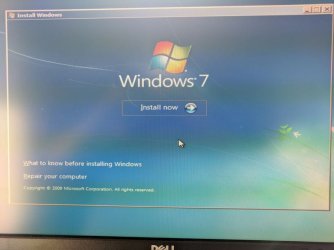
Win7InstallNowScreen.jpg
None of those options (that I can see) take me to the screen you have shown. Choosing "Repair your computer" brings up the compatibility error message and then back to the screen shown. If I close the window (with the upper-right X), the system reboots.

How do I get to the options you posted from the installation USB? They look like the options from teh Startup Repair menu. Can I create a startup repair disk that incorporates the drivers that are now on the Installation USB stick? Or, is there some way to boot the installation USB stick into startup repair mode?
 

My Computer My Computer

Computer type
PC/Desktop
Computer Manufacturer/Model Number
custom
OS
Windows 7 Home Premium 64bit SP 1 (Version 6.1.7601)
CPU
Intel i7-5820K
Motherboard
ASUS X99-A (BIOS 3505)
Memory
16 GB
Graphics Card(s)
NVidia GeForce GTX 970
Sound Card
MB default (Crystal Sound 2)
Monitor(s) Displays
Dell 2408 WFP
Screen Resolution
1920x1280
Hard Drives
C:
Samsung 960 PRO 2 TB SSD
D:
Crucial M4 512GB SSD
PSU
Thermaltake Toughpower 750 W
On your usb stick, rename sources\boot.wim to something else, e.g. boot-original.wim.

Then copy boot.wim from the 17514x64-v6.iso sources into your usb sources folder.

When you boot your usb stick, explorer should launch as the shell. Try using command prompt from the explorer interface.

It also contains Aomei partition manager,Partition Guru ( now called DiskGenius) and windows disk management.

You can take screenshots using the little camera icon on the taskbar.
 

My Computers My Computers

System One System Two

  • Computer type
    PC/Desktop
    OS
    7 X64
    CPU
    i5 8400
    Motherboard
    gigabyte b365m ds3h
    Memory
    2x8gb 3200mhz
    Hard Drives
    various
    PSU
    pure power 11 400w cm
    Case
    Coolermaster
    Cooling
    cryorig m9i
  • Computer type
    PC/Desktop
    OS
    7x64
    CPU
    g5400
    Motherboard
    ga b365m ds3h
    Memory
    8gb ddr4 2400
    PSU
    xfx pro 450w
Or, is there some way to boot the installation USB stick into startup repair mode?

Yes, but you will probably get the same result. Try using the boot.wim from 17514x64-v6 as described above.


[For anybody interested, you can launch an application as the shell by creating a text file pointing at it, name the text file winpeshl.ini and put it in system32 of the boot image

e.g. to launch recovery environment
winpeshl.ini

[LaunchApps]
%systemdrive%\sources\recovery\recenv.exe


If you look in 17514x64-v6 boot.wim system 32 you will find
winpeshl.ini
[LaunchApps]
"Pecmd.exe Main %SystemDrive%\Windows\System32\Pecmd.ini"

That launches pecmd.exe and tells it to execute the instructions in the Pecmd.ini file.

]
 

My Computers My Computers

System One System Two

  • Computer type
    PC/Desktop
    OS
    7 X64
    CPU
    i5 8400
    Motherboard
    gigabyte b365m ds3h
    Memory
    2x8gb 3200mhz
    Hard Drives
    various
    PSU
    pure power 11 400w cm
    Case
    Coolermaster
    Cooling
    cryorig m9i
  • Computer type
    PC/Desktop
    OS
    7x64
    CPU
    g5400
    Motherboard
    ga b365m ds3h
    Memory
    8gb ddr4 2400
    PSU
    xfx pro 450w
On your usb stick, rename sources\boot.wim to something else, e.g. boot-original.wim.

Then copy boot.wim from the 17514x64-v6.iso sources into your usb sources folder.

When you boot your usb stick, explorer should launch as the shell. Try using command prompt from the explorer interface.

It also contains Aomei partition manager,Partition Guru ( now called DiskGenius) and windows disk management.

You can take screenshots using the little camera icon on the taskbar.

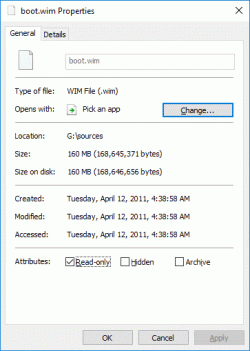
Thank you, SIW2. Where is 17514x64-v6.iso? I have Win7_HomePrem_SP1_English_x64.iso from Megahertz07's link in post #7. The boot.wim file in there looks like
boot_wim_properties_from_Win7_HomePrem_SP1_English_x64_iso.gif
(Should I be worried about those 2011 dates?)

And, I notice that your tool creates an ISO called 7601_24168_en-US_x64.iso.

Are either of those the correct one?
 

My Computer My Computer

Computer type
PC/Desktop
Computer Manufacturer/Model Number
custom
OS
Windows 7 Home Premium 64bit SP 1 (Version 6.1.7601)
CPU
Intel i7-5820K
Motherboard
ASUS X99-A (BIOS 3505)
Memory
16 GB
Graphics Card(s)
NVidia GeForce GTX 970
Sound Card
MB default (Crystal Sound 2)
Monitor(s) Displays
Dell 2408 WFP
Screen Resolution
1920x1280
Hard Drives
C:
Samsung 960 PRO 2 TB SSD
D:
Crucial M4 512GB SSD
PSU
Thermaltake Toughpower 750 W
My Computer My Computer

Computer type
Laptop
Computer Manufacturer/Model Number
Fujitsu LIFEBOOK
OS
Win 7 HP SP1 64-bit Vista HB SP2 32-bit Linux Mint 18.3
CPU
Intel(R) Pentium(R) CPU P6200 @ 2.13GHz
Motherboard
FUJITSU FJNBB06
Memory
4.00 GB
Graphics Card(s)
Intel(R) Graphics Media Accelerator HD
Sound Card
[1] Realtek High Definition Audio [2] Intel(R) Display Audio
Screen Resolution
1366 x 768 x 32 bits (4294967296 colors) @ 59 Hz
Hard Drives
TOSHIBA MK5076GSX
Antivirus
AVG FREE
Thank you!
 

My Computer My Computer

Computer type
PC/Desktop
Computer Manufacturer/Model Number
custom
OS
Windows 7 Home Premium 64bit SP 1 (Version 6.1.7601)
CPU
Intel i7-5820K
Motherboard
ASUS X99-A (BIOS 3505)
Memory
16 GB
Graphics Card(s)
NVidia GeForce GTX 970
Sound Card
MB default (Crystal Sound 2)
Monitor(s) Displays
Dell 2408 WFP
Screen Resolution
1920x1280
Hard Drives
C:
Samsung 960 PRO 2 TB SSD
D:
Crucial M4 512GB SSD
PSU
Thermaltake Toughpower 750 W
Thank you Paul and SIW2. I was able to boot the USB stick to a usable Windows environment.

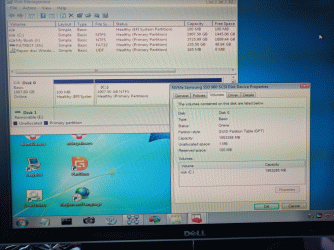
I did the simplest thing I could to determine whether my PC's drive is legacy - MBR or UEFI - GPT. I opened Windows' Disk Management tool and looked at the properties for Disk 0 (the Samsung 960 Pro SSD). Below is a screenshot of what I was seeing.
DiskManagement-Disk0-Samsung960Pro.gif

I am probably misinterpreting this somehow. But, that is why I was thinking that the drive was GPT. Does it not mean that? Does this change how I should be creating the installation USB stick so that I can successfully run "Repair my computer"?
 

My Computer My Computer

Computer type
PC/Desktop
Computer Manufacturer/Model Number
custom
OS
Windows 7 Home Premium 64bit SP 1 (Version 6.1.7601)
CPU
Intel i7-5820K
Motherboard
ASUS X99-A (BIOS 3505)
Memory
16 GB
Graphics Card(s)
NVidia GeForce GTX 970
Sound Card
MB default (Crystal Sound 2)
Monitor(s) Displays
Dell 2408 WFP
Screen Resolution
1920x1280
Hard Drives
C:
Samsung 960 PRO 2 TB SSD
D:
Crucial M4 512GB SSD
PSU
Thermaltake Toughpower 750 W
As it has a EFI partition it's EFI - GPT
Open disk management - View tab - Top - List disk
 

My Computers My Computers

System One System Two

  • Computer type
    PC/Desktop
    Computer Manufacturer/Model Number
    custom build
    OS
    Windows 7 HP 64
    CPU
    i5 6600K - 800MHz to 4200MHz
    Motherboard
    GA-Z170-HD3P
    Memory
    4+4G GSkill DDR4 3000
    Graphics Card(s)
    IG - Intel 530
    Monitor(s) Displays
    Samsung 226BW
    Screen Resolution
    1680x1050
    Hard Drives
    (1) -1 SM951 – 128GB M.2 AHCI PCIe SSD drive for Windows 7 and Lubuntu
    (2) -1 WD SATA 3 - 1T for Data
    (3) -1 WD SATA 3 - 1T for backup
    PSU
    Thermaltake 450W TR2 gold
    Keyboard
    Old and good Chicony mechanical keyboard
    Mouse
    Logitech mX performance - 9 buttons (had to disable some)
    Internet Speed
    500Mb/s
    Browser
    Firefox 64
    Other Info
    TinyWall firewall
  • Computer type
    Laptop
    System Manufacturer/Model Number
    Asus Q550LF
    OS
    Windows 7 Pro
    CPU
    i7-4500U 800MHz to 3.0GHz
    Motherboard
    Asus Q550LF
    Memory
    (4+4)G DDR3 1600
    Graphics Card(s)
    IG intel 4400 + NVIDIA GeForce GT 745M
    Sound Card
    Realtek
    Monitor(s) Displays
    LG Display LP156WF4-SPH1
    Screen Resolution
    1920 x 1080
    Hard Drives
    BX500 120G SSD for Windows and programs +
    1T HDD for data
    Internet Speed
    500 Mb/s
    Browser
    Firefox
    Other Info
    TinyWall firewall
With the disk list looking like the following
DiskManagement-DiskList.jpg
So, the disk is GPT. Since, I think I have been creating the USB installation stick for MBR, that seems like one reason the "Repair my computer" option has been giving a compatibility error. Does that sound correct?

I am going to re-read this thread, as I think there were notes on making the installation USB stick for a GPT drive. Hopefully, this is getting closer to having a bootable Windows 7 on that SSD.
 

My Computer My Computer

Computer type
PC/Desktop
Computer Manufacturer/Model Number
custom
OS
Windows 7 Home Premium 64bit SP 1 (Version 6.1.7601)
CPU
Intel i7-5820K
Motherboard
ASUS X99-A (BIOS 3505)
Memory
16 GB
Graphics Card(s)
NVidia GeForce GTX 970
Sound Card
MB default (Crystal Sound 2)
Monitor(s) Displays
Dell 2408 WFP
Screen Resolution
1920x1280
Hard Drives
C:
Samsung 960 PRO 2 TB SSD
D:
Crucial M4 512GB SSD
PSU
Thermaltake Toughpower 750 W
Yes it is UEFI.
You must boot the win 7 installation disk (with the added drivers) as UEFI.
To boot as UEFI the USB flash must be Fat32
read the post Windows 7 not starting at all

I think the problem is how you select the UEFI Flash disk.
Do you use the boot menu (F8) during POST?
 

My Computers My Computers

System One System Two

  • Computer type
    PC/Desktop
    Computer Manufacturer/Model Number
    custom build
    OS
    Windows 7 HP 64
    CPU
    i5 6600K - 800MHz to 4200MHz
    Motherboard
    GA-Z170-HD3P
    Memory
    4+4G GSkill DDR4 3000
    Graphics Card(s)
    IG - Intel 530
    Monitor(s) Displays
    Samsung 226BW
    Screen Resolution
    1680x1050
    Hard Drives
    (1) -1 SM951 – 128GB M.2 AHCI PCIe SSD drive for Windows 7 and Lubuntu
    (2) -1 WD SATA 3 - 1T for Data
    (3) -1 WD SATA 3 - 1T for backup
    PSU
    Thermaltake 450W TR2 gold
    Keyboard
    Old and good Chicony mechanical keyboard
    Mouse
    Logitech mX performance - 9 buttons (had to disable some)
    Internet Speed
    500Mb/s
    Browser
    Firefox 64
    Other Info
    TinyWall firewall
  • Computer type
    Laptop
    System Manufacturer/Model Number
    Asus Q550LF
    OS
    Windows 7 Pro
    CPU
    i7-4500U 800MHz to 3.0GHz
    Motherboard
    Asus Q550LF
    Memory
    (4+4)G DDR3 1600
    Graphics Card(s)
    IG intel 4400 + NVIDIA GeForce GT 745M
    Sound Card
    Realtek
    Monitor(s) Displays
    LG Display LP156WF4-SPH1
    Screen Resolution
    1920 x 1080
    Hard Drives
    BX500 120G SSD for Windows and programs +
    1T HDD for data
    Internet Speed
    500 Mb/s
    Browser
    Firefox
    Other Info
    TinyWall firewall
I am still working on this. I tried creating the FAT32 USB install stick from the ISO SIW2's tool created, both using Rufus and Using the Windows Download Tool. Both failed. Rufus errored out with "Unable to patch/setup files for boot." and the Windows tool said it was unable to use bootsect.

Your post mentioned that there doesn't have to be anything special about the USB stick as long as it's formatted FAT32 and has efi/boot/bootx64.efi. So, I reformatted the USB stick as FAT32 and then copied over the installation folder files and then made sure bootx64.efi was in efi/boot.

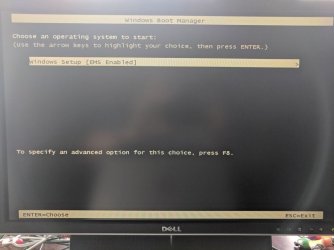
But, when I attempt to boot from that USB stick, I am not booting up to the install screen with "Repair my computer" option. I hit the F8 key to enter the PC BIOS's boot menu and choose to do a UEFI boot from the USB stick. But, this is the screen that shows up
InstallUEFIBootScreen1.jpg
When I hit Enter, the following screen shows up
InstallUEFIBootScreen2.jpg
If I choose either "Windows Setup [EMS enabled]" or F8, I am kicked back to the first screen.
 

My Computer My Computer

Computer type
PC/Desktop
Computer Manufacturer/Model Number
custom
OS
Windows 7 Home Premium 64bit SP 1 (Version 6.1.7601)
CPU
Intel i7-5820K
Motherboard
ASUS X99-A (BIOS 3505)
Memory
16 GB
Graphics Card(s)
NVidia GeForce GTX 970
Sound Card
MB default (Crystal Sound 2)
Monitor(s) Displays
Dell 2408 WFP
Screen Resolution
1920x1280
Hard Drives
C:
Samsung 960 PRO 2 TB SSD
D:
Crucial M4 512GB SSD
PSU
Thermaltake Toughpower 750 W
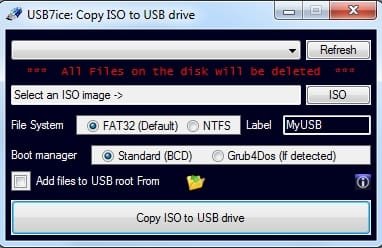
I am not sure what you are doing. Try using this to create efi bootable usb from the installation media:

Leave it set at fat32

View attachment Usb7ice.zip

usb7ice.jpg
 

My Computers My Computers

System One System Two

  • Computer type
    PC/Desktop
    OS
    7 X64
    CPU
    i5 8400
    Motherboard
    gigabyte b365m ds3h
    Memory
    2x8gb 3200mhz
    Hard Drives
    various
    PSU
    pure power 11 400w cm
    Case
    Coolermaster
    Cooling
    cryorig m9i
  • Computer type
    PC/Desktop
    OS
    7x64
    CPU
    g5400
    Motherboard
    ga b365m ds3h
    Memory
    8gb ddr4 2400
    PSU
    xfx pro 450w
I used USB7ice and the ISO that your utility created and... got to a usable startup repair screen. Running it now.

Thank you!
 

My Computer My Computer

Computer type
PC/Desktop
Computer Manufacturer/Model Number
custom
OS
Windows 7 Home Premium 64bit SP 1 (Version 6.1.7601)
CPU
Intel i7-5820K
Motherboard
ASUS X99-A (BIOS 3505)
Memory
16 GB
Graphics Card(s)
NVidia GeForce GTX 970
Sound Card
MB default (Crystal Sound 2)
Monitor(s) Displays
Dell 2408 WFP
Screen Resolution
1920x1280
Hard Drives
C:
Samsung 960 PRO 2 TB SSD
D:
Crucial M4 512GB SSD
PSU
Thermaltake Toughpower 750 W
Well, that improved things, I think. I booted from the USB stick and ran Startup Repair.

That found a restore point and asked if I wanted to use it. I did. I rebooted at the end and Windows booted up.

However, there are (at least) two problems. First, it seems like every other time I boot, I get kicked to the BIOS. Just clicking "Save and Restart" (even though, as the BIOS warns me, I have made no changes) seems to get things working and Windows boots. But, something is still obvious not working properly if I have to do that every time or every other time I reboot. Possibly just a BIOS setting?

The other thing is that it seems like restarting after connecting an external (USB) hard drive (I have a WD MyBook I use for backups mostly) makes the PC unbootable and I have to go through the startup repair process all over again. At least now, though, startup repair will start from the SDD (no other drives attached to the PC).

But
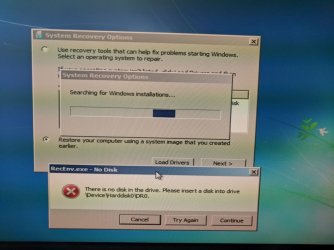
, startup repair doesn't recognize the C: drive and initially finds no Windows partitions until I attach a USB stick with the drivers SIW2 posted before and then, after loading the driver, it finds the C: drive. Then it starts searching for Windows installations and it gives me a "There is no disk in the drive" error that goes away if I click Try Again 6-8 times.
StartupRepairDriveError.jpg
Eventually, startup repair runs (and uses a restore point, etc.) and things are back. This makes me wonder if maybe the drivers still aren't properly installed everywhere they should be on C:? (Or, from wherever Startup Repair runs from when nominally booting from the SSD?)
 

My Computer My Computer

Computer type
PC/Desktop
Computer Manufacturer/Model Number
custom
OS
Windows 7 Home Premium 64bit SP 1 (Version 6.1.7601)
CPU
Intel i7-5820K
Motherboard
ASUS X99-A (BIOS 3505)
Memory
16 GB
Graphics Card(s)
NVidia GeForce GTX 970
Sound Card
MB default (Crystal Sound 2)
Monitor(s) Displays
Dell 2408 WFP
Screen Resolution
1920x1280
Hard Drives
C:
Samsung 960 PRO 2 TB SSD
D:
Crucial M4 512GB SSD
PSU
Thermaltake Toughpower 750 W
Have a look in device manager and see if it tells you something is missing.
 

My Computers My Computers

System One System Two

  • Computer type
    PC/Desktop
    OS
    7 X64
    CPU
    i5 8400
    Motherboard
    gigabyte b365m ds3h
    Memory
    2x8gb 3200mhz
    Hard Drives
    various
    PSU
    pure power 11 400w cm
    Case
    Coolermaster
    Cooling
    cryorig m9i
  • Computer type
    PC/Desktop
    OS
    7x64
    CPU
    g5400
    Motherboard
    ga b365m ds3h
    Memory
    8gb ddr4 2400
    PSU
    xfx pro 450w
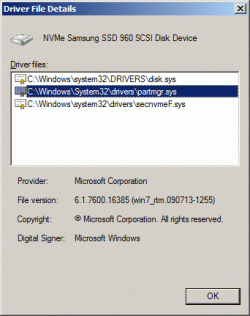
Here is what I see about the drivers. I see three drivers related to the Samsung 960.
DriverDetails1.gif
DriverDetails2.gif
DriverDetails3.gif
But, I don't know if this is the place to be check if everything is where it's supposed to be.
 

My Computer My Computer

Computer type
PC/Desktop
Computer Manufacturer/Model Number
custom
OS
Windows 7 Home Premium 64bit SP 1 (Version 6.1.7601)
CPU
Intel i7-5820K
Motherboard
ASUS X99-A (BIOS 3505)
Memory
16 GB
Graphics Card(s)
NVidia GeForce GTX 970
Sound Card
MB default (Crystal Sound 2)
Monitor(s) Displays
Dell 2408 WFP
Screen Resolution
1920x1280
Hard Drives
C:
Samsung 960 PRO 2 TB SSD
D:
Crucial M4 512GB SSD
PSU
Thermaltake Toughpower 750 W
Any exclamation marks in device manager?

Also look in msinfo32 >components>problem devices
 

My Computers My Computers

System One System Two

  • Computer type
    PC/Desktop
    OS
    7 X64
    CPU
    i5 8400
    Motherboard
    gigabyte b365m ds3h
    Memory
    2x8gb 3200mhz
    Hard Drives
    various
    PSU
    pure power 11 400w cm
    Case
    Coolermaster
    Cooling
    cryorig m9i
  • Computer type
    PC/Desktop
    OS
    7x64
    CPU
    g5400
    Motherboard
    ga b365m ds3h
    Memory
    8gb ddr4 2400
    PSU
    xfx pro 450w
The System Information -> Components -> Problem Devices page has the following entries:
Code:
Device                          PNP Device ID                      Error Code
------------------------------  ---------------------------------  ----------------
Cisco AnyConnect Secure         ROOT\NET\0000                      This device is 
Mobility Client Virtual                                            disabled.
Miniport Adapter for Windows 
x64          
Not Available                   ACPI\PNP0A0A\2&DABA3FF&2           The drivers for this 
                                                                   device are not 
                                                                   installed.
I disabled Cisco when I installed another VPN. I am not sure about the second entry. It corresponds to an "Other devices" Unknown device in the Device Manager.
 

My Computer My Computer

Computer type
PC/Desktop
Computer Manufacturer/Model Number
custom
OS
Windows 7 Home Premium 64bit SP 1 (Version 6.1.7601)
CPU
Intel i7-5820K
Motherboard
ASUS X99-A (BIOS 3505)
Memory
16 GB
Graphics Card(s)
NVidia GeForce GTX 970
Sound Card
MB default (Crystal Sound 2)
Monitor(s) Displays
Dell 2408 WFP
Screen Resolution
1920x1280
Hard Drives
C:
Samsung 960 PRO 2 TB SSD
D:
Crucial M4 512GB SSD
PSU
Thermaltake Toughpower 750 W

My Computers My Computers

System One System Two

  • Computer type
    PC/Desktop
    OS
    7 X64
    CPU
    i5 8400
    Motherboard
    gigabyte b365m ds3h
    Memory
    2x8gb 3200mhz
    Hard Drives
    various
    PSU
    pure power 11 400w cm
    Case
    Coolermaster
    Cooling
    cryorig m9i
  • Computer type
    PC/Desktop
    OS
    7x64
    CPU
    g5400
    Motherboard
    ga b365m ds3h
    Memory
    8gb ddr4 2400
    PSU
    xfx pro 450w
After some searching, it looks like this is a driver to let some ASUS utility software talk to a (temperature?) sensor on the MB. I downloaded ASUS' "ASUS Probe II Sense Driver V1.0.1.0 for Windows 7/8/8.1/10 32bit & 64bit." driver and installed it. (What's in quotes is what appears on the ASUS downloads page. It's a Utilities category driver dated 2015/07/29, for anyone looking for it.)

The yellow :warn: is gone from the Device Manager and msinfo32 no longer shows this as a problem device. I am rebooting in a minute to see if it had any effect on fixing my Win 7 boot issues.
 

My Computer My Computer

Computer type
PC/Desktop
Computer Manufacturer/Model Number
custom
OS
Windows 7 Home Premium 64bit SP 1 (Version 6.1.7601)
CPU
Intel i7-5820K
Motherboard
ASUS X99-A (BIOS 3505)
Memory
16 GB
Graphics Card(s)
NVidia GeForce GTX 970
Sound Card
MB default (Crystal Sound 2)
Monitor(s) Displays
Dell 2408 WFP
Screen Resolution
1920x1280
Hard Drives
C:
Samsung 960 PRO 2 TB SSD
D:
Crucial M4 512GB SSD
PSU
Thermaltake Toughpower 750 W
Back
Top