Windows Cannot be Installed to Disk 0 Partition 1

Ok thanks ill post here after i have the disk should i search for a Hp back up and make a CD of that too?
 

My Computer My Computer

Computer type
PC/Desktop
Computer Manufacturer/Model Number
Hp
OS
Windows 7 professional 32-bit
CPU
Amd phenom ll 1045T
Memory
8gb ddr3
Graphics Card(s)
Ati radeon HD 5570
Hard Drives
1TB seagate
Ok i found the network driver i can put that on a flash drive?
 

My Computer My Computer

Computer type
PC/Desktop
Computer Manufacturer/Model Number
Hp
OS
Windows 7 professional 32-bit
CPU
Amd phenom ll 1045T
Memory
8gb ddr3
Graphics Card(s)
Ati radeon HD 5570
Hard Drives
1TB seagate
What HP Backup? Yes save driver to stick. Is it the only Ethernet LAN driver?

Have you tried tapping F11 during boot to see if HP Recovery will run? If so do a Minimal recovery.

You said you wiped the hard drive. How exactly did you do this? If you only wiped C then check if Recovery or Diagnostics will run from ESC key at boot

When you booted the 32 bit Pro disk did it offer any UEFI boot choices?
Which exactly did you choose? Put the disk in the drive now, reboot and tap F9 key to report back the choices.

If there's a non UEFI DVD choice you can run a test install with Pro leaving key blank, providing there's a 32 bit Ethernet driver in case it is needed. Then get online to download ISO and install tool to burn to DVD. Boot DVD to install Premium over Pro.
 
Every thing is wiped all partitions deleted i reformated afew times also thinking that would help make the install work but got no where so im sure theres nothing left on it. On Hp i put in my PC name and they gave me a list of drivers its called Original "Realtek Networking Controller Driver"
 

My Computer My Computer

Computer type
PC/Desktop
Computer Manufacturer/Model Number
Hp
OS
Windows 7 professional 32-bit
CPU
Amd phenom ll 1045T
Memory
8gb ddr3
Graphics Card(s)
Ati radeon HD 5570
Hard Drives
1TB seagate
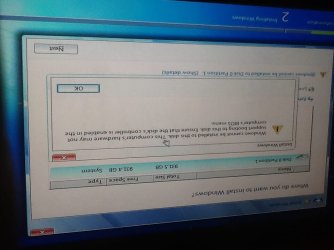
The key isnt the problem it tells me "windows cannot be installed to disk 0 partition 1"
 

My Computer My Computer

Computer type
PC/Desktop
Computer Manufacturer/Model Number
Hp
OS
Windows 7 professional 32-bit
CPU
Amd phenom ll 1045T
Memory
8gb ddr3
Graphics Card(s)
Ati radeon HD 5570
Hard Drives
1TB seagate

My Computer My Computer

Computer type
PC/Desktop
Computer Manufacturer/Model Number
Skylake Special #666
OS
Windows 10 Pro x64
CPU
Intel Core i7 6700K
Motherboard
Asus Sabertooth Z170 Mark 1
Memory
GSkill TridentZ RGB 16GB 3600 16-16-16-36
Graphics Card(s)
EVGA GTX 980 Ti SC x2
Sound Card
Realtek High Definition
Monitor(s) Displays
AOC G2460PG
Screen Resolution
1920 x 1080 144Hz
Hard Drives
Samsung 860 Pro 256GB, Seagate Barracuda 4TB x2
PSU
EVGA 1000 P2, EVGA White Custom Braided Cables
Case
Corsair Vengeance C70 Gunmetal Black
Cooling
Corsair H100i v2, Corsair ML120 x2, Thermal Grizzly Kryonaut
Keyboard
Logitech G910 Orion Spectrum
Mouse
Logitech G700s
Internet Speed
Verizon Fios Quantum Gateway 75/75
Antivirus
Windows Defender, Malwarebytes Free 3.8.3
Browser
Chrome
Other Info
Corsair SP120 x4, LG Blu-ray Drive, Durabrand HT-395 100 Watt Dolby Digital Amp, Corsair H2100 Wireless 7.1 Headset
Are you going to answer my questions which you've just ignored? Each of those questions was to determine the cause of the installation error.

It could be you have a UEFI BIOS with a GPT disk that needs to have a 64 bit installer booted as a UEFI device. Unless every partition was deleted - not formatted or installed over, but deleted - then it will remain a GPT disk until partitions are deleted at which time you can boot an 32 bit installer to install to an MBR disk.

Please go back and follow each step to answer my questions.
 
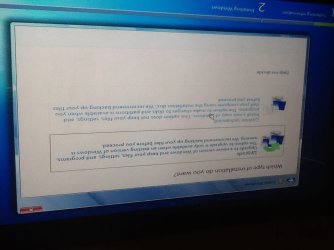
Im sorry i answered some of your questions but sorry ill try the minimal install and get back to you. When using the disk i choose custom since i cant upgrade to a new windows without having windows then...
 

Attachments

  • image.jpg
    image.jpg
    50.3 KB · Views: 4

My Computer My Computer

Computer type
PC/Desktop
Computer Manufacturer/Model Number
Hp
OS
Windows 7 professional 32-bit
CPU
Amd phenom ll 1045T
Memory
8gb ddr3
Graphics Card(s)
Ati radeon HD 5570
Hard Drives
1TB seagate
I get to this error not many paths i can take or try till i get past this ill go and try F9 and show you what i find
 

Attachments

  • image.jpg
    image.jpg
    58.3 KB · Views: 4

My Computer My Computer

Computer type
PC/Desktop
Computer Manufacturer/Model Number
Hp
OS
Windows 7 professional 32-bit
CPU
Amd phenom ll 1045T
Memory
8gb ddr3
Graphics Card(s)
Ati radeon HD 5570
Hard Drives
1TB seagate
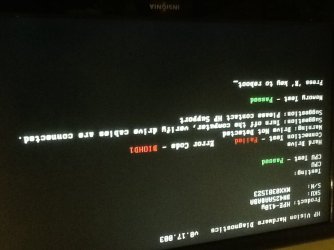
Ok so for me F9 is a diagnostics and this is what i get
 

Attachments

  • image.jpg
    image.jpg
    50.7 KB · Views: 2

My Computer My Computer

Computer type
PC/Desktop
Computer Manufacturer/Model Number
Hp
OS
Windows 7 professional 32-bit
CPU
Amd phenom ll 1045T
Memory
8gb ddr3
Graphics Card(s)
Ati radeon HD 5570
Hard Drives
1TB seagate
How are you booting the disk? I asked you specifically if it offers UEFI choices in the Boot menu? Is there a UEFI DVD drive choice or not?

You're not Upgrading to a new Windows. You should do a Custom install.

Click on the Drive Options at the bottom of the drive selection screen shown to Delete the partition and create a New one of 100gb size, Format and try install again.

2441d1379261910t-clean-install-windows-7-step8.jpg


Strange that Diagnostics will run if the HD is not detected since they normally run from the Hard drive HP Tools partition. Perhaps some are loaded into your BIOS on that model. But check the cables to HD to make sure, and boot into BIOS setup using the ESC key to see if the HD is detected under Storage drives and Boot Priority menu - often giving it's Serial Number which you can google to interpret and then run bootable HD Diagnostic CD.

While in BIOS setup look on all tabs for any settings for UEFI, EFI, CSM, Legacy BIOS, or similar, report back the settings choices.

Now let's see if Minimal Factory Recovery will run by tapping F11, or choosing REcovery from the ESC menu. This will be nearly a Clean Reinstall except you'll need to uninstall the HP Wireless Manager and connect using Win7's superior Wireless Manager in the bottom right System Tray.

 
Alright ill try that and post what i get from Recovery and BIOS. Strange thing is in CMD i did some kind of scan and it Showed the HDD and said Healthy next to it
 

My Computer My Computer

Computer type
PC/Desktop
Computer Manufacturer/Model Number
Hp
OS
Windows 7 professional 32-bit
CPU
Amd phenom ll 1045T
Memory
8gb ddr3
Graphics Card(s)
Ati radeon HD 5570
Hard Drives
1TB seagate
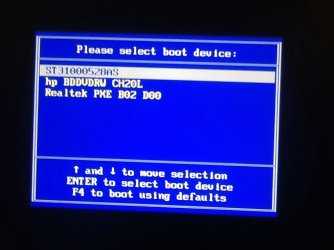
The disk boots on its own and i press F11 and it does nothing it just boots the Dvd drive ill show you my boot menu and then check BIOS for the HDD
 

My Computer My Computer

Computer type
PC/Desktop
Computer Manufacturer/Model Number
Hp
OS
Windows 7 professional 32-bit
CPU
Amd phenom ll 1045T
Memory
8gb ddr3
Graphics Card(s)
Ati radeon HD 5570
Hard Drives
1TB seagate
The HDD shows on my boot menu but no choices for the disk
 

Attachments

  • image.jpg
    image.jpg
    55.2 KB · Views: 0

My Computer My Computer

Computer type
PC/Desktop
Computer Manufacturer/Model Number
Hp
OS
Windows 7 professional 32-bit
CPU
Amd phenom ll 1045T
Memory
8gb ddr3
Graphics Card(s)
Ati radeon HD 5570
Hard Drives
1TB seagate
That's a Seagate HD (ST) so if nothing else works then you'd download Downloads | Seagate ISO, rightclick the ISO to Burn to CD with Windows Image Burner, boot it to run Extended Test to learn for sure the HD condition.

But try everything else given first. When no solution is found we usually learn that the solution was a skipped step.

If no sign of UEFI then there are more steps compiled here for Overcoming Windows 7 Installation Failures - Windows 7 Help Forums
 
Ok heres bios and it shows HDD also
 

Attachments

  • image.jpg
    image.jpg
    74.3 KB · Views: 0

My Computer My Computer

Computer type
PC/Desktop
Computer Manufacturer/Model Number
Hp
OS
Windows 7 professional 32-bit
CPU
Amd phenom ll 1045T
Memory
8gb ddr3
Graphics Card(s)
Ati radeon HD 5570
Hard Drives
1TB seagate
Im not sure what this is
 

Attachments

  • image.jpg
    image.jpg
    54.2 KB · Views: 0

My Computer My Computer

Computer type
PC/Desktop
Computer Manufacturer/Model Number
Hp
OS
Windows 7 professional 32-bit
CPU
Amd phenom ll 1045T
Memory
8gb ddr3
Graphics Card(s)
Ati radeon HD 5570
Hard Drives
1TB seagate
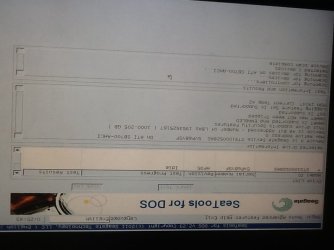
Ok i found my seagate tools disk i tryed this once befor its testing the HDD now
 

Attachments

  • image.jpg
    image.jpg
    52.5 KB · Views: 2

My Computer My Computer

Computer type
PC/Desktop
Computer Manufacturer/Model Number
Hp
OS
Windows 7 professional 32-bit
CPU
Amd phenom ll 1045T
Memory
8gb ddr3
Graphics Card(s)
Ati radeon HD 5570
Hard Drives
1TB seagate
The HDD shows on my boot menu but no choices for the disk

The choice to choose the bd/dvd rom is right there.

And why are all your pictures upside down ?

Do you take them standing on your head :roflmao:
 

My Computer My Computer

Computer type
PC/Desktop
Computer Manufacturer/Model Number
Skylake Special #666
OS
Windows 10 Pro x64
CPU
Intel Core i7 6700K
Motherboard
Asus Sabertooth Z170 Mark 1
Memory
GSkill TridentZ RGB 16GB 3600 16-16-16-36
Graphics Card(s)
EVGA GTX 980 Ti SC x2
Sound Card
Realtek High Definition
Monitor(s) Displays
AOC G2460PG
Screen Resolution
1920 x 1080 144Hz
Hard Drives
Samsung 860 Pro 256GB, Seagate Barracuda 4TB x2
PSU
EVGA 1000 P2, EVGA White Custom Braided Cables
Case
Corsair Vengeance C70 Gunmetal Black
Cooling
Corsair H100i v2, Corsair ML120 x2, Thermal Grizzly Kryonaut
Keyboard
Logitech G910 Orion Spectrum
Mouse
Logitech G700s
Internet Speed
Verizon Fios Quantum Gateway 75/75
Antivirus
Windows Defender, Malwarebytes Free 3.8.3
Browser
Chrome
Other Info
Corsair SP120 x4, LG Blu-ray Drive, Durabrand HT-395 100 Watt Dolby Digital Amp, Corsair H2100 Wireless 7.1 Headset
Lol Add. greg was asking if i had uefi boot on the disk but all it showed was a normal boot and i took them with my ipad and i guess the way im holding it takes them upsidedown lol.
 

My Computer My Computer

Computer type
PC/Desktop
Computer Manufacturer/Model Number
Hp
OS
Windows 7 professional 32-bit
CPU
Amd phenom ll 1045T
Memory
8gb ddr3
Graphics Card(s)
Ati radeon HD 5570
Hard Drives
1TB seagate
Back
Top