Windows Startup Repair query

Hi Greg and GoKay,

I went into the Bios and disabled the SAS Raid Controller and then got the following message on the next screen:

Alert! Hard drive not found.

Press F1 key to retry
Press F2 key for setup utility
Press F5 key to run onboard diagnostics
 

My Computer My Computer

At a glance

Microsoft Windows 7 Professional 64-bitDual Xeon(R) CPU E5-2687W v3 @ 3.10GHz32.00 GBNVIDIA Quadro K4200
Computer type
PC/Desktop
Computer Manufacturer/Model Number
Dell Precision Tower 7910 Workstation
OS
Microsoft Windows 7 Professional 64-bit
CPU
Dual Xeon(R) CPU E5-2687W v3 @ 3.10GHz
Motherboard
Dell Inc. 0215PR
Memory
32.00 GB
Graphics Card(s)
NVIDIA Quadro K4200
Sound Card
(1) NVIDIA High Definition Audio (2) High Definition Audio
Hard Drives
(1) SK hynix SC210 2.5 7MM 256GB ATA Device
(2) ATA WDC WD4003FZEX-0 SCSI Disk Device
Antivirus
Avast Free and Malwarebytes Free
Browser
Chrome
Other Info
BIOS: BIOS Date: 04/14/15 18:58:26 Ver: A07.00
I guess that's because you disabled the SAS RAID controller. That is not what we want. We want to change it's operation mode to AHCI if possible. Anyway checking Tech specs for your mobo, SATA 0-1 are SATA III ports and default is AHCI. So lets use them.

Ok, lets try this:
- Enable SAS RAID back in BIOS
- Log in Windows
- Download AS SSD benchmark and run it, what does it say in green text at upper left side? Take a screenshot and post please.
- Go into registry and enable msahci driver. http://www.sevenforums.com/tutorials/61869-ahci-enable-windows-7-vista.html do steps 1-4
- Shut down PC
- Open case, remove SSD data cable from board and attach to where DVD-ROM (remove this from mobo as well) is, so SATA-0 is SSD. SATA 0-1 might have a different color to SAS ports.
- Attach DVD-ROM data cable to SATA-1, should be next to SATA-0.
- Start PC, see if it will boot.

You can always change back the cabling if it won't work.

Report back

Edit: If you can't change DVD-ROM and SSD places, then attach SSD to SATA-1. The reason I ask for you to locate SSD to SATA-0 is sometimes Windows System Repair disk can't find the OS when SSD is attached in another port. Also added one more step above.
 
Last edited:

My Computer My Computer

At a glance

Windows 7 Ultimate x64 SP1AMD Phenom 2 1090T2x8GB Kingston HyperX Fury Black 1600Mhz Unga...MSI GTX 970 Gaming 4G
Computer type
PC/Desktop
Computer Manufacturer/Model Number
Custom Build
OS
Windows 7 Ultimate x64 SP1
CPU
AMD Phenom 2 1090T
Motherboard
Gigabyte GA-890FXA-UD5
Memory
2x8GB Kingston HyperX Fury Black 1600Mhz Unganged
Graphics Card(s)
MSI GTX 970 Gaming 4G
Sound Card
Realtek On-Board HD 7.1 Audio / Logitech G35
Monitor(s) Displays
3xAcer GD245HQ
Screen Resolution
1920x1080
Hard Drives
Samsung 850 Pro 512GB SSD - OS /
WD Caviar Black SATA 3 - 1 TBx2 - Dynamic RAID 0 /
WD Caviar Green SATA 2 - 640GBx2 - Dynamic RAID 0 /
WD Caviar Green SATA 2 - 640GB - Internal Backup /
Seagate Barracude SATA 3 - 3TB - External Backup/ Sync
PSU
HighPower 1000W
Case
Cooler Master HAF 932
Cooling
Noctua NH-D14
Keyboard
Logitech G19
Mouse
Logitech G500
Internet Speed
100/4 Mbit Cable (100GB quota)
Antivirus
ZoneAlarm Extreme Security / MBAM Pro / MBAE Free / SAS Free
Browser
IE 11 - Firefox - Chrome
Other Info
Logitech F710/ G27/ G940/ Z5500 // TrackIR 5 // Nvidia 3D Surround Vision
If you can't change to AHCI you can still do the Clean Reinstall to the SSD in the mode it's in with no problems. Just make sure to choose the SSD during install, delete all partitions, create and format a new one or just click Next to let the installer do it for you.

Again if you stick with the steps in Clean Reinstall Factory OEM then you will end up with a perfect install which will stay that way as long as you use only the tools and methods given.

It's entirely up to you if you want to keep the RAID array shown in your screenshot as the data drive. I only asked you to look inside the case and count the hard drives besides the SSD so you'd know how many drives are in the array. I didn't mean to scare you. :eek:
 
Last edited:
I guess that's because you disabled the SAS RAID controller. That is not what we want. We want to change it's operation mode to AHCI if possible. Anyway checking Tech specs for your mobo, SATA 0-1 are SATA III ports and default is AHCI. So lets use them.

Ok, lets try this:
- Enable SAS RAID back in BIOS
- Log in Windows
- Download AS SSD benchmark and run it, what does it say in green text at upper left side? Take a screenshot and post please.
- Go into registry and enable msahci driver. http://www.sevenforums.com/tutorials/61869-ahci-enable-windows-7-vista.html do steps 1-4
- Shut down PC
- Open case, remove SSD data cable from board and attach to where DVD-ROM (remove this from mobo as well) is, so SATA-0 is SSD. SATA 0-1 might have a different color to SAS ports.
- Attach DVD-ROM data cable to SATA-1, should be next to SATA-0.
- Start PC, see if it will boot.

You can always change back the cabling if it won't work.

Report back

Edit: If you can't change DVD-ROM and SSD places, then attach SSD to SATA-1. The reason I ask for you to locate SSD to SATA-0 is sometimes Windows System Repair disk can't find the OS when SSD is attached in another port. Also added one more step above.

Thanks for the help GokAy, I'm in work now I will try take a look at this when I get home later
 

My Computer My Computer

At a glance

Microsoft Windows 7 Professional 64-bitDual Xeon(R) CPU E5-2687W v3 @ 3.10GHz32.00 GBNVIDIA Quadro K4200
Computer type
PC/Desktop
Computer Manufacturer/Model Number
Dell Precision Tower 7910 Workstation
OS
Microsoft Windows 7 Professional 64-bit
CPU
Dual Xeon(R) CPU E5-2687W v3 @ 3.10GHz
Motherboard
Dell Inc. 0215PR
Memory
32.00 GB
Graphics Card(s)
NVIDIA Quadro K4200
Sound Card
(1) NVIDIA High Definition Audio (2) High Definition Audio
Hard Drives
(1) SK hynix SC210 2.5 7MM 256GB ATA Device
(2) ATA WDC WD4003FZEX-0 SCSI Disk Device
Antivirus
Avast Free and Malwarebytes Free
Browser
Chrome
Other Info
BIOS: BIOS Date: 04/14/15 18:58:26 Ver: A07.00
If you can't change to AHCI you can still do the Clean Reinstall to the SSD in the mode it's in with no problems. Just make sure to choose the SSD during install, delete all partitions, create and format a new one or just click Next to let the installer do it for you.

Again if you stick with the steps in Clean Reinstall Factory OEM then you will end up with a perfect install which will stay that way as long as you use only the tools and methods given.

It's entirely up to you if you want to keep the RAID array shown in your screenshot as the data drive. I only asked you to look inside the case and count the hard drives besides the SSD so you'd know how many drives are in the array. I didn't mean to scare you. :eek:

The SATA Operation option in the Bios is set to AHCI. I haven't changed that. Dell are sending me a Windows 7 OEM disc in the next 7-12 working days, so I will definitely be doing a system wipe.

About keeping the RAID array, I'd probably prefer not to from what I have heard here from you guys. This affects performance too does it? I need this PC running in peak condition with the programs I use.

Just so you know, I only have the SSD in it now, I took out the 4TB HDD for now. But indicated in the pic is where I had it a few days ago until my problems began. The attached image shows the way my hard drives go in. That whole area above them 4 bays is just a blank space.
 

Attachments

  • Dell_Hard_Drive_Bays.jpg
    Dell_Hard_Drive_Bays.jpg
    332.1 KB · Views: 1

My Computer My Computer

At a glance

Microsoft Windows 7 Professional 64-bitDual Xeon(R) CPU E5-2687W v3 @ 3.10GHz32.00 GBNVIDIA Quadro K4200
Computer type
PC/Desktop
Computer Manufacturer/Model Number
Dell Precision Tower 7910 Workstation
OS
Microsoft Windows 7 Professional 64-bit
CPU
Dual Xeon(R) CPU E5-2687W v3 @ 3.10GHz
Motherboard
Dell Inc. 0215PR
Memory
32.00 GB
Graphics Card(s)
NVIDIA Quadro K4200
Sound Card
(1) NVIDIA High Definition Audio (2) High Definition Audio
Hard Drives
(1) SK hynix SC210 2.5 7MM 256GB ATA Device
(2) ATA WDC WD4003FZEX-0 SCSI Disk Device
Antivirus
Avast Free and Malwarebytes Free
Browser
Chrome
Other Info
BIOS: BIOS Date: 04/14/15 18:58:26 Ver: A07.00
Oh, discard what I wrote earlier for changing cables and whatnot :)

The empty space above is probably for a 2nd CD/DVD/Blu-ray drive and that one is SATA-1 as seen in BIOS.

Changing the SAS RAID controller operation mode (if that is even possible) won't affect SSD performance. Single disk in RAID mode is basically AHCI.

Download and run AS SSD benchmark, post screenshot when finished here. Lets see how your drive is doing.
 

My Computer My Computer

At a glance

Windows 7 Ultimate x64 SP1AMD Phenom 2 1090T2x8GB Kingston HyperX Fury Black 1600Mhz Unga...MSI GTX 970 Gaming 4G
Computer type
PC/Desktop
Computer Manufacturer/Model Number
Custom Build
OS
Windows 7 Ultimate x64 SP1
CPU
AMD Phenom 2 1090T
Motherboard
Gigabyte GA-890FXA-UD5
Memory
2x8GB Kingston HyperX Fury Black 1600Mhz Unganged
Graphics Card(s)
MSI GTX 970 Gaming 4G
Sound Card
Realtek On-Board HD 7.1 Audio / Logitech G35
Monitor(s) Displays
3xAcer GD245HQ
Screen Resolution
1920x1080
Hard Drives
Samsung 850 Pro 512GB SSD - OS /
WD Caviar Black SATA 3 - 1 TBx2 - Dynamic RAID 0 /
WD Caviar Green SATA 2 - 640GBx2 - Dynamic RAID 0 /
WD Caviar Green SATA 2 - 640GB - Internal Backup /
Seagate Barracude SATA 3 - 3TB - External Backup/ Sync
PSU
HighPower 1000W
Case
Cooler Master HAF 932
Cooling
Noctua NH-D14
Keyboard
Logitech G19
Mouse
Logitech G500
Internet Speed
100/4 Mbit Cable (100GB quota)
Antivirus
ZoneAlarm Extreme Security / MBAM Pro / MBAE Free / SAS Free
Browser
IE 11 - Firefox - Chrome
Other Info
Logitech F710/ G27/ G940/ Z5500 // TrackIR 5 // Nvidia 3D Surround Vision
Oh, discard what I wrote earlier for changing cables and whatnot :)

The empty space above is probably for a 2nd CD/DVD/Blu-ray drive and that one is SATA-1 as seen in BIOS.

Changing the SAS RAID controller operation mode (if that is even possible) won't affect SSD performance. Single disk in RAID mode is basically AHCI.

Download and run AS SSD benchmark, post screenshot when finished here. Lets see how your drive is doing.

OK, I will do that. I like how simple it is to just slot the drives in. As I said, me and opening up the insides of PC's - we don't go well together!
 

My Computer My Computer

At a glance

Microsoft Windows 7 Professional 64-bitDual Xeon(R) CPU E5-2687W v3 @ 3.10GHz32.00 GBNVIDIA Quadro K4200
Computer type
PC/Desktop
Computer Manufacturer/Model Number
Dell Precision Tower 7910 Workstation
OS
Microsoft Windows 7 Professional 64-bit
CPU
Dual Xeon(R) CPU E5-2687W v3 @ 3.10GHz
Motherboard
Dell Inc. 0215PR
Memory
32.00 GB
Graphics Card(s)
NVIDIA Quadro K4200
Sound Card
(1) NVIDIA High Definition Audio (2) High Definition Audio
Hard Drives
(1) SK hynix SC210 2.5 7MM 256GB ATA Device
(2) ATA WDC WD4003FZEX-0 SCSI Disk Device
Antivirus
Avast Free and Malwarebytes Free
Browser
Chrome
Other Info
BIOS: BIOS Date: 04/14/15 18:58:26 Ver: A07.00
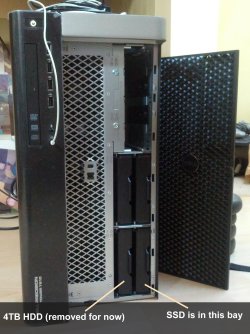
Did you say you had a single data HDD and not a RAID array spanning multiple hard drives which is what RAID is. I had asked you that question earlier and you were too afraid to open your case, remember?

If you don't have RAIDed drives then you don't have RAID so you can turn it off. A RAID is more than one hard drives spanned together. Period.
 
GokAy, please see results below.

Greg, I have a separate HDD that it currently removed. The PC arrived with just the SSD inside.

If I turn Raid off, the PC fails to boot, as I mentioned a few posts back.
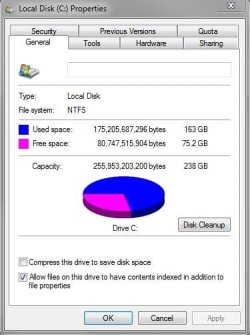
Edit: I just want to add this info too, the drive space is really low and I have hardly anything even installed
 

Attachments

  • AS_SSD_Benchmark_Results.JPG
    AS_SSD_Benchmark_Results.JPG
    49.1 KB · Views: 19
  • C_Space.JPG
    C_Space.JPG
    34.2 KB · Views: 19

My Computer My Computer

At a glance

Microsoft Windows 7 Professional 64-bitDual Xeon(R) CPU E5-2687W v3 @ 3.10GHz32.00 GBNVIDIA Quadro K4200
Computer type
PC/Desktop
Computer Manufacturer/Model Number
Dell Precision Tower 7910 Workstation
OS
Microsoft Windows 7 Professional 64-bit
CPU
Dual Xeon(R) CPU E5-2687W v3 @ 3.10GHz
Motherboard
Dell Inc. 0215PR
Memory
32.00 GB
Graphics Card(s)
NVIDIA Quadro K4200
Sound Card
(1) NVIDIA High Definition Audio (2) High Definition Audio
Hard Drives
(1) SK hynix SC210 2.5 7MM 256GB ATA Device
(2) ATA WDC WD4003FZEX-0 SCSI Disk Device
Antivirus
Avast Free and Malwarebytes Free
Browser
Chrome
Other Info
BIOS: BIOS Date: 04/14/15 18:58:26 Ver: A07.00
Did you say you had a single data HDD and not a RAID array spanning multiple hard drives which is what RAID is. I had asked you that question earlier and you were too afraid to open your case, remember?

If you don't have RAIDed drives then you don't have RAID so you can turn it off. A RAID is more than one hard drives spanned together. Period.

Hey, Greg

He tried turning the RAID off the other day but that option seems to shut off the controller instead of turning off the RAID mode (no drives reported while it was off). There is also an option for SATA operation in BIOS, already set as AHCI, which seems to affect SATA0-1 ports. DVD-ROM is SATA 0, SATA-1 seems to be a 5.25" drive bay.

I really wonder which driver he is using for SSD at the moment, so I asked for an AS SSD screenshot.
 

My Computer My Computer

At a glance

Windows 7 Ultimate x64 SP1AMD Phenom 2 1090T2x8GB Kingston HyperX Fury Black 1600Mhz Unga...MSI GTX 970 Gaming 4G
Computer type
PC/Desktop
Computer Manufacturer/Model Number
Custom Build
OS
Windows 7 Ultimate x64 SP1
CPU
AMD Phenom 2 1090T
Motherboard
Gigabyte GA-890FXA-UD5
Memory
2x8GB Kingston HyperX Fury Black 1600Mhz Unganged
Graphics Card(s)
MSI GTX 970 Gaming 4G
Sound Card
Realtek On-Board HD 7.1 Audio / Logitech G35
Monitor(s) Displays
3xAcer GD245HQ
Screen Resolution
1920x1080
Hard Drives
Samsung 850 Pro 512GB SSD - OS /
WD Caviar Black SATA 3 - 1 TBx2 - Dynamic RAID 0 /
WD Caviar Green SATA 2 - 640GBx2 - Dynamic RAID 0 /
WD Caviar Green SATA 2 - 640GB - Internal Backup /
Seagate Barracude SATA 3 - 3TB - External Backup/ Sync
PSU
HighPower 1000W
Case
Cooler Master HAF 932
Cooling
Noctua NH-D14
Keyboard
Logitech G19
Mouse
Logitech G500
Internet Speed
100/4 Mbit Cable (100GB quota)
Antivirus
ZoneAlarm Extreme Security / MBAM Pro / MBAE Free / SAS Free
Browser
IE 11 - Firefox - Chrome
Other Info
Logitech F710/ G27/ G940/ Z5500 // TrackIR 5 // Nvidia 3D Surround Vision
What is the SSD model? The benchmark results are not promising, you should be getting around 500 read/write sequential (really depends on SSD model but those write speeds are not acceptable). By the way you are using a driver called LSI-SAS 3.

Did you enable msahci driver already? If not http://www.sevenforums.com/tutorials/61869-ahci-enable-windows-7-vista.html. It is enough to just enable msahci.

After that can you try something? Shut down PC, open front, get a flash light and see if you can see sata data and power connections inside the top empty space as you call it. Look at the HDD's (that you removed) back side to see what I mean. Or the picture below.

sata power and data.jpg

If you can see it inside the SATA-1 bay, remove your SSD and try to insert into there. You may have hard time inserting your hand in though. If you succeed, you may have to change BIOS boot order. Report back.
 

My Computer My Computer

At a glance

Windows 7 Ultimate x64 SP1AMD Phenom 2 1090T2x8GB Kingston HyperX Fury Black 1600Mhz Unga...MSI GTX 970 Gaming 4G
Computer type
PC/Desktop
Computer Manufacturer/Model Number
Custom Build
OS
Windows 7 Ultimate x64 SP1
CPU
AMD Phenom 2 1090T
Motherboard
Gigabyte GA-890FXA-UD5
Memory
2x8GB Kingston HyperX Fury Black 1600Mhz Unganged
Graphics Card(s)
MSI GTX 970 Gaming 4G
Sound Card
Realtek On-Board HD 7.1 Audio / Logitech G35
Monitor(s) Displays
3xAcer GD245HQ
Screen Resolution
1920x1080
Hard Drives
Samsung 850 Pro 512GB SSD - OS /
WD Caviar Black SATA 3 - 1 TBx2 - Dynamic RAID 0 /
WD Caviar Green SATA 2 - 640GBx2 - Dynamic RAID 0 /
WD Caviar Green SATA 2 - 640GB - Internal Backup /
Seagate Barracude SATA 3 - 3TB - External Backup/ Sync
PSU
HighPower 1000W
Case
Cooler Master HAF 932
Cooling
Noctua NH-D14
Keyboard
Logitech G19
Mouse
Logitech G500
Internet Speed
100/4 Mbit Cable (100GB quota)
Antivirus
ZoneAlarm Extreme Security / MBAM Pro / MBAE Free / SAS Free
Browser
IE 11 - Firefox - Chrome
Other Info
Logitech F710/ G27/ G940/ Z5500 // TrackIR 5 // Nvidia 3D Surround Vision
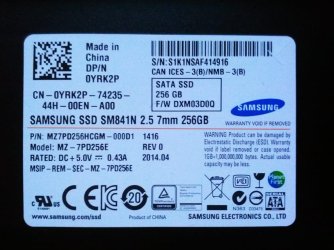
Here is a pic of my SSD - to be honest, I have had a weird feeling about this drive from day one.

Edit: Not too sure about the driver you mention how do I check that?
 

Attachments

  • SSD_Model.jpg
    SSD_Model.jpg
    120.9 KB · Views: 1

My Computer My Computer

At a glance

Microsoft Windows 7 Professional 64-bitDual Xeon(R) CPU E5-2687W v3 @ 3.10GHz32.00 GBNVIDIA Quadro K4200
Computer type
PC/Desktop
Computer Manufacturer/Model Number
Dell Precision Tower 7910 Workstation
OS
Microsoft Windows 7 Professional 64-bit
CPU
Dual Xeon(R) CPU E5-2687W v3 @ 3.10GHz
Motherboard
Dell Inc. 0215PR
Memory
32.00 GB
Graphics Card(s)
NVIDIA Quadro K4200
Sound Card
(1) NVIDIA High Definition Audio (2) High Definition Audio
Hard Drives
(1) SK hynix SC210 2.5 7MM 256GB ATA Device
(2) ATA WDC WD4003FZEX-0 SCSI Disk Device
Antivirus
Avast Free and Malwarebytes Free
Browser
Chrome
Other Info
BIOS: BIOS Date: 04/14/15 18:58:26 Ver: A07.00
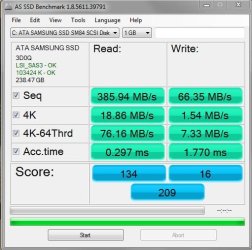
According to Samsung SM841 vs 840 Pro ? [Solved] - Storage - Storage your SSD is the OEM verson of Samsung 840 Pro, which is a good SSD. So your device is definitely underperforming at the moment and the reason most probably is the SAS RAID driver.

When you open AS SSD ( no need to run the benchmark), see green text in upper left corner? It says LSI_SAS3 - OK (LSI_SAS3 is the driver it is using). If it was using the MS built in AHCI it would say msahci. Clear enough?

See the back of your SSD, and check inside the upper large hole in front, try to insert the SSD there if possible. Might need some work :)
 

My Computer My Computer

At a glance

Windows 7 Ultimate x64 SP1AMD Phenom 2 1090T2x8GB Kingston HyperX Fury Black 1600Mhz Unga...MSI GTX 970 Gaming 4G
Computer type
PC/Desktop
Computer Manufacturer/Model Number
Custom Build
OS
Windows 7 Ultimate x64 SP1
CPU
AMD Phenom 2 1090T
Motherboard
Gigabyte GA-890FXA-UD5
Memory
2x8GB Kingston HyperX Fury Black 1600Mhz Unganged
Graphics Card(s)
MSI GTX 970 Gaming 4G
Sound Card
Realtek On-Board HD 7.1 Audio / Logitech G35
Monitor(s) Displays
3xAcer GD245HQ
Screen Resolution
1920x1080
Hard Drives
Samsung 850 Pro 512GB SSD - OS /
WD Caviar Black SATA 3 - 1 TBx2 - Dynamic RAID 0 /
WD Caviar Green SATA 2 - 640GBx2 - Dynamic RAID 0 /
WD Caviar Green SATA 2 - 640GB - Internal Backup /
Seagate Barracude SATA 3 - 3TB - External Backup/ Sync
PSU
HighPower 1000W
Case
Cooler Master HAF 932
Cooling
Noctua NH-D14
Keyboard
Logitech G19
Mouse
Logitech G500
Internet Speed
100/4 Mbit Cable (100GB quota)
Antivirus
ZoneAlarm Extreme Security / MBAM Pro / MBAE Free / SAS Free
Browser
IE 11 - Firefox - Chrome
Other Info
Logitech F710/ G27/ G940/ Z5500 // TrackIR 5 // Nvidia 3D Surround Vision
According to Samsung SM841 vs 840 Pro ? [Solved] - Storage - Storage your SSD is the OEM verson of Samsung 840 Pro, which is a good SSD. So your device is definitely underperforming at the moment and the reason most probably is the SAS RAID driver.

When you open AS SSD ( no need to run the benchmark), see green text in upper left corner? It says LSI_SAS3 - OK (LSI_SAS3 is the driver it is using). If it was using the MS built in AHCI it would say msahci. Clear enough?

See the back of your SSD, and check inside the upper large hole in front, try to insert the SSD there if possible. Might need some work :)

Ok, I see. So that's why it's so slow. When in install 3ds max, it took 40-50 mins I reckon. Usually it installs in about 10 mins maybe.

I will power down and try that with the SSD. I can actually see some wires/connectors in that big gap area
 

My Computer My Computer

At a glance

Microsoft Windows 7 Professional 64-bitDual Xeon(R) CPU E5-2687W v3 @ 3.10GHz32.00 GBNVIDIA Quadro K4200
Computer type
PC/Desktop
Computer Manufacturer/Model Number
Dell Precision Tower 7910 Workstation
OS
Microsoft Windows 7 Professional 64-bit
CPU
Dual Xeon(R) CPU E5-2687W v3 @ 3.10GHz
Motherboard
Dell Inc. 0215PR
Memory
32.00 GB
Graphics Card(s)
NVIDIA Quadro K4200
Sound Card
(1) NVIDIA High Definition Audio (2) High Definition Audio
Hard Drives
(1) SK hynix SC210 2.5 7MM 256GB ATA Device
(2) ATA WDC WD4003FZEX-0 SCSI Disk Device
Antivirus
Avast Free and Malwarebytes Free
Browser
Chrome
Other Info
BIOS: BIOS Date: 04/14/15 18:58:26 Ver: A07.00
I can't really get at them connectors, very awkward to get to. But from what I see the SSD will not connect in there.
 

My Computer My Computer

At a glance

Microsoft Windows 7 Professional 64-bitDual Xeon(R) CPU E5-2687W v3 @ 3.10GHz32.00 GBNVIDIA Quadro K4200
Computer type
PC/Desktop
Computer Manufacturer/Model Number
Dell Precision Tower 7910 Workstation
OS
Microsoft Windows 7 Professional 64-bit
CPU
Dual Xeon(R) CPU E5-2687W v3 @ 3.10GHz
Motherboard
Dell Inc. 0215PR
Memory
32.00 GB
Graphics Card(s)
NVIDIA Quadro K4200
Sound Card
(1) NVIDIA High Definition Audio (2) High Definition Audio
Hard Drives
(1) SK hynix SC210 2.5 7MM 256GB ATA Device
(2) ATA WDC WD4003FZEX-0 SCSI Disk Device
Antivirus
Avast Free and Malwarebytes Free
Browser
Chrome
Other Info
BIOS: BIOS Date: 04/14/15 18:58:26 Ver: A07.00
Mind taking a photo of those connectors and the connectors at the back of SSD?

Also wondering if there is no way to set SAS ports to act as AHCI in BIOS. Did you thoroughly check each option?
 

My Computer My Computer

At a glance

Windows 7 Ultimate x64 SP1AMD Phenom 2 1090T2x8GB Kingston HyperX Fury Black 1600Mhz Unga...MSI GTX 970 Gaming 4G
Computer type
PC/Desktop
Computer Manufacturer/Model Number
Custom Build
OS
Windows 7 Ultimate x64 SP1
CPU
AMD Phenom 2 1090T
Motherboard
Gigabyte GA-890FXA-UD5
Memory
2x8GB Kingston HyperX Fury Black 1600Mhz Unganged
Graphics Card(s)
MSI GTX 970 Gaming 4G
Sound Card
Realtek On-Board HD 7.1 Audio / Logitech G35
Monitor(s) Displays
3xAcer GD245HQ
Screen Resolution
1920x1080
Hard Drives
Samsung 850 Pro 512GB SSD - OS /
WD Caviar Black SATA 3 - 1 TBx2 - Dynamic RAID 0 /
WD Caviar Green SATA 2 - 640GBx2 - Dynamic RAID 0 /
WD Caviar Green SATA 2 - 640GB - Internal Backup /
Seagate Barracude SATA 3 - 3TB - External Backup/ Sync
PSU
HighPower 1000W
Case
Cooler Master HAF 932
Cooling
Noctua NH-D14
Keyboard
Logitech G19
Mouse
Logitech G500
Internet Speed
100/4 Mbit Cable (100GB quota)
Antivirus
ZoneAlarm Extreme Security / MBAM Pro / MBAE Free / SAS Free
Browser
IE 11 - Firefox - Chrome
Other Info
Logitech F710/ G27/ G940/ Z5500 // TrackIR 5 // Nvidia 3D Surround Vision
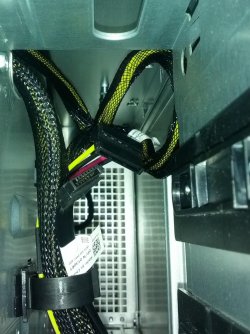
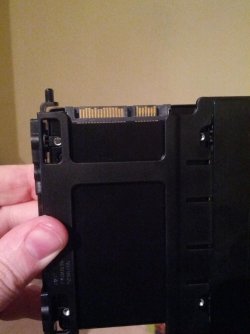
Here are two pics.

About your other question - to be honest I'm not really sure as this has been wrecking my head for days now. I have a headache from the whole thing. Thank you so much for your help though, I really appreciate it. Very helpful posts.
 

Attachments

  • Inside_Empty_Space.jpg
    Inside_Empty_Space.jpg
    256.7 KB · Views: 2
  • Back_Of_SSD.jpg
    Back_Of_SSD.jpg
    100.1 KB · Views: 2

My Computer My Computer

At a glance

Microsoft Windows 7 Professional 64-bitDual Xeon(R) CPU E5-2687W v3 @ 3.10GHz32.00 GBNVIDIA Quadro K4200
Computer type
PC/Desktop
Computer Manufacturer/Model Number
Dell Precision Tower 7910 Workstation
OS
Microsoft Windows 7 Professional 64-bit
CPU
Dual Xeon(R) CPU E5-2687W v3 @ 3.10GHz
Motherboard
Dell Inc. 0215PR
Memory
32.00 GB
Graphics Card(s)
NVIDIA Quadro K4200
Sound Card
(1) NVIDIA High Definition Audio (2) High Definition Audio
Hard Drives
(1) SK hynix SC210 2.5 7MM 256GB ATA Device
(2) ATA WDC WD4003FZEX-0 SCSI Disk Device
Antivirus
Avast Free and Malwarebytes Free
Browser
Chrome
Other Info
BIOS: BIOS Date: 04/14/15 18:58:26 Ver: A07.00
Nice, exactly what we needed to see!

The SSD has regular SATA data and power connectors.

Those cables are also the regular ones, the longer one is the power, shorter one is the L type SATA connector.

I know you said you don't like to mess with the case but I strongly urge you to find a way to get there.

I was thinking that there was a bay in there which you could slide in a DVD-ROM and it would just connect but seems there are cabling. So there must be a way to open it.

- Make sure there are no stickers on the back/sides (or anywhere for that matter) of the case which would stop you from opening.
- Open Dell Precision Tower 7910 Owner's Manual
- expand "Removing and Installing components"
- scroll down to "Removing the right cover"
- remove the right cover
-hopefully the cables will be in the open, attach your SSD to these cables (they are fail proof, only 1 way of attaching them)
- just put the SSD there, don't close cover. Boot into BIOS, set boot order if needed, log in to windows (you did enable msahci from earlier post - #111, right?)

You can finish all this in tops 10 minutes, it is really easy business! :)
 

My Computer My Computer

At a glance

Windows 7 Ultimate x64 SP1AMD Phenom 2 1090T2x8GB Kingston HyperX Fury Black 1600Mhz Unga...MSI GTX 970 Gaming 4G
Computer type
PC/Desktop
Computer Manufacturer/Model Number
Custom Build
OS
Windows 7 Ultimate x64 SP1
CPU
AMD Phenom 2 1090T
Motherboard
Gigabyte GA-890FXA-UD5
Memory
2x8GB Kingston HyperX Fury Black 1600Mhz Unganged
Graphics Card(s)
MSI GTX 970 Gaming 4G
Sound Card
Realtek On-Board HD 7.1 Audio / Logitech G35
Monitor(s) Displays
3xAcer GD245HQ
Screen Resolution
1920x1080
Hard Drives
Samsung 850 Pro 512GB SSD - OS /
WD Caviar Black SATA 3 - 1 TBx2 - Dynamic RAID 0 /
WD Caviar Green SATA 2 - 640GBx2 - Dynamic RAID 0 /
WD Caviar Green SATA 2 - 640GB - Internal Backup /
Seagate Barracude SATA 3 - 3TB - External Backup/ Sync
PSU
HighPower 1000W
Case
Cooler Master HAF 932
Cooling
Noctua NH-D14
Keyboard
Logitech G19
Mouse
Logitech G500
Internet Speed
100/4 Mbit Cable (100GB quota)
Antivirus
ZoneAlarm Extreme Security / MBAM Pro / MBAE Free / SAS Free
Browser
IE 11 - Firefox - Chrome
Other Info
Logitech F710/ G27/ G940/ Z5500 // TrackIR 5 // Nvidia 3D Surround Vision
Great help GokAy. I'd rep you but I need to pass it around first.

Connecting directly to the mobo's SATA ports both the SSD and a single data drive is certainly best. But I worry about the RAID card causing trouble as we've seen here in the past. A discreet RAID card should have a popup at boot to disable. It think I mentioned it in the beginning. I suspect he has a RAID card because Dell was finding him a driver for it and they wouldn't do that for a single HD I don't think.
 
I think the same way as you do Greg, there should be a way to change that SAS RAID controllers operation mode. But we can think of that later if it causes problems with the 4TB spinner (currently removed).

I believe the SSD will start to perform with it's advertised speeds once it has been moved to SATA-1. It is 40MB/s write at the moment, that's barely better than a USB2 stick/HDD. Access times/4K etc are low as well.

We will see once RedLAd returns and gets his hands dirty :D
 

My Computer My Computer

At a glance

Windows 7 Ultimate x64 SP1AMD Phenom 2 1090T2x8GB Kingston HyperX Fury Black 1600Mhz Unga...MSI GTX 970 Gaming 4G
Computer type
PC/Desktop
Computer Manufacturer/Model Number
Custom Build
OS
Windows 7 Ultimate x64 SP1
CPU
AMD Phenom 2 1090T
Motherboard
Gigabyte GA-890FXA-UD5
Memory
2x8GB Kingston HyperX Fury Black 1600Mhz Unganged
Graphics Card(s)
MSI GTX 970 Gaming 4G
Sound Card
Realtek On-Board HD 7.1 Audio / Logitech G35
Monitor(s) Displays
3xAcer GD245HQ
Screen Resolution
1920x1080
Hard Drives
Samsung 850 Pro 512GB SSD - OS /
WD Caviar Black SATA 3 - 1 TBx2 - Dynamic RAID 0 /
WD Caviar Green SATA 2 - 640GBx2 - Dynamic RAID 0 /
WD Caviar Green SATA 2 - 640GB - Internal Backup /
Seagate Barracude SATA 3 - 3TB - External Backup/ Sync
PSU
HighPower 1000W
Case
Cooler Master HAF 932
Cooling
Noctua NH-D14
Keyboard
Logitech G19
Mouse
Logitech G500
Internet Speed
100/4 Mbit Cable (100GB quota)
Antivirus
ZoneAlarm Extreme Security / MBAM Pro / MBAE Free / SAS Free
Browser
IE 11 - Firefox - Chrome
Other Info
Logitech F710/ G27/ G940/ Z5500 // TrackIR 5 // Nvidia 3D Surround Vision
Back
Top