
Windows Startup Repair query

Is it possible that the Max installer be corrupted in any way? Try redownloading it?
Another thing comes to mind, did you restart PC after you made the changes to folders? Not sure if necessary but doesn't hurt to try.

Also check Preparing your System for Installation | Installation, Activation & Licensing | Autodesk Knowledge Network

The installer should be fine, I had installed I had installed it on the SSD a few weeks back.But when I got the additional HDD installed yesterday, I did an uninstall of Max. But now it just will not work. I did a restart before the install too yes. No luck :(

Greg, when the install did eventually finish (without any errors given btw), it created folders in the old location - C:\Users\User\Documents\3dsMax

And also in the new one - F:\My Documents\3dsMax. Something is definitely up, it should only put the files in the new one, F.


Here is a screen grab to help:
 

Attachments

  • 3ds_Max_Install.jpg
    3ds_Max_Install.jpg
    118.1 KB · Views: 0

My Computer My Computer

Computer type
PC/Desktop
Computer Manufacturer/Model Number
Dell Precision Tower 7910 Workstation
OS
Microsoft Windows 7 Professional 64-bit
CPU
Dual Xeon(R) CPU E5-2687W v3 @ 3.10GHz
Motherboard
Dell Inc. 0215PR
Memory
32.00 GB
Graphics Card(s)
NVIDIA Quadro K4200
Sound Card
(1) NVIDIA High Definition Audio (2) High Definition Audio
Hard Drives
(1) SK hynix SC210 2.5 7MM 256GB ATA Device
(2) ATA WDC WD4003FZEX-0 SCSI Disk Device
Antivirus
Avast Free and Malwarebytes Free
Browser
Chrome
Other Info
BIOS: BIOS Date: 04/14/15 18:58:26 Ver: A07.00
In addition see if the program has a Custom install where you can choose paths as many do, then point it to C:\ root or your Documents folder.
 
In addition see if the program has a Custom install where you can choose paths as many do, then point it to C:\ root or your Documents folder.

As far as I know, I couldn't change the path to where it was installing which was C: drive, my SSD. I think it was greyed out and I couldn't change it. I will check again when home.

A friend suggested to try this:

  1. Uninstall Max yet again.
  2. Point my user folders back to their default location on C:
  3. Remove the second hard drive from my PC.
  4. Install 3ds Max again.
  5. Then, put the other hard drive back in and point the user folders to that.

It's worth a shot.
 

My Computer My Computer

Computer type
PC/Desktop
Computer Manufacturer/Model Number
Dell Precision Tower 7910 Workstation
OS
Microsoft Windows 7 Professional 64-bit
CPU
Dual Xeon(R) CPU E5-2687W v3 @ 3.10GHz
Motherboard
Dell Inc. 0215PR
Memory
32.00 GB
Graphics Card(s)
NVIDIA Quadro K4200
Sound Card
(1) NVIDIA High Definition Audio (2) High Definition Audio
Hard Drives
(1) SK hynix SC210 2.5 7MM 256GB ATA Device
(2) ATA WDC WD4003FZEX-0 SCSI Disk Device
Antivirus
Avast Free and Malwarebytes Free
Browser
Chrome
Other Info
BIOS: BIOS Date: 04/14/15 18:58:26 Ver: A07.00
Hi again,

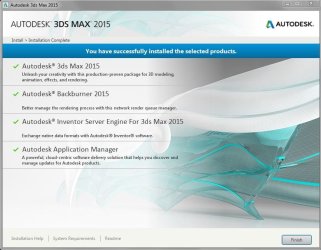
I'm installing Max again now, the separate hard drive has been removed from the PC and the installed has been running for about 40 mins now. Before it even finished, I know something is up and this install looks like it will be corrupt again. I will let it finish anyway and post back. The crazy thing is, I installed it on the same SSD a few days after I bought the PC and it too about 15-20 mins I reckon.

Something has seriously messed up on me and I don't know where to start in order to fix it.

I will be calling Dell about it, but want to ask would a complete wipe be a good option? I don't have the disc for Windows that is installed on it. Can it be factory reset without it?

Also - if I did wipe it, does that mean all drivers and other things are deleted and need to be fetched and installed again?

Any help will be great, thanks.
 

My Computer My Computer

Computer type
PC/Desktop
Computer Manufacturer/Model Number
Dell Precision Tower 7910 Workstation
OS
Microsoft Windows 7 Professional 64-bit
CPU
Dual Xeon(R) CPU E5-2687W v3 @ 3.10GHz
Motherboard
Dell Inc. 0215PR
Memory
32.00 GB
Graphics Card(s)
NVIDIA Quadro K4200
Sound Card
(1) NVIDIA High Definition Audio (2) High Definition Audio
Hard Drives
(1) SK hynix SC210 2.5 7MM 256GB ATA Device
(2) ATA WDC WD4003FZEX-0 SCSI Disk Device
Antivirus
Avast Free and Malwarebytes Free
Browser
Chrome
Other Info
BIOS: BIOS Date: 04/14/15 18:58:26 Ver: A07.00
The install just finished and it still crashes when it gets to the main UI. Here is the window message at the end of the install, this is totally bizarre stuff.
 

Attachments

  • 3ds_Max_Install_Window.JPG
    3ds_Max_Install_Window.JPG
    72.9 KB · Views: 0

My Computer My Computer

Computer type
PC/Desktop
Computer Manufacturer/Model Number
Dell Precision Tower 7910 Workstation
OS
Microsoft Windows 7 Professional 64-bit
CPU
Dual Xeon(R) CPU E5-2687W v3 @ 3.10GHz
Motherboard
Dell Inc. 0215PR
Memory
32.00 GB
Graphics Card(s)
NVIDIA Quadro K4200
Sound Card
(1) NVIDIA High Definition Audio (2) High Definition Audio
Hard Drives
(1) SK hynix SC210 2.5 7MM 256GB ATA Device
(2) ATA WDC WD4003FZEX-0 SCSI Disk Device
Antivirus
Avast Free and Malwarebytes Free
Browser
Chrome
Other Info
BIOS: BIOS Date: 04/14/15 18:58:26 Ver: A07.00
If you have less than a perfect install or if this is still the crappy factory install then you can indeed benefit greatly from a Clean Reinstall Windows 7. It compiles everything that works best in tens of thousands of installs we've directly helped with here, and has been followed by 1.5 million consumers without a single complaint.

Be sure to read the Special Note for Dells Owners at the end.
 
If you have less than a perfect install or if this is still the crappy factory install then you can indeed benefit greatly from a Clean Reinstall Windows 7. It compiles everything that works best in tens of thousands of installs we've directly helped with here, and has been followed by 1.5 million consumers without a single complaint.

Be sure to read the Special Note for Dells Owners at the end.

Cheers for the link Greg, I will go through that. Just a bit of back story to my case I'd like to share:

When I bought the PC, it had Windows 8 on it, so I asked for it to be downgraded to Windows 7 and there was some issue with the raid card and Dell had to supply a driver to fix the problem. This was the company in the UK who I bought the PC from.

I just hope that if I wipe it, (and that looks like it's the best bet) - that there is no real issues with stuff 'not working' like drivers and other components. I am just not very knowledgeable on this type of stuff.

A friend in work tells me he has a Dell Precision also, think his is a model below mine. He said when he bought his he tried to install Windows 7 Ultimate and it wouldn't take it so he had to get Windows 7 Professional installed. That's what is on mine, Windows 7 Professional. The way these are built must be a bit different to the standard PC. I just hope I can get it fixed.
 

My Computer My Computer

Computer type
PC/Desktop
Computer Manufacturer/Model Number
Dell Precision Tower 7910 Workstation
OS
Microsoft Windows 7 Professional 64-bit
CPU
Dual Xeon(R) CPU E5-2687W v3 @ 3.10GHz
Motherboard
Dell Inc. 0215PR
Memory
32.00 GB
Graphics Card(s)
NVIDIA Quadro K4200
Sound Card
(1) NVIDIA High Definition Audio (2) High Definition Audio
Hard Drives
(1) SK hynix SC210 2.5 7MM 256GB ATA Device
(2) ATA WDC WD4003FZEX-0 SCSI Disk Device
Antivirus
Avast Free and Malwarebytes Free
Browser
Chrome
Other Info
BIOS: BIOS Date: 04/14/15 18:58:26 Ver: A07.00
I would not install Win7 to RAID which we only see problems with in WIn7 - never a single good report, regular bad ones.

I don't know why they'd go to a bunch of trouble with a RAID card and driver since it's undesirable, doesn't speed things up, and isn't even Redundant (the first letter of it's name!) since most lose all data if they lose one drive.

So I'd unplug any second drive and RAID card, set SATA controller to AHCI and follow the steps in Clean Reinstall Windows 7. The driver steps are printed in red so you dont' miss them since some try to apply XPired methods and get in trouble. But nobody who's followed those steps has ever reported back a single complaint about their install.

If you have installation failure then Troubleshoot Windows 7 Installation Failures - Windows 7 Help Forums

Remember that for a Win8 PC you must enter BIOS setup to disable Secure Boot, boot the Win7 disk as a UEFI device, delete all partitions or wipe the drive with Diskpart Clean Command before install as discussed in Downgrade Windows 8 to Windows 7

There is no difference between Win7 Ultimate, Professional or Home Premium except a few extra expensive unlocked features that are already there. They are the same exact OS.
 
I would not install Win7 to RAID which we only see problems with in WIn7 - never a single good report, regular bad ones.

I don't know why they'd go to a bunch of trouble with a RAID card and driver since it's undesirable, doesn't speed things up, and isn't even Redundant (the first letter of it's name!) since most lose all data if they lose one drive.

So I'd unplug any second drive and RAID card, set SATA controller to AHCI and follow the steps in Clean Reinstall Windows 7. The driver steps are printed in red so you dont' miss them since some try to apply XPired methods and get in trouble. But nobody who's followed those steps has ever reported back a single complaint about their install.

If you have installation failure then Troubleshoot Windows 7 Installation Failures - Windows 7 Help Forums

Remember that for a Win8 PC you must enter BIOS setup to disable Secure Boot, boot the Win7 disk as a UEFI device, delete all partitions or wipe the drive with Diskpart Clean Command before install as discussed in Downgrade Windows 8 to Windows 7

There is no difference between Win7 Ultimate, Professional or Home Premium except a few extra expensive unlocked features that are already there. They are the same exact OS.

Cheers for this Greg, very helpful. I can understand bits of it. Just about the raid card. God only knows why they did that. If that is removed is there any reason that Windows would not boot? Would that have been put there for a specific reason?

Also, to set SATA controller to AHCI, is this done in the BIOS? Will this boost performance in any way?

Sorry for all the questions, it's just that I'm a bit freaked by this whole thing, it's a mess.
 

My Computer My Computer

Computer type
PC/Desktop
Computer Manufacturer/Model Number
Dell Precision Tower 7910 Workstation
OS
Microsoft Windows 7 Professional 64-bit
CPU
Dual Xeon(R) CPU E5-2687W v3 @ 3.10GHz
Motherboard
Dell Inc. 0215PR
Memory
32.00 GB
Graphics Card(s)
NVIDIA Quadro K4200
Sound Card
(1) NVIDIA High Definition Audio (2) High Definition Audio
Hard Drives
(1) SK hynix SC210 2.5 7MM 256GB ATA Device
(2) ATA WDC WD4003FZEX-0 SCSI Disk Device
Antivirus
Avast Free and Malwarebytes Free
Browser
Chrome
Other Info
BIOS: BIOS Date: 04/14/15 18:58:26 Ver: A07.00
AHCI is a SATA controller setting you may have in BIOS setup. It is optimal for Win7.

A RAID card will normally popup something at boot. See if you can select it and disable. If not look for any RAID in BIOS. If in doubt ask back. Camera snaps will help. Attach with paper clip icon in reply box.
 
AHCI is a SATA controller setting you may have in BIOS setup. It is optimal for Win7.

A RAID card will normally popup something at boot. See if you can select it and disable. If not look for any RAID in BIOS. If in doubt ask back. Camera snaps will help. Attach with paper clip icon in reply box.
 
AHCI is a SATA controller setting you may have in BIOS setup. It is optimal for Win7.

A RAID card will normally popup something at boot. See if you can select it and disable. If not look for any RAID in BIOS. If in doubt ask back. Camera snaps will help. Attach with paper clip icon in reply box.

Hi Greg, I haven't done anything with my PC yet, but have found this in the manual on the Dell site if it helps at all? It might shed some light on the system.

System Setup Options


Boot List Option

Allows you to change the boot list option.
Legacy
UEFI


Integrated NIC

Allows you to configure the integrated network controller. The options are:
Enable UEFI Network Stack
Disabled
NOTE: You can use the Disabled option, only if Active Management Technology (AMT) option is disabled.
Enabled
Enabled w/PXE (Default)


Integrated NIC 2

Allows you to configure the integrated network controller. The options are:
Enabled (Default)
Enabled w/PXE
NOTE: This feature is supported only on Tower 7910.


SATA Operation

Allows you to configure the internal SATA hard-drive controller. The options are:
Disabled
ATA
AHCI (Default)
NOTE: SATA is configured to support RAID mode. No SATA operation support in Tower 7910.


Drives

SATA–0
SATA–1
Default Setting: All drives are enabled.

NOTE: If the hard drives are connected to a RAID controller card, the hard drives will display {none} in all the fields. The hard drives can be seen in the RAID controller card BIOS.


SAS RAID Controller (Tower 7910 only)
Allows you to control the operation of the integrated SAS RAID HDD controller.
Enabled (Default)
Disabled.


Hope this info helps

Cheers
 

My Computer My Computer

Computer type
PC/Desktop
Computer Manufacturer/Model Number
Dell Precision Tower 7910 Workstation
OS
Microsoft Windows 7 Professional 64-bit
CPU
Dual Xeon(R) CPU E5-2687W v3 @ 3.10GHz
Motherboard
Dell Inc. 0215PR
Memory
32.00 GB
Graphics Card(s)
NVIDIA Quadro K4200
Sound Card
(1) NVIDIA High Definition Audio (2) High Definition Audio
Hard Drives
(1) SK hynix SC210 2.5 7MM 256GB ATA Device
(2) ATA WDC WD4003FZEX-0 SCSI Disk Device
Antivirus
Avast Free and Malwarebytes Free
Browser
Chrome
Other Info
BIOS: BIOS Date: 04/14/15 18:58:26 Ver: A07.00

My Computer My Computer

Computer type
PC/Desktop
Computer Manufacturer/Model Number
Dell Precision Tower 7910 Workstation
OS
Microsoft Windows 7 Professional 64-bit
CPU
Dual Xeon(R) CPU E5-2687W v3 @ 3.10GHz
Motherboard
Dell Inc. 0215PR
Memory
32.00 GB
Graphics Card(s)
NVIDIA Quadro K4200
Sound Card
(1) NVIDIA High Definition Audio (2) High Definition Audio
Hard Drives
(1) SK hynix SC210 2.5 7MM 256GB ATA Device
(2) ATA WDC WD4003FZEX-0 SCSI Disk Device
Antivirus
Avast Free and Malwarebytes Free
Browser
Chrome
Other Info
BIOS: BIOS Date: 04/14/15 18:58:26 Ver: A07.00
So look where it says to disable any RAID card. As I said post back pics of choices if in doubt. Set all to AHCI. Unplug one HD to install
 
So look where it says to disable any RAID card. As I said post back pics of choices if in doubt. Set all to AHCI. Unplug one HD to install

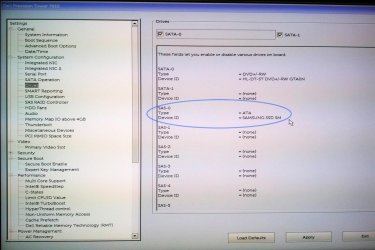
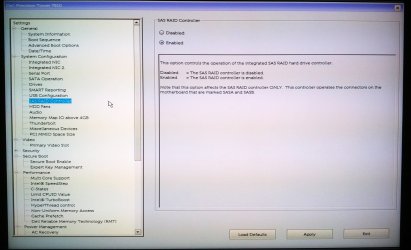
When you say 'unplug one HD to install' are you referring to the extra WD HDD that I bought? That has already been removed. These are options I see. If I am to do a clean install, disabling the raid controller won't mess up the PC will it?

The fact the Samsung SSD is set to ATA - this is bad right? Also, I don't recognize that model of Samsung even when I google it which is strange.

Screens:
 

Attachments

  • Drives.jpg
    Drives.jpg
    156.8 KB · Views: 3
  • SAS_Raid_Controller.jpg
    SAS_Raid_Controller.jpg
    152 KB · Views: 1

My Computer My Computer

Computer type
PC/Desktop
Computer Manufacturer/Model Number
Dell Precision Tower 7910 Workstation
OS
Microsoft Windows 7 Professional 64-bit
CPU
Dual Xeon(R) CPU E5-2687W v3 @ 3.10GHz
Motherboard
Dell Inc. 0215PR
Memory
32.00 GB
Graphics Card(s)
NVIDIA Quadro K4200
Sound Card
(1) NVIDIA High Definition Audio (2) High Definition Audio
Hard Drives
(1) SK hynix SC210 2.5 7MM 256GB ATA Device
(2) ATA WDC WD4003FZEX-0 SCSI Disk Device
Antivirus
Avast Free and Malwarebytes Free
Browser
Chrome
Other Info
BIOS: BIOS Date: 04/14/15 18:58:26 Ver: A07.00
I read back through the thread to find your Disk Mgmt screenshot. It doesn't look like your SSD is involved in the RAID but only the data drives.

Look inside the case and at the RAID controller to see if you have 2-3 hard drives in an array that show as one in Disk Mgmt. due to RAID

If in doubt talk with Dell to ask why they would RAID your data drives so that you'd lose all data if one drive dies. Then have them explain why you shouldn't unRaid them and how exactly to do so without data loss. So idiotic this is that you'd probably need a 3 gb external drive to move a full RAIDed drive's data off to get it out of a RAID. This is to me absurd malpractice.

If you need further help with that RAID mess ask Dell or one of our hardware Gurus as it irritates me to even have to deal with such utter junk nonsense this far. I can't even advise you to unplug the other drives to reinstall to SSD for fear the RAID would be broken. I'd like to hear Dell explain why they'd build such dated crap - for a video editor with TB files? Why else?
 
I read back through the thread to find your Disk Mgmt screenshot. It doesn't look like your SSD is involved in the RAID but only the data drives.

Look inside the case and at the RAID controller to see if you have 2-3 hard drives in an array that show as one in Disk Mgmt. due to RAID

If in doubt talk with Dell to ask why they would RAID your data drives so that you'd lose all data if one drive dies. Then have them explain why you shouldn't unRaid them and how exactly to do so without data loss. So idiotic this is that you'd probably need a 3 gb external drive to move a full RAIDed drive's data off to get it out of a RAID. This is to me absurd malpractice.

If you need further help with that RAID mess ask Dell or one of our hardware Gurus as it irritates me to even have to deal with such utter junk nonsense this far. I can't even advise you to unplug the other drives to reinstall to SSD for fear the RAID would be broken. I'd like to hear Dell explain why they'd build such dated crap - for a video editor with TB files? Why else?

Greg, you have me worried now. I've paid a lot of money for this PC. I wouldn't know anything about the inside of these things, I will have to call them. Or I'll ask a hardware person on here as you say.
 

My Computer My Computer

Computer type
PC/Desktop
Computer Manufacturer/Model Number
Dell Precision Tower 7910 Workstation
OS
Microsoft Windows 7 Professional 64-bit
CPU
Dual Xeon(R) CPU E5-2687W v3 @ 3.10GHz
Motherboard
Dell Inc. 0215PR
Memory
32.00 GB
Graphics Card(s)
NVIDIA Quadro K4200
Sound Card
(1) NVIDIA High Definition Audio (2) High Definition Audio
Hard Drives
(1) SK hynix SC210 2.5 7MM 256GB ATA Device
(2) ATA WDC WD4003FZEX-0 SCSI Disk Device
Antivirus
Avast Free and Malwarebytes Free
Browser
Chrome
Other Info
BIOS: BIOS Date: 04/14/15 18:58:26 Ver: A07.00
Removing the raided disks "shouldn't" lose the array, as the info is written in option ROM or whatever it might be called. In my system (2x Raid0) I didn't lose the arrays while installing the OS (had all 4 disks disconnected). However, it is best to backup data before trying anything.

It may also be possible that there is no raid setup, however the controller might be in raid mode. In that case you can simply change to AHCI mode in BIOS, just make sure you do the registry change to load the msahci drivers at least.

http://www.sevenforums.com/tutorials/61869-ahci-enable-windows-7-vista.html

The above won't matter if you will be doing a new OS installation.

By the way from the screenshots, it looks like the only drives attached at the moment is the SSD and dvd-rom.
 

My Computer My Computer

Computer type
PC/Desktop
Computer Manufacturer/Model Number
Custom Build
OS
Windows 7 Ultimate x64 SP1
CPU
AMD Phenom 2 1090T
Motherboard
Gigabyte GA-890FXA-UD5
Memory
2x8GB Kingston HyperX Fury Black 1600Mhz Unganged
Graphics Card(s)
MSI GTX 970 Gaming 4G
Sound Card
Realtek On-Board HD 7.1 Audio / Logitech G35
Monitor(s) Displays
3xAcer GD245HQ
Screen Resolution
1920x1080
Hard Drives
Samsung 850 Pro 512GB SSD - OS /
WD Caviar Black SATA 3 - 1 TBx2 - Dynamic RAID 0 /
WD Caviar Green SATA 2 - 640GBx2 - Dynamic RAID 0 /
WD Caviar Green SATA 2 - 640GB - Internal Backup /
Seagate Barracude SATA 3 - 3TB - External Backup/ Sync
PSU
HighPower 1000W
Case
Cooler Master HAF 932
Cooling
Noctua NH-D14
Keyboard
Logitech G19
Mouse
Logitech G500
Internet Speed
100/4 Mbit Cable (100GB quota)
Antivirus
ZoneAlarm Extreme Security / MBAM Pro / MBAE Free / SAS Free
Browser
IE 11 - Firefox - Chrome
Other Info
Logitech F710/ G27/ G940/ Z5500 // TrackIR 5 // Nvidia 3D Surround Vision
Removing the raided disks "shouldn't" lose the array, as the info is written in option ROM or whatever it might be called. In my system (2x Raid0) I didn't lose the arrays while installing the OS (had all 4 disks disconnected). However, it is best to backup data before trying anything.

It may also be possible that there is no raid setup, however the controller might be in raid mode. In that case you can simply change to AHCI mode in BIOS, just make sure you do the registry change to load the msahci drivers at least.

http://www.sevenforums.com/tutorials/61869-ahci-enable-windows-7-vista.html

The above won't matter if you will be doing a new OS installation.

Hi,

Cheers for the post. To be honest, I don't really have anything on the PC that I need t keep, just a few files which I can easily backup. So I don't really care about loosing anything you know. I can install programs again. All I want is to have a working PC! :)
 

My Computer My Computer

Computer type
PC/Desktop
Computer Manufacturer/Model Number
Dell Precision Tower 7910 Workstation
OS
Microsoft Windows 7 Professional 64-bit
CPU
Dual Xeon(R) CPU E5-2687W v3 @ 3.10GHz
Motherboard
Dell Inc. 0215PR
Memory
32.00 GB
Graphics Card(s)
NVIDIA Quadro K4200
Sound Card
(1) NVIDIA High Definition Audio (2) High Definition Audio
Hard Drives
(1) SK hynix SC210 2.5 7MM 256GB ATA Device
(2) ATA WDC WD4003FZEX-0 SCSI Disk Device
Antivirus
Avast Free and Malwarebytes Free
Browser
Chrome
Other Info
BIOS: BIOS Date: 04/14/15 18:58:26 Ver: A07.00
Oh one more thing :)

You do get a bit more sequential read/write speeds with a RAID0 even though Greg don't like it.

Here is a test I just made: a simple one that is

From my Samsung 850 Pro to other drives - 3.07 GB (3D Mark Folder)
- Single drive - 640GB WD Cavier Green - 1:05.19 s
- RAID 0 - 2x640GB WD Caviar Green - 24.76 s
- RAID 0 - 2x1TB WD Cavier Black - 18 s

Raids are setup in Windows Disk Management. Using FreeFileSync to backup to 3TB E-Sata disk.
 

My Computer My Computer

Computer type
PC/Desktop
Computer Manufacturer/Model Number
Custom Build
OS
Windows 7 Ultimate x64 SP1
CPU
AMD Phenom 2 1090T
Motherboard
Gigabyte GA-890FXA-UD5
Memory
2x8GB Kingston HyperX Fury Black 1600Mhz Unganged
Graphics Card(s)
MSI GTX 970 Gaming 4G
Sound Card
Realtek On-Board HD 7.1 Audio / Logitech G35
Monitor(s) Displays
3xAcer GD245HQ
Screen Resolution
1920x1080
Hard Drives
Samsung 850 Pro 512GB SSD - OS /
WD Caviar Black SATA 3 - 1 TBx2 - Dynamic RAID 0 /
WD Caviar Green SATA 2 - 640GBx2 - Dynamic RAID 0 /
WD Caviar Green SATA 2 - 640GB - Internal Backup /
Seagate Barracude SATA 3 - 3TB - External Backup/ Sync
PSU
HighPower 1000W
Case
Cooler Master HAF 932
Cooling
Noctua NH-D14
Keyboard
Logitech G19
Mouse
Logitech G500
Internet Speed
100/4 Mbit Cable (100GB quota)
Antivirus
ZoneAlarm Extreme Security / MBAM Pro / MBAE Free / SAS Free
Browser
IE 11 - Firefox - Chrome
Other Info
Logitech F710/ G27/ G940/ Z5500 // TrackIR 5 // Nvidia 3D Surround Vision
Back
Top