Windows Update Keeps checking For updates forever

My Computer

Computer Manufacturer/Model Number
HP Pavilion Elite 495UK
OS
Windows 7 Ultimate SP1 64-Bit
CPU
Intel Core i7 870 @ 2.93GHz
Motherboard
MSI 2A9C (CPU1)
Memory
8Gb Dual-Channel DDR3 @ 664MHz
Graphics Card(s)
nVidia GeForce GTX 460 1024MB dedicated RAM
Sound Card
Realtek HD Audio
Monitor(s) Displays
HP2310i
Screen Resolution
1920 x 1080
Hard Drives
1x1954GB Hitachi HDS22020ALA 330 (RAID), 1x1954GB Hitachi External for backup and storage
PSU
460W
Case
HP Elite
Cooling
Air cooled
Keyboard
Logitech K750 solar-powered keyboard
Mouse
Logitech Wireless M180 mouse
Internet Speed
2Mb
Other Info
Pure Avanti Flow Internet Radio with iPod Dock, 64Gb iPod, HP USB Speakers, Sony MDR-V500 Headphones, Sony Vaio F-Series Laptop
I would suggest it's time you consider contacting Microsoft Technical Support vie email { a free service I believe provided for genuine Microsoft Products.}

Microsoft Support
 

My Computer

Computer Manufacturer/Model Number
LAPTOP. HP Pavilion dv7-4010TX .
OS
Win 7 Ultimate 64-bit. SP1.
CPU
Intel i7 -720QM.[1.6GHz Turbo Boost 2.8GHz. 6MB Cache.]
Memory
8 DDR 3 RAM. 1066MHZ
Graphics Card(s)
ATI 1024 MB. DDR3. Radeon HD5650
Monitor(s) Displays
17.3" High Definition Brightview LCD. LED Backlit.
Screen Resolution
1600 x 900.
Hard Drives
640GB
Case
Laptop / notebook.
Mouse
Logitech Anywhere mouse. MX.
Internet Speed
ADSL [ but too slow ]
I tried all the above, it still isn't finishing checking for updates. I contacted Microsoft support, and i am waiting for a reply.
 

My Computer

OS
Windows 7 home premium 64 bit
Skoalm1nt,
Have used Microsoft Technical Support before { email & also via Remote Desktop}
I found them to be polite, helpful & my "problem" was eventually solved.
 

My Computer

Computer Manufacturer/Model Number
LAPTOP. HP Pavilion dv7-4010TX .
OS
Win 7 Ultimate 64-bit. SP1.
CPU
Intel i7 -720QM.[1.6GHz Turbo Boost 2.8GHz. 6MB Cache.]
Memory
8 DDR 3 RAM. 1066MHZ
Graphics Card(s)
ATI 1024 MB. DDR3. Radeon HD5650
Monitor(s) Displays
17.3" High Definition Brightview LCD. LED Backlit.
Screen Resolution
1600 x 900.
Hard Drives
640GB
Case
Laptop / notebook.
Mouse
Logitech Anywhere mouse. MX.
Internet Speed
ADSL [ but too slow ]
Yea, i've been talking to a microsoft rep for the past few days, she's trying to figure out the issue to resolve it.
 

My Computer

OS
Windows 7 home premium 64 bit
Here's my log for the 24th is the automatic update checker working at least? I just want to make sure im up to date on the updates, and if i need to just have it automatically do it for me, i'm good with that. So is the automatic updater working? Here's my log for the 24th.


2011-10-24 03:00:10:005 140 6f4 AU Forced install timer expired for scheduled install
2011-10-24 03:00:10:005 140 6f4 AU UpdateDownloadProperties: 0 download(s) are still in progress.
2011-10-24 03:00:10:005 140 6f4 AU Setting AU scheduled install time to 2011-10-25 08:00:00
2011-10-24 03:00:10:005 140 6f4 AU Successfully wrote event for AU health state:0
2011-10-24 15:23:34:009 140 6f4 AU AU setting next sqm report timeout to 2011-10-25 20:23:34
2011-10-24 18:15:14:708 140 6f4 Shutdwn user declined update at shutdown
2011-10-24 18:15:14:708 140 6f4 AU Successfully wrote event for AU health state:0
2011-10-24 18:15:14:708 140 6f4 AU AU initiates service shutdown
2011-10-24 18:15:14:708 140 6f4 AU ########### AU: Uninitializing Automatic Updates ###########
2011-10-24 18:20:40:695 332 734 Misc =========== Logging initialized (build: 7.5.7601.17514, tz: -0500) ===========
2011-10-24 18:20:40:710 332 734 Misc = Process: C:\Windows\system32\svchost.exe
2011-10-24 18:20:40:710 332 734 Misc = Module: c:\windows\system32\wuaueng.dll
2011-10-24 18:20:40:695 332 734 Service *************
2011-10-24 18:20:40:710 332 734 Service ** START ** Service: Service startup
2011-10-24 18:20:40:710 332 734 Service *********
2011-10-24 18:20:40:975 332 734 Agent * WU client version 7.5.7601.17514
2011-10-24 18:20:40:975 332 734 Agent * Base directory: C:\Windows\SoftwareDistribution
2011-10-24 18:20:40:975 332 734 Agent * Access type: No proxy
2011-10-24 18:20:41:100 332 734 Agent * Network state: Connected
2011-10-24 18:21:27:198 332 734 Report CWERReporter::Init succeeded
2011-10-24 18:21:27:198 332 734 Agent *********** Agent: Initializing Windows Update Agent ***********
2011-10-24 18:21:27:198 332 734 Agent *********** Agent: Initializing global settings cache ***********
2011-10-24 18:21:27:198 332 734 Agent * WSUS server: <NULL>
2011-10-24 18:21:27:198 332 734 Agent * WSUS status server: <NULL>
2011-10-24 18:21:27:198 332 734 Agent * Target group: (Unassigned Computers)
2011-10-24 18:21:27:198 332 734 Agent * Windows Update access disabled: No
2011-10-24 18:21:27:198 332 734 DnldMgr Download manager restoring 0 downloads
2011-10-24 18:21:27:229 332 734 AU ########### AU: Initializing Automatic Updates ###########
2011-10-24 18:21:27:245 332 734 AU AU setting next detection timeout to 2011-10-24 23:21:27
2011-10-24 18:21:27:245 332 734 AU # Approval type: Scheduled (User preference)
2011-10-24 18:21:27:245 332 734 AU # Scheduled install day/time: Every day at 3:00
2011-10-24 18:21:27:245 332 734 AU # Auto-install minor updates: Yes (User preference)
2011-10-24 18:21:27:245 332 734 AU # Will interact with non-admins (Non-admins are elevated (User preference))
2011-10-24 18:21:27:245 332 734 AU # Will display featured software notifications (User preference)
2011-10-24 18:21:27:245 332 734 AU Setting AU scheduled install time to 2011-10-25 08:00:00
2011-10-24 18:21:27:401 332 734 Report *********** Report: Initializing static reporting data ***********
2011-10-24 18:21:27:401 332 734 Report * OS Version = 6.1.7601.1.0.66304
2011-10-24 18:21:27:401 332 734 Report * OS Product Type = 0x00000003
2011-10-24 18:21:27:401 332 734 Report * Computer Brand = Gigabyte Technology Co., Ltd.
2011-10-24 18:21:27:401 332 734 Report * Computer Model = X58A-UD3R
2011-10-24 18:21:27:401 332 734 Report * Bios Revision = FA
2011-10-24 18:21:27:401 332 734 Report * Bios Name = Award Modular BIOS v6.00PG
2011-10-24 18:21:27:401 332 734 Report * Bios Release Date = 2010-04-20T00:00:00
2011-10-24 18:21:27:401 332 734 Report * Locale ID = 1033
2011-10-24 18:21:27:417 332 734 AU Successfully wrote event for AU health state:0
2011-10-24 18:21:27:417 332 734 AU Initializing featured updates
2011-10-24 18:21:27:417 332 734 AU Found 0 cached featured updates
2011-10-24 18:21:27:417 332 734 AU Successfully wrote event for AU health state:0
2011-10-24 18:21:27:417 332 734 AU AU finished delayed initialization
2011-10-24 18:21:27:417 332 734 AU #############
2011-10-24 18:21:27:417 332 734 AU ## START ## AU: Search for updates
2011-10-24 18:21:27:417 332 734 AU #########
2011-10-24 18:21:27:526 332 734 AU <<## SUBMITTED ## AU: Search for updates [CallId = {9987D9D1-824B-408C-9359-44A8BD84609A}]
2011-10-25 03:01:20:933 332 734 AU Forced install timer expired for scheduled install
2011-10-25 03:01:20:958 332 734 AU UpdateDownloadProperties: 0 download(s) are still in progress.
2011-10-25 03:01:20:978 332 734 AU Setting AU scheduled install time to 2011-10-26 08:00:00
2011-10-25 03:01:20:978 332 734 AU Successfully wrote event for AU health state:0
2011-10-25 15:24:39:048 332 734 AU AU setting next sqm report timeout to 2011-10-26 20:24:39
 

My Computer

OS
Windows 7 home premium 64 bit
I had this problem after installing a new Velociraptor 1TB drive from Western Digital. It's a known bug - need to update Intel RSY Driver.
 

My Computer

OS
Windows 7 Ultimate x64
I had the same problem before. I go to command bar at start menu .Type " run" and then in the run command type "%temp" . When it opens a file, delete all the items in there. Then recheck for windows update. It works for me.
 

My Computer

Computer type
Laptop
Computer Manufacturer/Model Number
toshiba
OS
windows vista home basic
CPU
centrino
I had to disable this registry edit.

Go to [HKEY_CURRENT_USER\Software\Microsoft\Internet Explorer\Main\] right-click in the open area to create a DWORD Value with the name "NoUpdateCheck" in "Main" key.
Set it to 0 or just delete it.
 

My Computer

Computer type
PC/Desktop
OS
Windows 7 64-bit
Have had this when installed fresh clean install win 7 64 bit on 2 drives in raid 0.
Could not fix with all the fixes listed on the net so removed one drive and did another clean install.
All seemed to be working to start with including updates but then it happened.
Checked and last thing installed was latest update program for windows. No way to remove it
so I did restore back to finish of clean install. Some updates came in, about 20 of them.
After these problem returned. Tried a few fixes again. no good. About to give up and I ran
Ccleaner registry cleaner and now its working, nearly 900 mb of downloads came in.
Worth a try as last resort Ccleaner may work for some.
 

My Computer

Computer type
PC/Desktop
Computer Manufacturer/Model Number
custom build
OS
Windows 7 Home Premium 64bit
CPU
I5
Motherboard
Gigabyte
Memory
16 gigabyte
Graphics Card(s)
Nvidia GTX 650
Hard Drives
Raptor 500 gb x 2 in raid 0
Antivirus
Norton internet security
Browser
IE 11
Fixing with CCleaner

About to give up and I ran
Ccleaner registry cleaner and now its working, nearly 900 mb of downloads came in.
Worth a try as last resort Ccleaner may work for some.

I tried running the CCleaner on the registry. It came up with 28 issues which were all described as .dll leftovers from programs which have been uninstalled. I only reinstalled windows yesterday, no software other than web browsers and drivers, nothing has been uninstalled.

I don't get it. Why is the same installation I used last year now refusing to find any updates, taking up 50% of my CPU & 1.6GB of RAM with the svchost?
 

My Computer

Computer type
PC/Desktop
Computer Manufacturer/Model Number
HP Workstation
OS
Windows7 Home Premium 64bit
CPU
Dual-Core AMD Opteron 2216 HE 2.4Ghz
Motherboard
Don't know
Memory
8GB
Graphics Card(s)
NVIDIA GeForce GT 120
Hard Drives
CT250BX1 00SSD1
Samsung HA252HI
ST350063 0AS
Antivirus
Microsoft Security Essentials
Browser
Firefox
I just installed original Windows 7 msdn image 2009 without SP1 and Windows Update is working properly. Then I installed SP1 and all other updates. Simple as it is.
 

My Computer

Computer type
Laptop
Computer Manufacturer/Model Number
HP Pavilion g6 1020sl
OS
Windows 7 Ultimate x64
CPU
Intel Core i5 M480
Motherboard
Intel Ibex Peak-M HM55 Intel Ironlake-M
Memory
8 GB
Graphics Card(s)
ATI Radeon 6470M
Sound Card
IDT High Definition Audio CODEC
Monitor(s) Displays
Samsung 156 AT05-H07
Screen Resolution
1366x768
Hard Drives
HP CDDVDW TS-L633R 500 GB
Antivirus
Norton 360
Browser
Mozilla Firefox
About to give up and I ran
Ccleaner registry cleaner and now its working, nearly 900 mb of downloads came in.
Worth a try as last resort Ccleaner may work for some.

I tried running the CCleaner on the registry. It came up with 28 issues which were all described as .dll leftovers from programs which have been uninstalled. I only reinstalled windows yesterday, no software other than web browsers and drivers, nothing has been uninstalled.

I don't get it. Why is the same installation I used last year now refusing to find any updates, taking up 50% of my CPU & 1.6GB of RAM with the svchost?

Give this thread a try, same thing was effecting a laptop i was trying to rebuild and came across this:
http://www.sevenforums.com/windows-...ver-stops-checking-updates-2.html#post3188983
 

My Computer

Computer type
PC/Desktop
Computer Manufacturer/Model Number
Custom
OS
Windows 7 Ultimate x64
CPU
i5 @ 3.30Ghz
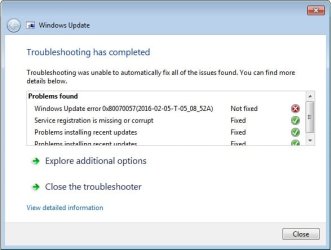
Guys same issue here, tried all the answers above, still have this error
 

Attachments

  • Untitled.jpg
    Untitled.jpg
    30.1 KB · Views: 68

My Computer

Computer type
Laptop
OS
Windows 7 Ultimate x64
...
 

Attachments

  • Untitled.jpg
    Untitled.jpg
    30.1 KB · Views: 65

My Computer

Computer type
Laptop
OS
Windows 7 Ultimate x64

My Computer

Computer type
PC/Desktop
Computer Manufacturer/Model Number
Custom Build
OS
Win 7 Ultimate, Win 8.1 Pro, Linux Mint 19 Cinnamon (All 64-Bit)
CPU
Intel i5 4690K
Motherboard
Gigabyte Z97X-UD3H
Memory
Corsair Vengeance LP 32GB DDR3
Graphics Card(s)
MSI GTX 1060 GAMING X 6GB
Sound Card
Onboard
Hard Drives
Samsung 850 EVO 250GB SSD (x2)
Samsung 860 EVO 1TB SSD (x2)
Crucial MX300 525GB SSD
WD Blue 2TB 5400rpm Intellipark Disabled (x2)
PSU
Corsair HX750i
Case
Phanteks Enthoo Pro
Cooling
CM Hyper 212 EVO on CPU, Noctua Redux NF-P14S 1500rpm (x6)
Keyboard
Corsair K70 RGB LUX
Mouse
Corsair Sabre RGB
Antivirus
Avast Free, MalwareBytes, SAS & CryptoPrevent
Browser
Chrome
Other Info
StarTech PEXESAT322I 2 Port PCI-E SATA Card
ASUS PCE-AC56 Dual-band AC1300 Wireless Card
Akasa FC.Six Manual Fan Controller
And a Partridge in a Pear Tree!

My Computer

Computer type
PC/Desktop
OS
Microsoft Windows 10 Professional / Windows 7 Professional
CPU
Intel i5-3570
Motherboard
Lenovo Mahobay
Memory
16GB DDR3
Graphics Card(s)
AMD Radeon HD 7850 2GB
Sound Card
(1) Realtek HD Audio (2) AMD HD Audio
Monitor(s) Displays
LG LS192WS
Screen Resolution
1440 x 900 @ 32bit color
Hard Drives
(1) SUV300S37A/120G (2) ST3500413AS SATA Disk Device AHCI mode enabled.
PSU
Corsair HX620
Case
Thermaltake V4 Black Edition
Cooling
Cooler Master Hyper 212 + Artic Silver 5 on CPU/GPU
Keyboard
Dell SK-8115
Mouse
Razer Copperhead with MAPED mat (awesome!)
Internet Speed
100 Mbps up/down
Browser
Chrome
Copied from another thread in case it assists anyone...

I had this problem when setting up a new PC from a W7 SP1 CD. Update ran for 32 hours, and then crashed when I tried to install 220 updates. As an added bonus Update backed out all the updates which had been installed.
I turned off automatic updates and ran Update again. It ran for 26 hours and I selected the only first 50 updates to be installed. This ran ok.
I then ran Update again, but after six hours I turned off the PC and went to bed.
I tried re-installing the Update agent, and tried running Update again, but after an hour I cancelled it.
I tried re-installing the Update agent, and run the fix tool for Windows Update that made two fixes. I ran the Update, and cancelled it after two hours.

I re-installed the Update agent, ran the Update fix tool, and installed https://support.microsoft.com/en-us/kb/3102810 which is mentioned in this thread. Ran Update again, and two minutes later it said there was 200 updates for my PC.

For the future I have a W7 Update folder with (1) the Update Agent, (2) the Update Fix-Tool, and (3) KB3102810.

Lee
 

My Computer

Computer type
PC/Desktop
Computer Manufacturer/Model Number
build
OS
W7 x64
CPU
I7
Motherboard
Gigabyte
Memory
12g
Graphics Card(s)
board
Antivirus
Kaspersky
Browser
Internet Exployer and Chrome
Back
Top