Zip Folders - Enable or Disable Windows Explorer View

Disable Explorer Folder View of Cab and Zip Files in Vista, Windows 7, and Windows 8

   Information
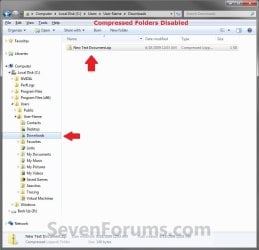
By default, Windows handles ZIP files just like folders. ZIP files will show in the navigation pane of Windows Explorer, and if selected in the navigation pane, you will see the ZIP file's contents in Windows Explorer just like a folder.

If you have a 3rd party ZIP program (ex: 7-Zip, etc.) installed, then this can be an annoyance to you and you may want to turn this feature off so ZIP files will only open in the program instead of Windows Explorer.

This tutorial will show you how to enable or disable ZIP folders (compressed and cab folders) from having their contents expand and show in Windows Explorer like folders for all users.

   Note
Compressed (ZIP) folders and Cab folders are enabled by default to have their content expand and display in Windows Explorer folder view like normal folders.

If disabled, you will only be able to open ZIP and CAB files and extract/view their contents with a 3rd party program (ex: 7-Zip, etc.). You will only see the ZIP and CAB files in Windows Explorer.

   Warning
This can only be done while logged on to an administrator account.


EXAMPLE: Zip Folders (compressed and cab folders) Enabled and Disabled
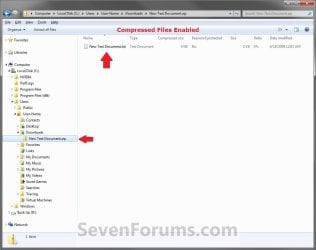
Enabled.jpg

Disabled.jpg

Here's How:

1. Do step 2 and/or 3 or step 4 and/or 5 below for what you would like to do.

2. To Enable ZIP Compressed Folders
NOTE: This is the default setting.
A) Click/tap on the Download button below to download the file below, and go to step 6 below.
Enable_ZIP_Compressed_Folders.reg


Download


3. To Enable CAB Folders
NOTE: This is the default setting.
A) Click/tap on the Download button below to download the file below, and go to step 6 below.
Enable_CAB_Files.reg

Download


4. To Disable ZIP Compressed Folders
A) Click/tap on the Download button below to download the file below, and go to step 6 below.
Disable_ZIP_Compressed_Folders.reg


Download


5. To Disable CAB Folders
A) Click/tap on the Download button below to download the file below, and go to step 6 below.
Disable_CAB_Files.reg

Download


6. Save the .reg file to your desktop.

7. Double click/tap on the downloaded .reg file to merge it.

8. If prompted, click on Run, Yes (UAC Windows 7/8) or Continue (UAC Vista), Yes, and OK when prompted.

9. Log out and in, or restart the PC to apply.


That's it,
Shawn


Attachments

Last edited:
Hello Pgriffet, and welcome to Seven Forums.

Are you using the built-in ZIP feature in Windows 7, or some 3rd party ZIP program?

Go through the steps again in case you may have made a mistake, and go ahead and enable CAB folders as well. You may need to restart the computer afterwards for it to be applied.

Hope this helps for now,
Shawn
 

My Computer My Computer

Computer type
PC/Desktop
Computer Manufacturer/Model Number
Self built custom
OS
64-bit Windows 11 Pro for Workstations
CPU
Intel i7-8700K OC'd to 5 GHz
Motherboard
ASUS ROG Maximus XI Formula Z390
Memory
64 GB (4x16GB) G.SKILL TridentZ RGB DDR4 3600 MHz
Graphics Card(s)
ASUS ROG-STRIX-GTX1080TI-O11G-GAMING
Sound Card
Integrated
Monitor(s) Displays
2 x Samsung Odyssey G7 27"
Screen Resolution
2560x1440
Hard Drives
1TB Samsung 990 PRO M.2,
4TB Samsung 990 PRO PRO M.2,
TerraMaster F8 SSD Plus NAS
PSU
Seasonic Prime Titanium 850W
Case
Thermaltake Core P3
Cooling
Corsair Hydro H115i
Keyboard
Logitech wireless K800
Mouse
Logitech MX Master 4
Internet Speed
2 Gb/s Download and 100 Mb/s Upload
Antivirus
Malwarebyte Anti-Malware Premium
Browser
Google Chrome
Other Info
Logitech Z625 speaker system,
Logitech BRIO 4K Pro webcam,
HP Color LaserJet Pro MFP M477fdn,
APC SMART-UPS RT 1000 XL - SURT1000XLI,
Galaxy S23 Plus phone
Hi Shawn, thanks for the answer.
Actually, Winrar was installed on my PC when I purchased it and I 've uninstalled winrar.
I use to handle all my files with Total Commander(TC), a File Manager very powerful, with dozens of built-in functions (batch rename, handling lots of archives, FTP, compare files, split or join files, and son on). This tool is a shareware but the only "limitation" is a nag screen at start, you have full access to all the commands, even if you don't buy it. Total Commander - home
TC doesn't interfer in the zip handling as it has it's own dll to handle it.
But sometimes, if I only have to extract a file from a zip archive, I would like to use the built-in explorer function and I can't.
I will go through the steps again.

Well, the problem is solved. :)
I choose "open with.." in the context menu of a zip file in explorer and I had only Explorer as choice, so I check the box "always open" (don't know the right text in English), I clicked ok and I can now open my zip with Explorer !
Anyway, thanks for helping me.
I will open a new thread about the "save as.." option in IE which gives always .mht filetype as first choice, which is for me painful. I would like to have web page (as in IE6) as default but I think it's not possible, except with a third party tool.
 
Last edited:

My Computer My Computer

OS
7
That's great news Pgriffet. I'm happy to hear that you got it sorted. :)
 

My Computer My Computer

Computer type
PC/Desktop
Computer Manufacturer/Model Number
Self built custom
OS
64-bit Windows 11 Pro for Workstations
CPU
Intel i7-8700K OC'd to 5 GHz
Motherboard
ASUS ROG Maximus XI Formula Z390
Memory
64 GB (4x16GB) G.SKILL TridentZ RGB DDR4 3600 MHz
Graphics Card(s)
ASUS ROG-STRIX-GTX1080TI-O11G-GAMING
Sound Card
Integrated
Monitor(s) Displays
2 x Samsung Odyssey G7 27"
Screen Resolution
2560x1440
Hard Drives
1TB Samsung 990 PRO M.2,
4TB Samsung 990 PRO PRO M.2,
TerraMaster F8 SSD Plus NAS
PSU
Seasonic Prime Titanium 850W
Case
Thermaltake Core P3
Cooling
Corsair Hydro H115i
Keyboard
Logitech wireless K800
Mouse
Logitech MX Master 4
Internet Speed
2 Gb/s Download and 100 Mb/s Upload
Antivirus
Malwarebyte Anti-Malware Premium
Browser
Google Chrome
Other Info
Logitech Z625 speaker system,
Logitech BRIO 4K Pro webcam,
HP Color LaserJet Pro MFP M477fdn,
APC SMART-UPS RT 1000 XL - SURT1000XLI,
Galaxy S23 Plus phone
Are you sure it's not (for 64-bit Win 7):

Code:
HKEY_LOCAL_MACHINE\SOFTWARE\Classes\Wow6432Node\CLSID\{E88DCCE0-B7B3-11d1-A9F0-00AA0060FA31}\ShellFolder

Because I have one of those but not one of these:

Code:
HKEY_LOCAL_MACHINE\SOFTWARE\Wow6432Node\Classes\CLSID\{E88DCCE0-B7B3-11d1-A9F0-00AA0060FA31}\ShellFolder
 

My Computer My Computer

OS
Windows 7 Professional x64
Hello Joey, and welcome to Seven Forums.

I'm 100% positive. I have it at both locations by default, but the path below would be the one to delete to disable it. Do you have the entry for CAB folders here?

Code:
HKEY_LOCAL_MACHINE\SOFTWARE\Wow6432Node\Classes\CLSID\{E88DCCE0-B7B3-11d1-A9F0-00AA0060FA31}\ShellFolder

Doing step 1 in OPTION TWO will restore the entry above though if you wanted to enable it.

Hope this helps,
Shawn
 

My Computer My Computer

Computer type
PC/Desktop
Computer Manufacturer/Model Number
Self built custom
OS
64-bit Windows 11 Pro for Workstations
CPU
Intel i7-8700K OC'd to 5 GHz
Motherboard
ASUS ROG Maximus XI Formula Z390
Memory
64 GB (4x16GB) G.SKILL TridentZ RGB DDR4 3600 MHz
Graphics Card(s)
ASUS ROG-STRIX-GTX1080TI-O11G-GAMING
Sound Card
Integrated
Monitor(s) Displays
2 x Samsung Odyssey G7 27"
Screen Resolution
2560x1440
Hard Drives
1TB Samsung 990 PRO M.2,
4TB Samsung 990 PRO PRO M.2,
TerraMaster F8 SSD Plus NAS
PSU
Seasonic Prime Titanium 850W
Case
Thermaltake Core P3
Cooling
Corsair Hydro H115i
Keyboard
Logitech wireless K800
Mouse
Logitech MX Master 4
Internet Speed
2 Gb/s Download and 100 Mb/s Upload
Antivirus
Malwarebyte Anti-Malware Premium
Browser
Google Chrome
Other Info
Logitech Z625 speaker system,
Logitech BRIO 4K Pro webcam,
HP Color LaserJet Pro MFP M477fdn,
APC SMART-UPS RT 1000 XL - SURT1000XLI,
Galaxy S23 Plus phone
Hello Joey, and welcome to Seven Forums.

I'm 100% positive. I have it at both locations by default, but the path below would be the one to delete to disable it. Do you have the entry for CAB folders here?

Code:
HKEY_LOCAL_MACHINE\SOFTWARE\Wow6432Node\Classes\CLSID\{E88DCCE0-B7B3-11d1-A9F0-00AA0060FA31}\ShellFolder
Nope, I definitely don't have that one... I just checked. Zip folders are now gone from the Explorer but are still showing up in Open... dialogs. :(
 

My Computer My Computer

OS
Windows 7 Professional x64
So I had this one:

Code:
HKEY_CLASSES_ROOT\Wow6432Node\CLSID\{E88DCCE0-B7B3-11d1-A9F0-00AA0060FA31}\ShellFolder

and deleted it... now we'll see if it solves zip files showing as folders in the Open/Save As dialogs.

And it did... dont' know if it's a difference between Windows 7 Pro and Ulti but honestly I didn't have the ones specified in the instructions.
 

My Computer My Computer

OS
Windows 7 Professional x64
That's fine Joey. Glad to hear that you got it sorted. :)
 

My Computer My Computer

Computer type
PC/Desktop
Computer Manufacturer/Model Number
Self built custom
OS
64-bit Windows 11 Pro for Workstations
CPU
Intel i7-8700K OC'd to 5 GHz
Motherboard
ASUS ROG Maximus XI Formula Z390
Memory
64 GB (4x16GB) G.SKILL TridentZ RGB DDR4 3600 MHz
Graphics Card(s)
ASUS ROG-STRIX-GTX1080TI-O11G-GAMING
Sound Card
Integrated
Monitor(s) Displays
2 x Samsung Odyssey G7 27"
Screen Resolution
2560x1440
Hard Drives
1TB Samsung 990 PRO M.2,
4TB Samsung 990 PRO PRO M.2,
TerraMaster F8 SSD Plus NAS
PSU
Seasonic Prime Titanium 850W
Case
Thermaltake Core P3
Cooling
Corsair Hydro H115i
Keyboard
Logitech wireless K800
Mouse
Logitech MX Master 4
Internet Speed
2 Gb/s Download and 100 Mb/s Upload
Antivirus
Malwarebyte Anti-Malware Premium
Browser
Google Chrome
Other Info
Logitech Z625 speaker system,
Logitech BRIO 4K Pro webcam,
HP Color LaserJet Pro MFP M477fdn,
APC SMART-UPS RT 1000 XL - SURT1000XLI,
Galaxy S23 Plus phone
Instead of deleting the whole thing, just turning off the "I'm a folder" bit works for me:

Code:
[HKEY_CLASSES_ROOT\CLSID\{E88DCCE0-B7B3-11d1-A9F0-00AA0060FA31}\ShellFolder]
"Attributes"="dword:000001a0" ; was 200001a0

[HKEY_CLASSES_ROOT\Wow6432Node\CLSID\{E88DCCE0-B7B3-11d1-A9F0-00AA0060FA31}\ShellFolder]
"Attributes"="dword:000001a0" ; was 200001a0
 

My Computer My Computer

OS
Windows 7 Enterprise 64 bit
Thank You!

Thanks for this tutorial!

After reviewing it, I decided te delete only the Default Value of:
HKEY_CLASSES_ROOT\CompressedFolder\ShellEx\StorageHandler

So Explorer won't refer to {E88DCCE0-B7B3-11d1-A9F0-00AA0060FA31}
After logout - login it did it's job and it's easier to roll back the changes.

Thanks again, it was very useful!
 

My Computer My Computer

Computer Manufacturer/Model Number
Custom built
OS
Windows 7 Professional x64
CPU
Intel Core2Quad Q9500
Motherboard
Gigabyte GA-EP41-UD3L
Memory
Elixir DDR2-800 4GB (2x2GB)
Graphics Card(s)
Gigabyte ATi Radeon HD6850
Sound Card
Realtek HDAudio
Monitor(s) Displays
Samsung Syncmaster P2450
Hard Drives
Samsung 500GB SATA2 7,2
PSU
Enermax 450W
Case
Chieftec
Cooling
2xPapst 8cm
You're most welcome fstyle, and welcome to Seven Forums. :)
 

My Computer My Computer

Computer type
PC/Desktop
Computer Manufacturer/Model Number
Self built custom
OS
64-bit Windows 11 Pro for Workstations
CPU
Intel i7-8700K OC'd to 5 GHz
Motherboard
ASUS ROG Maximus XI Formula Z390
Memory
64 GB (4x16GB) G.SKILL TridentZ RGB DDR4 3600 MHz
Graphics Card(s)
ASUS ROG-STRIX-GTX1080TI-O11G-GAMING
Sound Card
Integrated
Monitor(s) Displays
2 x Samsung Odyssey G7 27"
Screen Resolution
2560x1440
Hard Drives
1TB Samsung 990 PRO M.2,
4TB Samsung 990 PRO PRO M.2,
TerraMaster F8 SSD Plus NAS
PSU
Seasonic Prime Titanium 850W
Case
Thermaltake Core P3
Cooling
Corsair Hydro H115i
Keyboard
Logitech wireless K800
Mouse
Logitech MX Master 4
Internet Speed
2 Gb/s Download and 100 Mb/s Upload
Antivirus
Malwarebyte Anti-Malware Premium
Browser
Google Chrome
Other Info
Logitech Z625 speaker system,
Logitech BRIO 4K Pro webcam,
HP Color LaserJet Pro MFP M477fdn,
APC SMART-UPS RT 1000 XL - SURT1000XLI,
Galaxy S23 Plus phone
Disable Windows ZIP

Thanks. This worked great.
 

My Computer My Computer

OS
Windows 7 Ultimate x32
Glad to hear it helped waywyrd, and welcome to Seven Forums. :)
 

My Computer My Computer

Computer type
PC/Desktop
Computer Manufacturer/Model Number
Self built custom
OS
64-bit Windows 11 Pro for Workstations
CPU
Intel i7-8700K OC'd to 5 GHz
Motherboard
ASUS ROG Maximus XI Formula Z390
Memory
64 GB (4x16GB) G.SKILL TridentZ RGB DDR4 3600 MHz
Graphics Card(s)
ASUS ROG-STRIX-GTX1080TI-O11G-GAMING
Sound Card
Integrated
Monitor(s) Displays
2 x Samsung Odyssey G7 27"
Screen Resolution
2560x1440
Hard Drives
1TB Samsung 990 PRO M.2,
4TB Samsung 990 PRO PRO M.2,
TerraMaster F8 SSD Plus NAS
PSU
Seasonic Prime Titanium 850W
Case
Thermaltake Core P3
Cooling
Corsair Hydro H115i
Keyboard
Logitech wireless K800
Mouse
Logitech MX Master 4
Internet Speed
2 Gb/s Download and 100 Mb/s Upload
Antivirus
Malwarebyte Anti-Malware Premium
Browser
Google Chrome
Other Info
Logitech Z625 speaker system,
Logitech BRIO 4K Pro webcam,
HP Color LaserJet Pro MFP M477fdn,
APC SMART-UPS RT 1000 XL - SURT1000XLI,
Galaxy S23 Plus phone
Hello, i managed to restore this (windows explorer handling zip) only by choosing "explorer.exe" as default program for .zip (start, default program, look for zip, change to explorer.exe)

I think it's more simple to do it that way.
 

My Computer My Computer

Computer type
PC/Desktop
OS
7x64 ultimate / 7x64 pro / Some linux x64 distro
CPU
i7-870
Motherboard
MSI P55-GD85
Memory
Kingston 4x2gb 1600 9-9-9
Graphics Card(s)
MSI GTX460 Cyclone 1GDDR5x2 + Gigabyte 285GTX 1GDDR5(PhysX)
Sound Card
Realtek alc 889
Monitor(s) Displays
Samsung syncmaster 2333sw + some old acer screen
Screen Resolution
3200x1024
Hard Drives
WDC WD1500HLFS-01G6U1 - System partition
WDC WD1500HLFS-01G6U1 -
WDC WD1500HLFS-01G6U1 | RAID
WDC WD1500HLFS-01G6U1 |
WDC WD1500HLFS-01G6U1-
PSU
LC Power "Arkangel" 850W
Case
Aerocool BX-500
Cooling
Noctua NH something
Keyboard
Razer Lycosa
Mouse
Razer Imperator
Antivirus
Kaspersky Pure/Kaspersky Small Office Security
Browser
Chrome+Chrominium & Internet Explorer
Other Info
Razer Nostromo (Because there's not enough buttons for all the shortcut on a keyboard)
Hello Magissia,

Thank you for your post. :)

That would be fine if it was only an association issue, but it wouldn't help to undo the tutorial. Plus, the tutorial will affect all users.
 

My Computer My Computer

Computer type
PC/Desktop
Computer Manufacturer/Model Number
Self built custom
OS
64-bit Windows 11 Pro for Workstations
CPU
Intel i7-8700K OC'd to 5 GHz
Motherboard
ASUS ROG Maximus XI Formula Z390
Memory
64 GB (4x16GB) G.SKILL TridentZ RGB DDR4 3600 MHz
Graphics Card(s)
ASUS ROG-STRIX-GTX1080TI-O11G-GAMING
Sound Card
Integrated
Monitor(s) Displays
2 x Samsung Odyssey G7 27"
Screen Resolution
2560x1440
Hard Drives
1TB Samsung 990 PRO M.2,
4TB Samsung 990 PRO PRO M.2,
TerraMaster F8 SSD Plus NAS
PSU
Seasonic Prime Titanium 850W
Case
Thermaltake Core P3
Cooling
Corsair Hydro H115i
Keyboard
Logitech wireless K800
Mouse
Logitech MX Master 4
Internet Speed
2 Gb/s Download and 100 Mb/s Upload
Antivirus
Malwarebyte Anti-Malware Premium
Browser
Google Chrome
Other Info
Logitech Z625 speaker system,
Logitech BRIO 4K Pro webcam,
HP Color LaserJet Pro MFP M477fdn,
APC SMART-UPS RT 1000 XL - SURT1000XLI,
Galaxy S23 Plus phone
Thank you MRCS.

That is much easier to do. I've updated the tutorial for this for both ZIP and CAB files. :)
 

My Computer My Computer

Computer type
PC/Desktop
Computer Manufacturer/Model Number
Self built custom
OS
64-bit Windows 11 Pro for Workstations
CPU
Intel i7-8700K OC'd to 5 GHz
Motherboard
ASUS ROG Maximus XI Formula Z390
Memory
64 GB (4x16GB) G.SKILL TridentZ RGB DDR4 3600 MHz
Graphics Card(s)
ASUS ROG-STRIX-GTX1080TI-O11G-GAMING
Sound Card
Integrated
Monitor(s) Displays
2 x Samsung Odyssey G7 27"
Screen Resolution
2560x1440
Hard Drives
1TB Samsung 990 PRO M.2,
4TB Samsung 990 PRO PRO M.2,
TerraMaster F8 SSD Plus NAS
PSU
Seasonic Prime Titanium 850W
Case
Thermaltake Core P3
Cooling
Corsair Hydro H115i
Keyboard
Logitech wireless K800
Mouse
Logitech MX Master 4
Internet Speed
2 Gb/s Download and 100 Mb/s Upload
Antivirus
Malwarebyte Anti-Malware Premium
Browser
Google Chrome
Other Info
Logitech Z625 speaker system,
Logitech BRIO 4K Pro webcam,
HP Color LaserJet Pro MFP M477fdn,
APC SMART-UPS RT 1000 XL - SURT1000XLI,
Galaxy S23 Plus phone
Also, If you don't want to restart you can open task manager to kill and rerun explorer.exe
 

My Computer My Computer

Computer type
PC/Desktop
Computer Manufacturer/Model Number
Alienware m15x
OS
Windows 7 Ultimate x64
I haven't tried the .reg files yet, but why does Enable_CAB_Files.reg contain minus signs preceding the path names unlike Enable_ZIP_Compressed_Folders.reg?
 

My Computer My Computer

Computer type
PC/Desktop
OS
Windows 7 Home Premium 64bit
I haven't tried the .reg files yet, but why does Enable_CAB_Files.reg contain minus signs preceding the path names unlike Enable_ZIP_Compressed_Folders.reg?

Thank you. Fixed. :)
 

My Computer My Computer

Computer type
PC/Desktop
Computer Manufacturer/Model Number
Self built custom
OS
64-bit Windows 11 Pro for Workstations
CPU
Intel i7-8700K OC'd to 5 GHz
Motherboard
ASUS ROG Maximus XI Formula Z390
Memory
64 GB (4x16GB) G.SKILL TridentZ RGB DDR4 3600 MHz
Graphics Card(s)
ASUS ROG-STRIX-GTX1080TI-O11G-GAMING
Sound Card
Integrated
Monitor(s) Displays
2 x Samsung Odyssey G7 27"
Screen Resolution
2560x1440
Hard Drives
1TB Samsung 990 PRO M.2,
4TB Samsung 990 PRO PRO M.2,
TerraMaster F8 SSD Plus NAS
PSU
Seasonic Prime Titanium 850W
Case
Thermaltake Core P3
Cooling
Corsair Hydro H115i
Keyboard
Logitech wireless K800
Mouse
Logitech MX Master 4
Internet Speed
2 Gb/s Download and 100 Mb/s Upload
Antivirus
Malwarebyte Anti-Malware Premium
Browser
Google Chrome
Other Info
Logitech Z625 speaker system,
Logitech BRIO 4K Pro webcam,
HP Color LaserJet Pro MFP M477fdn,
APC SMART-UPS RT 1000 XL - SURT1000XLI,
Galaxy S23 Plus phone
Back
Top