Just plain HELP!!!

Thank you, but to be honest I have been getting help from here and slowly working through the issues, and it is begining to behave it'self and realise who is boss :D I will bear your advise in mind if it starts to play up agaoin though.
 

My Computer My Computer

At a glance

Microfsoft windows 7 home premium edition (64...Intel(R) pentium(R0 CPU p6200 @2.13GHz 2.132.00 GB (1.87 GB usable)
Computer Manufacturer/Model Number
Lenovo G560 lap top
OS
Microfsoft windows 7 home premium edition (64bit)
CPU
Intel(R) pentium(R0 CPU p6200 @2.13GHz 2.13
Motherboard
INTEL PCH HM55
Memory
2.00 GB (1.87 GB usable)
Sound Card
CX20671 smartaudio HD
Monitor(s) Displays
THINKPAD DISPLAY 1366 X 768 (32BIT)(60 Hz)
Hard Drives
WDC WD2500BEVT - 24A23TO
Internet Speed
150mbps
MucAfee is one of the worst infections we see here. It really corrupts the OS in multiple ways.

Have you uninstalled MucAfee and replaced it with MSE or Avast 6 as suggested? Microsoft Security Essentials

If so, run CCleaner "Run Cleaner" and then Registry tab, clean up whatever Registry items it finds. CCleaner - Free software downloads and software reviews - CNET Download.com

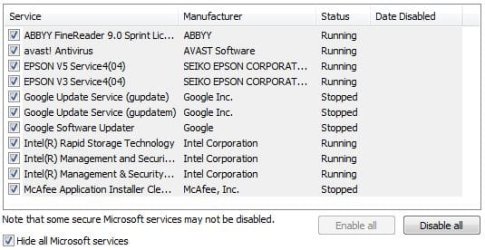
Now go back to msconfig>Services tab, Hide All MS Services, then trace the path for any remaining MucAfee registry keys or files which are starting with Windows and delete them. If they are Registry Keys, find them by typing regedit in Start Search box, rightclick on result to Run as Admin. Set a restore point first - you need to check if System Restore is working anyway: System Restore Point - Create. Then browse to the Reg Key via its tree and rightclick to Delete the exact key listed only.

Let us know if you need any further help doing these things..


I have taken a screen grab of what I am seeing after unistalling McAfee, you will see one remains at the bottom of the list.

Now what of these remaining ones must I delete?
services.JPG
 
Last edited:

My Computer My Computer

At a glance

Microfsoft windows 7 home premium edition (64...Intel(R) pentium(R0 CPU p6200 @2.13GHz 2.132.00 GB (1.87 GB usable)
Computer Manufacturer/Model Number
Lenovo G560 lap top
OS
Microfsoft windows 7 home premium edition (64bit)
CPU
Intel(R) pentium(R0 CPU p6200 @2.13GHz 2.13
Motherboard
INTEL PCH HM55
Memory
2.00 GB (1.87 GB usable)
Sound Card
CX20671 smartaudio HD
Monitor(s) Displays
THINKPAD DISPLAY 1366 X 768 (32BIT)(60 Hz)
Hard Drives
WDC WD2500BEVT - 24A23TO
Internet Speed
150mbps
I would uncheck everything shown there and on the Startup tab (besides AV), then after restarts check back to see if anything has written itself back in. Turn it off in its Program Preferences or uninstall it.

The only reason the Epson software needs to be starting with Windows and running in background is if you need the ability to scan to desktop by simply pressing the Scan button on printer.

To try to find any remnants of MacAfee run CCleaner "Run Cleaner" and Registry tab, clean up Reg items found.

Next type MacAfee into Start Search box, delete any files it finds.

Then type Regedit into Start Search box, rightclick on result above, Run as Admin, Click on Edit tab, Select Find, type MacAfee in to find and then delete any remaining Reg Keys.
 
Ok will do, lets see what that turns up :)
 

My Computer My Computer

At a glance

Microfsoft windows 7 home premium edition (64...Intel(R) pentium(R0 CPU p6200 @2.13GHz 2.132.00 GB (1.87 GB usable)
Computer Manufacturer/Model Number
Lenovo G560 lap top
OS
Microfsoft windows 7 home premium edition (64bit)
CPU
Intel(R) pentium(R0 CPU p6200 @2.13GHz 2.13
Motherboard
INTEL PCH HM55
Memory
2.00 GB (1.87 GB usable)
Sound Card
CX20671 smartaudio HD
Monitor(s) Displays
THINKPAD DISPLAY 1366 X 768 (32BIT)(60 Hz)
Hard Drives
WDC WD2500BEVT - 24A23TO
Internet Speed
150mbps
I would uncheck everything shown there and on the Startup tab (besides AV), then after restarts check back to see if anything has written itself back in. Turn it off in its Program Preferences or uninstall it.

The only reason the Epson software needs to be starting with Windows and running in background is if you need the ability to scan to desktop by simply pressing the Scan button on printer.

To try to find any remnants of MacAfee run CCleaner "Run Cleaner" and Registry tab, clean up Reg items found.

Next type MacAfee into Start Search box, delete any files it finds.

Then type Regedit into Start Search box, rightclick on result above, Run as Admin, Click on Edit tab, Select Find, type MacAfee in to find and then delete any remaining Reg Keys.
Okay, I have done all that, I found one more Macafee entry which I deleted, nothing else is showing up in any searches - good eh.

Can I ask you another question please, I may need to put this in another thread but I will give it a go. I keep hitting the touch pad when typing and sending the cursor shooting off all over the place.
I have been in the mouse devices and disabled it and tick disable when mouse is in USB but it is still functioning, how can I stop it??
 

My Computer My Computer

At a glance

Microfsoft windows 7 home premium edition (64...Intel(R) pentium(R0 CPU p6200 @2.13GHz 2.132.00 GB (1.87 GB usable)
Computer Manufacturer/Model Number
Lenovo G560 lap top
OS
Microfsoft windows 7 home premium edition (64bit)
CPU
Intel(R) pentium(R0 CPU p6200 @2.13GHz 2.13
Motherboard
INTEL PCH HM55
Memory
2.00 GB (1.87 GB usable)
Sound Card
CX20671 smartaudio HD
Monitor(s) Displays
THINKPAD DISPLAY 1366 X 768 (32BIT)(60 Hz)
Hard Drives
WDC WD2500BEVT - 24A23TO
Internet Speed
150mbps
Set a System Restore point, Plug in the USB mouse, go into Device Manager to figure out which is the touchpad mouse driver, disable it until you need touchpad.

You may need to tame the touchpad further by uninstalling it's software (Synaptics pointing device?) so that only the driver is used and can be disabled in Dev. Mgr.
 
Thank you I will give that a go.
 

My Computer My Computer

At a glance

Microfsoft windows 7 home premium edition (64...Intel(R) pentium(R0 CPU p6200 @2.13GHz 2.132.00 GB (1.87 GB usable)
Computer Manufacturer/Model Number
Lenovo G560 lap top
OS
Microfsoft windows 7 home premium edition (64bit)
CPU
Intel(R) pentium(R0 CPU p6200 @2.13GHz 2.13
Motherboard
INTEL PCH HM55
Memory
2.00 GB (1.87 GB usable)
Sound Card
CX20671 smartaudio HD
Monitor(s) Displays
THINKPAD DISPLAY 1366 X 768 (32BIT)(60 Hz)
Hard Drives
WDC WD2500BEVT - 24A23TO
Internet Speed
150mbps
Can it be disabled from Device Manager perhaps?
 

My Computer My Computer

At a glance

Windows 10 Pro X64Intel Quad Core i7-4770 @ 3.4Ghz16.0GB PC3-12800 DDR3 SDRAM 1600 MHzIntel Integrated HD Graphics
Computer type
PC/Desktop
Computer Manufacturer/Model Number
Lenovo IdeaCenter 450
OS
Windows 10 Pro X64
CPU
Intel Quad Core i7-4770 @ 3.4Ghz
Memory
16.0GB PC3-12800 DDR3 SDRAM 1600 MHz
Graphics Card(s)
Intel Integrated HD Graphics
Sound Card
Realtek HD Audio
Monitor(s) Displays
HP 22" LCD
Screen Resolution
1680 x 1050
Hard Drives
250GB Samsung EVO SATA-3 SSD
2TB Seagate ST2000DM001 SATA-2
1.5TB Seagate ST3150041AS SATA
Keyboard
Dell USB
Mouse
Lenovo USB
Internet Speed
Cable via Road Runner 3MB Upload, 30MB Download
Antivirus
Windows Defender, MBAM Pro, MBAE
Browser
Seamonkey
Other Info
UEFI/GPT
PLDS DVD-RW DH16AERSH
It is proving difficult to remove. I have gone through all the normal methods of inactivating it, but although everything shows disable, it still merrily trundles around the screen:(
 

My Computer My Computer

At a glance

Microfsoft windows 7 home premium edition (64...Intel(R) pentium(R0 CPU p6200 @2.13GHz 2.132.00 GB (1.87 GB usable)
Computer Manufacturer/Model Number
Lenovo G560 lap top
OS
Microfsoft windows 7 home premium edition (64bit)
CPU
Intel(R) pentium(R0 CPU p6200 @2.13GHz 2.13
Motherboard
INTEL PCH HM55
Memory
2.00 GB (1.87 GB usable)
Sound Card
CX20671 smartaudio HD
Monitor(s) Displays
THINKPAD DISPLAY 1366 X 768 (32BIT)(60 Hz)
Hard Drives
WDC WD2500BEVT - 24A23TO
Internet Speed
150mbps
What is the make/model of the touchpad device, and does it have it's software installed?

If so, uninstall the software. Restart to automatically reinstall just the driver.

Then in Dev Mgr. disable the driver.
 
It is a ELAN PS/2 port smart pad.
I was a little afraid to disable the driver as my husband uses the pad occasionally, can it just be enabled again when he want to use it ?
 

My Computer My Computer

At a glance

Microfsoft windows 7 home premium edition (64...Intel(R) pentium(R0 CPU p6200 @2.13GHz 2.132.00 GB (1.87 GB usable)
Computer Manufacturer/Model Number
Lenovo G560 lap top
OS
Microfsoft windows 7 home premium edition (64bit)
CPU
Intel(R) pentium(R0 CPU p6200 @2.13GHz 2.13
Motherboard
INTEL PCH HM55
Memory
2.00 GB (1.87 GB usable)
Sound Card
CX20671 smartaudio HD
Monitor(s) Displays
THINKPAD DISPLAY 1366 X 768 (32BIT)(60 Hz)
Hard Drives
WDC WD2500BEVT - 24A23TO
Internet Speed
150mbps
is there not a f key that has a trackpad disabe image on it ,on my laptop it is the f8 key ,i use a mouse so i hold Fn down and press f8 to disable trackpad temporarily, some laptops you have to repeat the fn trick to re-enable the trackpad on start-up
 

My Computer My Computer

At a glance

Microsoft Windows 7 Home Premium 64-bit 7600IIx4 amd athelon 635 processor2x2gbati radeon HD 5450
Computer Manufacturer/Model Number
Hewlett packard/p6512uk
OS
Microsoft Windows 7 Home Premium 64-bit 7600
CPU
IIx4 amd athelon 635 processor
Motherboard
FOXCONN 2AA9
Memory
2x2gb
Graphics Card(s)
ati radeon HD 5450
Sound Card
(1) Realtek High Definition Audio (2) AMD High Definition
Monitor(s) Displays
samsung lcd tv 32"
Screen Resolution
1360x 768
Hard Drives
(1) WDC WD10 01FAES-60Z2A0 SATA Disk Device (2) Maxtor OneTouch USB Device (3) ST310003 33AS USB Device (4) WD My Book 1111 USB Device
PSU
?
Cooling
air!
Keyboard
wireless hp
Mouse
wireless Hp,optical
Internet Speed
1.10mb/s
Antivirus
MSE
Browser
Firefox
nope, tried it didn't work on this lappy unfortunately :(
 

My Computer My Computer

At a glance

Microfsoft windows 7 home premium edition (64...Intel(R) pentium(R0 CPU p6200 @2.13GHz 2.132.00 GB (1.87 GB usable)
Computer Manufacturer/Model Number
Lenovo G560 lap top
OS
Microfsoft windows 7 home premium edition (64bit)
CPU
Intel(R) pentium(R0 CPU p6200 @2.13GHz 2.13
Motherboard
INTEL PCH HM55
Memory
2.00 GB (1.87 GB usable)
Sound Card
CX20671 smartaudio HD
Monitor(s) Displays
THINKPAD DISPLAY 1366 X 768 (32BIT)(60 Hz)
Hard Drives
WDC WD2500BEVT - 24A23TO
Internet Speed
150mbps

My Computer My Computer

At a glance

Windows 7 Home Premium SP1i36 GBATI Radeon
Computer Manufacturer/Model Number
Dell Inspiron 580s
OS
Windows 7 Home Premium SP1
CPU
i3
Memory
6 GB
Graphics Card(s)
ATI Radeon
Hello, thank you for your tips, I have tried both suggestions. In the mouse menu with in the Elan tab it shows disabled and disabled when USB mouse is in, neither FN +8 or FN +6 work either - bless it, it is still merrily galloping around the screen.:(
 

My Computer My Computer

At a glance

Microfsoft windows 7 home premium edition (64...Intel(R) pentium(R0 CPU p6200 @2.13GHz 2.132.00 GB (1.87 GB usable)
Computer Manufacturer/Model Number
Lenovo G560 lap top
OS
Microfsoft windows 7 home premium edition (64bit)
CPU
Intel(R) pentium(R0 CPU p6200 @2.13GHz 2.13
Motherboard
INTEL PCH HM55
Memory
2.00 GB (1.87 GB usable)
Sound Card
CX20671 smartaudio HD
Monitor(s) Displays
THINKPAD DISPLAY 1366 X 768 (32BIT)(60 Hz)
Hard Drives
WDC WD2500BEVT - 24A23TO
Internet Speed
150mbps
It is a ELAN PS/2 port smart pad.
I was a little afraid to disable the driver as my husband uses the pad occasionally, can it just be enabled again when he want to use it ?

Then plug in the USB mouse and make sure it's driver shows up under Mouse in Device Manager.

Set a System Restore point. System Restore Point - Create - Windows 7 Forums

Next click on Smart Pad driver tab to Disable it and see if that solves the problem.
 
According to the manual for your laptop, Fn+F6 will disable/enable the touchpad.
 

My Computer My Computer

At a glance

Windows 10 Pro X64Intel Quad Core i7-4770 @ 3.4Ghz16.0GB PC3-12800 DDR3 SDRAM 1600 MHzIntel Integrated HD Graphics
Computer type
PC/Desktop
Computer Manufacturer/Model Number
Lenovo IdeaCenter 450
OS
Windows 10 Pro X64
CPU
Intel Quad Core i7-4770 @ 3.4Ghz
Memory
16.0GB PC3-12800 DDR3 SDRAM 1600 MHz
Graphics Card(s)
Intel Integrated HD Graphics
Sound Card
Realtek HD Audio
Monitor(s) Displays
HP 22" LCD
Screen Resolution
1680 x 1050
Hard Drives
250GB Samsung EVO SATA-3 SSD
2TB Seagate ST2000DM001 SATA-2
1.5TB Seagate ST3150041AS SATA
Keyboard
Dell USB
Mouse
Lenovo USB
Internet Speed
Cable via Road Runner 3MB Upload, 30MB Download
Antivirus
Windows Defender, MBAM Pro, MBAE
Browser
Seamonkey
Other Info
UEFI/GPT
PLDS DVD-RW DH16AERSH
Hello, yes I read that in my manual and tried it - several times, but unfortunately my machine seems to think it knows better :(
 

My Computer My Computer

At a glance

Microfsoft windows 7 home premium edition (64...Intel(R) pentium(R0 CPU p6200 @2.13GHz 2.132.00 GB (1.87 GB usable)
Computer Manufacturer/Model Number
Lenovo G560 lap top
OS
Microfsoft windows 7 home premium edition (64bit)
CPU
Intel(R) pentium(R0 CPU p6200 @2.13GHz 2.13
Motherboard
INTEL PCH HM55
Memory
2.00 GB (1.87 GB usable)
Sound Card
CX20671 smartaudio HD
Monitor(s) Displays
THINKPAD DISPLAY 1366 X 768 (32BIT)(60 Hz)
Hard Drives
WDC WD2500BEVT - 24A23TO
Internet Speed
150mbps
Go back into msconfig>Startup or CCleaner>Tools>Startup and look for a touchpad listing that was disabled and re-enable it to see if hotkey Ztruker found for you will work.
 
It is a ELAN PS/2 port smart pad.
I was a little afraid to disable the driver as my husband uses the pad occasionally, can it just be enabled again when he want to use it ?

Then plug in the USB mouse and make sure it's driver shows up under Mouse in Device Manager.

Set a System Restore point. System Restore Point - Create - Windows 7 Forums

Next click on Smart Pad driver tab to Disable it and see if that solves the problem.

Righty ho, am getting desperate now, so if it means that hubby has to use a mouse so be it, I will give it a go.
 

My Computer My Computer

At a glance

Microfsoft windows 7 home premium edition (64...Intel(R) pentium(R0 CPU p6200 @2.13GHz 2.132.00 GB (1.87 GB usable)
Computer Manufacturer/Model Number
Lenovo G560 lap top
OS
Microfsoft windows 7 home premium edition (64bit)
CPU
Intel(R) pentium(R0 CPU p6200 @2.13GHz 2.13
Motherboard
INTEL PCH HM55
Memory
2.00 GB (1.87 GB usable)
Sound Card
CX20671 smartaudio HD
Monitor(s) Displays
THINKPAD DISPLAY 1366 X 768 (32BIT)(60 Hz)
Hard Drives
WDC WD2500BEVT - 24A23TO
Internet Speed
150mbps
Back
Top