why do my Restore Points keep disappearing?

Security Check results..

:thumbsup: Well done! Good luck!
Thank you so much for all your help Noel, you have elevated my standings in the Duffer status. Your guidance, encouragement and patience are all very much appreciated.

Noel, Thank you. Your assistance is very much appreciated.

1.)Download security check below.
This will show me what security software you use and what the status is of services such as windows firewall:
When done, a Notepad report opens automatically, called: checkup.txt
Please post the checkup.txt in your reply using the paperclip:

And here they are Andrew;

View attachment 318613

Cheers

Newly created Restore Points are disappearing within minutes of creation:

This is really getting out of control, and to say that I'm losing confidence and becoming demoralised by what is happening, is an understatement. It's no joke.

Two things.. First, this morning at about 8.25am, a Windows Defender Update was installed - I know 'cos I saw the icon in my System tray, and later viewed it in the Update History, here;

Windows Update of about 8.25am 21 May 2014 - NO Restore Point creation evident.JPG

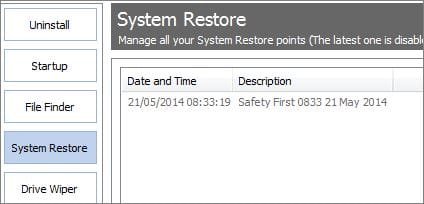
I noted via CCleaner>Tools>System Restore that a Restore Point had been created at the time of the Update, but for added security I chose to create another one. This I finished by 8.33am;
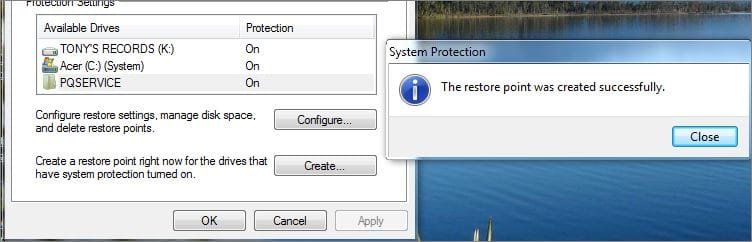
Created Restore Point at 08.33 21 May 2014.JPG

...and verified here;

Restore Point at 08.33 21 May 2014 - CCleaner Tools view.JPG


And second, as I was in the process of making a report of this event to this thread, my system CRASHED ... blue screen and text...all I saw was a recommendation to go look for a crash dump file. When the blue screen went, I selected the Start Windows Normally mode, and am still here, filing this report.

However, by 8.55am, I'm back to where I began, with NOT ONE system Restore Point showing;
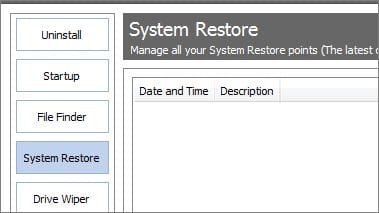
Restore Point at 08.55 21 May 2014 - CCleaner Tools view.JPG

So where to from here? I guess try and find the crash dump file [another new realm for me] and put that up here as well. Boy, is this Laptop sick, or what?
 
Last edited:

My Computer My Computer

Computer Manufacturer/Model Number
Acer Aspire Timeline X Laptop - Model 5820TG - V1.23
OS
Windows 7 Home Premium x64 - SP1
CPU
Intel Core i5 @ 2.67GHz Arrandale 32nm Technology
Motherboard
Acer JM51_CP (CPU) Base Board Version
Memory
8 GB RAM [2 x 4 GB DDR3]
Graphics Card(s)
AMD Radeon HD 6650M, Intel (R) HD Graphics
Sound Card
Realtek HD Audio, ATI HD Audio Device
Monitor(s) Displays
Acer Aspire Notebook - 15.7"; Acer LCD Monitor X223Wsd - 22"
Screen Resolution
1366 x 768 x 60Hertz
Hard Drives
Notebook - 733GB Western Digital WDC WD7500BPVT- 22HXZT1 Sata.
External HDs [4];Maxtor One Touch4 - 500GB External HD [Drive M:\].Western Digital WDXMS1200TA - 120GB External HD. WD My Book 'Elite' 1TB External HD [Windows 7 dedicated - Partitioned
Mouse
Logitech Wireless V320 for Notebooks
Other Info
Brother MFC-465CN; PC to Fax/Scan/Copy/Photo Multi Function Centre. Epson Perfection V300 Photo Scanner.
Siemens Speedstream 6520 Router.
Wacom 'Bamboo Fun' CTE-650 PC Tablet, Stylus and Mouse. Logitech X-230 Notebook Stereo Speakers and Sub-woofer.
UAC - On. Internet - FireFox v13.0.1 & IE8.
Hon.RSM to the 4th [Assault Pioneer] Troop Pune Sepoys , and 3rd Troop Jodhpur Bengali Lancers

My Computer My Computer

Computer type
PC/Desktop
Computer Manufacturer/Model Number
Custom Built
OS
Windows 10 Pro
CPU
AMD Ryzen 5 2400G Processor with Radeon RX Vega 11 Graphics
Motherboard
ASRock X470 Master SLI/AC AM4 AMD Promontory X470 SATA 6Gb/s
Memory
G.SKILL Ripjaws V Series 16GB (2 x 8GB) 288-Pin DDR4 SDRAM D
Graphics Card(s)
2047MB NVIDIA GeForce GTX 1060 6GB (EVGA)
Sound Card
Motherboard Built in
Monitor(s) Displays
Acer R240HY bidx 23.8-Inch IPS HDMI DVI VGA (1920 x 1080) Wi
Screen Resolution
1920 x 1080
Hard Drives
1TB Sandisk SSD PLUS (Main drive)
500 GB Seagate 7200 RPM (Games)
500 GB Western Digital 7200 RPM (Virtual Machines)
PSU
CORSAIR TX Series TX650M 650W 80+ Gold Modular Power Supply
Case
CORSAIR CARBIDE SPEC-02 Mid-Tower Gaming Case, Red LED Fan
Cooling
220mm, two 120mm, and four 60mm fans
Keyboard
Wired Dell keyboard
Mouse
Wireless Logitech mouse
Internet Speed
250mb down, 30mb up
Antivirus
Panda Cloud Antivirus
Browser
Chrome-ish x64
Other Info
Your awesome for reading this.
You are in good hands but this is just a reminder from the installation department that if you're still running the factory Win7 that is the worst possible install one can have, larded with bloatware and useless duplicate utiltilies that interfere with better versions built into Win7. For that reason most tech enthusiasts prefer to Clean Reinstall - Factory OEM Windows 7 to enjoy native Win7 for the first time on your PC. You go from the worst install possible to the very best in just a few short hours.
 
Unfortantly, your attachment does not work. Can you upload it again?

Follow these directions for bsod, and we can get someone on it:

http://www.sevenforums.com/bsod-help-support/96879-blue-screen-death-bsod-posting-instructions.html

And sorry you're having all these issues :( We can get it figured out soon, I promise.

Sorry about that, and just as I was about to throw myself to the old saltie-crocs!!

So I'll try again ...it's the only good news for the past few days ...

View attachment Security Check 20140521.zip

I've tested that, and it seems to be OK here.

BSOD zip folder here;

View attachment TONY-PC-Wed_21_05_2014_172145_60.zip

Sorry 'bout all this guys, I feel as though I'm putting one and all through a metal shredder
 
Last edited:

My Computer My Computer

Computer Manufacturer/Model Number
Acer Aspire Timeline X Laptop - Model 5820TG - V1.23
OS
Windows 7 Home Premium x64 - SP1
CPU
Intel Core i5 @ 2.67GHz Arrandale 32nm Technology
Motherboard
Acer JM51_CP (CPU) Base Board Version
Memory
8 GB RAM [2 x 4 GB DDR3]
Graphics Card(s)
AMD Radeon HD 6650M, Intel (R) HD Graphics
Sound Card
Realtek HD Audio, ATI HD Audio Device
Monitor(s) Displays
Acer Aspire Notebook - 15.7"; Acer LCD Monitor X223Wsd - 22"
Screen Resolution
1366 x 768 x 60Hertz
Hard Drives
Notebook - 733GB Western Digital WDC WD7500BPVT- 22HXZT1 Sata.
External HDs [4];Maxtor One Touch4 - 500GB External HD [Drive M:\].Western Digital WDXMS1200TA - 120GB External HD. WD My Book 'Elite' 1TB External HD [Windows 7 dedicated - Partitioned
Mouse
Logitech Wireless V320 for Notebooks
Other Info
Brother MFC-465CN; PC to Fax/Scan/Copy/Photo Multi Function Centre. Epson Perfection V300 Photo Scanner.
Siemens Speedstream 6520 Router.
Wacom 'Bamboo Fun' CTE-650 PC Tablet, Stylus and Mouse. Logitech X-230 Notebook Stereo Speakers and Sub-woofer.
UAC - On. Internet - FireFox v13.0.1 & IE8.
Hon.RSM to the 4th [Assault Pioneer] Troop Pune Sepoys , and 3rd Troop Jodhpur Bengali Lancers
Just a note from post #61 and System Specs.
Windows Defender; could it be causing a problem?

Two things.. First, this morning at about 8.25am, a Windows Defender Update was installed - I know 'cos I saw the icon in my System tray, and later viewed it in the Update History, here;

Has this been addressed from sassoalco specs.

FireFox v13.0.1 & IE8

Back to watching.
 

My Computer My Computer

Computer type
PC/Desktop
Computer Manufacturer/Model Number
Home made Desktop
OS
Windows 10 Pro. 64/ version 1709 Windows 7 Pro/64
CPU
Intel i7-6800K @ 4.3
Motherboard
ASUS X-99 Deluxe II
Memory
Corsair Platinum 16 gig @2400
Graphics Card(s)
EVGA GTX 1070 OC
Monitor(s) Displays
Asus 27" LED LCD/VE278Q
Screen Resolution
1920-1080 or 1280-720 HDMI
Hard Drives
INTEL SSD 730-240 Gb Sata 3.0/
PSU
EVGA Platium 1200W
Case
Phanteks Luxe Tempered Glass 8 fans/ one radiator
Cooling
XSPC/ Water Cooled CPU
Keyboard
Das 4 Professional
Mouse
Logitech M705/MX Anywhere 2-S
Internet Speed
100 mbits
Antivirus
Microsoft Security Essentials/ Malwarebytes Premium 3.0/ SAS
Browser
I.E. 11 default/Firefox/ ISP Time Warner Cable/Spectrum
Other Info
LG BluRay Burner/
Sound system-KLipsch-THX/
Icy Dock ssd Hot Swap bays.
You are in good hands but this is just a reminder from the installation department that if you're still running the factory Win7 that is the worst possible install one can have, larded with bloatware and useless duplicate utiltilies that interfere with better versions built into Win7. For that reason most tech enthusiasts prefer to Clean Reinstall - Factory OEM Windows 7 to enjoy native Win7 for the first time on your PC. You go from the worst install possible to the very best in just a few short hours.

Mate... I understand what you are saying, but frankly, this is so, so, so, so far out there from my level of confidence and expertise, that it is but a dot on the horizon of wishful thinking.
 

My Computer My Computer

Computer Manufacturer/Model Number
Acer Aspire Timeline X Laptop - Model 5820TG - V1.23
OS
Windows 7 Home Premium x64 - SP1
CPU
Intel Core i5 @ 2.67GHz Arrandale 32nm Technology
Motherboard
Acer JM51_CP (CPU) Base Board Version
Memory
8 GB RAM [2 x 4 GB DDR3]
Graphics Card(s)
AMD Radeon HD 6650M, Intel (R) HD Graphics
Sound Card
Realtek HD Audio, ATI HD Audio Device
Monitor(s) Displays
Acer Aspire Notebook - 15.7"; Acer LCD Monitor X223Wsd - 22"
Screen Resolution
1366 x 768 x 60Hertz
Hard Drives
Notebook - 733GB Western Digital WDC WD7500BPVT- 22HXZT1 Sata.
External HDs [4];Maxtor One Touch4 - 500GB External HD [Drive M:\].Western Digital WDXMS1200TA - 120GB External HD. WD My Book 'Elite' 1TB External HD [Windows 7 dedicated - Partitioned
Mouse
Logitech Wireless V320 for Notebooks
Other Info
Brother MFC-465CN; PC to Fax/Scan/Copy/Photo Multi Function Centre. Epson Perfection V300 Photo Scanner.
Siemens Speedstream 6520 Router.
Wacom 'Bamboo Fun' CTE-650 PC Tablet, Stylus and Mouse. Logitech X-230 Notebook Stereo Speakers and Sub-woofer.
UAC - On. Internet - FireFox v13.0.1 & IE8.
Hon.RSM to the 4th [Assault Pioneer] Troop Pune Sepoys , and 3rd Troop Jodhpur Bengali Lancers
Just a note from post #61 and System Specs.
Windows Defender; could it be causing a problem?

Two things.. First, this morning at about 8.25am, a Windows Defender Update was installed - I know 'cos I saw the icon in my System tray, and later viewed it in the Update History, here;
Has this been addressed from sassoalco specs.

FireFox v13.0.1 & IE8
Back to watching.

Firefox v27.0.1, and
IE v11 [v11.0.9600.17017]

....updates are always, mostly done, but not to my profile :o
 

My Computer My Computer

Computer Manufacturer/Model Number
Acer Aspire Timeline X Laptop - Model 5820TG - V1.23
OS
Windows 7 Home Premium x64 - SP1
CPU
Intel Core i5 @ 2.67GHz Arrandale 32nm Technology
Motherboard
Acer JM51_CP (CPU) Base Board Version
Memory
8 GB RAM [2 x 4 GB DDR3]
Graphics Card(s)
AMD Radeon HD 6650M, Intel (R) HD Graphics
Sound Card
Realtek HD Audio, ATI HD Audio Device
Monitor(s) Displays
Acer Aspire Notebook - 15.7"; Acer LCD Monitor X223Wsd - 22"
Screen Resolution
1366 x 768 x 60Hertz
Hard Drives
Notebook - 733GB Western Digital WDC WD7500BPVT- 22HXZT1 Sata.
External HDs [4];Maxtor One Touch4 - 500GB External HD [Drive M:\].Western Digital WDXMS1200TA - 120GB External HD. WD My Book 'Elite' 1TB External HD [Windows 7 dedicated - Partitioned
Mouse
Logitech Wireless V320 for Notebooks
Other Info
Brother MFC-465CN; PC to Fax/Scan/Copy/Photo Multi Function Centre. Epson Perfection V300 Photo Scanner.
Siemens Speedstream 6520 Router.
Wacom 'Bamboo Fun' CTE-650 PC Tablet, Stylus and Mouse. Logitech X-230 Notebook Stereo Speakers and Sub-woofer.
UAC - On. Internet - FireFox v13.0.1 & IE8.
Hon.RSM to the 4th [Assault Pioneer] Troop Pune Sepoys , and 3rd Troop Jodhpur Bengali Lancers

My Computer My Computer

Computer Manufacturer/Model Number
Acer Aspire Timeline X Laptop - Model 5820TG - V1.23
OS
Windows 7 Home Premium x64 - SP1
CPU
Intel Core i5 @ 2.67GHz Arrandale 32nm Technology
Motherboard
Acer JM51_CP (CPU) Base Board Version
Memory
8 GB RAM [2 x 4 GB DDR3]
Graphics Card(s)
AMD Radeon HD 6650M, Intel (R) HD Graphics
Sound Card
Realtek HD Audio, ATI HD Audio Device
Monitor(s) Displays
Acer Aspire Notebook - 15.7"; Acer LCD Monitor X223Wsd - 22"
Screen Resolution
1366 x 768 x 60Hertz
Hard Drives
Notebook - 733GB Western Digital WDC WD7500BPVT- 22HXZT1 Sata.
External HDs [4];Maxtor One Touch4 - 500GB External HD [Drive M:\].Western Digital WDXMS1200TA - 120GB External HD. WD My Book 'Elite' 1TB External HD [Windows 7 dedicated - Partitioned
Mouse
Logitech Wireless V320 for Notebooks
Other Info
Brother MFC-465CN; PC to Fax/Scan/Copy/Photo Multi Function Centre. Epson Perfection V300 Photo Scanner.
Siemens Speedstream 6520 Router.
Wacom 'Bamboo Fun' CTE-650 PC Tablet, Stylus and Mouse. Logitech X-230 Notebook Stereo Speakers and Sub-woofer.
UAC - On. Internet - FireFox v13.0.1 & IE8.
Hon.RSM to the 4th [Assault Pioneer] Troop Pune Sepoys , and 3rd Troop Jodhpur Bengali Lancers
Worth a try. Really hadn't heard of that before.

Let us know what happens.
 
I can't see how that can hurt anything and I do believe it might help.
It just might start you off with the ability to create new restore points where Windows 7 wants them so Windows 7 can find them.
 

My Computer My Computer

Computer type
PC/Desktop
Computer Manufacturer/Model Number
Home made Desktop
OS
Windows 10 Pro. 64/ version 1709 Windows 7 Pro/64
CPU
Intel i7-6800K @ 4.3
Motherboard
ASUS X-99 Deluxe II
Memory
Corsair Platinum 16 gig @2400
Graphics Card(s)
EVGA GTX 1070 OC
Monitor(s) Displays
Asus 27" LED LCD/VE278Q
Screen Resolution
1920-1080 or 1280-720 HDMI
Hard Drives
INTEL SSD 730-240 Gb Sata 3.0/
PSU
EVGA Platium 1200W
Case
Phanteks Luxe Tempered Glass 8 fans/ one radiator
Cooling
XSPC/ Water Cooled CPU
Keyboard
Das 4 Professional
Mouse
Logitech M705/MX Anywhere 2-S
Internet Speed
100 mbits
Antivirus
Microsoft Security Essentials/ Malwarebytes Premium 3.0/ SAS
Browser
I.E. 11 default/Firefox/ ISP Time Warner Cable/Spectrum
Other Info
LG BluRay Burner/
Sound system-KLipsch-THX/
Icy Dock ssd Hot Swap bays.
You have had quite a few BSODs but the most recent one is our main concern as the older ones date back to 2013.

Code:
BugCheck [COLOR="Red"]9F[/COLOR], {3, fffffa800ae85060, fffff80000ba2748, [COLOR="Green"]fffffa80176dec60[/COLOR]}

Probably caused by : [COLOR="Red"]usbhub.sys[/COLOR]

Well a USB driver is being blamed that can't be identified.

If we look at the blocked IRP we still can't find what USB driver is responsible.

Code:
 [ 16, 2]   0 e1 fffffa800ae73a00 00000000 fffff8000327f710-fffffa80118ab6a0 Success Error Cancel pending
	       \Driver\[COLOR="red"]usbccgp[/COLOR]	nt!IopUnloadSafeCompletion
			Args: 00014400 00000001 00000004 00000002
 [  0, 0]   0  0 00000000 00000000 00000000-fffffa8007918190

But most 0x9F bugchecks are caused by display drivers, so we should look at your display driver.

Code:
fffff880`04c42000 fffff880`0531e000   atikmdag   (deferred)             
    Image path: \SystemRoot\system32\DRIVERS\atikmdag.sys
    Image name: atikmdag.sys
    Timestamp:        [COLOR="red"]Thu Oct 21 10:07:06 2010[/COLOR] (4CC002BA)
    CheckSum:         00699180
    ImageSize:        006DC000
    Translations:     0000.04b0 0000.04e4 0409.04b0 0409.04e4

It's very outdated, update it form the AMD website.
Some useful instructions for you to follow.

How-To Install AMD Catalyst? Drivers For A Windows® Based System

Can you also follow these instructions so I can check your USB devices.

Upload the list of all the third party drivers Using NirSoft DriverView:

  • Download and execute Driverview
  • View > Hide Microsoft Drivers
  • Edit > Select all
  • File > Save Selected Items
  • In the Save dialog, Set the path to desktop, Put "Driverview" in the name field, and save.
  • Zip the .txt file and upload it.
 

My Computer My Computer

Computer type
PC/Desktop
Can I thank the Doctor for all the effort put into this so far, but regrettably, much just caused more problems for me ... something I really did not need at this point of try to get some sort of resolution here...

.......caused by display drivers, so we should look at your display driver.

Code:
fffff880`04c42000 fffff880`0531e000   atikmdag   (deferred)             
    Image path: \SystemRoot\system32\DRIVERS\atikmdag.sys
    Image name: atikmdag.sys
    Timestamp:        [COLOR=red]Thu Oct 21 10:07:06 2010[/COLOR] (4CC002BA)
    CheckSum:         00699180
    ImageSize:        006DC000
    Translations:     0000.04b0 0000.04e4 0409.04b0 0409.04e4
It's very outdated, update it form the AMD website.
Some useful instructions for you to follow.

How-To Install AMD Catalyst? Drivers For A Windows® Based System

This for me is not the answer. I am not, nor will ever be, a Gamer. And unfortunately, precise following of all the instructions and process here, left me with files and programs that I wish no part of. Not only that, the whole download and installation of the AMD Catalyst Control Panel /Raptr setup was punctuated by yet another BSOD event. It has since then, taken me some considerable time to get my Laptop back to something that looks a little more 'normal'. Further, there is no uninstaller for the above, but I've managed to get rid of both via CCleaner Uninstaller.

I think that I've managed to download and install a new Display Driver from the Acer website. I now have one from ATI Technologies Version 8.840.7.4000, dated 13/06/2011. There is another mentioned that is later at 11/04/2012, but that can wait until I get my main problem sorted.

Can you also follow these instructions so I can check your USB devices.

Upload the list of all the third party drivers Using NirSoft DriverView:

  • Download and execute Driverview
  • View > Hide Microsoft Drivers
  • Edit > Select all
  • File > Save Selected Items
  • In the Save dialog, Set the path to desktop, Put "Driverview" in the name field, and save.
  • Zip the .txt file and upload it.

I think that I will pass on the above, for the moment... thank-you. My goal at this stage is to concentrate on establishing regular Restore Points that don't disappear out of sight, within minutes of being created.
 

My Computer My Computer

Computer Manufacturer/Model Number
Acer Aspire Timeline X Laptop - Model 5820TG - V1.23
OS
Windows 7 Home Premium x64 - SP1
CPU
Intel Core i5 @ 2.67GHz Arrandale 32nm Technology
Motherboard
Acer JM51_CP (CPU) Base Board Version
Memory
8 GB RAM [2 x 4 GB DDR3]
Graphics Card(s)
AMD Radeon HD 6650M, Intel (R) HD Graphics
Sound Card
Realtek HD Audio, ATI HD Audio Device
Monitor(s) Displays
Acer Aspire Notebook - 15.7"; Acer LCD Monitor X223Wsd - 22"
Screen Resolution
1366 x 768 x 60Hertz
Hard Drives
Notebook - 733GB Western Digital WDC WD7500BPVT- 22HXZT1 Sata.
External HDs [4];Maxtor One Touch4 - 500GB External HD [Drive M:\].Western Digital WDXMS1200TA - 120GB External HD. WD My Book 'Elite' 1TB External HD [Windows 7 dedicated - Partitioned
Mouse
Logitech Wireless V320 for Notebooks
Other Info
Brother MFC-465CN; PC to Fax/Scan/Copy/Photo Multi Function Centre. Epson Perfection V300 Photo Scanner.
Siemens Speedstream 6520 Router.
Wacom 'Bamboo Fun' CTE-650 PC Tablet, Stylus and Mouse. Logitech X-230 Notebook Stereo Speakers and Sub-woofer.
UAC - On. Internet - FireFox v13.0.1 & IE8.
Hon.RSM to the 4th [Assault Pioneer] Troop Pune Sepoys , and 3rd Troop Jodhpur Bengali Lancers

My Computer My Computer

Computer Manufacturer/Model Number
Acer Aspire Timeline X Laptop - Model 5820TG - V1.23
OS
Windows 7 Home Premium x64 - SP1
CPU
Intel Core i5 @ 2.67GHz Arrandale 32nm Technology
Motherboard
Acer JM51_CP (CPU) Base Board Version
Memory
8 GB RAM [2 x 4 GB DDR3]
Graphics Card(s)
AMD Radeon HD 6650M, Intel (R) HD Graphics
Sound Card
Realtek HD Audio, ATI HD Audio Device
Monitor(s) Displays
Acer Aspire Notebook - 15.7"; Acer LCD Monitor X223Wsd - 22"
Screen Resolution
1366 x 768 x 60Hertz
Hard Drives
Notebook - 733GB Western Digital WDC WD7500BPVT- 22HXZT1 Sata.
External HDs [4];Maxtor One Touch4 - 500GB External HD [Drive M:\].Western Digital WDXMS1200TA - 120GB External HD. WD My Book 'Elite' 1TB External HD [Windows 7 dedicated - Partitioned
Mouse
Logitech Wireless V320 for Notebooks
Other Info
Brother MFC-465CN; PC to Fax/Scan/Copy/Photo Multi Function Centre. Epson Perfection V300 Photo Scanner.
Siemens Speedstream 6520 Router.
Wacom 'Bamboo Fun' CTE-650 PC Tablet, Stylus and Mouse. Logitech X-230 Notebook Stereo Speakers and Sub-woofer.
UAC - On. Internet - FireFox v13.0.1 & IE8.
Hon.RSM to the 4th [Assault Pioneer] Troop Pune Sepoys , and 3rd Troop Jodhpur Bengali Lancers
There are no new dump files.

Check in the following directories for different dump files then look at the date on them and see whether it looks like the BSOD that has happened recently.

Small Memory Dump (minidump)
C:/Windows/minidump

Kernel Memory Dump and Complete Memory Dump
C:/Windows/memory.dmp

If it is a memory.dmp file then you will have to upload it to a file sharing website such as OneDrive.
 

My Computer My Computer

Computer type
PC/Desktop
There are no new dump files.

Check in the following directories for different dump files then look at the date on them and see whether it looks like the BSOD that has happened recently.

Small Memory Dump (minidump)
C:/Windows/minidump

Kernel Memory Dump and Complete Memory Dump
C:/Windows/memory.dmp

If it is a memory.dmp file then you will have to upload it to a file sharing website such as OneDrive.

You are right ... there are no new dump files from the time that the last BSOD happened. So I will run DM Log Collector and upload the results again.. I'm totally confused
 

My Computer My Computer

Computer Manufacturer/Model Number
Acer Aspire Timeline X Laptop - Model 5820TG - V1.23
OS
Windows 7 Home Premium x64 - SP1
CPU
Intel Core i5 @ 2.67GHz Arrandale 32nm Technology
Motherboard
Acer JM51_CP (CPU) Base Board Version
Memory
8 GB RAM [2 x 4 GB DDR3]
Graphics Card(s)
AMD Radeon HD 6650M, Intel (R) HD Graphics
Sound Card
Realtek HD Audio, ATI HD Audio Device
Monitor(s) Displays
Acer Aspire Notebook - 15.7"; Acer LCD Monitor X223Wsd - 22"
Screen Resolution
1366 x 768 x 60Hertz
Hard Drives
Notebook - 733GB Western Digital WDC WD7500BPVT- 22HXZT1 Sata.
External HDs [4];Maxtor One Touch4 - 500GB External HD [Drive M:\].Western Digital WDXMS1200TA - 120GB External HD. WD My Book 'Elite' 1TB External HD [Windows 7 dedicated - Partitioned
Mouse
Logitech Wireless V320 for Notebooks
Other Info
Brother MFC-465CN; PC to Fax/Scan/Copy/Photo Multi Function Centre. Epson Perfection V300 Photo Scanner.
Siemens Speedstream 6520 Router.
Wacom 'Bamboo Fun' CTE-650 PC Tablet, Stylus and Mouse. Logitech X-230 Notebook Stereo Speakers and Sub-woofer.
UAC - On. Internet - FireFox v13.0.1 & IE8.
Hon.RSM to the 4th [Assault Pioneer] Troop Pune Sepoys , and 3rd Troop Jodhpur Bengali Lancers
Let's see if anything new on this one

Here we go again;

View attachment TONY-PC-Thu_22_05_2014_195949_88.zip

The same size as the last, so don't hold out much hope

EDIT - add..

I've just done a restart reboot, and all seemds to have gone OK until the Desktop loaded, at which point I got a warning sound = 'Device failed to connect'. Opened Device Manager and expanded all system entries, but not one ':warn:' amongst them.
 
Last edited:

My Computer My Computer

Computer Manufacturer/Model Number
Acer Aspire Timeline X Laptop - Model 5820TG - V1.23
OS
Windows 7 Home Premium x64 - SP1
CPU
Intel Core i5 @ 2.67GHz Arrandale 32nm Technology
Motherboard
Acer JM51_CP (CPU) Base Board Version
Memory
8 GB RAM [2 x 4 GB DDR3]
Graphics Card(s)
AMD Radeon HD 6650M, Intel (R) HD Graphics
Sound Card
Realtek HD Audio, ATI HD Audio Device
Monitor(s) Displays
Acer Aspire Notebook - 15.7"; Acer LCD Monitor X223Wsd - 22"
Screen Resolution
1366 x 768 x 60Hertz
Hard Drives
Notebook - 733GB Western Digital WDC WD7500BPVT- 22HXZT1 Sata.
External HDs [4];Maxtor One Touch4 - 500GB External HD [Drive M:\].Western Digital WDXMS1200TA - 120GB External HD. WD My Book 'Elite' 1TB External HD [Windows 7 dedicated - Partitioned
Mouse
Logitech Wireless V320 for Notebooks
Other Info
Brother MFC-465CN; PC to Fax/Scan/Copy/Photo Multi Function Centre. Epson Perfection V300 Photo Scanner.
Siemens Speedstream 6520 Router.
Wacom 'Bamboo Fun' CTE-650 PC Tablet, Stylus and Mouse. Logitech X-230 Notebook Stereo Speakers and Sub-woofer.
UAC - On. Internet - FireFox v13.0.1 & IE8.
Hon.RSM to the 4th [Assault Pioneer] Troop Pune Sepoys , and 3rd Troop Jodhpur Bengali Lancers
You would have the reinstall finished enjoying the best Win7 one can have by now instead of worst. Instead you want to mess with all this, and when you are at the top site for reinstall?!

If millions have done this without a single complaint, what exactly are you afraid of? You already have the worst install one can have and have never even experienced Win7 performance on that PC.

While you wait to have the dump read cull the logs, check System Resources and all other steps in the Troubleshooting steps in my sig pic below.
 
You are in good hands but this is just a reminder from the installation department that if you're still running the factory Win7 that is the worst possible install one can have, larded with bloatware and useless duplicate utiltilies that interfere with better versions built into Win7. For that reason most tech enthusiasts prefer to Clean Reinstall - Factory OEM Windows 7 to enjoy native Win7 for the first time on your PC. You go from the worst install possible to the very best in just a few short hours.

Mate... I understand what you are saying, but frankly, this is so, so, so, so far out there from my level of confidence and expertise, that it is but a dot on the horizon of wishful thinking.

Then you might want to find a friend that can help you thru those steps. Your computer has some serious issues. If you have another computer (or even a smart phone) that will let you communicate with gregrocker via forum post while you re-install W7, then you already have a friend that can help you with this :-)


You would have the reinstall finished enjoying the best Win7 one can have by now instead of worst...
Keep nudging :-)
 

My Computer My Computer

Computer type
Laptop
Computer Manufacturer/Model Number
Employer provided Dell Latitude
OS
W7 Pro SP1 64bit
CPU
i7
Memory
8GB
Graphics Card(s)
Intel HD Graphics
Hard Drives
crappy SSD
Antivirus
Employer mandated Symantec Endpoint Protection
Browser
Pale Moon 64bit, IE11 64bit & Chrome 64bit
Still no new dump files, if you keep getting BSODs and no dump files are being made then I suggest driver verifier.

From what this sounds I suggest a re-install, obviously that's your decision.

Can you enable driver verifier but only enable the options: Standard settings and IRP logging step 3.
Don't enable Force Pending I/O Requests

Enable Driver Verifier to monitor the drivers.
Driver Verifier -Enable and Disable
Run Driver Verifier for 24 hours or the occurrence of the next crash, whichever is earlier.

   Information

Why Driver Verifier:
It puts a stress on the drivers, and so it makes the unstable drivers crash. Hopefully the driver that crashes is recorded in the memory dump.

How Can we know that DV is enabled:
It will make the system bit of slow, laggy.


   Warning

Before enabling DV, make sure that you have earlier System restore points made in your computer. You can check it easily by using CCleaner looking at Tools > System Restore.

If there are no points, make a System Restore Point Manually before enabling DV.


   Tip

  • If you fail to get on the Desktop because of DV, Boot into Advanced Boot Options > Safe mode. Disable DV there. Now boot normally again, and try following the instruction of enabling DV again.
  • If you cannot boot in Safe mode too, do a System Restore to a point you made earlier.


Let us know the results, with the subsequent crash dumps, if any.
 

My Computer My Computer

Computer type
PC/Desktop
Time out please - to gather confidence.

Gentlemen. I need some 'Time-Out' on all of this, so that I can gather my thoughts and make myself fully conversant with all aspects of what has been so firmly and concisely recommended. I fully appreciate your candour - a little chastisement is much needed at times, and this is one of those times.

However... I
need to understand every step in the process, before I attempt something that is way beyond my current level of expertise. I know my limitations, but having said that, I have never shirked from learning - because with learning comes confidence, and sometimes that confidence can only be gained through nudges, to shoves, to pushes.

Frankly, I have lacked the confidence to even try to do what is glaringly obvious - the fresh reinstall of Windows 7, and so far, it's not been a matter of 'wanting to mess' with all of this, I've simply been following the guidance and suggestions that Forum members have posted about ways and means of determining where the problem rests. Ultimately, it's quite plainly obvious that the root cause of the problem is with the person sitting at the keyboard of this Laptop.

Most of the time, my inability to understand what is required, comes from not comprehending what the 'technical terminology' is directing me to do. To that end, over the next few days I will be visiting the recommended sites and posts, and starting to ask a lot questions to clarify various points of advice.

I thank you for the incredible patience all have shown so far, and just ask that you bear with it for a while longer so that this issue is finally resolved, successfully, and to the satisfaction of all.

You would have the reinstall finished enjoying the best Win7 one can have by now instead of worst. Instead you want to mess with all this, and when you are at the top site for reinstall?!
If millions have done this without a single complaint, what exactly are you afraid of? You already have the worst install one can have and have never even experienced Win7 performance on that PC.
While you wait to have the dump read cull the logs, check System Resources and all other steps in the Troubleshooting steps in my sig pic below.

Then you might want to find a friend that can help you thru those steps. Your computer has some serious issues. If you have another computer (or even a smart phone) that will let you communicate with gregrocker via forum post while you re-install W7, then you already have a friend that can help you with this :-)
You would have the reinstall finished enjoying the best Win7 one can have by now instead of worst...
Keep nudging :-)

I do have a brand new HP Pavilion TS15 laptop with Windows 8.1, purchased in case this became totally cooked. I have yet to get to grips with it, and have just bought "Windows 8.1 for Seniors for Dummies" and am going through an accelerated learning curve there too. But at least I still have, as you suggest, access to this Forum.

TIME OUT on ALL the following, please.

Still no new dump files, if you keep getting BSODs and no dump files are being made then I suggest driver verifier.
From what this sounds I suggest a re-install, obviously that's your decision.
Can you enable driver verifier but only enable the options: Standard settings and IRP logging step 3.
Don't enable Force Pending I/O Requests
Enable Driver Verifier to monitor the drivers.
Driver Verifier -Enable and Disable
Run Driver Verifier for 24 hours or the occurrence of the next crash, whichever is earlier.
   Information

Why Driver Verifier:
It puts a stress on the drivers, and so it makes the unstable drivers crash. Hopefully the driver that crashes is recorded in the memory dump.
How Can we know that DV is enabled:
It will make the system bit of slow, laggy.

   Warning

Before enabling DV, make sure that you have earlier System restore points made in your computer. You can check it easily by using CCleaner looking at Tools > System Restore.
If there are no points, make a System Restore Point Manually before enabling DV.

   Tip

  • If you fail to get on the Desktop because of DV, Boot into Advanced Boot Options > Safe mode. Disable DV there. Now boot normally again, and try following the instruction of enabling DV again.
  • If you cannot boot in Safe mode too, do a System Restore to a point you made earlier.

Let us know the results, with the subsequent crash dumps, if any.

That's it for the time being, but I won't be letting the issue rest.
 

My Computer My Computer

Computer Manufacturer/Model Number
Acer Aspire Timeline X Laptop - Model 5820TG - V1.23
OS
Windows 7 Home Premium x64 - SP1
CPU
Intel Core i5 @ 2.67GHz Arrandale 32nm Technology
Motherboard
Acer JM51_CP (CPU) Base Board Version
Memory
8 GB RAM [2 x 4 GB DDR3]
Graphics Card(s)
AMD Radeon HD 6650M, Intel (R) HD Graphics
Sound Card
Realtek HD Audio, ATI HD Audio Device
Monitor(s) Displays
Acer Aspire Notebook - 15.7"; Acer LCD Monitor X223Wsd - 22"
Screen Resolution
1366 x 768 x 60Hertz
Hard Drives
Notebook - 733GB Western Digital WDC WD7500BPVT- 22HXZT1 Sata.
External HDs [4];Maxtor One Touch4 - 500GB External HD [Drive M:\].Western Digital WDXMS1200TA - 120GB External HD. WD My Book 'Elite' 1TB External HD [Windows 7 dedicated - Partitioned
Mouse
Logitech Wireless V320 for Notebooks
Other Info
Brother MFC-465CN; PC to Fax/Scan/Copy/Photo Multi Function Centre. Epson Perfection V300 Photo Scanner.
Siemens Speedstream 6520 Router.
Wacom 'Bamboo Fun' CTE-650 PC Tablet, Stylus and Mouse. Logitech X-230 Notebook Stereo Speakers and Sub-woofer.
UAC - On. Internet - FireFox v13.0.1 & IE8.
Hon.RSM to the 4th [Assault Pioneer] Troop Pune Sepoys , and 3rd Troop Jodhpur Bengali Lancers
Back
Top