

Security Check results..
And here they are Andrew;
View attachment 318613
Cheers
Newly created Restore Points are disappearing within minutes of creation:
This is really getting out of control, and to say that I'm losing confidence and becoming demoralised by what is happening, is an understatement. It's no joke.
Two things.. First, this morning at about 8.25am, a Windows Defender Update was installed - I know 'cos I saw the icon in my System tray, and later viewed it in the Update History, here;

I noted via CCleaner>Tools>System Restore that a Restore Point had been created at the time of the Update, but for added security I chose to create another one. This I finished by 8.33am;
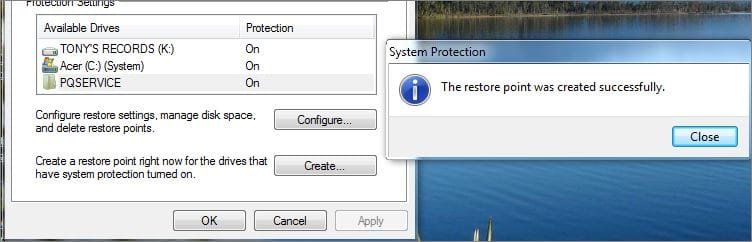
...and verified here;
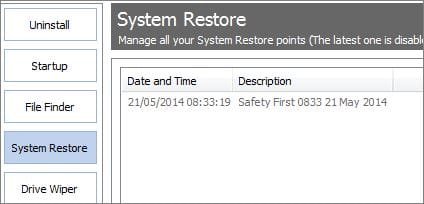
And second, as I was in the process of making a report of this event to this thread, my system CRASHED ... blue screen and text...all I saw was a recommendation to go look for a crash dump file. When the blue screen went, I selected the Start Windows Normally mode, and am still here, filing this report.
However, by 8.55am, I'm back to where I began, with NOT ONE system Restore Point showing;
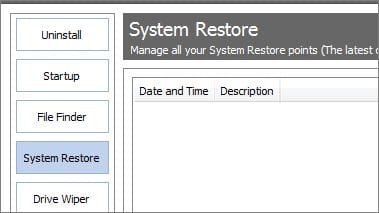
So where to from here? I guess try and find the crash dump file [another new realm for me] and put that up here as well. Boy, is this Laptop sick, or what?
Thank you so much for all your help Noel, you have elevated my standings in the Duffer status. Your guidance, encouragement and patience are all very much appreciated.Well done! Good luck!
Noel, Thank you. Your assistance is very much appreciated.
1.)Download security check below.
This will show me what security software you use and what the status is of services such as windows firewall:
When done, a Notepad report opens automatically, called: checkup.txt
Please post the checkup.txt in your reply using the paperclip:
And here they are Andrew;
View attachment 318613
Cheers
Newly created Restore Points are disappearing within minutes of creation:
This is really getting out of control, and to say that I'm losing confidence and becoming demoralised by what is happening, is an understatement. It's no joke.
Two things.. First, this morning at about 8.25am, a Windows Defender Update was installed - I know 'cos I saw the icon in my System tray, and later viewed it in the Update History, here;
I noted via CCleaner>Tools>System Restore that a Restore Point had been created at the time of the Update, but for added security I chose to create another one. This I finished by 8.33am;
...and verified here;
And second, as I was in the process of making a report of this event to this thread, my system CRASHED ... blue screen and text...all I saw was a recommendation to go look for a crash dump file. When the blue screen went, I selected the Start Windows Normally mode, and am still here, filing this report.
However, by 8.55am, I'm back to where I began, with NOT ONE system Restore Point showing;
So where to from here? I guess try and find the crash dump file [another new realm for me] and put that up here as well. Boy, is this Laptop sick, or what?
Last edited:
My Computer
- Computer Manufacturer/Model Number
- Acer Aspire Timeline X Laptop - Model 5820TG - V1.23
- OS
- Windows 7 Home Premium x64 - SP1
- CPU
- Intel Core i5 @ 2.67GHz Arrandale 32nm Technology
- Motherboard
- Acer JM51_CP (CPU) Base Board Version
- Memory
- 8 GB RAM [2 x 4 GB DDR3]
- Graphics Card(s)
- AMD Radeon HD 6650M, Intel (R) HD Graphics
- Sound Card
- Realtek HD Audio, ATI HD Audio Device
- Monitor(s) Displays
- Acer Aspire Notebook - 15.7"; Acer LCD Monitor X223Wsd - 22"
- Screen Resolution
- 1366 x 768 x 60Hertz
- Hard Drives
- Notebook - 733GB Western Digital WDC WD7500BPVT- 22HXZT1 Sata.
External HDs [4];Maxtor One Touch4 - 500GB External HD [Drive M:\].Western Digital WDXMS1200TA - 120GB External HD. WD My Book 'Elite' 1TB External HD [Windows 7 dedicated - Partitioned
- Mouse
- Logitech Wireless V320 for Notebooks
- Other Info
- Brother MFC-465CN; PC to Fax/Scan/Copy/Photo Multi Function Centre. Epson Perfection V300 Photo Scanner.
Siemens Speedstream 6520 Router.
Wacom 'Bamboo Fun' CTE-650 PC Tablet, Stylus and Mouse. Logitech X-230 Notebook Stereo Speakers and Sub-woofer.
UAC - On. Internet - FireFox v13.0.1 & IE8.
Hon.RSM to the 4th [Assault Pioneer] Troop Pune Sepoys , and 3rd Troop Jodhpur Bengali Lancers

 We can get it figured out soon, I promise.


