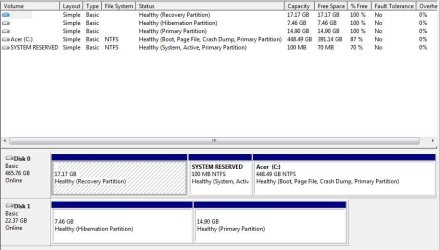
Hi, I am ready to upgrade my Acer Aspire s3's [500 GB + 20GB] SSHD hybrid drive to a SSD. The laptop is 5.5 years old, and still works flawlessly, but I thought I would upgrade the OS drive to extend life and get an inexpensive performance boost. (I bought a Crucial 240 GB SSD, so it will be smaller than my hybrid SSHD, but that would only be a concern if I am cloning, and there is a ton of empty space on the hybrid drive so I can shrink the partitions to easily fit the 240 GB SSD.)
Questions:
1. I'm led to think I should do a clean install of Windows 7, rather than clone my current installation, not only because of the benefits of a clean install, but also because I'm not sure the 20 GB portion of the hybrid drive would clone correctly. Is clean the best way to go? Or should I clone, and not include/not worry about the two 20 GB hybrid partitions (which aren't really partitions, are they, as they are on a seperate 20 GB SSD, hence my confusion about what would happen during cloning).
2. If a clean install is the best way to go: I have the original Acer System Disc, and the 4 Recovery DVDs, that shipped with the computer. When I boot into the System Disc, the factory reinstall choices appear, HOWEVER, it looks like I would first need to open the chassis and unplug my old hybrid SSHD, and replace it internally with the new blank SSD, because the System Disc utility apparently doesn't permit having more than one hard drive connected during the Windows 7 reinstall. Is this the case? Can I not route the factory install to the new SSD, connected via a USB/SATA adapter, while leaving the old hybrid SSHD installed inside the laptop? (The reason is, if something doesn't work, I wouldn't have had to open the chassis and remove and reinstall the hybrid SSHD; would be a less time consuming workflow, and less potentially damaging to my laptop).
3. Assuming I do have to first remove the SSHD, and the clean install to the SSD doesn't work, would I have any problem simply reinstalling the old hybrid SSHD? Obviously I would have removed it without formatting it; it would have been removed with Windows 7 unchanged and in perfect working condition. Is there any reason it would cease to work as a result of this procedure?
4. Last, is there a better way to do a clean install of Windows 7 than what I am describing above? I tried to get an ISO from Microsoft but it errored, saying I can't download it because my license is a pre-installed one and thus I would need to go through the OEM.
Questions:
1. I'm led to think I should do a clean install of Windows 7, rather than clone my current installation, not only because of the benefits of a clean install, but also because I'm not sure the 20 GB portion of the hybrid drive would clone correctly. Is clean the best way to go? Or should I clone, and not include/not worry about the two 20 GB hybrid partitions (which aren't really partitions, are they, as they are on a seperate 20 GB SSD, hence my confusion about what would happen during cloning).
2. If a clean install is the best way to go: I have the original Acer System Disc, and the 4 Recovery DVDs, that shipped with the computer. When I boot into the System Disc, the factory reinstall choices appear, HOWEVER, it looks like I would first need to open the chassis and unplug my old hybrid SSHD, and replace it internally with the new blank SSD, because the System Disc utility apparently doesn't permit having more than one hard drive connected during the Windows 7 reinstall. Is this the case? Can I not route the factory install to the new SSD, connected via a USB/SATA adapter, while leaving the old hybrid SSHD installed inside the laptop? (The reason is, if something doesn't work, I wouldn't have had to open the chassis and remove and reinstall the hybrid SSHD; would be a less time consuming workflow, and less potentially damaging to my laptop).
3. Assuming I do have to first remove the SSHD, and the clean install to the SSD doesn't work, would I have any problem simply reinstalling the old hybrid SSHD? Obviously I would have removed it without formatting it; it would have been removed with Windows 7 unchanged and in perfect working condition. Is there any reason it would cease to work as a result of this procedure?
4. Last, is there a better way to do a clean install of Windows 7 than what I am describing above? I tried to get an ISO from Microsoft but it errored, saying I can't download it because my license is a pre-installed one and thus I would need to go through the OEM.
My Computer
At a glance
Windows 7 Home Premium 64bit
- OS
- Windows 7 Home Premium 64bit