Solved BIOS Update - Boot Loader Missing

When you installed Windows 7 fresh, did you have all other hard disconnected?
I do that as a rule, ie connect only the SSD and 1 optical drive - and disconnect all HDD's. The operative expression here is "as a rule". I'll betcha that I hurried last time and neglected to do so, result being the 100 MB MS Boot Partition is scattered all over. Will do a reinstall - the right way - and let you know.

@essenbe
Are we there yet? Or are we taking Christmas night off.
I really love it when somebody pushes me. Usually it's the other way around. Truth is, after having been up for three nights in a row till 3:00 am, I did crash. essenbe, you are indeed incredible - even more tenacious than I am. Thank you so much for giving so much of your time to my ongoing problems.

In the past few days I have developed a real, and well-founded, fear of failure. What to do next, so I don't end up reinstalling the rest of my remaining life?

Btw, there are some powerfully smart and scarily knowledgeable people in this forum and I thank you for tolerating me. I do think I can be useful in a way though. I seem to come across lots of problems that really end up being good teaching experiences for others. :shock:

1)
It would also be important to know if what the file table format of all the drives is - MBR format or GPT format - particularly the SDD.
That's actually a relevant question - at least in my case. Why? Well, I have about 20 TB of HDD backup (all my work for the NSA, you know ;)). Anyway, I ran out of partition letters (26), so I needed to convert some of my drives (3 TB) to GPT so I could read them and then use "Folders". Answer: Only the 3 TB drive is GPT, no other choice, but my SSD is not tampered with since it's architecture in no way resembles a HDD - I did quite a study of SSD's a while back, my conclusion being just to let the darn things alone, since mine are all Gen 2 and above)

2) @TVeblen
When you installed W7 fresh, did you have all other hard disk drives disconnected
As I mentioned, I think I dropped the ball there. Good point!

3) @ganjiri and theog http://www.sevenforums.com/tutorial...e-firmware-interface-install-windows-7-a.html Converting a BIOS is way above my pay grade. Never done it. Actually never knew it was possible. But I can follow instructions. Should I do that?

4) @theog I looked at your attachment and must say that I have not seen a BIOS that elementary since about 1991. Am I missing something?

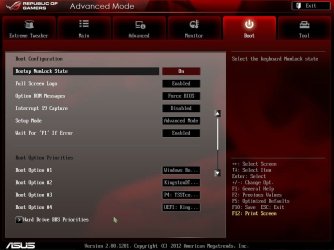
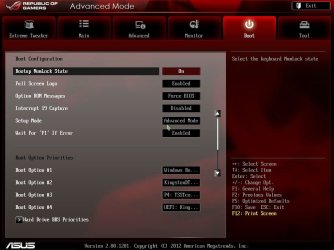
For what it's worth, I know what normal boot order looks like. I just don't understand the nonsense that I am now seeing. By the way, the ASUS Crosshair V motherboard BIOS I have reverted back to factory defaults, #1203 I think - rather ancient anyway. And still scrambled boot order (so I think the Boot Loader is partially installed on one or more of the HDD's and not on the SSD where it should be)

5) Should I disconnect all drives except the USB flash and then update the BIOS to #1703 (latest) and then connect the SSD and optical to reinstall Win 7 - or ....
 

My Computer

OS
Win 7-64
As far as updating, it should not matter as long as you have set optimized defaults first.

@TVeblen, I may be wrong, but I have read that the only way to install to UEFI is to install on a raw drive. It was my intention to not do that and format the partition primary before the install. Am I wrong? With this new technology, there seems there should be 1 place to go that explains it in detail rather than having to pick it up a piece at a time.
 

My Computers

System One System Two

  • Computer type
    PC/Desktop
    Computer Manufacturer/Model Number
    ALWAYS UNDER CONSTRUCTION
    OS
    Windows 11 Pro
    CPU
    Ryzen 9 5900X
    Motherboard
    Asus X570 Crosshair Viii Hero
    Memory
    32GB G Skill DDR4-3600
    Graphics Card(s)
    EVGA RTX 3080 FTW 3 Ultra
    Sound Card
    On Board/Sennheiser PC37X Headset
    Monitor(s) Displays
    3 X Asus 27"
    Screen Resolution
    2560x1440
    Hard Drives
    2 X 1 TB NVME drives
    PSU
    EVGA 850
    Case
    Phanteks Eclipse P400A
    Cooling
    EVGA 280 AIO
    Keyboard
    Logitech G510s/ Logitech G13
    Mouse
    Logitech G502
    Internet Speed
    24/1
    Antivirus
    ESET/MBAM Pro/SAS Pro
    Browser
    Chrome/ Firefox/ Edge
  • Computer type
    Laptop
    System Manufacturer/Model Number
    Dell 16 Plus
    OS
    Windows 11 Pro
    CPU
    Intel Ultra 9 288V
    Memory
    32 GB LPDDR5X 8533
    Monitor(s) Displays
    16" Mini-LED HDR600 Touch 90 Hz
    Screen Resolution
    2560X1600
    Hard Drives
    1 TB NVME
You should check to see if the SSD is GPT. Definitely.

You should post the Disk Management info so we can see what is going on.

You should hold off on any BIOS changes at least until you have determined if the problem is in the drive/partition structure first.
 

My Computer

Computer type
PC/Desktop
Computer Manufacturer/Model Number
Home Built - Jan 2013
OS
Windows 7 64 Bit Home Premium SP1
CPU
i7-3820
Motherboard
Asus P9X79-PRO - Bios 4608
Memory
GSkill F3-14900CL9Q - 16GB
Graphics Card(s)
EVGA GeForce GTX660 - Driver 352.86
Sound Card
On board Realtek ALC898
Monitor(s) Displays
Acer S271HL
Screen Resolution
1920 x 1080
Hard Drives
#1- Samsung 840 Pro Series
#2- Western Digital WD1002FAEX Sata3 Black
#3- Western Digital WD1002FAEX Sata3 Black
PSU
Corsair CMPSU-850TX-V2 - 850 watt (by Seasonic)
Case
Corsair Obsidian 550D
Cooling
Standard 3 120mm case fans, Cooler Master Hyper 212 EVO
Keyboard
MS KC-0405
Mouse
Intellimouse 5-button
Internet Speed
56 Mbits/Sec (on a good day)
Antivirus
Avast & Malwarebytes
Browser
Firefox
Other Info
Asus DVD - DRW-24B1ST 24X
@TVeblen, I may be wrong, but I have read that the only way to install to UEFI is to install on a raw drive. It was my intention to not do that and format the partition primary before the install. Am I wrong? With this new technology, there seems there should be 1 place to go that explains it in detail rather than having to pick it up a piece at a time.

Yeah, it is frustrating as all get out. It is like the system is some trade secret and they don't want you to know! I've been compiling info on this in advance of a new build for months and I do not feel I've got it all clear in my head yet.

The things I am clear on is that UEFI is a BIOS. As a matter of fact we should not even use the acronym B.I.O.S. when referring to a UEFI system. But that would just confuse a lot of people so we keep doing it anyway.

So you are correct that to install Windows on a UEFI system you should do it by installing to a raw drive. This will allow the Windows installer to access the EFI files within Windows (C:\Windows\Boot\EFI ) to create the necessary partition structure to operate in a pure EFI or UEFI environment.

There may be a way to prepare or convert a disk to use in an UEFI environment but I have not researched that.

These two articles here have been very helpful for me in understanding this new system:
Understanding Disk Partitions
Windows and GPT FAQ
 

My Computer

Computer type
PC/Desktop
Computer Manufacturer/Model Number
Home Built - Jan 2013
OS
Windows 7 64 Bit Home Premium SP1
CPU
i7-3820
Motherboard
Asus P9X79-PRO - Bios 4608
Memory
GSkill F3-14900CL9Q - 16GB
Graphics Card(s)
EVGA GeForce GTX660 - Driver 352.86
Sound Card
On board Realtek ALC898
Monitor(s) Displays
Acer S271HL
Screen Resolution
1920 x 1080
Hard Drives
#1- Samsung 840 Pro Series
#2- Western Digital WD1002FAEX Sata3 Black
#3- Western Digital WD1002FAEX Sata3 Black
PSU
Corsair CMPSU-850TX-V2 - 850 watt (by Seasonic)
Case
Corsair Obsidian 550D
Cooling
Standard 3 120mm case fans, Cooler Master Hyper 212 EVO
Keyboard
MS KC-0405
Mouse
Intellimouse 5-button
Internet Speed
56 Mbits/Sec (on a good day)
Antivirus
Avast & Malwarebytes
Browser
Firefox
Other Info
Asus DVD - DRW-24B1ST 24X
TVebiem said:
There may be a way to prepare or convert a disk to use in an UEFI environment but I have not researched that.

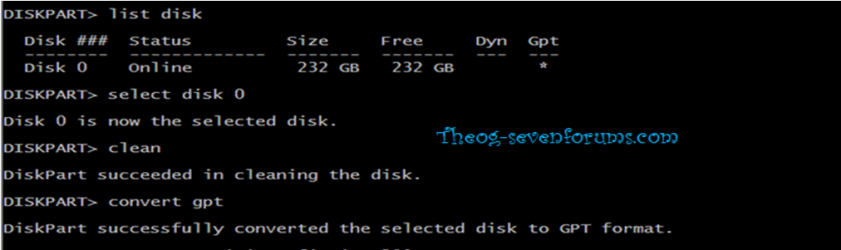
From diskpart

list disk
select disk ?
clean
convert gpt or convert GPT


Windows 8 Downgrade-011 SB.PNG
 

My Computer

OS
ME/XP/Vista/Win7
I'm beginning to feel like the centipede who, when asked what legs he moved first and in what order, could no longer walk naturally, then rolled over in the ditch and died.

So I don't know why I need to think so much to do a reinstall. For example, all this talk about UEFI. When I restore to factory defaults, my Crosshair BIOS is what it is. When I update it to the latest #1703, it also is what it is. (geez, I hate cliches but that's the only way I know how to say it. Basically, why should I screw up the natural order of things?)

What I do know is:

1) Disconnect all drives except the SSD and the Opticals - Now Done

2) Set the BIOS boot order to CD #1 and SSD #2


What I don't know is should I flash the BIOS before doing an install?

If I should, would I not also disconnect the SSD to reduce the number of variables - and just use the USB thumb drive to flash the BIOS from?
 

My Computer

OS
Win 7-64
I would try before if I was going to do it. maybe try it like it is, but first format the partition, then install.
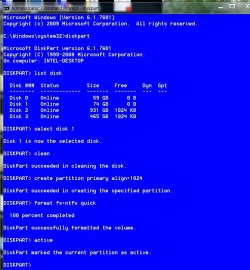
When you boot the installer, at the first page do not select your language, hold down Shift and press F10, it will bring up a command prompt. Type these commands and press enter after each one. If you have only 1 disk attached you should show only 1 disk numbered 0 (number zero)
Diskpart (wait for the window to reply diskpart)
List disk
Select disk 0
clean
create partition primary align=1024
format fs=ntfs quick
active
exit exit
You will be right back where you were. I did an example. I used disk 1, but you will only have 1 disk and it will be 0.
this is what it should look like. all the text other than the commands I gave is what the window will reply, just give it a couple of seconds. If you make a mistake it will tell you. then continue with set up and install.

clean-align-format SSD.JPG
 

My Computers

System One System Two

  • Computer type
    PC/Desktop
    Computer Manufacturer/Model Number
    ALWAYS UNDER CONSTRUCTION
    OS
    Windows 11 Pro
    CPU
    Ryzen 9 5900X
    Motherboard
    Asus X570 Crosshair Viii Hero
    Memory
    32GB G Skill DDR4-3600
    Graphics Card(s)
    EVGA RTX 3080 FTW 3 Ultra
    Sound Card
    On Board/Sennheiser PC37X Headset
    Monitor(s) Displays
    3 X Asus 27"
    Screen Resolution
    2560x1440
    Hard Drives
    2 X 1 TB NVME drives
    PSU
    EVGA 850
    Case
    Phanteks Eclipse P400A
    Cooling
    EVGA 280 AIO
    Keyboard
    Logitech G510s/ Logitech G13
    Mouse
    Logitech G502
    Internet Speed
    24/1
    Antivirus
    ESET/MBAM Pro/SAS Pro
    Browser
    Chrome/ Firefox/ Edge
  • Computer type
    Laptop
    System Manufacturer/Model Number
    Dell 16 Plus
    OS
    Windows 11 Pro
    CPU
    Intel Ultra 9 288V
    Memory
    32 GB LPDDR5X 8533
    Monitor(s) Displays
    16" Mini-LED HDR600 Touch 90 Hz
    Screen Resolution
    2560X1600
    Hard Drives
    1 TB NVME
I agree with Essenbe regarding a reinstall.

If you want to flash the BIOS (to get it to the most recent version I would presume?) then there is no reason why you can't do it with no drives attached. It's a "can't hurt, might help" situation.
 

My Computer

Computer type
PC/Desktop
Computer Manufacturer/Model Number
Home Built - Jan 2013
OS
Windows 7 64 Bit Home Premium SP1
CPU
i7-3820
Motherboard
Asus P9X79-PRO - Bios 4608
Memory
GSkill F3-14900CL9Q - 16GB
Graphics Card(s)
EVGA GeForce GTX660 - Driver 352.86
Sound Card
On board Realtek ALC898
Monitor(s) Displays
Acer S271HL
Screen Resolution
1920 x 1080
Hard Drives
#1- Samsung 840 Pro Series
#2- Western Digital WD1002FAEX Sata3 Black
#3- Western Digital WD1002FAEX Sata3 Black
PSU
Corsair CMPSU-850TX-V2 - 850 watt (by Seasonic)
Case
Corsair Obsidian 550D
Cooling
Standard 3 120mm case fans, Cooler Master Hyper 212 EVO
Keyboard
MS KC-0405
Mouse
Intellimouse 5-button
Internet Speed
56 Mbits/Sec (on a good day)
Antivirus
Avast & Malwarebytes
Browser
Firefox
Other Info
Asus DVD - DRW-24B1ST 24X
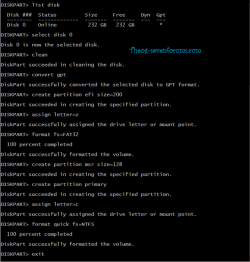
For uEFI partitioning.

Diskpart

uEFI 010-1.PNG

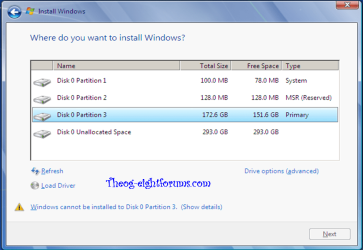
As seen in Disk management

uEFI 011-1.PNG

Windows 7 installer.

Windows 8 Downgrade-012 SB.PNG
 

My Computer

OS
ME/XP/Vista/Win7
If you want to flash the BIOS (to get it to the most recent version I would presume?) then there is no reason why you can't do it with no drives attached. It's a "can't hurt, might help" situation.

This way I will do for sure. As far as computers can be said to "make sense", this way (reduce the number of variables) makes sense, at least in a logical world.

@essenbe

Whoa! What the heck ever happened to just connecting the SSD and the optical drives, popping in my installation disk and just sitting back?

Not saying you're wrong and I will indeed do what you tell me - just curious.
 

My Computer

OS
Win 7-64
OK, did what I said I was going to do, which I think is what was suggested.

Disconnected all drives except the opticals.

Flashed the BIOS with USB (BIOS #1703)

The I selected "optimized defaults" - before and after screenshots show no difference in boot order

The screenshots document everything, including the remaining boot order chaos.

Just a quick lifestyle question: Do you fellows think I should consult Jack Daniels in the future. I don't drink; but right now it seems like a very appealing idea. :(
 

Attachments

  • 080102074140.jpg
    080102074140.jpg
    47.3 KB · Views: 6
  • 080102074214.jpg
    080102074214.jpg
    66.2 KB · Views: 5
  • 080102074356.jpg
    080102074356.jpg
    66.1 KB · Views: 6

My Computer

OS
Win 7-64
Perhaps I am wrong, but it is my understanding that for the installation to be in UEFI mode, the installer will do that, but the drive has to be in raw format in order to do it that way, or can be formatted as Theog's example in part a GPT partition. It was my intention to make it to where that could not happen. You will have an aligned primary partition to install to and, unless I'm wrong, cannot be installed as UEFI style. There are others much more versed in this than me and I could be wrong, but that was my understanding. The installer with a formatted primary partition will do a legacy install, which is what you would like.
 

My Computers

System One System Two

  • Computer type
    PC/Desktop
    Computer Manufacturer/Model Number
    ALWAYS UNDER CONSTRUCTION
    OS
    Windows 11 Pro
    CPU
    Ryzen 9 5900X
    Motherboard
    Asus X570 Crosshair Viii Hero
    Memory
    32GB G Skill DDR4-3600
    Graphics Card(s)
    EVGA RTX 3080 FTW 3 Ultra
    Sound Card
    On Board/Sennheiser PC37X Headset
    Monitor(s) Displays
    3 X Asus 27"
    Screen Resolution
    2560x1440
    Hard Drives
    2 X 1 TB NVME drives
    PSU
    EVGA 850
    Case
    Phanteks Eclipse P400A
    Cooling
    EVGA 280 AIO
    Keyboard
    Logitech G510s/ Logitech G13
    Mouse
    Logitech G502
    Internet Speed
    24/1
    Antivirus
    ESET/MBAM Pro/SAS Pro
    Browser
    Chrome/ Firefox/ Edge
  • Computer type
    Laptop
    System Manufacturer/Model Number
    Dell 16 Plus
    OS
    Windows 11 Pro
    CPU
    Intel Ultra 9 288V
    Memory
    32 GB LPDDR5X 8533
    Monitor(s) Displays
    16" Mini-LED HDR600 Touch 90 Hz
    Screen Resolution
    2560X1600
    Hard Drives
    1 TB NVME
You guys are gonna give me Freddy Kruger bad dreams tonight. Until I had this problem, I never had occasion to give the BIOS a moment's notice.

Conclusions:

1) I think I should do what essenbe suggested:
When you boot the installer, at the first page do not select your language, hold down Shift and press F10, it will bring up a command prompt. Type these commands and press enter after each one. If you have only 1 disk attached you should show only 1 disk numbered 0 (number zero)
Diskpart (wait for the window to reply diskpart)
List disk
Select disk 0
clean
create partition primary align=1024
format fs=ntfs quick
active
exit exit
I'm way out of my league here but I think that kind of cleans up the boot order?

Please vote: Yes -or- No

2) Just connect the opticals and the single SSD

Please vote: Yes -or- No

3) Let the Windows installation take care of the SSD preparation. Although it's probably unnecessary because of SSD architecture (routine TRIM cleanup) and most people agree that formatting an SSD is "bad" because it increases wear (a silly argument because you will probably die before your SSD gets worn out from formatting), I just let Win 7 "format" the SSD just as it would during a normal install on an HDD.

Please vote: Yes -or- No

In conclusion, then, am I correct to do the above three (3) things? :confused:
 

My Computer

OS
Win 7-64
As far as the formatting goes, a full format is not necessary. You notice I gave the command ntfs quick. That is a quick (light) format and is what the installer itself would do. By doing those commands the installer does not format the drive, it is already formatted. The installer simply installs. If it were me, I would connect only the optical and the 1 SSD, go to bios, make sure I was in AHCI mode, set the first boot device to the optical drive, the 2nd boot device to the SSD and not the Windows boot loader, save and exit. Follow the diskpart guide I gave and install. Now, that is what I would do and exactly what I usually do and have never had a UEFI boot option.
 

My Computers

System One System Two

  • Computer type
    PC/Desktop
    Computer Manufacturer/Model Number
    ALWAYS UNDER CONSTRUCTION
    OS
    Windows 11 Pro
    CPU
    Ryzen 9 5900X
    Motherboard
    Asus X570 Crosshair Viii Hero
    Memory
    32GB G Skill DDR4-3600
    Graphics Card(s)
    EVGA RTX 3080 FTW 3 Ultra
    Sound Card
    On Board/Sennheiser PC37X Headset
    Monitor(s) Displays
    3 X Asus 27"
    Screen Resolution
    2560x1440
    Hard Drives
    2 X 1 TB NVME drives
    PSU
    EVGA 850
    Case
    Phanteks Eclipse P400A
    Cooling
    EVGA 280 AIO
    Keyboard
    Logitech G510s/ Logitech G13
    Mouse
    Logitech G502
    Internet Speed
    24/1
    Antivirus
    ESET/MBAM Pro/SAS Pro
    Browser
    Chrome/ Firefox/ Edge
  • Computer type
    Laptop
    System Manufacturer/Model Number
    Dell 16 Plus
    OS
    Windows 11 Pro
    CPU
    Intel Ultra 9 288V
    Memory
    32 GB LPDDR5X 8533
    Monitor(s) Displays
    16" Mini-LED HDR600 Touch 90 Hz
    Screen Resolution
    2560X1600
    Hard Drives
    1 TB NVME
essenbe, all that is pretty straight-forward and just good old common sense. Will do.

I like what you taught me and am eager to see how it works!
 

My Computer

OS
Win 7-64

My Computer

OS
ME/XP/Vista/Win7
essenbe, all that is pretty straight-forward and just good old common sense. Will do.

I like what you taught me and am eager to see how it works!

If I gave the correct instructions to solve your problems.
 

My Computers

System One System Two

  • Computer type
    PC/Desktop
    Computer Manufacturer/Model Number
    ALWAYS UNDER CONSTRUCTION
    OS
    Windows 11 Pro
    CPU
    Ryzen 9 5900X
    Motherboard
    Asus X570 Crosshair Viii Hero
    Memory
    32GB G Skill DDR4-3600
    Graphics Card(s)
    EVGA RTX 3080 FTW 3 Ultra
    Sound Card
    On Board/Sennheiser PC37X Headset
    Monitor(s) Displays
    3 X Asus 27"
    Screen Resolution
    2560x1440
    Hard Drives
    2 X 1 TB NVME drives
    PSU
    EVGA 850
    Case
    Phanteks Eclipse P400A
    Cooling
    EVGA 280 AIO
    Keyboard
    Logitech G510s/ Logitech G13
    Mouse
    Logitech G502
    Internet Speed
    24/1
    Antivirus
    ESET/MBAM Pro/SAS Pro
    Browser
    Chrome/ Firefox/ Edge
  • Computer type
    Laptop
    System Manufacturer/Model Number
    Dell 16 Plus
    OS
    Windows 11 Pro
    CPU
    Intel Ultra 9 288V
    Memory
    32 GB LPDDR5X 8533
    Monitor(s) Displays
    16" Mini-LED HDR600 Touch 90 Hz
    Screen Resolution
    2560X1600
    Hard Drives
    1 TB NVME
As far as I know, we have reasonably equivalent boards, just mine is Intel and yours is AMD. The biggest difference is I can select which type of install I want, legacy or UEFI, yours does not have that option. What I suggested is to see if we can force your board to do and boot from a legacy install. If not, you may have to have a UEFI installation. Please show us the disk management screenshot so Theog can see the type of install you have. He probably knows much more about the UEFI than I do, and is probably a better judge.
 

My Computers

System One System Two

  • Computer type
    PC/Desktop
    Computer Manufacturer/Model Number
    ALWAYS UNDER CONSTRUCTION
    OS
    Windows 11 Pro
    CPU
    Ryzen 9 5900X
    Motherboard
    Asus X570 Crosshair Viii Hero
    Memory
    32GB G Skill DDR4-3600
    Graphics Card(s)
    EVGA RTX 3080 FTW 3 Ultra
    Sound Card
    On Board/Sennheiser PC37X Headset
    Monitor(s) Displays
    3 X Asus 27"
    Screen Resolution
    2560x1440
    Hard Drives
    2 X 1 TB NVME drives
    PSU
    EVGA 850
    Case
    Phanteks Eclipse P400A
    Cooling
    EVGA 280 AIO
    Keyboard
    Logitech G510s/ Logitech G13
    Mouse
    Logitech G502
    Internet Speed
    24/1
    Antivirus
    ESET/MBAM Pro/SAS Pro
    Browser
    Chrome/ Firefox/ Edge
  • Computer type
    Laptop
    System Manufacturer/Model Number
    Dell 16 Plus
    OS
    Windows 11 Pro
    CPU
    Intel Ultra 9 288V
    Memory
    32 GB LPDDR5X 8533
    Monitor(s) Displays
    16" Mini-LED HDR600 Touch 90 Hz
    Screen Resolution
    2560X1600
    Hard Drives
    1 TB NVME
Back
Top