Convert GPT Disk to MBR Disk

How to Convert GPT Disk to MBR Disk

   Information
A disk is a separate physical hard drive. This will show you how to convert a GPT (GUID - Globally Unique Identifer) disk to a MBR (Master Boot Record) disk in Windows Disk Manager or in a command prompt. By default Windows uses MBR disks.

While all Windows can boot from a MBR disk, you can only boot from a GPT disk if you have a operating system (see below) that supports GPT and your motherboard has a EFI BIOS and is enabled. Windows 7 and Vista does support booting from a GPT disk.

You can still have a separate GPT disk as a data disk if your operating system (see below) supports reading a GPT disk, even if your system disk that Windows is installed on is still a MBR disk.


   Note
Differences Between MBR and GPT Disks:
  • MBR disks are supported (readable) by all Windows operating systems.
    • GPT disks are only supported (readable) by Windows server 2003 SP1 +, XP 64-bit, Vista, Windows 7, Windows Server 2008.
  • MBR disks use the standard BIOS partition table.
    • GPT disks use extensible firmware interface (EFI).
  • MBR disks supports up to 2TB per single partition.
    • GPT disks supports up to 256TB per single partition in Windows.
  • MBR disks supports up to 4 Primary partitions or 3 Primary partitions and 1 Extended partition with up to 128 logical volumes in the extended partition.
    • GPT disks supports up to 128 Primary partitions.
  • Removable disks are MBR disks by default.
    • Removable disks cannot be converted into a GPT disk.
   Warning

  • You must be a administrator to do this in Windows.
  • Before you convert a disk, close any programs that are running on or from that disk.
  • Before you convert a disk, be sure to backup anything that you do not want to lose on that disk. Converting the disk requires that all partitions and volumes are deleted on the disk first.
  • If you disable the Disk Defragmenter service, then you will get the error below when you try to do anything in Disk Management. If you get this error, then make sure that the Disk Defragmenter service is enabled and set to only Manual.
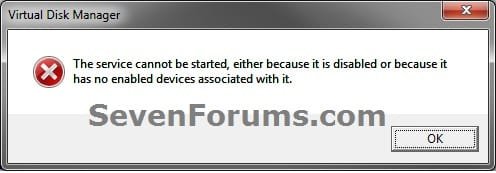
Error.jpg


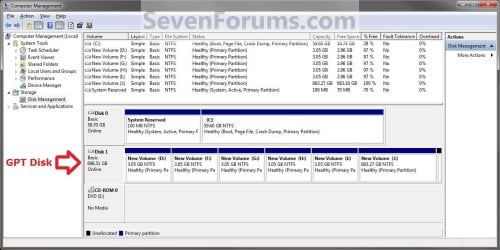
EXAMPLE: MBR disk vs GPT disk in Disk Management
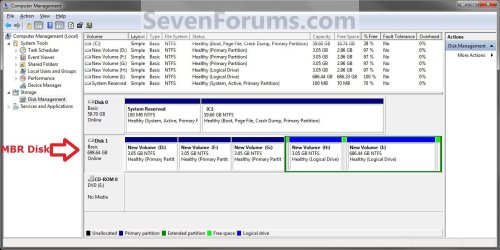
MBR_Disk_Example.jpg

GPT_Disk_Example.jpg


OPTION ONE

Through Disk Management


1. Open the Control Panel (icons view), and click on the Administrative Tools icon, then close the Control Panel window.

2. Click on Computer Management in Administrative Tools, then close the Administrative Tools window.

3. If prompted by UAC, click on Yes.

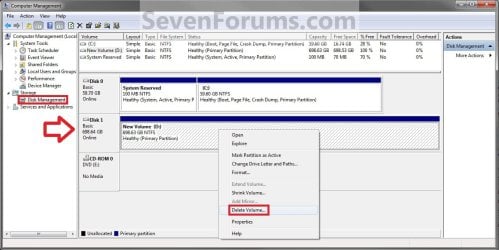
4. In the left pane under Storage, click on Disk Management. (See screenshot below)
Step1.jpg
5. In the disk (ex: Disk 1) that you want to convert to a MBR disk, right click on each partition and volume on the disk and click on Delete Volume until the whole disk is unallocated space. (See screenshot above)

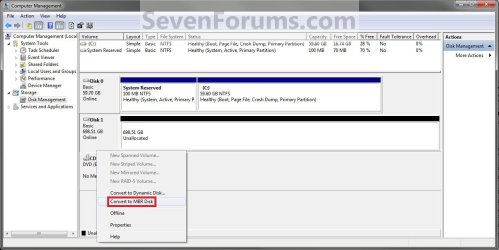
6. Right click on the disk (ex: Disk 1) that you want to convert to a MBR disk, and click on Convert to MBR Disk if available. (See screenshot below)
Step2.jpg
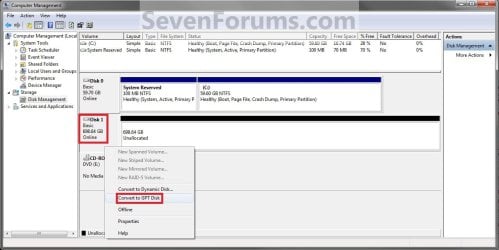
7. You can confirm that the disk is a MBR disk if you right click on the disk and it has Convert to GPT Disk instead now. (See screenshot below)
Step3.jpg
8. You can now create partitions on the now MBR disk if you like.

9. When done, close Disk Management.


OPTION TWO

Through a Command Prompt


1. Open an elevated command prompt, and go to step 3 below.

OR

2. Open a command prompt at boot, and go to step 3 below.
Command_MBR.jpg
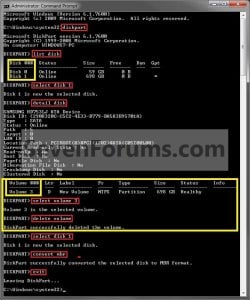
3. In the command prompt, type diskpart and press enter. (See screenshot above)

4. Type list disk and press enter.
NOTE: Make note of the disk number (ex: Disk 1) that you want to convert to a MBR disk.

5. Type select disk # and press enter.
NOTE: Substitute # with the actual disk number that you want to convert to a MBR disk. For example, select disk 1.

6. Do step 7 or 8 below for what you would like to do.

7. To Use the "Clean" Command to make Disk Unallocated
NOTE: This is the easiest method. It will wipe the disk clean all at once leaving it as unallocated space afterwards.
A) In the command prompt, type clean and press enter.

B) Go to step 9 below.
8. To Manually make Disk Unallocated
NOTE: This method has you manually delete each volume on the disk before converting the disk to MBR.
A) Type detail disk and press enter. If the disk does not have any volumes listed, then you can go to step 8E below.
NOTE: This will give you a list of all the volume numbers on the selected disk number that you will need to delete in steps 8B and 8C below.

B) Type select volume # and press enter.
NOTE: Substitute # with a volume number listed in step 8A. For example, select volume 3.

C) Type delete volume and press enter.

D) Repeat steps 8B and 8C for each volume # listed in step 8A until you have deleted all volume #'s.

E) When finished, type select disk # and press enter.
NOTE: You would use the same one from step 5 above. For example, select disk 1.

F) Go to step 9 below.
9. Type convert mbr and press enter.

10. Close the command prompt.

11. You can now create partitions on the now MBR disk if you like.
NOTE: Restart the computer if you did step 2 instead.
That's it,
Shawn


Last edited:
Hello Bakchr, and welcome to Seven Forums.

You could run the "clean" command on the SSD to wipe it clean to be unallocated space, then be able to install Windows 7 on it. :)

Hope this helps,
Shawn
 

My Computer

Computer type
PC/Desktop
Computer Manufacturer/Model Number
Self built custom
OS
64-bit Windows 11 Pro for Workstations
CPU
Intel i7-8700K OC'd to 5 GHz
Motherboard
ASUS ROG Maximus XI Formula Z390
Memory
64 GB (4x16GB) G.SKILL TridentZ RGB DDR4 3600 MHz
Graphics Card(s)
ASUS ROG-STRIX-GTX1080TI-O11G-GAMING
Sound Card
Integrated
Monitor(s) Displays
2 x Samsung Odyssey G7 27"
Screen Resolution
2560x1440
Hard Drives
1TB Samsung 990 PRO M.2,
4TB Samsung 990 PRO PRO M.2,
TerraMaster F8 SSD Plus NAS
PSU
Seasonic Prime Titanium 850W
Case
Thermaltake Core P3
Cooling
Corsair Hydro H115i
Keyboard
Logitech wireless K800
Mouse
Logitech MX Master 4
Internet Speed
2 Gb/s Download and 100 Mb/s Upload
Antivirus
Malwarebyte Anti-Malware Premium
Browser
Google Chrome
Other Info
Logitech Z625 speaker system,
Logitech BRIO 4K Pro webcam,
HP Color LaserJet Pro MFP M477fdn,
APC SMART-UPS RT 1000 XL - SURT1000XLI,
Galaxy S23 Plus phone
Yes !! I cleaned the @#$$%@@#!@% disk and now finally I'm running windows 7 from my ssd !!!

Thanks a lot Shawn !!!

Greetings from Greece :)

Christos
 

My Computer

OS
Windows 7 Home Premium 32bit
Hey guys thanks! But I fixed the problem using my Xbox to configure and then using the computer to re-format.
 

My Computer

OS
Windows 7 Ultimate x86, Mac OS X Lion
CPU
Intel Core i7 2600K
Motherboard
Asus P8H67-M LE
Memory
8.00GB
Graphics Card(s)
Sapphire AMD Radeon HD 6790
Keyboard
Razer Lycosa BlackWidow Ultimate
Mouse
Razer Naga Molten
Internet Speed
Unifi VIP10, Malaysia
That's great news Darryl. I'm happy to hear that you got it sorted. :)
 

My Computer

Computer type
PC/Desktop
Computer Manufacturer/Model Number
Self built custom
OS
64-bit Windows 11 Pro for Workstations
CPU
Intel i7-8700K OC'd to 5 GHz
Motherboard
ASUS ROG Maximus XI Formula Z390
Memory
64 GB (4x16GB) G.SKILL TridentZ RGB DDR4 3600 MHz
Graphics Card(s)
ASUS ROG-STRIX-GTX1080TI-O11G-GAMING
Sound Card
Integrated
Monitor(s) Displays
2 x Samsung Odyssey G7 27"
Screen Resolution
2560x1440
Hard Drives
1TB Samsung 990 PRO M.2,
4TB Samsung 990 PRO PRO M.2,
TerraMaster F8 SSD Plus NAS
PSU
Seasonic Prime Titanium 850W
Case
Thermaltake Core P3
Cooling
Corsair Hydro H115i
Keyboard
Logitech wireless K800
Mouse
Logitech MX Master 4
Internet Speed
2 Gb/s Download and 100 Mb/s Upload
Antivirus
Malwarebyte Anti-Malware Premium
Browser
Google Chrome
Other Info
Logitech Z625 speaker system,
Logitech BRIO 4K Pro webcam,
HP Color LaserJet Pro MFP M477fdn,
APC SMART-UPS RT 1000 XL - SURT1000XLI,
Galaxy S23 Plus phone
Yes !! I cleaned the @#$$%@@#!@% disk and now finally I'm running windows 7 from my ssd !!!

Thanks a lot Shawn !!!

Greetings from Greece :)

Christos

You're most welcome Christos. I'm happy to hear that cleaning the @#$$%@@#!@% out of the disk got it sorted for you. :p
 

My Computer

Computer type
PC/Desktop
Computer Manufacturer/Model Number
Self built custom
OS
64-bit Windows 11 Pro for Workstations
CPU
Intel i7-8700K OC'd to 5 GHz
Motherboard
ASUS ROG Maximus XI Formula Z390
Memory
64 GB (4x16GB) G.SKILL TridentZ RGB DDR4 3600 MHz
Graphics Card(s)
ASUS ROG-STRIX-GTX1080TI-O11G-GAMING
Sound Card
Integrated
Monitor(s) Displays
2 x Samsung Odyssey G7 27"
Screen Resolution
2560x1440
Hard Drives
1TB Samsung 990 PRO M.2,
4TB Samsung 990 PRO PRO M.2,
TerraMaster F8 SSD Plus NAS
PSU
Seasonic Prime Titanium 850W
Case
Thermaltake Core P3
Cooling
Corsair Hydro H115i
Keyboard
Logitech wireless K800
Mouse
Logitech MX Master 4
Internet Speed
2 Gb/s Download and 100 Mb/s Upload
Antivirus
Malwarebyte Anti-Malware Premium
Browser
Google Chrome
Other Info
Logitech Z625 speaker system,
Logitech BRIO 4K Pro webcam,
HP Color LaserJet Pro MFP M477fdn,
APC SMART-UPS RT 1000 XL - SURT1000XLI,
Galaxy S23 Plus phone
Thanks For The Solution :D

After I installed Chromium OS on my internal hard disk, it wasn't booting. So, I decided to overwrite it with Windows 8. But when I was installing it, I got an error that the disk was of GPT format. Then I formatted the partition but of no use. I was afraid a lot! What should I do now?!!! What should I do now?!!! I was thinking:cry:. Then spending a lot of time at Google for solution, at last I got this site. The Command Prompt method helped me a LOT LOT LOT!!!!!! Thanks! :D I was almost DEAD!!! :cry:
 

My Computer

OS
Windows 7 Ultimate 64-bit
You're most welcome Deepak, and welcome to Seven Forums. :)
 

My Computer

Computer type
PC/Desktop
Computer Manufacturer/Model Number
Self built custom
OS
64-bit Windows 11 Pro for Workstations
CPU
Intel i7-8700K OC'd to 5 GHz
Motherboard
ASUS ROG Maximus XI Formula Z390
Memory
64 GB (4x16GB) G.SKILL TridentZ RGB DDR4 3600 MHz
Graphics Card(s)
ASUS ROG-STRIX-GTX1080TI-O11G-GAMING
Sound Card
Integrated
Monitor(s) Displays
2 x Samsung Odyssey G7 27"
Screen Resolution
2560x1440
Hard Drives
1TB Samsung 990 PRO M.2,
4TB Samsung 990 PRO PRO M.2,
TerraMaster F8 SSD Plus NAS
PSU
Seasonic Prime Titanium 850W
Case
Thermaltake Core P3
Cooling
Corsair Hydro H115i
Keyboard
Logitech wireless K800
Mouse
Logitech MX Master 4
Internet Speed
2 Gb/s Download and 100 Mb/s Upload
Antivirus
Malwarebyte Anti-Malware Premium
Browser
Google Chrome
Other Info
Logitech Z625 speaker system,
Logitech BRIO 4K Pro webcam,
HP Color LaserJet Pro MFP M477fdn,
APC SMART-UPS RT 1000 XL - SURT1000XLI,
Galaxy S23 Plus phone
Thanks !!

It works like a charm...
Thanks to you, I saved two laptops !!:)
 

My Computer

OS
Windows 7 Ultimate x64
Glad it could help svrkarthik. Welcome to Seven Forums.
smile.gif
 

My Computer

Computer type
PC/Desktop
Computer Manufacturer/Model Number
Self built custom
OS
64-bit Windows 11 Pro for Workstations
CPU
Intel i7-8700K OC'd to 5 GHz
Motherboard
ASUS ROG Maximus XI Formula Z390
Memory
64 GB (4x16GB) G.SKILL TridentZ RGB DDR4 3600 MHz
Graphics Card(s)
ASUS ROG-STRIX-GTX1080TI-O11G-GAMING
Sound Card
Integrated
Monitor(s) Displays
2 x Samsung Odyssey G7 27"
Screen Resolution
2560x1440
Hard Drives
1TB Samsung 990 PRO M.2,
4TB Samsung 990 PRO PRO M.2,
TerraMaster F8 SSD Plus NAS
PSU
Seasonic Prime Titanium 850W
Case
Thermaltake Core P3
Cooling
Corsair Hydro H115i
Keyboard
Logitech wireless K800
Mouse
Logitech MX Master 4
Internet Speed
2 Gb/s Download and 100 Mb/s Upload
Antivirus
Malwarebyte Anti-Malware Premium
Browser
Google Chrome
Other Info
Logitech Z625 speaker system,
Logitech BRIO 4K Pro webcam,
HP Color LaserJet Pro MFP M477fdn,
APC SMART-UPS RT 1000 XL - SURT1000XLI,
Galaxy S23 Plus phone
How to Convert a GPT Disk to a MBR Disk

Hi BRINK ,
Thank you for this tutorial I have read with great interest .
I myself am stuck with a compatibility problem with Windows 8 ( upgraded from W7 ) and would like to revert to Windows 7 . I can't convert the system disk back to MRB in the Computer Manager since it is the primary one . I was thinking to format it in NTFS on my second computer , replace it in my first one and use a system repair disc to reinstall an image of my previous W7 system . Would this work ?
Thank you for your attention .
Best regards ,
fanaudi :)
 

My Computer

Computer type
PC/Desktop
Computer Manufacturer/Model Number
HP Pavilion H8
OS
Windows 7 Ultimate 64 bit
CPU
Intel 7 quadcore
Motherboard
Pegatron 2AB5
Memory
14 ram DDR3
Graphics Card(s)
ASUS gtx 650
Sound Card
Realtec HD
Monitor(s) Displays
HP x22Led
Screen Resolution
1440x900 ( max 1920 x 1080 )
Hard Drives
WDC 500 Gb Sata 3
Hitachi 2T sata 3
several external drives .
PSU
HP 450 W
Case
HP
Cooling
regular fans
Keyboard
Microsoft Azerty
Mouse
Microsoft wireless
Internet Speed
cable high speed
Antivirus
Windows Defender ,
Browser
IE 11
Other Info
Several malware and spy killers ( MalwareBytes , Spy Hunter 4 , Eset on line , Adware Removal Tool ).
Hello Fanaudi,

Please go ahead and post back with a screenshot showing the full layout of your Disk Management window. This will let us know what your options may be. :)
 

My Computer

Computer type
PC/Desktop
Computer Manufacturer/Model Number
Self built custom
OS
64-bit Windows 11 Pro for Workstations
CPU
Intel i7-8700K OC'd to 5 GHz
Motherboard
ASUS ROG Maximus XI Formula Z390
Memory
64 GB (4x16GB) G.SKILL TridentZ RGB DDR4 3600 MHz
Graphics Card(s)
ASUS ROG-STRIX-GTX1080TI-O11G-GAMING
Sound Card
Integrated
Monitor(s) Displays
2 x Samsung Odyssey G7 27"
Screen Resolution
2560x1440
Hard Drives
1TB Samsung 990 PRO M.2,
4TB Samsung 990 PRO PRO M.2,
TerraMaster F8 SSD Plus NAS
PSU
Seasonic Prime Titanium 850W
Case
Thermaltake Core P3
Cooling
Corsair Hydro H115i
Keyboard
Logitech wireless K800
Mouse
Logitech MX Master 4
Internet Speed
2 Gb/s Download and 100 Mb/s Upload
Antivirus
Malwarebyte Anti-Malware Premium
Browser
Google Chrome
Other Info
Logitech Z625 speaker system,
Logitech BRIO 4K Pro webcam,
HP Color LaserJet Pro MFP M477fdn,
APC SMART-UPS RT 1000 XL - SURT1000XLI,
Galaxy S23 Plus phone
Re: How to Convert a GPT Disk to a MBR Diske:

Brink ,
Thanks for the quick response .
Meanwhile , I have solved my compatibility issue ( error code 10 with a PCIe device ) . Nevertheless , if , for any other raison , I would choose to downgrade to Windows 7 , I would post you a screenshot of my Disk Management window . Btw , just formatting a GPT disc would set things strait , would'nt it or am I missing something here ? If this works , would I then need to reinstall a fresh version of Windows 7 or could I immediately boot a system image with my system repair disc ?
Thanks again for your attention .
Best regards ,
fanaudi .;)
 

My Computer

Computer type
PC/Desktop
Computer Manufacturer/Model Number
HP Pavilion H8
OS
Windows 7 Ultimate 64 bit
CPU
Intel 7 quadcore
Motherboard
Pegatron 2AB5
Memory
14 ram DDR3
Graphics Card(s)
ASUS gtx 650
Sound Card
Realtec HD
Monitor(s) Displays
HP x22Led
Screen Resolution
1440x900 ( max 1920 x 1080 )
Hard Drives
WDC 500 Gb Sata 3
Hitachi 2T sata 3
several external drives .
PSU
HP 450 W
Case
HP
Cooling
regular fans
Keyboard
Microsoft Azerty
Mouse
Microsoft wireless
Internet Speed
cable high speed
Antivirus
Windows Defender ,
Browser
IE 11
Other Info
Several malware and spy killers ( MalwareBytes , Spy Hunter 4 , Eset on line , Adware Removal Tool ).
That's great news Fanaudi. :)

To downgrade back to Windows 7 from a UEFI (GPT disk) Windows 8, the tutorial below can help show you how to.

Downgrade Windows 8 to Windows 7
 

My Computer

Computer type
PC/Desktop
Computer Manufacturer/Model Number
Self built custom
OS
64-bit Windows 11 Pro for Workstations
CPU
Intel i7-8700K OC'd to 5 GHz
Motherboard
ASUS ROG Maximus XI Formula Z390
Memory
64 GB (4x16GB) G.SKILL TridentZ RGB DDR4 3600 MHz
Graphics Card(s)
ASUS ROG-STRIX-GTX1080TI-O11G-GAMING
Sound Card
Integrated
Monitor(s) Displays
2 x Samsung Odyssey G7 27"
Screen Resolution
2560x1440
Hard Drives
1TB Samsung 990 PRO M.2,
4TB Samsung 990 PRO PRO M.2,
TerraMaster F8 SSD Plus NAS
PSU
Seasonic Prime Titanium 850W
Case
Thermaltake Core P3
Cooling
Corsair Hydro H115i
Keyboard
Logitech wireless K800
Mouse
Logitech MX Master 4
Internet Speed
2 Gb/s Download and 100 Mb/s Upload
Antivirus
Malwarebyte Anti-Malware Premium
Browser
Google Chrome
Other Info
Logitech Z625 speaker system,
Logitech BRIO 4K Pro webcam,
HP Color LaserJet Pro MFP M477fdn,
APC SMART-UPS RT 1000 XL - SURT1000XLI,
Galaxy S23 Plus phone
Re : How to Convert a GPT Disk to a MBR Disk

That's great news Fanaudi. :)

To downgrade back to Windows 7 from a UEFI (GPT disk) Windows 8, the tutorial below can help show you how to.

Downgrade Windows 8 to Windows 7

Thank You Shawn ,
I have now learned a little more about degrading . Very useful !
Have a nice day.
Chris .;)
 

My Computer

Computer type
PC/Desktop
Computer Manufacturer/Model Number
HP Pavilion H8
OS
Windows 7 Ultimate 64 bit
CPU
Intel 7 quadcore
Motherboard
Pegatron 2AB5
Memory
14 ram DDR3
Graphics Card(s)
ASUS gtx 650
Sound Card
Realtec HD
Monitor(s) Displays
HP x22Led
Screen Resolution
1440x900 ( max 1920 x 1080 )
Hard Drives
WDC 500 Gb Sata 3
Hitachi 2T sata 3
several external drives .
PSU
HP 450 W
Case
HP
Cooling
regular fans
Keyboard
Microsoft Azerty
Mouse
Microsoft wireless
Internet Speed
cable high speed
Antivirus
Windows Defender ,
Browser
IE 11
Other Info
Several malware and spy killers ( MalwareBytes , Spy Hunter 4 , Eset on line , Adware Removal Tool ).
You're welcome Chris. I hope you have a good one as well. :)
 

My Computer

Computer type
PC/Desktop
Computer Manufacturer/Model Number
Self built custom
OS
64-bit Windows 11 Pro for Workstations
CPU
Intel i7-8700K OC'd to 5 GHz
Motherboard
ASUS ROG Maximus XI Formula Z390
Memory
64 GB (4x16GB) G.SKILL TridentZ RGB DDR4 3600 MHz
Graphics Card(s)
ASUS ROG-STRIX-GTX1080TI-O11G-GAMING
Sound Card
Integrated
Monitor(s) Displays
2 x Samsung Odyssey G7 27"
Screen Resolution
2560x1440
Hard Drives
1TB Samsung 990 PRO M.2,
4TB Samsung 990 PRO PRO M.2,
TerraMaster F8 SSD Plus NAS
PSU
Seasonic Prime Titanium 850W
Case
Thermaltake Core P3
Cooling
Corsair Hydro H115i
Keyboard
Logitech wireless K800
Mouse
Logitech MX Master 4
Internet Speed
2 Gb/s Download and 100 Mb/s Upload
Antivirus
Malwarebyte Anti-Malware Premium
Browser
Google Chrome
Other Info
Logitech Z625 speaker system,
Logitech BRIO 4K Pro webcam,
HP Color LaserJet Pro MFP M477fdn,
APC SMART-UPS RT 1000 XL - SURT1000XLI,
Galaxy S23 Plus phone
Re : How to Convert a GPT Disk to a MBR Disk

Hello Brink ,
Just this small message to tell you that , like several other fellow users , I had enough of Windows 8 after 2 weeks on my desktop and decided to revert back to Windows 7 . The good news is that this was done without a single problem . Guess I was very lucky because , earlier after a full opgrade to Windows 8 , I noticed in the Disk Management that my System disc had remained MRB ( this is maybe normal only after an upgrade ? ) . All I needed to do was to insert my Windows 7 System Repair Disc , collect an W7 image from my secundary and the job was done in less than half an hour .
Best regards ,
Chris .
cool.gif
 

My Computer

Computer type
PC/Desktop
Computer Manufacturer/Model Number
HP Pavilion H8
OS
Windows 7 Ultimate 64 bit
CPU
Intel 7 quadcore
Motherboard
Pegatron 2AB5
Memory
14 ram DDR3
Graphics Card(s)
ASUS gtx 650
Sound Card
Realtec HD
Monitor(s) Displays
HP x22Led
Screen Resolution
1440x900 ( max 1920 x 1080 )
Hard Drives
WDC 500 Gb Sata 3
Hitachi 2T sata 3
several external drives .
PSU
HP 450 W
Case
HP
Cooling
regular fans
Keyboard
Microsoft Azerty
Mouse
Microsoft wireless
Internet Speed
cable high speed
Antivirus
Windows Defender ,
Browser
IE 11
Other Info
Several malware and spy killers ( MalwareBytes , Spy Hunter 4 , Eset on line , Adware Removal Tool ).
That's great news Chris. :)

Hopefully Windows 8 may work out for you in the future.
 

My Computer

Computer type
PC/Desktop
Computer Manufacturer/Model Number
Self built custom
OS
64-bit Windows 11 Pro for Workstations
CPU
Intel i7-8700K OC'd to 5 GHz
Motherboard
ASUS ROG Maximus XI Formula Z390
Memory
64 GB (4x16GB) G.SKILL TridentZ RGB DDR4 3600 MHz
Graphics Card(s)
ASUS ROG-STRIX-GTX1080TI-O11G-GAMING
Sound Card
Integrated
Monitor(s) Displays
2 x Samsung Odyssey G7 27"
Screen Resolution
2560x1440
Hard Drives
1TB Samsung 990 PRO M.2,
4TB Samsung 990 PRO PRO M.2,
TerraMaster F8 SSD Plus NAS
PSU
Seasonic Prime Titanium 850W
Case
Thermaltake Core P3
Cooling
Corsair Hydro H115i
Keyboard
Logitech wireless K800
Mouse
Logitech MX Master 4
Internet Speed
2 Gb/s Download and 100 Mb/s Upload
Antivirus
Malwarebyte Anti-Malware Premium
Browser
Google Chrome
Other Info
Logitech Z625 speaker system,
Logitech BRIO 4K Pro webcam,
HP Color LaserJet Pro MFP M477fdn,
APC SMART-UPS RT 1000 XL - SURT1000XLI,
Galaxy S23 Plus phone
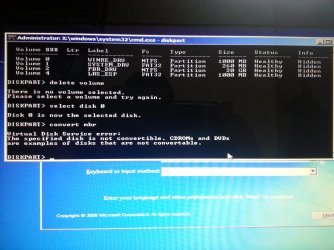
hi,
thanks for the tutorial.
I tried to install win7 on my laptop with pre-installed win8. as you can from my attachment, I failed to proceed through step "convert mbn".
Unfortunately I have already deleted and formated the partition with win8 so I cannot follow the guide you provided in the link above.
do you have any solution for me?
thanks in advance
 

Attachments

  • 20130120_125021.jpg
    20130120_125021.jpg
    573.6 KB · Views: 877

My Computer

OS
win8 64
Hello guesswhoo, and welcome to Seven Forums.

The tutorial below may be best for this instead since you are wanting to downgrade to Windows 7.

Downgrade Windows 8 to Windows 7

Hope this helps, :)
Shawn
 

My Computer

Computer type
PC/Desktop
Computer Manufacturer/Model Number
Self built custom
OS
64-bit Windows 11 Pro for Workstations
CPU
Intel i7-8700K OC'd to 5 GHz
Motherboard
ASUS ROG Maximus XI Formula Z390
Memory
64 GB (4x16GB) G.SKILL TridentZ RGB DDR4 3600 MHz
Graphics Card(s)
ASUS ROG-STRIX-GTX1080TI-O11G-GAMING
Sound Card
Integrated
Monitor(s) Displays
2 x Samsung Odyssey G7 27"
Screen Resolution
2560x1440
Hard Drives
1TB Samsung 990 PRO M.2,
4TB Samsung 990 PRO PRO M.2,
TerraMaster F8 SSD Plus NAS
PSU
Seasonic Prime Titanium 850W
Case
Thermaltake Core P3
Cooling
Corsair Hydro H115i
Keyboard
Logitech wireless K800
Mouse
Logitech MX Master 4
Internet Speed
2 Gb/s Download and 100 Mb/s Upload
Antivirus
Malwarebyte Anti-Malware Premium
Browser
Google Chrome
Other Info
Logitech Z625 speaker system,
Logitech BRIO 4K Pro webcam,
HP Color LaserJet Pro MFP M477fdn,
APC SMART-UPS RT 1000 XL - SURT1000XLI,
Galaxy S23 Plus phone
I'm unable to boot up Windows 8 GPT disk. I made a bootable usb that allows me to open Mini Partition Wizard though. Can I convert a partition from GPT to MBR using this?
 

My Computer

OS
Windows 8 Pro, Windows 7 Home Premium
Back
Top