Convert GPT Disk to MBR Disk

How to Convert GPT Disk to MBR Disk

   Information
A disk is a separate physical hard drive. This will show you how to convert a GPT (GUID - Globally Unique Identifer) disk to a MBR (Master Boot Record) disk in Windows Disk Manager or in a command prompt. By default Windows uses MBR disks.

While all Windows can boot from a MBR disk, you can only boot from a GPT disk if you have a operating system (see below) that supports GPT and your motherboard has a EFI BIOS and is enabled. Windows 7 and Vista does support booting from a GPT disk.

You can still have a separate GPT disk as a data disk if your operating system (see below) supports reading a GPT disk, even if your system disk that Windows is installed on is still a MBR disk.


   Note
Differences Between MBR and GPT Disks:
  • MBR disks are supported (readable) by all Windows operating systems.
    • GPT disks are only supported (readable) by Windows server 2003 SP1 +, XP 64-bit, Vista, Windows 7, Windows Server 2008.
  • MBR disks use the standard BIOS partition table.
    • GPT disks use extensible firmware interface (EFI).
  • MBR disks supports up to 2TB per single partition.
    • GPT disks supports up to 256TB per single partition in Windows.
  • MBR disks supports up to 4 Primary partitions or 3 Primary partitions and 1 Extended partition with up to 128 logical volumes in the extended partition.
    • GPT disks supports up to 128 Primary partitions.
  • Removable disks are MBR disks by default.
    • Removable disks cannot be converted into a GPT disk.
   Warning

  • You must be a administrator to do this in Windows.
  • Before you convert a disk, close any programs that are running on or from that disk.
  • Before you convert a disk, be sure to backup anything that you do not want to lose on that disk. Converting the disk requires that all partitions and volumes are deleted on the disk first.
  • If you disable the Disk Defragmenter service, then you will get the error below when you try to do anything in Disk Management. If you get this error, then make sure that the Disk Defragmenter service is enabled and set to only Manual.
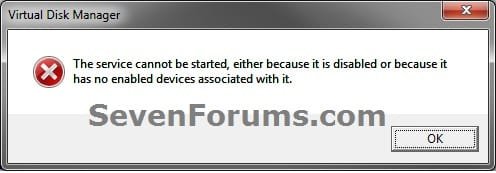
Error.jpg


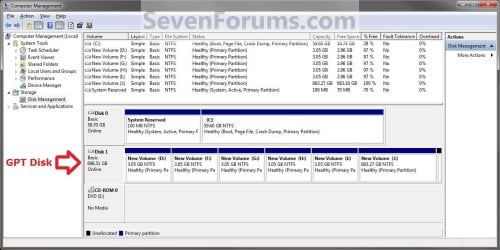
EXAMPLE: MBR disk vs GPT disk in Disk Management
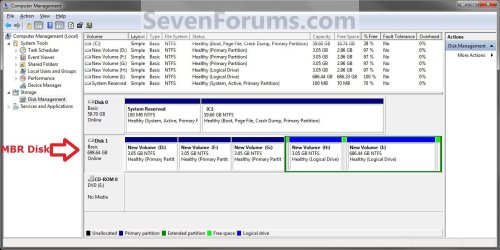
MBR_Disk_Example.jpg

GPT_Disk_Example.jpg


OPTION ONE

Through Disk Management


1. Open the Control Panel (icons view), and click on the Administrative Tools icon, then close the Control Panel window.

2. Click on Computer Management in Administrative Tools, then close the Administrative Tools window.

3. If prompted by UAC, click on Yes.

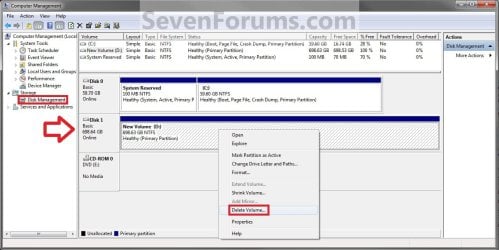
4. In the left pane under Storage, click on Disk Management. (See screenshot below)
Step1.jpg
5. In the disk (ex: Disk 1) that you want to convert to a MBR disk, right click on each partition and volume on the disk and click on Delete Volume until the whole disk is unallocated space. (See screenshot above)

6. Right click on the disk (ex: Disk 1) that you want to convert to a MBR disk, and click on Convert to MBR Disk if available. (See screenshot below)
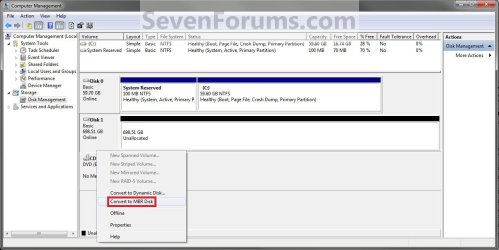
Step2.jpg
7. You can confirm that the disk is a MBR disk if you right click on the disk and it has Convert to GPT Disk instead now. (See screenshot below)
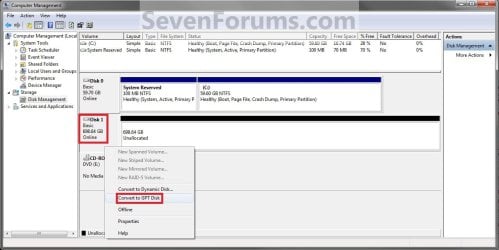
Step3.jpg
8. You can now create partitions on the now MBR disk if you like.

9. When done, close Disk Management.


OPTION TWO

Through a Command Prompt


1. Open an elevated command prompt, and go to step 3 below.

OR

2. Open a command prompt at boot, and go to step 3 below.
Command_MBR.jpg
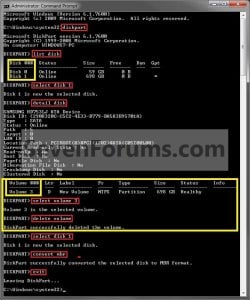
3. In the command prompt, type diskpart and press enter. (See screenshot above)

4. Type list disk and press enter.
NOTE: Make note of the disk number (ex: Disk 1) that you want to convert to a MBR disk.

5. Type select disk # and press enter.
NOTE: Substitute # with the actual disk number that you want to convert to a MBR disk. For example, select disk 1.

6. Do step 7 or 8 below for what you would like to do.

7. To Use the "Clean" Command to make Disk Unallocated
NOTE: This is the easiest method. It will wipe the disk clean all at once leaving it as unallocated space afterwards.
A) In the command prompt, type clean and press enter.

B) Go to step 9 below.
8. To Manually make Disk Unallocated
NOTE: This method has you manually delete each volume on the disk before converting the disk to MBR.
A) Type detail disk and press enter. If the disk does not have any volumes listed, then you can go to step 8E below.
NOTE: This will give you a list of all the volume numbers on the selected disk number that you will need to delete in steps 8B and 8C below.

B) Type select volume # and press enter.
NOTE: Substitute # with a volume number listed in step 8A. For example, select volume 3.

C) Type delete volume and press enter.

D) Repeat steps 8B and 8C for each volume # listed in step 8A until you have deleted all volume #'s.

E) When finished, type select disk # and press enter.
NOTE: You would use the same one from step 5 above. For example, select disk 1.

F) Go to step 9 below.
9. Type convert mbr and press enter.

10. Close the command prompt.

11. You can now create partitions on the now MBR disk if you like.
NOTE: Restart the computer if you did step 2 instead.
That's it,
Shawn


Last edited:
im pleased to announce successful dualboot
on machine that came with (asus) SAFEBOOT bios GTP partitions and preinstalled win8

now running win7 side-by-side with recovery partitions all intact. thank you sir
 

My Computer

OS
Win 7 Ultim x64
Great news Eltranced. :)
 

My Computer

Computer type
PC/Desktop
Computer Manufacturer/Model Number
Self built custom
OS
64-bit Windows 11 Pro for Workstations
CPU
Intel i7-8700K OC'd to 5 GHz
Motherboard
ASUS ROG Maximus XI Formula Z390
Memory
64 GB (4x16GB) G.SKILL TridentZ RGB DDR4 3600 MHz
Graphics Card(s)
ASUS ROG-STRIX-GTX1080TI-O11G-GAMING
Sound Card
Integrated
Monitor(s) Displays
2 x Samsung Odyssey G7 27"
Screen Resolution
2560x1440
Hard Drives
1TB Samsung 990 PRO M.2,
4TB Samsung 990 PRO PRO M.2,
TerraMaster F8 SSD Plus NAS
PSU
Seasonic Prime Titanium 850W
Case
Thermaltake Core P3
Cooling
Corsair Hydro H115i
Keyboard
Logitech wireless K800
Mouse
Logitech MX Master 4
Internet Speed
2 Gb/s Download and 100 Mb/s Upload
Antivirus
Malwarebyte Anti-Malware Premium
Browser
Google Chrome
Other Info
Logitech Z625 speaker system,
Logitech BRIO 4K Pro webcam,
HP Color LaserJet Pro MFP M477fdn,
APC SMART-UPS RT 1000 XL - SURT1000XLI,
Galaxy S23 Plus phone
Thank you for this tutorial - I didn't know about the "clean" command in the DISKPART utility. Had a hard drive where I couldn't remove the partitions in Windows Disk Management for anything (right-clicking on the partitions just have an option for Help), and the "clean" command saved me.
 

My Computer

Computer type
PC/Desktop
Computer Manufacturer/Model Number
Custom
OS
Windows 7 Premium 64-bit
CPU
AMD
Motherboard
MSI
Memory
16 GB
Graphics Card(s)
nVidia Geforce 660ti
You're welcome Jehartman, and welcome to Seven Forums. :)
 

My Computer

Computer type
PC/Desktop
Computer Manufacturer/Model Number
Self built custom
OS
64-bit Windows 11 Pro for Workstations
CPU
Intel i7-8700K OC'd to 5 GHz
Motherboard
ASUS ROG Maximus XI Formula Z390
Memory
64 GB (4x16GB) G.SKILL TridentZ RGB DDR4 3600 MHz
Graphics Card(s)
ASUS ROG-STRIX-GTX1080TI-O11G-GAMING
Sound Card
Integrated
Monitor(s) Displays
2 x Samsung Odyssey G7 27"
Screen Resolution
2560x1440
Hard Drives
1TB Samsung 990 PRO M.2,
4TB Samsung 990 PRO PRO M.2,
TerraMaster F8 SSD Plus NAS
PSU
Seasonic Prime Titanium 850W
Case
Thermaltake Core P3
Cooling
Corsair Hydro H115i
Keyboard
Logitech wireless K800
Mouse
Logitech MX Master 4
Internet Speed
2 Gb/s Download and 100 Mb/s Upload
Antivirus
Malwarebyte Anti-Malware Premium
Browser
Google Chrome
Other Info
Logitech Z625 speaker system,
Logitech BRIO 4K Pro webcam,
HP Color LaserJet Pro MFP M477fdn,
APC SMART-UPS RT 1000 XL - SURT1000XLI,
Galaxy S23 Plus phone
Sauvegarder sous DOS la partition Recovery ?

Bonjour l'Administrateur, Bonjour tout le monde,

je suis en train de tenter de réparer l'OS du pc portable d'un copain. pas d'accès à WINDOWS, le gros panneau blanc avec ERROR en rouge. il n'y a pas eu de dvd de sauvegarde de fait.!!
j'ai trouvé votre super forum, (merci google pour la traduction), avec un dvd de seven qui ne correspond pas au sien, j'ai donc réussi à accéder à Diskpart, avec la liste des disques et des partitions. Ma question, à ce niveau là puis je sauvegarder avec une commande DOS, la partition Recovery sur une clé USB, pour la réintégrer par la suite ? :sarc:


(je me suis exprimée le mieux possible, pour que google vous fasse une bonne traduction)

Merci..! je suis dedans depuis 4 jours..! :confused::confused:
 

My Computer

Computer type
PC/Desktop
OS
Windows 7 premium
Parlevouz English sevouzplais Rodney
 

My Computer

Computer type
PC/Desktop
Computer Manufacturer/Model Number
Golden Mk. I.4
OS
Windows 10 Pro x64 ; Xubuntu x64
CPU
Intel i7 860 @ 2.80 GHz O/C'ed to 4.0GHz
Motherboard
Gigabyte P55A-UD3R Rev.1. Award BIOS F13
Memory
16GB Corsair Vengance DDR3 @ 661 MHz Dual Channel (9-9-9-24)
Graphics Card(s)
EVGA NVidia GTX 560 1024MB
Sound Card
Realtek Integrated
Monitor(s) Displays
Dual Samsung SyncMaster 2494HS
Screen Resolution
1920*1080 and 1920*1080
Hard Drives
1*Samsung 840 EVO 120GB SSD;
1*OCZ Vertex 2 60GB SSD;
2*Samsung F3 SpinPoint 1TB in RAID0;
1*Samsung F1 SpinPoint 1TB;
2*Western Digital 1TB External USB 3.0
1*Western Digital 500GB External USB 3.0
1*Seagate 500GB External USB 2.0
PSU
Thermaltake ToughPower QFan 750W
Case
Thermaltake Element S VK60001W2Z
Cooling
Corsair H60 Water Cooling, 2*230mm and 2*80mm case fans
Keyboard
Logitech G110
Mouse
Logitech MX518
Administrator Hello, Hello everybody,

I'm trying to repair the OS laptop of a friend. no access to Windows, the big white sign with red ERROR. there was no dvd backup done.!
I found your great forum (thank you google for the translation), with a seven dvd that does not correspond to his, so I managed to access Diskpart with the list of disks and partitions. My question at this level then I save it with a DOS command, the Recovery partition on a USB stick for the back afterwards?

I will then convert the MBR and Windows 7 Installation

(I spoke the best possible, so that you make a good google translation)

Thank you ..! I'm in for 4 days ..!
 

My Computer

Computer type
PC/Desktop
OS
Windows 7 premium
Hello Lazebulone, and welcome to Seven Forums. :)

Does it have a GPT disk that you are trying to convert to MBR?

What brand and model number is the laptop?
 

My Computer

Computer type
PC/Desktop
Computer Manufacturer/Model Number
Self built custom
OS
64-bit Windows 11 Pro for Workstations
CPU
Intel i7-8700K OC'd to 5 GHz
Motherboard
ASUS ROG Maximus XI Formula Z390
Memory
64 GB (4x16GB) G.SKILL TridentZ RGB DDR4 3600 MHz
Graphics Card(s)
ASUS ROG-STRIX-GTX1080TI-O11G-GAMING
Sound Card
Integrated
Monitor(s) Displays
2 x Samsung Odyssey G7 27"
Screen Resolution
2560x1440
Hard Drives
1TB Samsung 990 PRO M.2,
4TB Samsung 990 PRO PRO M.2,
TerraMaster F8 SSD Plus NAS
PSU
Seasonic Prime Titanium 850W
Case
Thermaltake Core P3
Cooling
Corsair Hydro H115i
Keyboard
Logitech wireless K800
Mouse
Logitech MX Master 4
Internet Speed
2 Gb/s Download and 100 Mb/s Upload
Antivirus
Malwarebyte Anti-Malware Premium
Browser
Google Chrome
Other Info
Logitech Z625 speaker system,
Logitech BRIO 4K Pro webcam,
HP Color LaserJet Pro MFP M477fdn,
APC SMART-UPS RT 1000 XL - SURT1000XLI,
Galaxy S23 Plus phone
yes, the hard disk is GPT.
s it is an ASUS A301 Series
 

My Computer

Computer type
PC/Desktop
OS
Windows 7 premium
If you were wanting to do a factory recovery, then you might see if using Method One below may allow you to use the recovery partition to do so.

ASUSTeK Computer Inc. -Support-

Method One
Using the Recovery Partition(on selected models)
1. Press < F9 > during bootup.
2. Press [Enter] to select Windows Setup [EMS Enabled].
3. Select the language you want to recover and click Next.
4. Read the ASUS Preload Wizard messages and click Next.
5. Select a partition option and click Next. Partition options:

Recover Windows to first partition only.
This option deletes only the first partition and allows you to keep other partitions, and to create a new system partition as drive "C".
Recover Windows to entire HD.
This option deletes all partitions from your hard disk drive and creates a new system partition as drive "C".
Recover Windows to entire HD with two partitions.
This option deletes all partitions from your hard drive and creates two new partitions "C" (25%) and "D" (75%).
6. Follow the onscreen instructions to complete the recovery process
 

My Computer

Computer type
PC/Desktop
Computer Manufacturer/Model Number
Self built custom
OS
64-bit Windows 11 Pro for Workstations
CPU
Intel i7-8700K OC'd to 5 GHz
Motherboard
ASUS ROG Maximus XI Formula Z390
Memory
64 GB (4x16GB) G.SKILL TridentZ RGB DDR4 3600 MHz
Graphics Card(s)
ASUS ROG-STRIX-GTX1080TI-O11G-GAMING
Sound Card
Integrated
Monitor(s) Displays
2 x Samsung Odyssey G7 27"
Screen Resolution
2560x1440
Hard Drives
1TB Samsung 990 PRO M.2,
4TB Samsung 990 PRO PRO M.2,
TerraMaster F8 SSD Plus NAS
PSU
Seasonic Prime Titanium 850W
Case
Thermaltake Core P3
Cooling
Corsair Hydro H115i
Keyboard
Logitech wireless K800
Mouse
Logitech MX Master 4
Internet Speed
2 Gb/s Download and 100 Mb/s Upload
Antivirus
Malwarebyte Anti-Malware Premium
Browser
Google Chrome
Other Info
Logitech Z625 speaker system,
Logitech BRIO 4K Pro webcam,
HP Color LaserJet Pro MFP M477fdn,
APC SMART-UPS RT 1000 XL - SURT1000XLI,
Galaxy S23 Plus phone
hey not, otherwise there would be no problems, I can not restore. ====>
- Language choice
- Choice restoration windows
- Answer: are you sure you want to start restoring ...etc

a DOS window illuminates (x/windows/system32/diskpart

it disappears and gives way to a completely white screen with red letters written in ERROR.

in the blue banner of the screen indicating it there
[diskpart / sx: \ tools \ formatScript172ce.txt] meet error.
 

My Computer

Computer type
PC/Desktop
OS
Windows 7 premium

My Computer

Computer type
PC/Desktop
Computer Manufacturer/Model Number
Self built custom
OS
64-bit Windows 11 Pro for Workstations
CPU
Intel i7-8700K OC'd to 5 GHz
Motherboard
ASUS ROG Maximus XI Formula Z390
Memory
64 GB (4x16GB) G.SKILL TridentZ RGB DDR4 3600 MHz
Graphics Card(s)
ASUS ROG-STRIX-GTX1080TI-O11G-GAMING
Sound Card
Integrated
Monitor(s) Displays
2 x Samsung Odyssey G7 27"
Screen Resolution
2560x1440
Hard Drives
1TB Samsung 990 PRO M.2,
4TB Samsung 990 PRO PRO M.2,
TerraMaster F8 SSD Plus NAS
PSU
Seasonic Prime Titanium 850W
Case
Thermaltake Core P3
Cooling
Corsair Hydro H115i
Keyboard
Logitech wireless K800
Mouse
Logitech MX Master 4
Internet Speed
2 Gb/s Download and 100 Mb/s Upload
Antivirus
Malwarebyte Anti-Malware Premium
Browser
Google Chrome
Other Info
Logitech Z625 speaker system,
Logitech BRIO 4K Pro webcam,
HP Color LaserJet Pro MFP M477fdn,
APC SMART-UPS RT 1000 XL - SURT1000XLI,
Galaxy S23 Plus phone
Je regarde ça, Merci.:)
je vous dirai lorsque ça remarchera. (mais pas ce soir)

(English only please)

I look at it, thanks.
I will tell you when it walk again. (but not tonight)
 
Last edited by a moderator:

My Computer

Computer type
PC/Desktop
OS
Windows 7 premium

My Computer

Computer type
PC/Desktop
Computer Manufacturer/Model Number
HP Pavilion H8
OS
Windows 7 Ultimate 64 bit
CPU
Intel 7 quadcore
Motherboard
Pegatron 2AB5
Memory
14 ram DDR3
Graphics Card(s)
ASUS gtx 650
Sound Card
Realtec HD
Monitor(s) Displays
HP x22Led
Screen Resolution
1440x900 ( max 1920 x 1080 )
Hard Drives
WDC 500 Gb Sata 3
Hitachi 2T sata 3
several external drives .
PSU
HP 450 W
Case
HP
Cooling
regular fans
Keyboard
Microsoft Azerty
Mouse
Microsoft wireless
Internet Speed
cable high speed
Antivirus
Windows Defender ,
Browser
IE 11
Other Info
Several malware and spy killers ( MalwareBytes , Spy Hunter 4 , Eset on line , Adware Removal Tool ).
Junior Member​
power.png

reputation_green.gif

Join Date: May 2009

vista
86 posts
Local Time: 09:16 AM


user_offline.gif


there is a small mistake in title

>>> Maybe nonpasaran means it should technically be "How to Convert a GPT disk to an MBR disk." English grammar rule is that if the letter sounds like it begins with a vowel (M sounds like "em") then it is preceded by "an" rather than "a" even though the M stands for Master. Master would be preceded by an "a". Same with referring to a Registered Nurse as an R.N. (R sounds like "ahr".)

But since this is not a forum on English, most people wouldn't notice the difference ("Maybe I'm just blind this morning, but could you point out the mistake? I do not see one. :confused:")
 

My Computer

Computer type
PC/Desktop
Computer Manufacturer/Model Number
DELL
OS
Windows 7 Pro 64bit SP1
CPU
Intel® Core™ i7-4770 @ 3.40 GHz
Memory
12.0GB
Graphics Card(s)
AMD Radeon HD 7500 Series
Hard Drives
2 1TB HDD RAID1 Array
Antivirus
AdAware Anti-Virus Free Edition
Browser
Firefox
Thank you!!!

Thanks so much! I have been searching for this information because when I tried to upgrade my old laptop from Linux to Vista (was originally running WinXP with no recovery disk provided so I purchased a product key & borrowed a friend's genuine Vista install disk), I had to use an external hard drive because Zorin OS (Linux) screwed up my computer's HDD - changed it from NTFS to something else. And Zorin stopped working too. And I consider myself a computer whiz, but the one thing I can't do is tinker with the actual laptop - I would probably wreck it more if I tried to re-format the HDD. But when I selected the external hard drive during Vista setup, I found out that it was using a GPT partition scheme (I think that's what the setup DVD called it), and I was instructed to find one that was using MBR.

So this guide came in handy. Now I can put Vista on my external hard drive! Thank you!!!!!!! This guide saved me so much time! I can now continue my installation of Vista!

Sincerely,
hsevb
 

My Computer

Computer type
Laptop
Computer Manufacturer/Model Number
Dell
OS
Windows 8.1 64bit
Memory
6GB
Antivirus
AVG
Browser
Google Chrome
Hi Brink
Just a word in thanks and appreciation of this tutorial. I recently upgraded my grandson's desktop, motherboard was my first UEFI BIOS. Managed to make a mess of the first Hdd, which was the one from his original machine. Fitted a new Hdd using the parent Tutorial to this one, then followed this Tutorial here and saved the messed-up Hdd.
Grateful thanks, you saved me a 1TB drive for my next build!

EDIT:
I don't use this great Forum to learn grammar, I use it to obtain help with computing.;)
 

My Computer

Computer type
PC/Desktop
Computer Manufacturer/Model Number
bertison
OS
Windows 7/64 HPremium.
CPU
AMD FX-6300.
Motherboard
Asus M5A78L-M LE/USB3.
Memory
Corsair (2x4) GB DDR3 CMXGX3M2A1337CL9.
Graphics Card(s)
NVidia/Gigabyte GT730 (2GB) GDDR5.
Sound Card
Onboard.
Monitor(s) Displays
Iiyama PLE2407HDS.
Screen Resolution
1920 x 1280
Hard Drives
Desktop: 1TB. WD10EZEX-00BN5A0.
Zyxel nsa310 NAS: 2TB Seagate Barracuda 7200.14.
Cache Drive: Sandisk SDSSDRC032G.
Laptop Lenovo B50/80 128 GB SSD.
PSU
Corsair 750M.
Case
Coolermaster N300.
Cooling
FRONT: (2X) 140mm. TOP: (1x) 120mm. REAR: (1x) 120mm.
Keyboard
Logitech K290
Mouse
Trust Optical Wired
Internet Speed
15 Mb Down, 0.55 Up.
Antivirus
Kaspersky Total Security 2017, Hitman Pro.
Browser
Firefox.
Other Info
NETWORK:
Sky "Q box" and router.
Desktop & NAS - 30 Metres Cat6 Ethernet wired, via TP-Link 4-port switch.
Lenovo B50/80 Laptop, 2x Wileyfox phones, Lenovo TAB3-8 tablet - all wireless.
Grandchildren, their parents and friends as bandwidth 'parasites' at various times!
I'm glad it was able to help Bob. :)
 

My Computer

Computer type
PC/Desktop
Computer Manufacturer/Model Number
Self built custom
OS
64-bit Windows 11 Pro for Workstations
CPU
Intel i7-8700K OC'd to 5 GHz
Motherboard
ASUS ROG Maximus XI Formula Z390
Memory
64 GB (4x16GB) G.SKILL TridentZ RGB DDR4 3600 MHz
Graphics Card(s)
ASUS ROG-STRIX-GTX1080TI-O11G-GAMING
Sound Card
Integrated
Monitor(s) Displays
2 x Samsung Odyssey G7 27"
Screen Resolution
2560x1440
Hard Drives
1TB Samsung 990 PRO M.2,
4TB Samsung 990 PRO PRO M.2,
TerraMaster F8 SSD Plus NAS
PSU
Seasonic Prime Titanium 850W
Case
Thermaltake Core P3
Cooling
Corsair Hydro H115i
Keyboard
Logitech wireless K800
Mouse
Logitech MX Master 4
Internet Speed
2 Gb/s Download and 100 Mb/s Upload
Antivirus
Malwarebyte Anti-Malware Premium
Browser
Google Chrome
Other Info
Logitech Z625 speaker system,
Logitech BRIO 4K Pro webcam,
HP Color LaserJet Pro MFP M477fdn,
APC SMART-UPS RT 1000 XL - SURT1000XLI,
Galaxy S23 Plus phone
A gpt disk configured only as a data disk must be necessarily the ESP and MSR partitions too?
 

My Computer

Computer type
PC/Desktop
OS
Windows 7 Ultimate x64
A gpt disk configured only as a data disk must be necessarily the ESP and MSR partitions too?

Hello Lucbm, and welcome to Seven Forums.

If you were going to install Windows 7 with GPT and UEFI, then Windows 7 will automatically create the needed 100MB EFI System partition (ESP) and 128MB Microsoft Reserved partition (MSR) on the Windows disk.

A separate data disk can be formatted with GPT if you like, but it will not have a ESP or MSR partition. You would only really need a GPT data disk if you plan on having partitions larger than 2 TB in size, but you could use MBR or GPT if you like for it.

Hope this helps, :)
Shawn
 

My Computer

Computer type
PC/Desktop
Computer Manufacturer/Model Number
Self built custom
OS
64-bit Windows 11 Pro for Workstations
CPU
Intel i7-8700K OC'd to 5 GHz
Motherboard
ASUS ROG Maximus XI Formula Z390
Memory
64 GB (4x16GB) G.SKILL TridentZ RGB DDR4 3600 MHz
Graphics Card(s)
ASUS ROG-STRIX-GTX1080TI-O11G-GAMING
Sound Card
Integrated
Monitor(s) Displays
2 x Samsung Odyssey G7 27"
Screen Resolution
2560x1440
Hard Drives
1TB Samsung 990 PRO M.2,
4TB Samsung 990 PRO PRO M.2,
TerraMaster F8 SSD Plus NAS
PSU
Seasonic Prime Titanium 850W
Case
Thermaltake Core P3
Cooling
Corsair Hydro H115i
Keyboard
Logitech wireless K800
Mouse
Logitech MX Master 4
Internet Speed
2 Gb/s Download and 100 Mb/s Upload
Antivirus
Malwarebyte Anti-Malware Premium
Browser
Google Chrome
Other Info
Logitech Z625 speaker system,
Logitech BRIO 4K Pro webcam,
HP Color LaserJet Pro MFP M477fdn,
APC SMART-UPS RT 1000 XL - SURT1000XLI,
Galaxy S23 Plus phone
Back
Top