Solved Huge rebot time

@Gabe: The SFC output shows no errors - thanks for posting it.

Since Platypus has been doing most of the heavy lifting I'll defer to himher.
I suggest cleaning out the event log to make trouble shooting a bit easier for the rest of this session. The problem with that is there might be some useful information there. Once the event viewer is cleared, finding and posting events relative to the current environment will be a breeze.

Here's the tutorial: http://www.sevenforums.com/tutorials/320451-event-viewer-clear-all-events.html

Please wait before you take that step, give Platypus a chance to confirm that heshe doesn't need to look in the Event viewer logs.

Bill
.
 

My Computer

Computer type
Laptop
Computer Manufacturer/Model Number
HP Pavilion dv6-6c10us
OS
x64 (6.3.9600) Win8.1 Pro & soon dual boot x64 (6.1.7601) Win7_SP1 HomePrem
CPU
AMD A6-3420M APU with Radeon(tm) HD Graphics
Motherboard
Hewlett-Packard 1805
Memory
6.00 GB
Graphics Card(s)
AMD Radeon(TM) HD 6520G
Sound Card
(1) AMD High Definition Audio Device (2) IDT High Definiti
Monitor(s) Displays
HP W2072a 20" LCD (1600 x 900) @ 60 Hz
Screen Resolution
1366 x 768 x 32 bits (4294967296 colors) @ 60 Hz
Hard Drives
ST640LM0 00 HM641JI SATA Disk Device
Keyboard
Logitech k520 wireless KB
Mouse
Logitech m320 wireless mouse (bundled with KB)
Internet Speed
15/5 | 54 MB Wireless 'n'
Antivirus
Realtime: Defender or Avast | On-demand: Malwarebytes, ESET
Browser
IE 11 on Win8, IE 10 on win 7
Other Info
Media: [Gimp, Audacity, VLC] || Comm: [WEmail 2012, Skype] || Productivity: [OpenOffice,| Textpad] || Utils: [Sysinternals, cCleaner, Speccy, Defraggler]
I'll do that but just wondering ... why is it that my event viewer doesn't log every boot? isn't it supposed to log every single boot event?

@ PlatypusKnight

Thanks a lot and yes it worked, windows seems to be working as it should be(we reverted the change).

I was able to run C scheduled scan and scan didn't find any issues/error/bad sector etc.

What do you think about the first boot screenshot that I attached on page 6? also do you think I have hardware issues? (I'll try the Ram test and post back results but it may take a bit, I'm thinking to get help from a friend who has experience with opening laptops)

In the mean time can we make the windows boot and shutdown faster or atleast normal not so slow? I'm wondering if about all test results show my system is running fine and no issues with softwares then why is the boot and shutdown so slow?

But then again, thank you again for resolving the "no pre boot screen" issue!
 
Last edited:

My Computer

OS
Windows 7 Home Premium, Version 6.1 (Build 7601: Service Pack 1)
@ PlatypusKnight

Thanks a lot and yes it worked, windows seems to be working as it should be(we reverted the change).

Glad I could help. :dinesh:

I was able to run C scheduled scan and scan didn't find any issues/error/bad sector etc.

Good. Means everything is working as I expect.

What do you think about the first boot screenshot that I attached on page 6? also do you think I have hardware issues?

First boot screenshot on page 6? Did you mean page 5?
If you meant page 5 from CCleaner, I'd like you to screenshot every tab in [Startup]. You only gave me the [Windows] tab. I especially want [Scheduled Tasks] and [Internet Explorer].

There are only 3 hardware tests I could give you any assistance with. Testing your hard-drive, testing your RAM, and testing your CPU.
Your hard-drive came back clean, we're about to test your RAM as soon as you can find someone to unseat and reseat the memory modules, and then a CPU test will follow.

You may (and I really mean may, I don't expect it, but I wouldn't be surprised if it turns out to be true) have a corrupt memory stick.

My operating assumption is once you're satisfied that your system is physically fine you'll re-install Windows and start from scratch.

Remember how I said you're one of the big boys now and you will need to start acting like it more and more in the future? I don't know what sorts of alterations you've made to your system, and you don't either. :eek: There's nothing thus far that suggests that your system should be starting this slowly. Except this:
We're all tinkerers. You tinker. I tinker. Slartybart tinkers. The only difference is Slartybart and I (apologies for speaking for you here slarty) keep a log of all the changes we make. So they can be reversed (and we know what to reverse) should issues arise.

There was a time when Windows 7 was not as optimized as it is now. There was all sorts of advice on the web about which services to disable, and what to remove, and what to try in order to have Win 7 snappy and powerful. I know because I did it and spent many sleepless days and nights that blurred together wondering if I'd destroyed the system I spent so much money on and praying that if it would just please work I'd never ever mess with any settings again. Then I forget all that until I did it the next time. :banghead: I've now rescued numerous people from the effects of having done the same thing.

In my opinion Win 7 needs none of that tinkering to run optimally anymore. Some of those disabled services and other tinkering will cause problems because Microsoft did some tinkering themselves and their tinkering will conflict with our tinkering since we don't get to tell them what we did before we update our systems. For eg. it used to be a thing to disable Superfetch. I don't think that's a good idea. Superfetch learns what you want, then it learns when you usually want it, and then "caches" it before it thinks you want it. Your computer will feel faster as a result. I've seen many, many, people advise shutting this service off. That's not going to result in an optimal experience for most people.


Again, best thing for all parties would be to reinstall Windows, install all relevant updates, and you learn how to use Macrium or some other imaging software. Also, you'll be prepared if you get a new computer or SSD and need to migrate (best practices suggest you should keep only Windows and installed programs on the C: partition) you'll already be prepared. Speaking of which, you can probably make your OS partition smaller and put all that hard drive space on another partition. I wouldn't have my OS partition constantly being filled with stuff I download. I would move my torrent directory to a media partition or a separate drive. Again, that way if you need to move to another computer, or if you need to reimage, or recover from malware, or whatever the issue, your data is not on the OS partition.

I have a log on my external HD where I notate every significant change I make to my computer. So if something starts acting funny, I can go back through my log and by process of elimination sometimes (this is far from foolproof) work out what is conflicting with what to cause this unexpected funny acting.

You need to start following this practice as well. Apologies if I sound preachy. Trust me though, a little pain now will save you all sorts of headaches in the future. I haven't had to reinstall Windows in over a year. I used to reinstall Windows every 2 months give or take. :o That's 2 days every 2 months sitting at my other laptop hating every second of it, and watching this one update, and then re-installing all the programs I like to use. Then trying to remember how I had everything set up. Then trying to recreate what it was like last time and failing and being frustrated because after all the updates and installing it just didn't feel right. :picnic:
(Can I get a Amen?) I wasn't following best practices.
The last time that happened I'd just landed a big client on oDesk and if I didn't have my backup laptop I would have missed the deadline, lost that client, and ruined my reputation. All of us have to learn. In contrast, last time I did something stupid, I mean tinkered, all I did was fire up Macrium and load my last image a process that took me all of 8 mins. I know because Macrium said it took 8 mins.
It takes me longer to copy movies from my harddrive to my external. :cool:

(I'll try the Ram test and post back results but it may take a bit, I'm thinking to get help from a friend who has experience with opening laptops)

Ok. No problem. Did you watch those youtube videos?

In the mean time can we make the windows boot and shutdown faster or atleast normal not so slow? I'm wondering if about all test results show my system is running fine and no issues with softwares then why is the boot and shutdown so slow?

I'll put that in my next post.
 

My Computer

Computer type
Laptop
Computer Manufacturer/Model Number
HP
OS
Dual Boot Win 8.1 x64; Win 7 SP1 x64
CPU
i7-3610QM @ 2.3 GHz
Motherboard
Hewlett-Packard 181C (U3E1)
Memory
8 GB Dual-Channel DDR3 @ 798MHz
Graphics Card(s)
Intel HD Graphics 4000
Hard Drives
Hitachi HTS547575A9E384 SCSI Disk Device;
WD Elements 1042 USB Device
Antivirus
Microsoft Security Essentials; Comodo Firewall w/ Defense +
Attempt to speed up Boot

Well here's two things we could do to attempt to speed up boot.

But first please right click the Ultimate Windows Tweaker you downloaded before and click [Run as administrator].

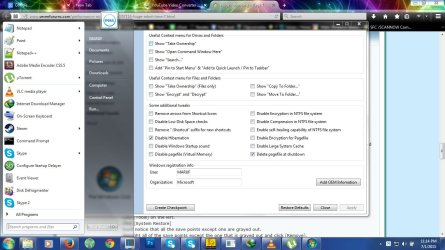
Click the [Additional Tweaks] tab and post a screenshot.

I'm looking to see if these options are checked because they slow boot and shutdown:

  • Enable Encryption for Pagefile
  • Enable Large System Cache
  • Delete pagefile at shutdown

It's very important that you follow these next steps in precisely the order I outline. Also, you should do this only when you have time. Maybe right before going to bed as the system will be unusable for a while.

Please close everything, every window, every program except for Ultimate Windows Tweaker. You're going to need to reboot at several points in this process and I don't want you to lose data.

Open Ultimate Windows Tweaker (if it's already open that's fine).
Click [Additional Tweaks].
We're going to create a Restore Point.
Click [Create Checkpoint].
After you click [Yes] wait a bit, and you'll get a notification that the System restore point has been created successfully.
Close Ultimate Windows Tweaker.

Open CCleaner.
Click [Tools] on the left.
Click [System Restore]
You'll notice that all the save points except one are grayed out.
Highlight all of the save points except the one that is grayed out and click [Remove].

Now we're going to disable Hibernation.
@SlartyBart suggested you use this tutorial to disable hibernation.
http://www.sevenforums.com/tutorials/819-hibernate-enable-disable.html
Feel free to do so.

For me, it's easier to use the Ultimate Windows Tweaker.
If you're using UWT, navigate to the [Additional Tweaks] tab.
First click [Create Checkpoint] so if something goes wrong you have a(nother) save point to revert to.
After you click [Yes] wait a bit, and you'll get a notification that the System restore point has been created successfully.

Check [Disable Hibernation]

Disable the Page file.
On the [Additional Tweaks] tab please also check the [Disable pagefile (Virtual Memory)] box.

Click [Apply].
Windows will tell you that you need to reboot. Allow it to reboot.

Run CCleaner
I want you to check these options:
Everything under the Windows Tab EXCEPT [Network Passwords] or [Environment Path].
Do not check
[Network Passwords] or [Environment Path].

Now full disclosure. As @slartybart mentioned before, it can be useful to burn the old event logs so we can isolate contemporary issues. This is precisely what we're going to do here. This will wipe all the event viewer logs. Now we can watch the event viewer and identify any issues as they arrive.

You are also going to lose any folder modifications you've made. If you have special folder modifications and you desperately need to keep them that way, you can feel free to uncheck [Custom Files and Folders].

Click the [Applications] tab.
Make sure nothing under [Games] is checked. Make sure [Windows DRM Cache] is NOT CHECKED. I'm sure you don't want to lose and need to reactivate any of your games. :)

If you don't have these options under the [Applications] tab in CCleaner, don't panic that's even better.

After checking all those options click [Analyze] and then click [Run Cleaner].
The Wipe Free Space portion is going to make this process take forever. I wouldn't be surprised if it needs 4-5 hours to complete this process. Maybe take a nap. :sleepy:


Reboot your machine.
This startup should be slightly slower than normal. It is even possible that the system will get hung on the shutdown part and need you to physically turn it off. Not a problem. However, DO NOT manually power off the system while the GUI is still on the screen. The only way you power it off is if you have a black screen (or the Dell screen) and you move the mouse and the trackpad and there is absolutely no activity on the screen. To manually power off, hold down the power button until the system powers down.

After boot
Re-enable the Page file.
Ultimate Windows Tweaker
[Additional Tweaks]
Uncheck [Disable pagefile (Virtual Memory)]
Reboot the system.

Click the [Start] button.
Right click [Computer] -- It's on the right.
Click [Properties]. An explorer window should open.
Click [Advanced system settings] on the left.
Under [Performance] click [Settings].
Click the [Advanced] tab.
Under [Virtual memory] check and see if there is a number beside [Total paging size for all drives]
Click [Change] - It is likely [Automatically manage paging file size for all drives] is already checked.

I'm not going to argue what the optimal settings for a page file are, I just want to see that it's either system managed, or there is a number greater than 1000 beside C:.
Please screenshot and post this window.
Click [OK].


Run UltraDefrag.
Use Full Optimization on the C: drive. (This will take some time). Maybe another nap. :sleepy:
When that's done use the [Optimize Master File Table] option.
Then click the [Boot Time Scan] option. This will add a boot defrag operation and defrag those parts of the partition that defrag can't touch when the system has logged them for use.
I would leave the boot time scan on for the text 3 restarts. After that you can turn it off until you want it again.

Restart the Computer.

We should see some speed improvements in the boot process over the next 3 to 4 boot cycles. If we don't I'll gently remind that you that when the other two system scans come back clean you should reinstall Windows. :D
 

My Computer

Computer type
Laptop
Computer Manufacturer/Model Number
HP
OS
Dual Boot Win 8.1 x64; Win 7 SP1 x64
CPU
i7-3610QM @ 2.3 GHz
Motherboard
Hewlett-Packard 181C (U3E1)
Memory
8 GB Dual-Channel DDR3 @ 798MHz
Graphics Card(s)
Intel HD Graphics 4000
Hard Drives
Hitachi HTS547575A9E384 SCSI Disk Device;
WD Elements 1042 USB Device
Antivirus
Microsoft Security Essentials; Comodo Firewall w/ Defense +
Thank you for your advises. I'll try to follow them after issues are resolved.

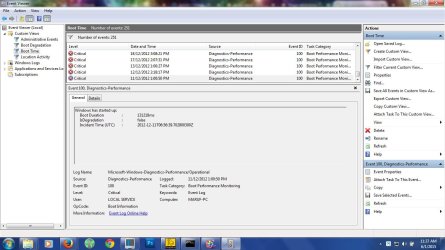
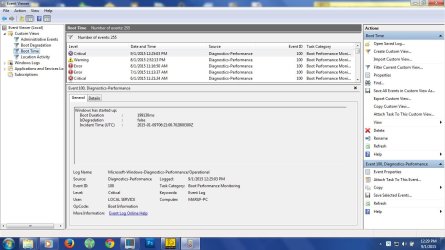
I was talking about this screenshot, I think it displays the very first boot time for this laptop and you'll see that even on first boot .. error and quite long loading time and if that's the case then its probably not the windows? or is it damaged from the beginning? or hardware .... I'm just guessing here.

And additional tweaks screenshot attached.

I'll post back results after running suggested tests.
 

Attachments

  • first boot.jpg
    first boot.jpg
    117.1 KB · Views: 2
  • additional-tweaks.jpg
    additional-tweaks.jpg
    129.8 KB · Views: 1

My Computer

OS
Windows 7 Home Premium, Version 6.1 (Build 7601: Service Pack 1)
Good work all.

I don't mind your speaking on my behalf KYHI.
  1. Yes, I tinker.
  2. Yes I keep track of changes.
  3. No I can't remember where I put that list

Gabe, If you recall, I posted an event viewer clean tutorial, but deferred to KYHI in case event entries might help.

It wasn't important to the issue, just some housekeeping. I run it about once a year, when my system has been running smooth for a while. That way I don't lose any events that might help determine the cause of an issue. It isn't a regular maintenance item and if you never clean up your event logs, that's ok too.

Bill
.
 

My Computer

Computer type
Laptop
Computer Manufacturer/Model Number
HP Pavilion dv6-6c10us
OS
x64 (6.3.9600) Win8.1 Pro & soon dual boot x64 (6.1.7601) Win7_SP1 HomePrem
CPU
AMD A6-3420M APU with Radeon(tm) HD Graphics
Motherboard
Hewlett-Packard 1805
Memory
6.00 GB
Graphics Card(s)
AMD Radeon(TM) HD 6520G
Sound Card
(1) AMD High Definition Audio Device (2) IDT High Definiti
Monitor(s) Displays
HP W2072a 20" LCD (1600 x 900) @ 60 Hz
Screen Resolution
1366 x 768 x 32 bits (4294967296 colors) @ 60 Hz
Hard Drives
ST640LM0 00 HM641JI SATA Disk Device
Keyboard
Logitech k520 wireless KB
Mouse
Logitech m320 wireless mouse (bundled with KB)
Internet Speed
15/5 | 54 MB Wireless 'n'
Antivirus
Realtime: Defender or Avast | On-demand: Malwarebytes, ESET
Browser
IE 11 on Win8, IE 10 on win 7
Other Info
Media: [Gimp, Audacity, VLC] || Comm: [WEmail 2012, Skype] || Productivity: [OpenOffice,| Textpad] || Utils: [Sysinternals, cCleaner, Speccy, Defraggler]
I just finished running ultra defrag full optimization, took like 3 hours I think ... on C drives status it shows "Optmized, 3 passes needed" what does it mean?

MFT ran without any issues ... took like 5 sec I think

Gonna run boot scan now. Cant use boot scan .. the button is disabled (is it because I'm using portable version)?

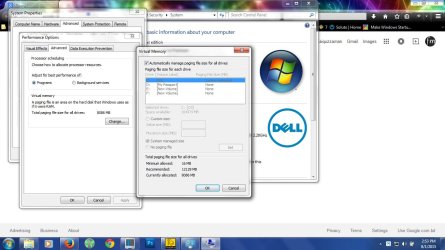
Here is the virtual memory tabs screenshot btw its set on system managed and strange thing is recommend is 12GB and its auto allocating 8GB .. why is that? would manual help(I'm thinking something like 16GB)?

Also the program "Soluto seem to have some good insights, noticed a few recommendation but I don't understand them all so I would like to share with your guys before making any changes etc) but sadly I was unable to find any share options .. any ideas?
 

Attachments

  • virtual memory.jpg
    virtual memory.jpg
    100.8 KB · Views: 2
Last edited:

My Computer

OS
Windows 7 Home Premium, Version 6.1 (Build 7601: Service Pack 1)
I just finished running ultra defrag full optimization, took like 3 hours I think ... on C drives status it shows "Optmized, 3 passes needed" what does it mean?

It means UltraDefrag went over your hard drive three times from start to finish in order to complete the optimization.

How long did the CCleaner process take?

MFT ran without any issues ... took like 5 sec I think

Good.

Gonna run boot scan now. Cant use boot scan .. the button is disabled (is it because I'm using portable version)?
Absolutely. I forgot that you had the portable version. Please download and install the latest version of UltraDefrag. Remember you do not have an Itanium processor.

Here is the virtual memory tabs screenshot btw its set on system managed and strange thing is recommend is 12GB and its auto allocating 8GB .. why is that? would manual help(I'm thinking something like 16GB)?

I wouldn't mess with it. If it actually needs 16 GB, Windows will enlarge the pagefile when it needs to. For a long time I set a manual size of 1 gigabyte and Windows ran fine. I set mine to system managed yesterday when I posted these suggestions to you, and Windows automatically set mine the same way it set yours. This is fine.

Also the program "Soluto seem to have some good insights, noticed a few recommendation but I don't understand them all so I would like to share with your guys before making any changes etc) but sadly I was unable to find any share options .. any ideas?

I haven't used Soluto in over a year. Do screenshots work?
 

My Computer

Computer type
Laptop
Computer Manufacturer/Model Number
HP
OS
Dual Boot Win 8.1 x64; Win 7 SP1 x64
CPU
i7-3610QM @ 2.3 GHz
Motherboard
Hewlett-Packard 181C (U3E1)
Memory
8 GB Dual-Channel DDR3 @ 798MHz
Graphics Card(s)
Intel HD Graphics 4000
Hard Drives
Hitachi HTS547575A9E384 SCSI Disk Device;
WD Elements 1042 USB Device
Antivirus
Microsoft Security Essentials; Comodo Firewall w/ Defense +
"How long did the CCleaner process take?"
* It took about 25-30 min I think

"I wouldn't mess with it. If it actually needs 16 GB, Windows will enlarge the pagefile when it needs to. For a long time I set a manual size of 1 gigabyte and Windows ran fine. I set mine to system managed yesterday when I posted these suggestions to you, and Windows automatically set mine the same way it set yours. This is fine."
* That was exactly my thought but I'm still wondering if windows itself is recommending 12GB and its "by itself" setting virtual memory to 8GB, why is it acting strange? although it maybe irrelevant to this topic but I'm wondering if this could somehow be related to the boot issue maybe? thoughts?

Attached are the soluto screenshots (there is way too much info to screenshot all ... I added as many possible (22 SS) in the zip file)
 

Attachments

My Computer

OS
Windows 7 Home Premium, Version 6.1 (Build 7601: Service Pack 1)
"How long did the CCleaner process take?"
* It took about 25-30 min I think
Ok.

* That was exactly my thought but I'm still wondering if windows itself is recommending 12GB and its "by itself" setting virtual memory to 8GB, why is it acting strange? although it maybe irrelevant to this topic but I'm wondering if this could somehow be related to the boot issue maybe? thoughts?

Not related. Says the same on my machine. I changed my rig to mirror your settings.

Attached are the soluto screenshots (there is way too much info to screenshot all ... I added as many possible (22 SS) in the zip file)

I will look into this.

Questions:

  1. How are you timing the boot?
  2. Did you have a time frame for your friend to open and physically inspect the RAM modules?
 

My Computer

Computer type
Laptop
Computer Manufacturer/Model Number
HP
OS
Dual Boot Win 8.1 x64; Win 7 SP1 x64
CPU
i7-3610QM @ 2.3 GHz
Motherboard
Hewlett-Packard 181C (U3E1)
Memory
8 GB Dual-Channel DDR3 @ 798MHz
Graphics Card(s)
Intel HD Graphics 4000
Hard Drives
Hitachi HTS547575A9E384 SCSI Disk Device;
WD Elements 1042 USB Device
Antivirus
Microsoft Security Essentials; Comodo Firewall w/ Defense +
Re: Soluto.

Sorry - missed your earlier post. I don't see anything in the Soluto screenshots to be concerned about. Nothing that's taking a huge amount of time to load. There's a few items that could be removed but that's optional and won't help improve boot time significantly.
 

My Computer

Computer type
Laptop
Computer Manufacturer/Model Number
ASUS
OS
Microsoft Windows 7 Home Premium 64-bit 7601 Multiprocessor Free Service Pack 1
CPU
AMD C-60 APU with Radeon(tm) HD Graphics
Motherboard
ASUSTeK COMPUTER INC. X501U
Memory
4.00 GB
Graphics Card(s)
AMD Radeon HD 6290 Graphics
Sound Card
(1) AMD High Definition Audio Device (2) Realtek High Defi
Screen Resolution
1366 x 768 x 32 bits (4294967296 colors) @ 60 Hz
Hard Drives
Hitachi HTS545050A7E380 SATA Disk Device
Antivirus
Comodo CIS & FW, SecureAplus App Whitelisting, Threatfire
Browser
Cyberfox 64bit, Opera 64bit, Airfox
Other Info
Spy-The-Spy, HitmanPro.Alert, Norton Connect Safe, MJRegWatcher, BitDefender TrafficLight, Voodoo Shield, Zemana AntiMalware
Soluto again

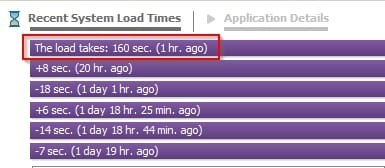
Your screenshots show boot takes 1 min 40 secs.

Compare that with mine:

Load times.jpg


So yours looks okay!
 

My Computer

Computer type
Laptop
Computer Manufacturer/Model Number
ASUS
OS
Microsoft Windows 7 Home Premium 64-bit 7601 Multiprocessor Free Service Pack 1
CPU
AMD C-60 APU with Radeon(tm) HD Graphics
Motherboard
ASUSTeK COMPUTER INC. X501U
Memory
4.00 GB
Graphics Card(s)
AMD Radeon HD 6290 Graphics
Sound Card
(1) AMD High Definition Audio Device (2) Realtek High Defi
Screen Resolution
1366 x 768 x 32 bits (4294967296 colors) @ 60 Hz
Hard Drives
Hitachi HTS545050A7E380 SATA Disk Device
Antivirus
Comodo CIS & FW, SecureAplus App Whitelisting, Threatfire
Browser
Cyberfox 64bit, Opera 64bit, Airfox
Other Info
Spy-The-Spy, HitmanPro.Alert, Norton Connect Safe, MJRegWatcher, BitDefender TrafficLight, Voodoo Shield, Zemana AntiMalware
@ PlatypusKnight

"How are you timing the boot?"
*This is from the last boot record after all scans etc(yesterday):
Windows has started up:
Boot Duration : 80042ms
IsDegradation : false
Incident Time (UTC) : ‎2015‎-‎01‎-‎08T08:49:39.702800300Z

Today's boot record screenshot attached ... it took 1.90sec ... why is it so unstable? Also why does it always show critical status?


"Did you have a time frame for your friend to open and physically inspect the RAM modules?"
* Hopefully this Sunday.

@ Callender
Perhaps 1.40sec is ok but yesterday I asked a friend of mine to run the custom event "boot time" to test how long their boot takes .. he used windows 8.1, system config: 2.2ghz i3 4th gen with 4gb ram ... he has about same data/software's as me on the system and it took only 48sec to load.
I'm not a techie but I have better ram and gpu ... not sure about the processor as its i7 2nd gen(2gen gap) .. and mine take 1.40sec and the boot screen still shows error

I attached a note describing my concerns about the screenshots on soluto .. please check and let me know your thoughts on this.

*** some of the suggestions mentioned in soluto ... cant find those programs in ccleaner startup option or msconfig ... so if we're to disable them .. how to do that?

Any idea why the custom event "boot time" shows error/critical etc on every boot record?
 

Attachments

  • details.txt
    details.txt
    3.1 KB · Views: 2
  • boot-09-01-2015.jpg
    boot-09-01-2015.jpg
    115.7 KB · Views: 1
Last edited:

My Computer

OS
Windows 7 Home Premium, Version 6.1 (Build 7601: Service Pack 1)
You're not going to win a boot up race with a Win 8 machine.

They boot significantly faster than Win 7. Don't even compare the two.
 

My Computer

Computer type
Laptop
Computer Manufacturer/Model Number
HP
OS
Dual Boot Win 8.1 x64; Win 7 SP1 x64
CPU
i7-3610QM @ 2.3 GHz
Motherboard
Hewlett-Packard 181C (U3E1)
Memory
8 GB Dual-Channel DDR3 @ 798MHz
Graphics Card(s)
Intel HD Graphics 4000
Hard Drives
Hitachi HTS547575A9E384 SCSI Disk Device;
WD Elements 1042 USB Device
Antivirus
Microsoft Security Essentials; Comodo Firewall w/ Defense +
You're not going to win a boot up race with a Win 8 machine.

They boot significantly faster than Win 7. Don't even compare the two.

@PlatypusKnight: You have very good eyes, I missed the fact that the friend's machine was Win8.
It is impossible to compare the two boot benchmarks, the same way you cannot compare a sports car and a race car.

Callender gave Gabe a fair comparison - there isn't much else to do.

Upgrading to Win8 or wait for Win10 will get the boot times Gabe wants. I tend to wait a few months to upgrade to give MS a chance to fix things in the RTM version. Most of the 'bugs' in the first Service Pack (or update in the case of Win8).

I'm not sure why people focus so much on this - other performance is more important, most of the speedy boot times people see stem from technology such as Intel Rapid Start, improved hibernation and fast boot, or faster devices (hybrid disk drives and SSDs).
 
Last edited:

My Computer

Computer type
Laptop
Computer Manufacturer/Model Number
HP Pavilion dv6-6c10us
OS
x64 (6.3.9600) Win8.1 Pro & soon dual boot x64 (6.1.7601) Win7_SP1 HomePrem
CPU
AMD A6-3420M APU with Radeon(tm) HD Graphics
Motherboard
Hewlett-Packard 1805
Memory
6.00 GB
Graphics Card(s)
AMD Radeon(TM) HD 6520G
Sound Card
(1) AMD High Definition Audio Device (2) IDT High Definiti
Monitor(s) Displays
HP W2072a 20" LCD (1600 x 900) @ 60 Hz
Screen Resolution
1366 x 768 x 32 bits (4294967296 colors) @ 60 Hz
Hard Drives
ST640LM0 00 HM641JI SATA Disk Device
Keyboard
Logitech k520 wireless KB
Mouse
Logitech m320 wireless mouse (bundled with KB)
Internet Speed
15/5 | 54 MB Wireless 'n'
Antivirus
Realtime: Defender or Avast | On-demand: Malwarebytes, ESET
Browser
IE 11 on Win8, IE 10 on win 7
Other Info
Media: [Gimp, Audacity, VLC] || Comm: [WEmail 2012, Skype] || Productivity: [OpenOffice,| Textpad] || Utils: [Sysinternals, cCleaner, Speccy, Defraggler]
Aha .. sorry I didn't know that windows 8 is that much fast but anyway .. any idea about the boot error/critical status on event log? I mean whats causing it and possible fix?
 

My Computer

OS
Windows 7 Home Premium, Version 6.1 (Build 7601: Service Pack 1)
Disable items?

Well if I really try I can get boot time down to less than 45 seconds but there's no point in disabling stuff that is useful. I'll look at your list of questions - it will take time to provide an answer. In the meantime just a couple of examples.

You can disable Flash Player and Google Update checking and the like but that would mean that you need to manually check for updates. How do you feel about that? My preference is to manually update every time but if you don't keep an eye on the availability of new versions you risk having unpatched software on your system.
 

My Computer

Computer type
Laptop
Computer Manufacturer/Model Number
ASUS
OS
Microsoft Windows 7 Home Premium 64-bit 7601 Multiprocessor Free Service Pack 1
CPU
AMD C-60 APU with Radeon(tm) HD Graphics
Motherboard
ASUSTeK COMPUTER INC. X501U
Memory
4.00 GB
Graphics Card(s)
AMD Radeon HD 6290 Graphics
Sound Card
(1) AMD High Definition Audio Device (2) Realtek High Defi
Screen Resolution
1366 x 768 x 32 bits (4294967296 colors) @ 60 Hz
Hard Drives
Hitachi HTS545050A7E380 SATA Disk Device
Antivirus
Comodo CIS & FW, SecureAplus App Whitelisting, Threatfire
Browser
Cyberfox 64bit, Opera 64bit, Airfox
Other Info
Spy-The-Spy, HitmanPro.Alert, Norton Connect Safe, MJRegWatcher, BitDefender TrafficLight, Voodoo Shield, Zemana AntiMalware
Aha .. sorry I didn't know that windows 8 is that much fast but anyway .. any idea about the boot error/critical status on event log? I mean whats causing it and possible fix?

No need to apologize - now you know ;)

This might be a bit of overkill on data collection, but please follow OPTION ONE - DM log collector in
http://www.sevenforums.com/bsod-hel...ath-bsod-posting-instructions.html#post836073

Ignore the BSOD references in the tut. The tool collects a lot of information that might bear out something on the Boot events.

Sometimes the Events are given a level that seems more important than the actual event it's reporting. I won't know anymore until I see exactly what the event is reporting.

Bill
.
 

My Computer

Computer type
Laptop
Computer Manufacturer/Model Number
HP Pavilion dv6-6c10us
OS
x64 (6.3.9600) Win8.1 Pro & soon dual boot x64 (6.1.7601) Win7_SP1 HomePrem
CPU
AMD A6-3420M APU with Radeon(tm) HD Graphics
Motherboard
Hewlett-Packard 1805
Memory
6.00 GB
Graphics Card(s)
AMD Radeon(TM) HD 6520G
Sound Card
(1) AMD High Definition Audio Device (2) IDT High Definiti
Monitor(s) Displays
HP W2072a 20" LCD (1600 x 900) @ 60 Hz
Screen Resolution
1366 x 768 x 32 bits (4294967296 colors) @ 60 Hz
Hard Drives
ST640LM0 00 HM641JI SATA Disk Device
Keyboard
Logitech k520 wireless KB
Mouse
Logitech m320 wireless mouse (bundled with KB)
Internet Speed
15/5 | 54 MB Wireless 'n'
Antivirus
Realtime: Defender or Avast | On-demand: Malwarebytes, ESET
Browser
IE 11 on Win8, IE 10 on win 7
Other Info
Media: [Gimp, Audacity, VLC] || Comm: [WEmail 2012, Skype] || Productivity: [OpenOffice,| Textpad] || Utils: [Sysinternals, cCleaner, Speccy, Defraggler]
I personally never saw any quicker booting between 8-10 that 7 doesn't perform
All are pretty much the same,
The only difference is the lock screens on 8 and 10 which is to me more of a noticeable to me delay
But then again a lock screen in general on startup makes no practical sense either :/
 

My Computer

Computer type
PC/Desktop
Computer Manufacturer/Model Number
Custom assembled by me :}
OS
Win-7-Pro64bit 7-H-Prem-64bit
CPU
i7-5930K 2nd i9-9940x both water blocked VRM's too
Motherboard
ASUS SABERTOOTH X99 2nd ASUS x299 Apex
Memory
Trident-z 3200C14 2nd Trident-z 3600C16
Graphics Card(s)
EVGA 1080ti ftw3 2nd Titan Xp both water blocked
Sound Card
Built-in Realtek
Monitor(s) Displays
1-AOC G2460PG 24"G-Sync 144Hz/ 2nd 1-ASUS VG248QE 24" 144Hz
Screen Resolution
1920 x 1080 144Hz
Hard Drives
2-Samsung M.2 Evo & Evo Plus
2-Samsung 850 EVO 500GB SSD's/ 3-2.5 W.D. Black 1tb-&3-1tb/3-3.5 WD Black 1tb hdd's
PSU
EVGA SuperNOVA 1000-P2 2nd 1200-P2
Case
2-Corsair Obsidian Series 450D Black ATX Mid Tower
Cooling
Custom water loops
Keyboard
Logitech G710+/ 2nd Logitech G910
Mouse
2-RedDragon M901 Perdition 16400 dpi Gaming mouse = wired
Internet Speed
Comcast Ping 19ms 89.31mbps download speed 6.12mbps upload
Antivirus
Malwarebytes Pro/ Superantispyware Pro
Browser
FireFox & Pale moon
Other Info
2nd ASUS X299 Apex/Intel i9-9940x with Custom water loop/7H-Prem-x64/Corsair 450D case/Ram Trident-z 3600C16 4x8gb / Samsung970Evo plus 500gb SSD/Dual ssd EZ swap evo/PSU EVGA SuperNova 1200w-P2 80+Platinum/GPU Titan Xp /8-ML-140 on push-pull on 2-280GTX rads
Answers

Well I've tried to answer your questions re: Soluto and what it shows.

Answers here: View attachment Questions_v2.txt

When I suggested Soluto I'd assumed that it was the desktop app that I have used myself in the past. They've withdrawn that and this new version is different. Try clicking on a background app (orange entry) then click remove from boot - or alternatively delay.

Just try one entry to start with then reboot to see if the setting stuck. If it works - continue with your selections. If it doesn't - uninstall Soluto. Uninstall it anyway once you're done. Note: When I uninstalled it it left a folder behind in Program Data.

2015/01/09 21:59:37 Successfully deleted::
C:\ProgramData\Soluto


Like I said I don't see anything that will make a huge difference.
 

My Computer

Computer type
Laptop
Computer Manufacturer/Model Number
ASUS
OS
Microsoft Windows 7 Home Premium 64-bit 7601 Multiprocessor Free Service Pack 1
CPU
AMD C-60 APU with Radeon(tm) HD Graphics
Motherboard
ASUSTeK COMPUTER INC. X501U
Memory
4.00 GB
Graphics Card(s)
AMD Radeon HD 6290 Graphics
Sound Card
(1) AMD High Definition Audio Device (2) Realtek High Defi
Screen Resolution
1366 x 768 x 32 bits (4294967296 colors) @ 60 Hz
Hard Drives
Hitachi HTS545050A7E380 SATA Disk Device
Antivirus
Comodo CIS & FW, SecureAplus App Whitelisting, Threatfire
Browser
Cyberfox 64bit, Opera 64bit, Airfox
Other Info
Spy-The-Spy, HitmanPro.Alert, Norton Connect Safe, MJRegWatcher, BitDefender TrafficLight, Voodoo Shield, Zemana AntiMalware
Back
Top