Solved Installing a new ssd

Thanks, again. I'll keep you posted.

BTW, have you heard of Paragon's new Migrate OS to SSD program. Supposed to be a program that "does it all". $20 is not a bad price if it "does it all" seemlessly
I have that program and I have used it. If you don't mind the $20, I highly recommend it. Makes life really easy and keeps you from making mistakes. And it is very, very easy to use plus the result is perfect.

I have 4 SSDs and although I have done that stuff already a few times, nearly each time I made at first some mistake. That you avoid with the Paragon program. And especially for those that have the 100MB active boot partition, the program is a real relief.

For those that don't know what we are talking about: Paragon Migrate OS to SSD - Overview
 

My Computer

Computer Manufacturer/Model Number
HP, Dell, Gateway, Toshiba - 4 laptops and 2 desktops
OS
Vista, Windows7, Mint Mate, Zorin, Windows 8
CPU
from 1.6GHz Duo to i7
Monitor(s) Displays
2x HP w2207
Hard Drives
5x HDD, 7x SSD, 12x Externals
Keyboard
with trackball - no mices
Mouse
Trackball mice
Internet Speed
DSL 6000
Yeah, I saw that. If you want to try that and have difficulties with the German registration, let me know. Being German, I can help you. And the program is English anyhow.
 

My Computer

Computer Manufacturer/Model Number
HP, Dell, Gateway, Toshiba - 4 laptops and 2 desktops
OS
Vista, Windows7, Mint Mate, Zorin, Windows 8
CPU
from 1.6GHz Duo to i7
Monitor(s) Displays
2x HP w2207
Hard Drives
5x HDD, 7x SSD, 12x Externals
Keyboard
with trackball - no mices
Mouse
Trackball mice
Internet Speed
DSL 6000
The site says it's the English version...we'll see. The email they sent me is in English.
 

My Computer

OS
windows 7 ultimate 32bit
Let's see how you make out.
 

My Computer

Computer Manufacturer/Model Number
HP, Dell, Gateway, Toshiba - 4 laptops and 2 desktops
OS
Vista, Windows7, Mint Mate, Zorin, Windows 8
CPU
from 1.6GHz Duo to i7
Monitor(s) Displays
2x HP w2207
Hard Drives
5x HDD, 7x SSD, 12x Externals
Keyboard
with trackball - no mices
Mouse
Trackball mice
Internet Speed
DSL 6000
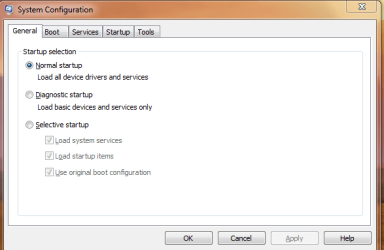
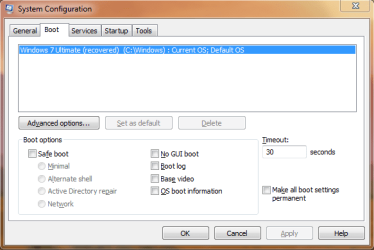
Well, I did it. I can't believe how quickly the process went with my free copy of Paragon Migrate OS to SSD. It took less than 1 hour. The only thing I had to do was adjust the BIOS to boot to my new SSD. The old C drive was re-labeled and the new SSD was labeled as C. I also had to use Diskpart to make the re-labeled old C drive inacive. I checked msconfig and it is correct.

For some reason, Paragon left about 60GB on the old C. Major stuff like windows and program folders. I'll reformat it since everything is working on my new SSD.

I'll also boot from the Win 7 repair CD to make sure all is ok.
 
Last edited:

My Computer

OS
windows 7 ultimate 32bit
For some reason, Paragon left about 60GB on the old C
I assume that was the complete content of your old C:. The tool only copies it and does not remove anything - at least as far as I remember.

Look like you are all set to go. If it is OK with you, I will (or you can) remind everybody of the chance to download the tool for free. There may be more people about to embark on SSDs.
 

My Computer

Computer Manufacturer/Model Number
HP, Dell, Gateway, Toshiba - 4 laptops and 2 desktops
OS
Vista, Windows7, Mint Mate, Zorin, Windows 8
CPU
from 1.6GHz Duo to i7
Monitor(s) Displays
2x HP w2207
Hard Drives
5x HDD, 7x SSD, 12x Externals
Keyboard
with trackball - no mices
Mouse
Trackball mice
Internet Speed
DSL 6000
OK, HELP. Win 7 repair CD doesn't recognize me new ssd and is asking me for drivers. What do I do??????
 

My Computer

OS
windows 7 ultimate 32bit
It probably cannot deal with the SSD - which is strange though because it is a normal Sata. What you could do is try to find a specific driver for your model SSD, load it on a flash drive and offer it to the repair program when it wants it.

I never had this happen to me, but I also never needed to repair because I rely 100% on my images. I don't think you have to repair anything either. As I can judge from here, your system was properly copied. But make an image asap (and also of the old C ) - just in case.
 

My Computer

Computer Manufacturer/Model Number
HP, Dell, Gateway, Toshiba - 4 laptops and 2 desktops
OS
Vista, Windows7, Mint Mate, Zorin, Windows 8
CPU
from 1.6GHz Duo to i7
Monitor(s) Displays
2x HP w2207
Hard Drives
5x HDD, 7x SSD, 12x Externals
Keyboard
with trackball - no mices
Mouse
Trackball mice
Internet Speed
DSL 6000
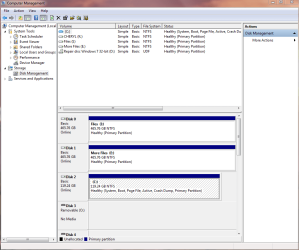
Please post back a screenshot of your full Disk Mgmt drive map with both drives connected. Use Snipping Tool in Start Menu, attach file using Paper Clip in Reply box.

Did you just burn the Repair CD or is it known to work? Try burning another using ImgBurn at 4x speed.

Why are you using the Repair CD - Are there issues with performance?
 
Everything was working fine. I set msconfig to normal to see if there were any problems. Then when I rebooted to the repair disk it came up to the old drive. Now it comes up to nothing.
 

My Computer

OS
windows 7 ultimate 32bit
Why did you set Msconfig to Normal? How would this reveal problems?

The Repair disk is for use when Win7 won't start, or System Restore won't work from Windows. If there is a reason it won't show your new SSD install, it can be revealed by looking at a Disk Mgmt screenshot.

Will Win7 boot now?

Need the screenshot requested.
 
But why do you muck around with the repair disk. Is there a problem?
 

My Computer

Computer Manufacturer/Model Number
HP, Dell, Gateway, Toshiba - 4 laptops and 2 desktops
OS
Vista, Windows7, Mint Mate, Zorin, Windows 8
CPU
from 1.6GHz Duo to i7
Monitor(s) Displays
2x HP w2207
Hard Drives
5x HDD, 7x SSD, 12x Externals
Keyboard
with trackball - no mices
Mouse
Trackball mice
Internet Speed
DSL 6000
OK, used the repair screen in the Win 7 repair disk and back to normal (Hopefully !!!). I'm taking a short break. Will post the snips shortly.
 

My Computer

OS
windows 7 ultimate 32bit
Here's the snips of msconfig and disk manager.

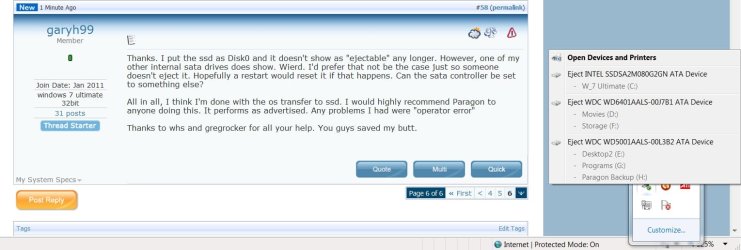
Another "dumb" question. Why, when I eject a memory stick, is my new ssd drive listed as ejectable?
 

Attachments

  • Capture.PNG
    Capture.PNG
    11.9 KB · Views: 6
  • Capture1.PNG
    Capture1.PNG
    14.1 KB · Views: 9
  • Capture3.PNG
    Capture3.PNG
    31.6 KB · Views: 23

My Computer

OS
windows 7 ultimate 32bit
Looks good. I would put the SSD on port0 - maybe that also solves this funny "eject" problem
 

My Computer

Computer Manufacturer/Model Number
HP, Dell, Gateway, Toshiba - 4 laptops and 2 desktops
OS
Vista, Windows7, Mint Mate, Zorin, Windows 8
CPU
from 1.6GHz Duo to i7
Monitor(s) Displays
2x HP w2207
Hard Drives
5x HDD, 7x SSD, 12x Externals
Keyboard
with trackball - no mices
Mouse
Trackball mice
Internet Speed
DSL 6000
Some mobos allow you to Safely Remove SSD/HD when you have SATA controller set to AHCI (hot-plugging).

Looks good. I would also plug SSD into DISK0.
 
Thanks. I put the ssd as Disk0 and it doesn't show as "ejectable" any longer. However, one of my other internal sata drives does show. Wierd. I'd prefer that not be the case just so someone doesn't eject it. Hopefully a restart would reset it if that happens. Can the sata controller be set to something else?

All in all, I think I'm done with the os transfer to ssd. I would highly recommend Paragon to anyone doing this. It performs as advertised. Any problems I had were "operator error"

Thanks to whs and gregrocker for all your help. You guys saved my butt.
 

My Computer

OS
windows 7 ultimate 32bit
All my drives are eject-able, it's part of what AHCI is.


click to enlarge
Eject.jpg
 

My Computer

Computer Manufacturer/Model Number
* BFK Customs *
OS
W 7 64-bit Ultimate
CPU
Intel Q9550 Yorkfield
Motherboard
ASUS P5Q Pro
Memory
8GB Dominator 8500C5D
Graphics Card(s)
ATI : XFX 5870
Sound Card
Realtek HD Audio 7-1
Monitor(s) Displays
1x 47" LCD HDMI & 3x 26" LCD HDMI
Screen Resolution
1920x1080P & 1920x1200
Hard Drives
1x 80GB Intel X25-M G2 SSD : 1x 500GB & 1x 640GB WD Caviar Black(s)
PSU
Corsair 620HX
Case
Cooler Master RC-690
Cooling
Tuniq Tower 120, 2x 140mm and 3x 120mm case fans
Keyboard
Microsoft 500
Mouse
Razer Diamondback 3G
Internet Speed
14 Mb/s
Other Info
1x Koutech 3Gb/s SATA HDD Hot Swap Rack
None of mine showed before I went on this quest. The only drives that showed were usb drives, nothing internal.
 

My Computer

OS
windows 7 ultimate 32bit
Back
Top