Just plain HELP!!!

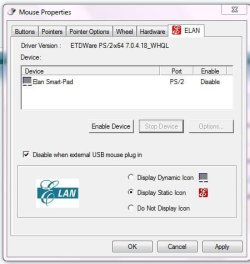
I have made a restore point and disabled as intructed, here is a screen grab of what I did - but it still works!!!!!
Elan.JPG
 

My Computer My Computer

At a glance

Microfsoft windows 7 home premium edition (64...Intel(R) pentium(R0 CPU p6200 @2.13GHz 2.132.00 GB (1.87 GB usable)
Computer Manufacturer/Model Number
Lenovo G560 lap top
OS
Microfsoft windows 7 home premium edition (64bit)
CPU
Intel(R) pentium(R0 CPU p6200 @2.13GHz 2.13
Motherboard
INTEL PCH HM55
Memory
2.00 GB (1.87 GB usable)
Sound Card
CX20671 smartaudio HD
Monitor(s) Displays
THINKPAD DISPLAY 1366 X 768 (32BIT)(60 Hz)
Hard Drives
WDC WD2500BEVT - 24A23TO
Internet Speed
150mbps
According to the manual for your laptop, Fn+F6 will disable/enable the touchpad.

enabled in start up still did not stop the little monster!!!!
 

My Computer My Computer

At a glance

Microfsoft windows 7 home premium edition (64...Intel(R) pentium(R0 CPU p6200 @2.13GHz 2.132.00 GB (1.87 GB usable)
Computer Manufacturer/Model Number
Lenovo G560 lap top
OS
Microfsoft windows 7 home premium edition (64bit)
CPU
Intel(R) pentium(R0 CPU p6200 @2.13GHz 2.13
Motherboard
INTEL PCH HM55
Memory
2.00 GB (1.87 GB usable)
Sound Card
CX20671 smartaudio HD
Monitor(s) Displays
THINKPAD DISPLAY 1366 X 768 (32BIT)(60 Hz)
Hard Drives
WDC WD2500BEVT - 24A23TO
Internet Speed
150mbps
Try re-enabling the Hotkeys Commands startup item as well.

You'll need to restart to turn back on the Hotkeys and Touchpad software at startup, then try the FN keys.
 
okay thank you I will try that.
 

My Computer My Computer

At a glance

Microfsoft windows 7 home premium edition (64...Intel(R) pentium(R0 CPU p6200 @2.13GHz 2.132.00 GB (1.87 GB usable)
Computer Manufacturer/Model Number
Lenovo G560 lap top
OS
Microfsoft windows 7 home premium edition (64bit)
CPU
Intel(R) pentium(R0 CPU p6200 @2.13GHz 2.13
Motherboard
INTEL PCH HM55
Memory
2.00 GB (1.87 GB usable)
Sound Card
CX20671 smartaudio HD
Monitor(s) Displays
THINKPAD DISPLAY 1366 X 768 (32BIT)(60 Hz)
Hard Drives
WDC WD2500BEVT - 24A23TO
Internet Speed
150mbps
Try re-enabling the Hotkeys Commands startup item as well.

You'll need to restart to turn back on the Hotkeys and Touchpad software at startup, then try the FN keys.


I have done that and gues what - it is still not disabled!!
I read some other suggestions on line about downloading a new driver, but, I have tried updating the driver, and get the reply that I have the lastest.
Is there any hope for me:cry:
 

My Computer My Computer

At a glance

Microfsoft windows 7 home premium edition (64...Intel(R) pentium(R0 CPU p6200 @2.13GHz 2.132.00 GB (1.87 GB usable)
Computer Manufacturer/Model Number
Lenovo G560 lap top
OS
Microfsoft windows 7 home premium edition (64bit)
CPU
Intel(R) pentium(R0 CPU p6200 @2.13GHz 2.13
Motherboard
INTEL PCH HM55
Memory
2.00 GB (1.87 GB usable)
Sound Card
CX20671 smartaudio HD
Monitor(s) Displays
THINKPAD DISPLAY 1366 X 768 (32BIT)(60 Hz)
Hard Drives
WDC WD2500BEVT - 24A23TO
Internet Speed
150mbps
Download the latest driver, then go into Device manager and Uninstall the driver, delete it's software if asked, then restart computer to use just the driver Win7 will auto-reinstall.

See if you then get any functionality with FKeys or can disable device in Dev Mgr.

If not, you can install the latest software and try all steps again, including the software checkbox for auto-disabling with USB mouse insertion.
 
will give it a go, becoming a obsession with me now - I will disable it or die trying :D
 

My Computer My Computer

At a glance

Microfsoft windows 7 home premium edition (64...Intel(R) pentium(R0 CPU p6200 @2.13GHz 2.132.00 GB (1.87 GB usable)
Computer Manufacturer/Model Number
Lenovo G560 lap top
OS
Microfsoft windows 7 home premium edition (64bit)
CPU
Intel(R) pentium(R0 CPU p6200 @2.13GHz 2.13
Motherboard
INTEL PCH HM55
Memory
2.00 GB (1.87 GB usable)
Sound Card
CX20671 smartaudio HD
Monitor(s) Displays
THINKPAD DISPLAY 1366 X 768 (32BIT)(60 Hz)
Hard Drives
WDC WD2500BEVT - 24A23TO
Internet Speed
150mbps
I don't give up either.

The last suggestion is standard, to reinstall malfunctioning drivers as well as their software if there is no Update.
 
Now I am totally lost, I downloaded the lastest driver, went into device manage to find unistall driver and there was no option to do that, so in desperatrion I hit the unistall this device button, restarted and blow me the dam thing is still funtional!!!
You know that ghost I thought was turning on the lappy - well I think it must like the touch pad!!!

Anthing else left to try?????
 

My Computer My Computer

At a glance

Microfsoft windows 7 home premium edition (64...Intel(R) pentium(R0 CPU p6200 @2.13GHz 2.132.00 GB (1.87 GB usable)
Computer Manufacturer/Model Number
Lenovo G560 lap top
OS
Microfsoft windows 7 home premium edition (64bit)
CPU
Intel(R) pentium(R0 CPU p6200 @2.13GHz 2.13
Motherboard
INTEL PCH HM55
Memory
2.00 GB (1.87 GB usable)
Sound Card
CX20671 smartaudio HD
Monitor(s) Displays
THINKPAD DISPLAY 1366 X 768 (32BIT)(60 Hz)
Hard Drives
WDC WD2500BEVT - 24A23TO
Internet Speed
150mbps
It will always reinstall the basic driver from C:\windows\system32\driverstore upon restart even if you tell it to Uninstall driver on the Update tab in Device manager as suggested, or uninstall the software in Control Panel.

So look in Control Panel>Programs and Features to see if the Touchpad software is installed.

Then make sure Hotkeys are enabled at startup and try disabling touchpad.

Then try reinstalling the Device software package and try disabling again both using the software checkbox, and hotkeys to disable.
 
Hello again, as you suspected yes the touchpad software is in programmes.
Now let me see if I have got this right
I have hotkeys ticked in startup so now I just disasble the touch pad as I did before.

One thing I am not clear on is how do I reinstall the device software package, where do I look to do this?
 

My Computer My Computer

At a glance

Microfsoft windows 7 home premium edition (64...Intel(R) pentium(R0 CPU p6200 @2.13GHz 2.132.00 GB (1.87 GB usable)
Computer Manufacturer/Model Number
Lenovo G560 lap top
OS
Microfsoft windows 7 home premium edition (64bit)
CPU
Intel(R) pentium(R0 CPU p6200 @2.13GHz 2.13
Motherboard
INTEL PCH HM55
Memory
2.00 GB (1.87 GB usable)
Sound Card
CX20671 smartaudio HD
Monitor(s) Displays
THINKPAD DISPLAY 1366 X 768 (32BIT)(60 Hz)
Hard Drives
WDC WD2500BEVT - 24A23TO
Internet Speed
150mbps
Thank you, do I just download the touch pad driver for the 64 bit and run it ?
 

My Computer My Computer

At a glance

Microfsoft windows 7 home premium edition (64...Intel(R) pentium(R0 CPU p6200 @2.13GHz 2.132.00 GB (1.87 GB usable)
Computer Manufacturer/Model Number
Lenovo G560 lap top
OS
Microfsoft windows 7 home premium edition (64bit)
CPU
Intel(R) pentium(R0 CPU p6200 @2.13GHz 2.13
Motherboard
INTEL PCH HM55
Memory
2.00 GB (1.87 GB usable)
Sound Card
CX20671 smartaudio HD
Monitor(s) Displays
THINKPAD DISPLAY 1366 X 768 (32BIT)(60 Hz)
Hard Drives
WDC WD2500BEVT - 24A23TO
Internet Speed
150mbps
YAY!!!!! doing happy little limpy dance - it's dead the touch pad has finally died:party:
Thank you so much for sticking with me and getting me through it, I will go away and stop bothering everyone now - until next time:D
 

My Computer My Computer

At a glance

Microfsoft windows 7 home premium edition (64...Intel(R) pentium(R0 CPU p6200 @2.13GHz 2.132.00 GB (1.87 GB usable)
Computer Manufacturer/Model Number
Lenovo G560 lap top
OS
Microfsoft windows 7 home premium edition (64bit)
CPU
Intel(R) pentium(R0 CPU p6200 @2.13GHz 2.13
Motherboard
INTEL PCH HM55
Memory
2.00 GB (1.87 GB usable)
Sound Card
CX20671 smartaudio HD
Monitor(s) Displays
THINKPAD DISPLAY 1366 X 768 (32BIT)(60 Hz)
Hard Drives
WDC WD2500BEVT - 24A23TO
Internet Speed
150mbps
good news , :D (not the going away bit!) ;)
 

My Computer My Computer

At a glance

Microsoft Windows 7 Home Premium 64-bit 7600IIx4 amd athelon 635 processor2x2gbati radeon HD 5450
Computer Manufacturer/Model Number
Hewlett packard/p6512uk
OS
Microsoft Windows 7 Home Premium 64-bit 7600
CPU
IIx4 amd athelon 635 processor
Motherboard
FOXCONN 2AA9
Memory
2x2gb
Graphics Card(s)
ati radeon HD 5450
Sound Card
(1) Realtek High Definition Audio (2) AMD High Definition
Monitor(s) Displays
samsung lcd tv 32"
Screen Resolution
1360x 768
Hard Drives
(1) WDC WD10 01FAES-60Z2A0 SATA Disk Device (2) Maxtor OneTouch USB Device (3) ST310003 33AS USB Device (4) WD My Book 1111 USB Device
PSU
?
Cooling
air!
Keyboard
wireless hp
Mouse
wireless Hp,optical
Internet Speed
1.10mb/s
Antivirus
MSE
Browser
Firefox
oh don't fret, I am sure I will come up with something else to drive everyone crazy over :D
 

My Computer My Computer

At a glance

Microfsoft windows 7 home premium edition (64...Intel(R) pentium(R0 CPU p6200 @2.13GHz 2.132.00 GB (1.87 GB usable)
Computer Manufacturer/Model Number
Lenovo G560 lap top
OS
Microfsoft windows 7 home premium edition (64bit)
CPU
Intel(R) pentium(R0 CPU p6200 @2.13GHz 2.13
Motherboard
INTEL PCH HM55
Memory
2.00 GB (1.87 GB usable)
Sound Card
CX20671 smartaudio HD
Monitor(s) Displays
THINKPAD DISPLAY 1366 X 768 (32BIT)(60 Hz)
Hard Drives
WDC WD2500BEVT - 24A23TO
Internet Speed
150mbps
Did the hotkeys work? Can you re-enable it? Did the software reinstall sort out the problem?
 
Hello, I did not try the hot keys, after I downloaded the driver I restarted and went into Mouse and the Elan tab and just disabled it from there no problem.

I have not tried to re-enable it - I do not want to start it off again and not be able to stop it - if hubby wants to use my machine he can just learn to use a mouse:D
Thank you again for all your help.
 

My Computer My Computer

At a glance

Microfsoft windows 7 home premium edition (64...Intel(R) pentium(R0 CPU p6200 @2.13GHz 2.132.00 GB (1.87 GB usable)
Computer Manufacturer/Model Number
Lenovo G560 lap top
OS
Microfsoft windows 7 home premium edition (64bit)
CPU
Intel(R) pentium(R0 CPU p6200 @2.13GHz 2.13
Motherboard
INTEL PCH HM55
Memory
2.00 GB (1.87 GB usable)
Sound Card
CX20671 smartaudio HD
Monitor(s) Displays
THINKPAD DISPLAY 1366 X 768 (32BIT)(60 Hz)
Hard Drives
WDC WD2500BEVT - 24A23TO
Internet Speed
150mbps
Glad to help.

Just to be clear for others who find this via Google: You uninstalled the Elan touchpad software and then reinstalled it (same version) to solve the problem?
 
Back
Top