Solved My.comp.wont.upgrade.to.Home.Premium....

In that case I can only say that you need to talk to MS Windows Support - where you may be able to get free remote assistance - as I'm out of ideas.

https://support.microsoft.com/oas/default.aspx?&c1=509&gprid=14502&&st=1&wfxredirect=1&sd=gn


One final flip of the coin.....
please post an MGADiag report - it may give some indication of errors (although I doubt it :()
we need to see a full copy of the report produced by the MGADiag tool
(download and save to desktop - http://go.microsoft.com/fwlink/?linkid=52012 )
Once saved, run the tool.
Click on the Continue button, which will produce the report.
To copy the report to your response, click on the Copy button in the tool (ignore any error messages at this point), and then paste (using either r-click/Paste, or Ctrl+V ) into your response.
 

My Computer My Computer

At a glance

Win 7 x64 Home Premium (and x86 VirtualBox VM...i3 370M/i7 6500U8GB - finally :)/8GBit's an i3, dude!/dual Intel&nVidia
Computer type
Laptop
Computer Manufacturer/Model Number
Asus K52F or Lenovo B51-80
OS
Win 7 x64 Home Premium (and x86 VirtualBox VM)/Win10
CPU
i3 370M/i7 6500U
Motherboard
Asus/Lenovo
Memory
8GB - finally :)/8GB
Graphics Card(s)
it's an i3, dude!/dual Intel&nVidia
Sound Card
onboard
Monitor(s) Displays
15.6" built-in
Screen Resolution
1366x768/1920x1080
Hard Drives
750GB Seagate internal
Sundry external drives attached to other computers on the local network
1TB SSD on the Lenovo
PSU
n/a
Internet Speed
as much as I can get - usually on a dongle/phone, so <1MB/s
Antivirus
MSE/Defender
Browser
IE11/12/Edge/Chrome/FF(if I must)
this might sound funny...

I am new but, does the pc have a modem plugged into the mobo? remove it. go into ur bios and turn everything to the basic settings, & try again...
 

My Computer My Computer

At a glance

windows 7 32bitintel p4 3.2 ht3GBati 300
Computer Manufacturer/Model Number
Homemade from unwanted parts
OS
windows 7 32bit
CPU
intel p4 3.2 ht
Motherboard
intel
Memory
3GB
Graphics Card(s)
ati 300
Sound Card
on board
Monitor(s) Displays
17 inch dell
Hard Drives
640,320,200,& usb 640
PSU
400 watt
Case
old vaio
Cooling
open side
Keyboard
wireless
Mouse
wireless
Internet Speed
cable-1.3mb up-10.2 down???
mobo? and its not.

should i try reinstalling the sp1? because that's the only suggestion i have not tried.

But here's the report:


Diagnostic Report (1.9.0027.0):
-----------------------------------------
Windows Validation Data-->

Validation Code: 0
Cached Online Validation Code: N/A, hr = 0xc004f012
Windows Product Key: *****-*****-MGJ3H-FT7VD-FG72J
Windows Product Key Hash: MajJQMO7x6C/zF514M1WFV804Hs=
Windows Product ID: 00342-OEM-8992707-00082
Windows Product ID Type: 2
Windows License Type: OEM SLP
Windows OS version: 6.1.7601.2.00010300.1.0.011
ID: {72A7FE7E-7FA5-41E7-A689-7824B8FEC9AF}(3)
Is Admin: Yes
TestCab: 0x0
LegitcheckControl ActiveX: N/A, hr = 0x80070002
Signed By: N/A, hr = 0x80070002
Product Name: Windows 7 Starter
Architecture: 0x00000000
Build lab: 7601.win7sp1_rtm.101119-1850
TTS Error:
Validation Diagnostic:
Resolution Status: N/A

Vista WgaER Data-->
ThreatID(s): N/A, hr = 0x80070002
Version: N/A, hr = 0x80070002

Windows XP Notifications Data-->
Cached Result: N/A, hr = 0x80070002
File Exists: No
Version: N/A, hr = 0x80070002
WgaTray.exe Signed By: N/A, hr = 0x80070002
WgaLogon.dll Signed By: N/A, hr = 0x80070002

OGA Notifications Data-->
Cached Result: N/A, hr = 0x80070002
Version: 2.0.48.0
OGAExec.exe Signed By: Microsoft
OGAAddin.dll Signed By: Microsoft

OGA Data-->
Office Status: 100 Genuine
Microsoft Office Enterprise 2007 - 100 Genuine
OGA Version: Registered, 2.0.48.0
Signed By: Microsoft
Office Diagnostics: B4D0AA8B-604-645_025D1FF3-364-80041010_025D1FF3-229-80041010_025D1FF3-230-1_025D1FF3-517-80040154_025D1FF3-237-80040154_025D1FF3-238-2_025D1FF3-244-80070002_025D1FF3-258-3_E2AD56EA-765-d003_E2AD56EA-766-0_E2AD56EA-134-80004005

Browser Data-->
Proxy settings: N/A
User Agent: Mozilla/4.0 (compatible; MSIE 8.0; Win32)
Default Browser: C:\Program Files\Internet Explorer\iexplore.exe
Download signed ActiveX controls: Prompt
Download unsigned ActiveX controls: Disabled
Run ActiveX controls and plug-ins: Allowed
Initialize and script ActiveX controls not marked as safe: Disabled
Allow scripting of Internet Explorer Webbrowser control: Disabled
Active scripting: Allowed
Script ActiveX controls marked as safe for scripting: Allowed

File Scan Data-->
File Mismatch: C:\Windows\system32\wat\watadminsvc.exe[Hr = 0x80070003]
File Mismatch: C:\Windows\system32\wat\npwatweb.dll[Hr = 0x80070003]
File Mismatch: C:\Windows\system32\wat\watux.exe[Hr = 0x80070003]
File Mismatch: C:\Windows\system32\wat\watweb.dll[Hr = 0x80070003]

Other data-->
Office Details: <GenuineResults><MachineData><UGUID>{72A7FE7E-7FA5-41E7-A689-7824B8FEC9AF}</UGUID><Version>1.9.0027.0</Version><OS>6.1.7601.2.00010300.1.0.011</OS><Architecture>x32</Architecture><PKey>*****-*****-*****-*****-FG72J</PKey><PID>00342-OEM-8992707-00082</PID><PIDType>2</PIDType><SID>S-1-5-21-3947434200-1068949108-861829318</SID><SYSTEM><Manufacturer>Dell Inc.</Manufacturer><Model>Inspiron 1012</Model></SYSTEM><BIOS><Manufacturer>Dell Inc.</Manufacturer><Version>A04</Version><SMBIOSVersion major="2" minor="5"/><Date>20091206000000.000000+000</Date></BIOS><HWID>2BBB0600018400E4</HWID><UserLCID>0409</UserLCID><SystemLCID>0409</SystemLCID><TimeZone>Eastern Standard Time(GMT-05:00)</TimeZone><iJoin>0</iJoin><SBID><stat>3</stat><msppid></msppid><name></name><model></model></SBID><OEM><OEMID>DELL </OEMID><OEMTableID>CL09 </OEMTableID></OEM><GANotification><File Name="OGAAddin.dll" Version="2.0.48.0"/></GANotification></MachineData><Software><Office><Result>100</Result><Products><Product GUID="{91120000-0030-0000-0000-0000000FF1CE}"><LegitResult>100</LegitResult><Name>Microsoft Office Enterprise 2007</Name><Ver>12</Ver><Val>39AA15DE5C92F14</Val><Hash>08eVi2GfcaZhiaouHYk1CTAdlZA=</Hash><Pid>81599-906-1465892-65025</Pid><PidType>1</PidType></Product></Products><Applications><App Id="15" Version="12" Result="100"/><App Id="16" Version="12" Result="100"/><App Id="18" Version="12" Result="100"/><App Id="19" Version="12" Result="100"/><App Id="1A" Version="12" Result="100"/><App Id="1B" Version="12" Result="100"/><App Id="44" Version="12" Result="100"/><App Id="A1" Version="12" Result="100"/><App Id="BA" Version="12" Result="100"/></Applications></Office></Software></GenuineResults>

Spsys.log Content: 0x80070002

Licensing Data-->
Software licensing service version: 6.1.7601.17514

Name: Windows(R) 7, Starter edition
Description: Windows Operating System - Windows(R) 7, OEM_SLP channel
Activation ID: 8be4a481-9b5c-4588-a5ec-5dad4b1f15da
Application ID: 55c92734-d682-4d71-983e-d6ec3f16059f
Extended PID: 00342-00178-927-000082-02-1033-7600.0000-0722010
Installation ID: 015306594262960642690186856784935535754161639445317833
Processor Certificate URL: http://go.microsoft.com/fwlink/?LinkID=88338
Machine Certificate URL: http://go.microsoft.com/fwlink/?LinkID=88339
Use License URL: http://go.microsoft.com/fwlink/?LinkID=88341
Product Key Certificate URL: http://go.microsoft.com/fwlink/?LinkID=88340
Partial Product Key: FG72J
License Status: Licensed
Remaining Windows rearm count: 4
Trusted time: 6/25/2012 3:38:45 PM

Windows Activation Technologies-->
HrOffline: 0x00000000
HrOnline: N/A
HealthStatus: 0x0000000000000000
Event Time Stamp: N/A
ActiveX: Not Registered - 0x80040154
Admin Service: Not Registered - 0x80040154
HealthStatus Bitmask Output:


HWID Data-->
HWID Hash Current: LAAAAAAAAgABAAIAAAABAAAAAQABAAEAnJ8YWBjdpKC6837OrC/ulN4uchk=

OEM Activation 1.0 Data-->
N/A

OEM Activation 2.0 Data-->
BIOS valid for OA 2.0: yes
Windows marker version: 0x20001
OEMID and OEMTableID Consistent: yes
BIOS Information:
ACPI Table Name OEMID Value OEMTableID Value
APIC DELL M09
FACP DELL M09
HPET DELL M09
BOOT DELL M09
MCFG INTEL CRESTLNE
TCPA Phoeni x
SLIC DELL CL09
OSFR DELL DELL
SSDT PmRef Cpu0Tst
SSDT PmRef Cpu0Tst
SSDT PmRef Cpu0Tst
 

My Computer My Computer

At a glance

Windows 7 Home Premium x64 Service Pack 1Intel(R) Core(TM) i3-2350 CPU @ 2.30 GHZ (4 C...6.00GB UsableIntel(R) HD Graphics Family
Computer Manufacturer/Model Number
HP Pavilon g7 Notebook PC
OS
Windows 7 Home Premium x64 Service Pack 1
CPU
Intel(R) Core(TM) i3-2350 CPU @ 2.30 GHZ (4 CPUs) ~ 2.3GHZ
Motherboard
Hewlwtt-Packard
Memory
6.00GB Usable
Graphics Card(s)
Intel(R) HD Graphics Family
Sound Card
(1)IDT High Definition Audio CODEC (2)Intel(R) Display Audio
Monitor(s) Displays
Generic PnP Monitor
Screen Resolution
1600 x 900 x 32-bits @ 60 Hz
Hard Drives
Local Disk (C:)
Recovery (D:)
Local Disk (Q:)
Seagate GoFlex 1TB Desktop Hardrive (External)
Other Info
Logitech m325 Blue Wireless mouse.
There's no indication of any problems in the report - but it does indicate that the system has never been validated, which I understood was part ot the Anytime Upgrade procedure.

Please go to www.microsoft.com/genuine/validate and see what happens - you'll be asked to install a couple of programs ( the WAT Update, and an ActiveX control)
once complete, if it passes, you'll be offered MSE and IE9 (don't bother for the moment) - try a reboot and the Upgrade again.

If validation fails, come back with the error message and a new MGADiag report.
 

My Computer My Computer

At a glance

Win 7 x64 Home Premium (and x86 VirtualBox VM...i3 370M/i7 6500U8GB - finally :)/8GBit's an i3, dude!/dual Intel&nVidia
Computer type
Laptop
Computer Manufacturer/Model Number
Asus K52F or Lenovo B51-80
OS
Win 7 x64 Home Premium (and x86 VirtualBox VM)/Win10
CPU
i3 370M/i7 6500U
Motherboard
Asus/Lenovo
Memory
8GB - finally :)/8GB
Graphics Card(s)
it's an i3, dude!/dual Intel&nVidia
Sound Card
onboard
Monitor(s) Displays
15.6" built-in
Screen Resolution
1366x768/1920x1080
Hard Drives
750GB Seagate internal
Sundry external drives attached to other computers on the local network
1TB SSD on the Lenovo
PSU
n/a
Internet Speed
as much as I can get - usually on a dongle/phone, so <1MB/s
Antivirus
MSE/Defender
Browser
IE11/12/Edge/Chrome/FF(if I must)
ok. it failed. here's the report:


Diagnostic Report (1.9.0027.0):
-----------------------------------------
Windows Validation Data-->

Validation Code: 0
Cached Online Validation Code: N/A, hr = 0xc004f012
Windows Product Key: *****-*****-MGJ3H-FT7VD-FG72J
Windows Product Key Hash: MajJQMO7x6C/zF514M1WFV804Hs=
Windows Product ID: 00342-OEM-8992707-00082
Windows Product ID Type: 2
Windows License Type: OEM SLP
Windows OS version: 6.1.7601.2.00010300.1.0.011
ID: {72A7FE7E-7FA5-41E7-A689-7824B8FEC9AF}(3)
Is Admin: Yes
TestCab: 0x0
LegitcheckControl ActiveX: N/A, hr = 0x80070002
Signed By: N/A, hr = 0x80070002
Product Name: Windows 7 Starter
Architecture: 0x00000000
Build lab: 7601.win7sp1_rtm.101119-1850
TTS Error:
Validation Diagnostic:
Resolution Status: N/A

Vista WgaER Data-->
ThreatID(s): N/A, hr = 0x80070002
Version: N/A, hr = 0x80070002

Windows XP Notifications Data-->
Cached Result: N/A, hr = 0x80070002
File Exists: No
Version: N/A, hr = 0x80070002
WgaTray.exe Signed By: N/A, hr = 0x80070002
WgaLogon.dll Signed By: N/A, hr = 0x80070002

OGA Notifications Data-->
Cached Result: N/A, hr = 0x80070002
Version: 2.0.48.0
OGAExec.exe Signed By: Microsoft
OGAAddin.dll Signed By: Microsoft

OGA Data-->
Office Status: 100 Genuine
Microsoft Office Enterprise 2007 - 100 Genuine
OGA Version: Registered, 2.0.48.0
Signed By: Microsoft
Office Diagnostics: B4D0AA8B-604-645_025D1FF3-364-80041010_025D1FF3-229-80041010_025D1FF3-230-1_025D1FF3-517-80040154_025D1FF3-237-80040154_025D1FF3-238-2_025D1FF3-244-80070002_025D1FF3-258-3

Browser Data-->
Proxy settings: N/A
User Agent: Mozilla/4.0 (compatible; MSIE 8.0; Win32)
Default Browser: C:\Program Files\Internet Explorer\iexplore.exe
Download signed ActiveX controls: Prompt
Download unsigned ActiveX controls: Disabled
Run ActiveX controls and plug-ins: Allowed
Initialize and script ActiveX controls not marked as safe: Disabled
Allow scripting of Internet Explorer Webbrowser control: Disabled
Active scripting: Allowed
Script ActiveX controls marked as safe for scripting: Allowed

File Scan Data-->
File Mismatch: C:\Windows\system32\wat\watadminsvc.exe[Hr = 0x80070003]
File Mismatch: C:\Windows\system32\wat\npwatweb.dll[Hr = 0x80070003]
File Mismatch: C:\Windows\system32\wat\watux.exe[Hr = 0x80070003]
File Mismatch: C:\Windows\system32\wat\watweb.dll[Hr = 0x80070003]

Other data-->
Office Details: <GenuineResults><MachineData><UGUID>{72A7FE7E-7FA5-41E7-A689-7824B8FEC9AF}</UGUID><Version>1.9.0027.0</Version><OS>6.1.7601.2.00010300.1.0.011</OS><Architecture>x32</Architecture><PKey>*****-*****-*****-*****-FG72J</PKey><PID>00342-OEM-8992707-00082</PID><PIDType>2</PIDType><SID>S-1-5-21-3947434200-1068949108-861829318</SID><SYSTEM><Manufacturer>Dell Inc.</Manufacturer><Model>Inspiron 1012</Model></SYSTEM><BIOS><Manufacturer>Dell Inc.</Manufacturer><Version>A04</Version><SMBIOSVersion major="2" minor="5"/><Date>20091206000000.000000+000</Date></BIOS><HWID>2BBB0600018400E4</HWID><UserLCID>0409</UserLCID><SystemLCID>0409</SystemLCID><TimeZone>Eastern Standard Time(GMT-05:00)</TimeZone><iJoin>0</iJoin><SBID><stat>3</stat><msppid></msppid><name></name><model></model></SBID><OEM><OEMID>DELL </OEMID><OEMTableID>CL09 </OEMTableID></OEM><GANotification><File Name="OGAAddin.dll" Version="2.0.48.0"/></GANotification></MachineData><Software><Office><Result>100</Result><Products><Product GUID="{91120000-0030-0000-0000-0000000FF1CE}"><LegitResult>100</LegitResult><Name>Microsoft Office Enterprise 2007</Name><Ver>12</Ver><Val>39AA15DE5C92F14</Val><Hash>08eVi2GfcaZhiaouHYk1CTAdlZA=</Hash><Pid>81599-906-1465892-65025</Pid><PidType>1</PidType></Product></Products><Applications><App Id="15" Version="12" Result="100"/><App Id="16" Version="12" Result="100"/><App Id="18" Version="12" Result="100"/><App Id="19" Version="12" Result="100"/><App Id="1A" Version="12" Result="100"/><App Id="1B" Version="12" Result="100"/><App Id="44" Version="12" Result="100"/><App Id="A1" Version="12" Result="100"/><App Id="BA" Version="12" Result="100"/></Applications></Office></Software></GenuineResults>

Spsys.log Content: 0x80070002

Licensing Data-->
Software licensing service version: 6.1.7601.17514

Name: Windows(R) 7, Starter edition
Description: Windows Operating System - Windows(R) 7, OEM_SLP channel
Activation ID: 8be4a481-9b5c-4588-a5ec-5dad4b1f15da
Application ID: 55c92734-d682-4d71-983e-d6ec3f16059f
Extended PID: 00342-00178-927-000082-02-1033-7600.0000-0722010
Installation ID: 015306594262960642690186856784935535754161639445317833
Processor Certificate URL: http://go.microsoft.com/fwlink/?LinkID=88338
Machine Certificate URL: http://go.microsoft.com/fwlink/?LinkID=88339
Use License URL: http://go.microsoft.com/fwlink/?LinkID=88341
Product Key Certificate URL: http://go.microsoft.com/fwlink/?LinkID=88340
Partial Product Key: FG72J
License Status: Licensed
Remaining Windows rearm count: 4
Trusted time: 6/25/2012 3:57:51 PM

Windows Activation Technologies-->
HrOffline: 0x00000000
HrOnline: N/A
HealthStatus: 0x0000000000000000
Event Time Stamp: N/A
ActiveX: Not Registered - 0x80040154
Admin Service: Not Registered - 0x80040154
HealthStatus Bitmask Output:


HWID Data-->
HWID Hash Current: LAAAAAAAAgABAAIAAAABAAAAAQABAAEAnJ8YWBjdpKC6837OrC/ulN4uchk=

OEM Activation 1.0 Data-->
N/A

OEM Activation 2.0 Data-->
BIOS valid for OA 2.0: yes
Windows marker version: 0x20001
OEMID and OEMTableID Consistent: yes
BIOS Information:
ACPI Table Name OEMID Value OEMTableID Value
APIC DELL M09
FACP DELL M09
HPET DELL M09
BOOT DELL M09
MCFG INTEL CRESTLNE
TCPA Phoeni x
SLIC DELL CL09
OSFR DELL DELL
SSDT PmRef Cpu0Tst
SSDT PmRef Cpu0Tst
SSDT PmRef Cpu0Tst

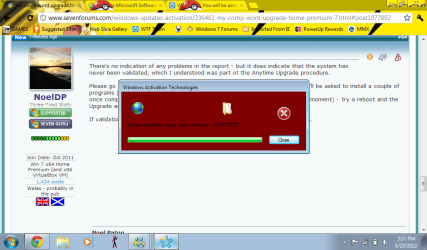
here's the error
 

Attachments

  • sukit.png
    sukit.png
    49.4 KB · Views: 17

My Computer My Computer

At a glance

Windows 7 Home Premium x64 Service Pack 1Intel(R) Core(TM) i3-2350 CPU @ 2.30 GHZ (4 C...6.00GB UsableIntel(R) HD Graphics Family
Computer Manufacturer/Model Number
HP Pavilon g7 Notebook PC
OS
Windows 7 Home Premium x64 Service Pack 1
CPU
Intel(R) Core(TM) i3-2350 CPU @ 2.30 GHZ (4 CPUs) ~ 2.3GHZ
Motherboard
Hewlwtt-Packard
Memory
6.00GB Usable
Graphics Card(s)
Intel(R) HD Graphics Family
Sound Card
(1)IDT High Definition Audio CODEC (2)Intel(R) Display Audio
Monitor(s) Displays
Generic PnP Monitor
Screen Resolution
1600 x 900 x 32-bits @ 60 Hz
Hard Drives
Local Disk (C:)
Recovery (D:)
Local Disk (Q:)
Seagate GoFlex 1TB Desktop Hardrive (External)
Other Info
Logitech m325 Blue Wireless mouse.
Ahah!
That's likely the whole problem then.
The error message inidcates an inability to contact the MS server.
Open Internet Options - go to the Security tab, and click on 'Reset all zones to default level' button - click Apply
Go to the Advanced tab, click on teh Restore Advanced Settings butoon - click Apply and OK

Please open an Elevated Command Prompt, and run the following command


NETSH WINSOCK RESET

reboot, and try validation again - note the error message and post back, if any

If that passes, then reboot and test the Upgrade.
 

My Computer My Computer

At a glance

Win 7 x64 Home Premium (and x86 VirtualBox VM...i3 370M/i7 6500U8GB - finally :)/8GBit's an i3, dude!/dual Intel&nVidia
Computer type
Laptop
Computer Manufacturer/Model Number
Asus K52F or Lenovo B51-80
OS
Win 7 x64 Home Premium (and x86 VirtualBox VM)/Win10
CPU
i3 370M/i7 6500U
Motherboard
Asus/Lenovo
Memory
8GB - finally :)/8GB
Graphics Card(s)
it's an i3, dude!/dual Intel&nVidia
Sound Card
onboard
Monitor(s) Displays
15.6" built-in
Screen Resolution
1366x768/1920x1080
Hard Drives
750GB Seagate internal
Sundry external drives attached to other computers on the local network
1TB SSD on the Lenovo
PSU
n/a
Internet Speed
as much as I can get - usually on a dongle/phone, so <1MB/s
Antivirus
MSE/Defender
Browser
IE11/12/Edge/Chrome/FF(if I must)
I tried the upgrade again after rebooting..even though there was no error it was still unsuccessful..
 

My Computer My Computer

At a glance

Windows 7 Home Premium x64 Service Pack 1Intel(R) Core(TM) i3-2350 CPU @ 2.30 GHZ (4 C...6.00GB UsableIntel(R) HD Graphics Family
Computer Manufacturer/Model Number
HP Pavilon g7 Notebook PC
OS
Windows 7 Home Premium x64 Service Pack 1
CPU
Intel(R) Core(TM) i3-2350 CPU @ 2.30 GHZ (4 CPUs) ~ 2.3GHZ
Motherboard
Hewlwtt-Packard
Memory
6.00GB Usable
Graphics Card(s)
Intel(R) HD Graphics Family
Sound Card
(1)IDT High Definition Audio CODEC (2)Intel(R) Display Audio
Monitor(s) Displays
Generic PnP Monitor
Screen Resolution
1600 x 900 x 32-bits @ 60 Hz
Hard Drives
Local Disk (C:)
Recovery (D:)
Local Disk (Q:)
Seagate GoFlex 1TB Desktop Hardrive (External)
Other Info
Logitech m325 Blue Wireless mouse.
Did validation work this time or not?
 

My Computer My Computer

At a glance

Win 7 x64 Home Premium (and x86 VirtualBox VM...i3 370M/i7 6500U8GB - finally :)/8GBit's an i3, dude!/dual Intel&nVidia
Computer type
Laptop
Computer Manufacturer/Model Number
Asus K52F or Lenovo B51-80
OS
Win 7 x64 Home Premium (and x86 VirtualBox VM)/Win10
CPU
i3 370M/i7 6500U
Motherboard
Asus/Lenovo
Memory
8GB - finally :)/8GB
Graphics Card(s)
it's an i3, dude!/dual Intel&nVidia
Sound Card
onboard
Monitor(s) Displays
15.6" built-in
Screen Resolution
1366x768/1920x1080
Hard Drives
750GB Seagate internal
Sundry external drives attached to other computers on the local network
1TB SSD on the Lenovo
PSU
n/a
Internet Speed
as much as I can get - usually on a dongle/phone, so <1MB/s
Antivirus
MSE/Defender
Browser
IE11/12/Edge/Chrome/FF(if I must)
yea. yea it did.
 

My Computer My Computer

At a glance

Windows 7 Home Premium x64 Service Pack 1Intel(R) Core(TM) i3-2350 CPU @ 2.30 GHZ (4 C...6.00GB UsableIntel(R) HD Graphics Family
Computer Manufacturer/Model Number
HP Pavilon g7 Notebook PC
OS
Windows 7 Home Premium x64 Service Pack 1
CPU
Intel(R) Core(TM) i3-2350 CPU @ 2.30 GHZ (4 CPUs) ~ 2.3GHZ
Motherboard
Hewlwtt-Packard
Memory
6.00GB Usable
Graphics Card(s)
Intel(R) HD Graphics Family
Sound Card
(1)IDT High Definition Audio CODEC (2)Intel(R) Display Audio
Monitor(s) Displays
Generic PnP Monitor
Screen Resolution
1600 x 900 x 32-bits @ 60 Hz
Hard Drives
Local Disk (C:)
Recovery (D:)
Local Disk (Q:)
Seagate GoFlex 1TB Desktop Hardrive (External)
Other Info
Logitech m325 Blue Wireless mouse.
In that case, MS Support is the way to go - I'm really out of suggestions now!
 

My Computer My Computer

At a glance

Win 7 x64 Home Premium (and x86 VirtualBox VM...i3 370M/i7 6500U8GB - finally :)/8GBit's an i3, dude!/dual Intel&nVidia
Computer type
Laptop
Computer Manufacturer/Model Number
Asus K52F or Lenovo B51-80
OS
Win 7 x64 Home Premium (and x86 VirtualBox VM)/Win10
CPU
i3 370M/i7 6500U
Motherboard
Asus/Lenovo
Memory
8GB - finally :)/8GB
Graphics Card(s)
it's an i3, dude!/dual Intel&nVidia
Sound Card
onboard
Monitor(s) Displays
15.6" built-in
Screen Resolution
1366x768/1920x1080
Hard Drives
750GB Seagate internal
Sundry external drives attached to other computers on the local network
1TB SSD on the Lenovo
PSU
n/a
Internet Speed
as much as I can get - usually on a dongle/phone, so <1MB/s
Antivirus
MSE/Defender
Browser
IE11/12/Edge/Chrome/FF(if I must)
Great...I'm ****ed for life...
 

My Computer My Computer

At a glance

Windows 7 Home Premium x64 Service Pack 1Intel(R) Core(TM) i3-2350 CPU @ 2.30 GHZ (4 C...6.00GB UsableIntel(R) HD Graphics Family
Computer Manufacturer/Model Number
HP Pavilon g7 Notebook PC
OS
Windows 7 Home Premium x64 Service Pack 1
CPU
Intel(R) Core(TM) i3-2350 CPU @ 2.30 GHZ (4 CPUs) ~ 2.3GHZ
Motherboard
Hewlwtt-Packard
Memory
6.00GB Usable
Graphics Card(s)
Intel(R) HD Graphics Family
Sound Card
(1)IDT High Definition Audio CODEC (2)Intel(R) Display Audio
Monitor(s) Displays
Generic PnP Monitor
Screen Resolution
1600 x 900 x 32-bits @ 60 Hz
Hard Drives
Local Disk (C:)
Recovery (D:)
Local Disk (Q:)
Seagate GoFlex 1TB Desktop Hardrive (External)
Other Info
Logitech m325 Blue Wireless mouse.
They're not that bad :)
The trick is to find the right route to the free support that I'm pretty sure you are entitled to.

If you really want to avoid that, then you could do a Recovery to ex-factory state, and try the upgrade then. - remember that this will delete all data, so back up to external media first.
 

My Computer My Computer

At a glance

Win 7 x64 Home Premium (and x86 VirtualBox VM...i3 370M/i7 6500U8GB - finally :)/8GBit's an i3, dude!/dual Intel&nVidia
Computer type
Laptop
Computer Manufacturer/Model Number
Asus K52F or Lenovo B51-80
OS
Win 7 x64 Home Premium (and x86 VirtualBox VM)/Win10
CPU
i3 370M/i7 6500U
Motherboard
Asus/Lenovo
Memory
8GB - finally :)/8GB
Graphics Card(s)
it's an i3, dude!/dual Intel&nVidia
Sound Card
onboard
Monitor(s) Displays
15.6" built-in
Screen Resolution
1366x768/1920x1080
Hard Drives
750GB Seagate internal
Sundry external drives attached to other computers on the local network
1TB SSD on the Lenovo
PSU
n/a
Internet Speed
as much as I can get - usually on a dongle/phone, so <1MB/s
Antivirus
MSE/Defender
Browser
IE11/12/Edge/Chrome/FF(if I must)
Alright, I'll give it a shot. is there a number or a way I can chat with them?
 

My Computer My Computer

At a glance

Windows 7 Home Premium x64 Service Pack 1Intel(R) Core(TM) i3-2350 CPU @ 2.30 GHZ (4 C...6.00GB UsableIntel(R) HD Graphics Family
Computer Manufacturer/Model Number
HP Pavilon g7 Notebook PC
OS
Windows 7 Home Premium x64 Service Pack 1
CPU
Intel(R) Core(TM) i3-2350 CPU @ 2.30 GHZ (4 CPUs) ~ 2.3GHZ
Motherboard
Hewlwtt-Packard
Memory
6.00GB Usable
Graphics Card(s)
Intel(R) HD Graphics Family
Sound Card
(1)IDT High Definition Audio CODEC (2)Intel(R) Display Audio
Monitor(s) Displays
Generic PnP Monitor
Screen Resolution
1600 x 900 x 32-bits @ 60 Hz
Hard Drives
Local Disk (C:)
Recovery (D:)
Local Disk (Q:)
Seagate GoFlex 1TB Desktop Hardrive (External)
Other Info
Logitech m325 Blue Wireless mouse.
Aye, there's the rub! :)
In trying to find a suitable link for you, I ran across this article - it may be worth running the Fixit from it first.
Error message when you install Windows Anytime Upgrade on a Windows 7-based computer: "Windows Anytime Upgrade was not successful"
also please upload the log file for ANytime Upgrade - The Windows Upgrade.log is in the following location: %userprofile%\AppData\Local\Microsoft\Windows\Windows Anytime Upgrade\update.log
Use the following command to copy the log to your desktop

COPY %userprofile%\AppData\Local\Microsoft\Windows\Windows Anytime Upgrade\update.log %userprofile%\Desktop\AUupdate.log

then attach the copy to your response....
 
Last edited:

My Computer My Computer

At a glance

Win 7 x64 Home Premium (and x86 VirtualBox VM...i3 370M/i7 6500U8GB - finally :)/8GBit's an i3, dude!/dual Intel&nVidia
Computer type
Laptop
Computer Manufacturer/Model Number
Asus K52F or Lenovo B51-80
OS
Win 7 x64 Home Premium (and x86 VirtualBox VM)/Win10
CPU
i3 370M/i7 6500U
Motherboard
Asus/Lenovo
Memory
8GB - finally :)/8GB
Graphics Card(s)
it's an i3, dude!/dual Intel&nVidia
Sound Card
onboard
Monitor(s) Displays
15.6" built-in
Screen Resolution
1366x768/1920x1080
Hard Drives
750GB Seagate internal
Sundry external drives attached to other computers on the local network
1TB SSD on the Lenovo
PSU
n/a
Internet Speed
as much as I can get - usually on a dongle/phone, so <1MB/s
Antivirus
MSE/Defender
Browser
IE11/12/Edge/Chrome/FF(if I must)
Here. Not sure if i did the instructions right, but here :)

And thanks, for still trying :)
 

Attachments

My Computer My Computer

At a glance

Windows 7 Home Premium x64 Service Pack 1Intel(R) Core(TM) i3-2350 CPU @ 2.30 GHZ (4 C...6.00GB UsableIntel(R) HD Graphics Family
Computer Manufacturer/Model Number
HP Pavilon g7 Notebook PC
OS
Windows 7 Home Premium x64 Service Pack 1
CPU
Intel(R) Core(TM) i3-2350 CPU @ 2.30 GHZ (4 CPUs) ~ 2.3GHZ
Motherboard
Hewlwtt-Packard
Memory
6.00GB Usable
Graphics Card(s)
Intel(R) HD Graphics Family
Sound Card
(1)IDT High Definition Audio CODEC (2)Intel(R) Display Audio
Monitor(s) Displays
Generic PnP Monitor
Screen Resolution
1600 x 900 x 32-bits @ 60 Hz
Hard Drives
Local Disk (C:)
Recovery (D:)
Local Disk (Q:)
Seagate GoFlex 1TB Desktop Hardrive (External)
Other Info
Logitech m325 Blue Wireless mouse.
"DoTransmogrify failed due to error 0x8007139f" appears in the report...
This is a different error to the one mentioned in the KB Article.
The only relevant Google hit I can find is in chinese, and only offers a Clean Boot as an option (there's no indication whether it worked or not).
Let's try it anyhow.

Step 1: Start the System Configuration Utility

Click Start, type msconfig in the Start Search box, and then press ENTER.


If you are prompted for an administrator password or for a confirmation, type the password, or provide confirmation.

Step 2: Configure Selective Startup options

  1. In the System Configuration Utility dialog box, click Selective Startup on the General tab.
  2. Click to clear the Load Startup Items check box.Note The Use Original Boot.ini check box is unavailable.
  3. Click the Services tab.
  4. Click to select the Hide All Microsoft Services check box.
  5. Click Disable All, and then click OK.
  6. When you are prompted, click Restart.
(yes, I pinched it from the MS site :))
after the reboot, try the upgrade again.
if it fails, copy the log to the desktop again, and attach it to your response.
 

My Computer My Computer

At a glance

Win 7 x64 Home Premium (and x86 VirtualBox VM...i3 370M/i7 6500U8GB - finally :)/8GBit's an i3, dude!/dual Intel&nVidia
Computer type
Laptop
Computer Manufacturer/Model Number
Asus K52F or Lenovo B51-80
OS
Win 7 x64 Home Premium (and x86 VirtualBox VM)/Win10
CPU
i3 370M/i7 6500U
Motherboard
Asus/Lenovo
Memory
8GB - finally :)/8GB
Graphics Card(s)
it's an i3, dude!/dual Intel&nVidia
Sound Card
onboard
Monitor(s) Displays
15.6" built-in
Screen Resolution
1366x768/1920x1080
Hard Drives
750GB Seagate internal
Sundry external drives attached to other computers on the local network
1TB SSD on the Lenovo
PSU
n/a
Internet Speed
as much as I can get - usually on a dongle/phone, so <1MB/s
Antivirus
MSE/Defender
Browser
IE11/12/Edge/Chrome/FF(if I must)
searching some more around the error message, a very similar one appears in Windows Update if any of the following programs are installed.
Installation of HP LasterJet 8150 driver
Daemon Tools (Alcohol 120%, etc, and similar virtual CD programs)
Lotus Notes
Lotus Communicator
other programs which cause an outsize registry key to be created
(Unfortunately, I know of no easy way to find such keys - and I thought that this problem was supposed to have been fixed by SP1)
Do you have any of the above programs installed?


My Computer My Computer

At a glance

Win 7 x64 Home Premium (and x86 VirtualBox VM...i3 370M/i7 6500U8GB - finally :)/8GBit's an i3, dude!/dual Intel&nVidia
Computer type
Laptop
Computer Manufacturer/Model Number
Asus K52F or Lenovo B51-80
OS
Win 7 x64 Home Premium (and x86 VirtualBox VM)/Win10
CPU
i3 370M/i7 6500U
Motherboard
Asus/Lenovo
Memory
8GB - finally :)/8GB
Graphics Card(s)
it's an i3, dude!/dual Intel&nVidia
Sound Card
onboard
Monitor(s) Displays
15.6" built-in
Screen Resolution
1366x768/1920x1080
Hard Drives
750GB Seagate internal
Sundry external drives attached to other computers on the local network
1TB SSD on the Lenovo
PSU
n/a
Internet Speed
as much as I can get - usually on a dongle/phone, so <1MB/s
Antivirus
MSE/Defender
Browser
IE11/12/Edge/Chrome/FF(if I must)
Uhm, no i dont o.o

and here:


2012-06-23 21:37:01, Info WAU WindowsAnytimeUpgradeUI.exe started
2012-06-23 21:37:01, Info WAU No available internet connection.
2012-06-23 21:37:01, Info WAU Found existing product key in registry. WAU is advancing straight to the verification page.
2012-06-23 21:37:01, Info WAU Verify page created successfully.
2012-06-23 21:38:09, Info WAU EULA page created successfully.
2012-06-23 21:38:12, Info WAU Confirm page created successfully.
2012-06-23 21:38:16, Info WAU Progress page created successfully.
2012-06-23 21:38:16, Info WAU WindowsAnytimeUpgrade.exe is starting.
2012-06-23 21:40:11, Error WAU DoTransmogrify failed due to error 0x8007139f.
2012-06-23 21:40:11, Error WAU UpgradeSKU failed. Exiting.
2012-06-23 21:40:11, Error WAU Windows Anytime Upgrade was not successful
2012-06-23 21:40:11, Error WAU The upgrade was not successful. Please try the upgrade again.
2012-06-23 21:40:11, Info WAU WAUError page created successfully.
2012-06-23 21:40:45, Info WAU windowsAnytimeUpgradeUI.exe is exiting.
2012-06-23 21:41:55, Info WAU WindowsAnytimeUpgradeUI.exe started
2012-06-23 21:41:55, Info WAU No available internet connection.
2012-06-23 21:41:55, Info WAU Found existing product key in registry. WAU is advancing straight to the verification page.
2012-06-23 21:41:55, Info WAU Verify page created successfully.
2012-06-23 21:42:58, Info WAU EULA page created successfully.
2012-06-23 21:43:04, Info WAU User pressed Cancel button on EULA page. Exiting.
2012-06-23 21:43:10, Info WAU windowsAnytimeUpgradeUI.exe is exiting.
2012-06-23 21:43:13, Info WAU WindowsAnytimeUpgradeUI.exe started
2012-06-23 21:43:13, Info WAU No available internet connection.
2012-06-23 21:43:13, Info WAU Found existing product key in registry. WAU is advancing straight to the verification page.
2012-06-23 21:43:13, Info WAU Verify page created successfully.
2012-06-23 21:44:16, Info WAU EULA page created successfully.
2012-06-23 21:44:32, Info WAU Confirm page created successfully.
2012-06-23 21:44:35, Info WAU Progress page created successfully.
2012-06-23 21:44:35, Info WAU WindowsAnytimeUpgrade.exe is starting.
2012-06-23 21:46:00, Error WAU DoTransmogrify failed due to error 0x8007139f.
2012-06-23 21:46:00, Error WAU UpgradeSKU failed. Exiting.
2012-06-23 21:46:00, Error WAU Windows Anytime Upgrade was not successful
2012-06-23 21:46:00, Error WAU The upgrade was not successful. Please try the upgrade again.
2012-06-23 21:46:00, Info WAU WAUError page created successfully.
2012-06-23 21:46:24, Info WAU windowsAnytimeUpgradeUI.exe is exiting.
2012-06-23 21:46:34, Info WAU WindowsAnytimeUpgradeUI.exe started
2012-06-23 21:46:34, Info WAU No available internet connection.
2012-06-23 21:46:34, Info WAU Found existing product key in registry. WAU is advancing straight to the verification page.
2012-06-23 21:46:34, Info WAU Verify page created successfully.
2012-06-23 21:47:38, Info WAU EULA page created successfully.
2012-06-23 22:54:08, Info WAU WindowsAnytimeUpgradeUI.exe started
2012-06-23 22:54:08, Info WAU An internet connection is available.
2012-06-23 22:54:08, Info WAU Found existing product key in registry. WAU is advancing straight to the verification page.
2012-06-23 22:54:08, Info WAU Verify page created successfully.
2012-06-23 22:55:40, Info WAU EULA page created successfully.
2012-06-23 22:55:53, Info WAU Confirm page created successfully.
2012-06-23 22:55:57, Info WAU Progress page created successfully.
2012-06-23 22:55:57, Info WAU WindowsAnytimeUpgrade.exe is starting.
2012-06-23 22:59:12, Error WAU DoTransmogrify failed due to error 0x8007139f.
2012-06-23 22:59:12, Error WAU UpgradeSKU failed. Exiting.
2012-06-23 22:59:12, Error WAU Windows Anytime Upgrade was not successful
2012-06-23 22:59:13, Error WAU The upgrade was not successful. Please try the upgrade again.
2012-06-23 22:59:13, Info WAU WAUError page created successfully.
2012-06-23 22:59:37, Info WAU windowsAnytimeUpgradeUI.exe is exiting.
2012-06-23 23:04:05, Info WAU WindowsAnytimeUpgradeUI.exe started
2012-06-23 23:04:05, Info WAU An internet connection is available.
2012-06-23 23:04:05, Info WAU Found existing product key in registry. WAU is advancing straight to the verification page.
2012-06-23 23:04:05, Info WAU Verify page created successfully.
2012-06-23 23:05:37, Info WAU EULA page created successfully.
2012-06-23 23:06:11, Info WAU Confirm page created successfully.
2012-06-23 23:06:14, Info WAU Progress page created successfully.
2012-06-23 23:06:15, Info WAU WindowsAnytimeUpgrade.exe is starting.
2012-06-23 23:08:41, Error WAU DoTransmogrify failed due to error 0x8007139f.
2012-06-23 23:08:41, Error WAU UpgradeSKU failed. Exiting.
2012-06-23 23:08:41, Error WAU Windows Anytime Upgrade was not successful
2012-06-23 23:08:41, Error WAU The upgrade was not successful. Please try the upgrade again.
2012-06-23 23:08:41, Info WAU WAUError page created successfully.
2012-06-23 23:08:54, Info WAU windowsAnytimeUpgradeUI.exe is exiting.
2012-06-23 23:12:33, Info WAU WindowsAnytimeUpgradeUI.exe started
2012-06-23 23:12:33, Info WAU An internet connection is available.
2012-06-23 23:12:33, Info WAU Found existing product key in registry. WAU is advancing straight to the verification page.
2012-06-23 23:12:33, Info WAU Verify page created successfully.
2012-06-23 23:13:54, Info WAU EULA page created successfully.
2012-06-23 23:14:32, Info WAU Confirm page created successfully.
2012-06-23 23:14:39, Info WAU Progress page created successfully.
2012-06-23 23:14:40, Info WAU WindowsAnytimeUpgrade.exe is starting.
2012-06-23 23:17:09, Error WAU DoTransmogrify failed due to error 0x8007139f.
2012-06-23 23:17:09, Error WAU UpgradeSKU failed. Exiting.
2012-06-23 23:17:09, Error WAU Windows Anytime Upgrade was not successful
2012-06-23 23:17:09, Error WAU The upgrade was not successful. Please try the upgrade again.
2012-06-23 23:17:10, Info WAU WAUError page created successfully.
2012-06-23 23:17:29, Info WAU windowsAnytimeUpgradeUI.exe is exiting.
2012-06-24 00:55:03, Info WAU WindowsAnytimeUpgradeUI.exe started
2012-06-24 00:55:03, Info WAU An internet connection is available.
2012-06-24 00:55:03, Info WAU Found existing product key in registry. WAU is advancing straight to the verification page.
2012-06-24 00:55:04, Info WAU Verify page created successfully.
2012-06-24 00:56:36, Info WAU EULA page created successfully.
2012-06-24 00:56:55, Info WAU Confirm page created successfully.
2012-06-24 00:57:02, Info WAU Progress page created successfully.
2012-06-24 00:57:02, Info WAU WindowsAnytimeUpgrade.exe is starting.
2012-06-24 00:59:08, Error WAU DoTransmogrify failed due to error 0x8007139f.
2012-06-24 00:59:08, Error WAU UpgradeSKU failed. Exiting.
2012-06-24 00:59:08, Error WAU Windows Anytime Upgrade was not successful
2012-06-24 00:59:08, Error WAU The upgrade was not successful. Please try the upgrade again.
2012-06-24 00:59:08, Info WAU WAUError page created successfully.
2012-06-24 01:01:49, Info WAU windowsAnytimeUpgradeUI.exe is exiting.
2012-06-24 01:04:34, Info WAU WindowsAnytimeUpgradeUI.exe started
2012-06-24 01:04:35, Info WAU An internet connection is available.
2012-06-24 01:04:35, Info WAU Found existing product key in registry. WAU is advancing straight to the verification page.
2012-06-24 01:04:35, Info WAU Verify page created successfully.
2012-06-24 01:05:57, Info WAU EULA page created successfully.
2012-06-24 01:07:32, Info WAU Confirm page created successfully.
2012-06-24 01:08:15, Info WAU Progress page created successfully.
2012-06-24 01:08:15, Info WAU WindowsAnytimeUpgrade.exe is starting.
2012-06-24 01:10:50, Error WAU DoTransmogrify failed due to error 0x8007139f.
2012-06-24 01:10:50, Error WAU UpgradeSKU failed. Exiting.
2012-06-24 01:10:50, Error WAU Windows Anytime Upgrade was not successful
2012-06-24 01:10:50, Error WAU The upgrade was not successful. Please try the upgrade again.
2012-06-24 01:10:50, Info WAU WAUError page created successfully.
2012-06-24 01:11:40, Info WAU Starting default browser for What do I do if my upgrade isn't successful?
2012-06-24 01:15:30, Info WAU Starting default browser for What do I do if my upgrade isn't successful?
2012-06-24 01:20:03, Info WAU windowsAnytimeUpgradeUI.exe is exiting.
2012-06-24 10:56:59, Info WAU WindowsAnytimeUpgradeUI.exe started
2012-06-24 10:56:59, Info WAU An internet connection is available.
2012-06-24 10:56:59, Info WAU Found existing product key in registry. WAU is advancing straight to the verification page.
2012-06-24 10:56:59, Info WAU Verify page created successfully.
2012-06-24 10:58:12, Info WAU EULA page created successfully.
2012-06-24 10:58:20, Info WAU Confirm page created successfully.
2012-06-24 10:58:25, Info WAU Progress page created successfully.
2012-06-24 10:58:25, Info WAU WindowsAnytimeUpgrade.exe is starting.
2012-06-24 11:00:15, Error WAU DoTransmogrify failed due to error 0x8007139f.
2012-06-24 11:00:15, Error WAU UpgradeSKU failed. Exiting.
2012-06-24 11:00:15, Error WAU Windows Anytime Upgrade was not successful
2012-06-24 11:00:15, Error WAU The upgrade was not successful. Please try the upgrade again.
2012-06-24 11:00:15, Info WAU WAUError page created successfully.
2012-06-24 11:01:56, Info WAU windowsAnytimeUpgradeUI.exe is exiting.
2012-06-24 20:26:44, Info WAU WindowsAnytimeUpgradeUI.exe started
2012-06-24 20:26:44, Info WAU No available internet connection.
2012-06-24 20:26:45, Info WAU Found existing product key in registry. WAU is advancing straight to the verification page.
2012-06-24 20:26:45, Info WAU Verify page created successfully.
2012-06-24 20:28:12, Info WAU EULA page created successfully.
2012-06-24 20:28:29, Info WAU Confirm page created successfully.
2012-06-24 20:28:45, Info WAU Progress page created successfully.
2012-06-24 20:28:45, Info WAU WindowsAnytimeUpgrade.exe is starting.
2012-06-24 20:30:56, Error WAU DoTransmogrify failed due to error 0x8007139f.
2012-06-24 20:30:57, Error WAU UpgradeSKU failed. Exiting.
2012-06-24 20:30:57, Error WAU Windows Anytime Upgrade was not successful
2012-06-24 20:30:57, Error WAU The upgrade was not successful. Please try the upgrade again.
2012-06-24 20:30:57, Info WAU WAUError page created successfully.
2012-06-24 20:38:17, Info WAU windowsAnytimeUpgradeUI.exe is exiting.
2012-06-25 02:08:49, Info WAU WindowsAnytimeUpgradeUI.exe started
2012-06-25 02:08:49, Info WAU An internet connection is available.
2012-06-25 02:08:49, Info WAU Found existing product key in registry. WAU is advancing straight to the verification page.
2012-06-25 02:08:49, Info WAU Verify page created successfully.
2012-06-25 02:10:03, Info WAU EULA page created successfully.
2012-06-25 03:17:08, Info WAU User pressed Cancel button on EULA page. Exiting.
2012-06-25 03:17:10, Info WAU windowsAnytimeUpgradeUI.exe is exiting.
2012-06-25 09:16:58, Info WAU WindowsAnytimeUpgradeUI.exe started
2012-06-25 09:17:00, Info WAU An internet connection is available.
2012-06-25 09:17:01, Info WAU Found existing product key in registry. WAU is advancing straight to the verification page.
2012-06-25 09:17:01, Info WAU Verify page created successfully.
2012-06-25 09:19:26, Info WAU EULA page created successfully.
2012-06-25 09:19:49, Info WAU Confirm page created successfully.
2012-06-25 09:20:05, Info WAU Progress page created successfully.
2012-06-25 09:20:06, Info WAU WindowsAnytimeUpgrade.exe is starting.
2012-06-25 09:25:17, Error WAU DoTransmogrify failed due to error 0x8007139f.
2012-06-25 09:25:17, Error WAU UpgradeSKU failed. Exiting.
2012-06-25 09:25:17, Error WAU Windows Anytime Upgrade was not successful
2012-06-25 09:25:18, Error WAU The upgrade was not successful. Please try the upgrade again.
2012-06-25 09:25:18, Info WAU WAUError page created successfully.
2012-06-25 09:36:09, Info WAU windowsAnytimeUpgradeUI.exe is exiting.
2012-06-25 10:38:02, Info WAU WindowsAnytimeUpgradeUI.exe started
2012-06-25 10:38:02, Info WAU An internet connection is available.
2012-06-25 10:38:02, Info WAU Found existing product key in registry. WAU is advancing straight to the verification page.
2012-06-25 10:38:02, Info WAU Verify page created successfully.
2012-06-25 10:39:11, Info WAU EULA page created successfully.
2012-06-25 10:41:53, Info WAU Confirm page created successfully.
2012-06-25 10:43:23, Info WAU Progress page created successfully.
2012-06-25 10:43:23, Info WAU WindowsAnytimeUpgrade.exe is starting.
2012-06-25 10:45:21, Error WAU DoTransmogrify failed due to error 0x8007139f.
2012-06-25 10:45:21, Error WAU UpgradeSKU failed. Exiting.
2012-06-25 10:45:21, Error WAU Windows Anytime Upgrade was not successful
2012-06-25 10:45:21, Error WAU The upgrade was not successful. Please try the upgrade again.
2012-06-25 10:45:21, Info WAU WAUError page created successfully.
2012-06-25 10:47:08, Info WAU windowsAnytimeUpgradeUI.exe is exiting.
2012-06-25 10:56:13, Info WAU WindowsAnytimeUpgradeUI.exe started
2012-06-25 10:56:13, Info WAU An internet connection is available.
2012-06-25 10:56:13, Info WAU Found existing product key in registry. WAU is advancing straight to the verification page.
2012-06-25 10:56:13, Info WAU Verify page created successfully.
2012-06-25 10:57:26, Info WAU EULA page created successfully.
2012-06-25 10:58:13, Info WAU Confirm page created successfully.
2012-06-25 10:58:17, Info WAU Progress page created successfully.
2012-06-25 10:58:18, Info WAU WindowsAnytimeUpgrade.exe is starting.
2012-06-25 11:00:11, Error WAU DoTransmogrify failed due to error 0x8007139f.
2012-06-25 11:00:11, Error WAU UpgradeSKU failed. Exiting.
2012-06-25 11:00:12, Error WAU Windows Anytime Upgrade was not successful
2012-06-25 11:00:12, Error WAU The upgrade was not successful. Please try the upgrade again.
2012-06-25 11:00:12, Info WAU WAUError page created successfully.
2012-06-25 11:09:01, Info WAU windowsAnytimeUpgradeUI.exe is exiting.
2012-06-25 13:13:48, Info WAU WindowsAnytimeUpgradeUI.exe started
2012-06-25 13:13:48, Info WAU An internet connection is available.
2012-06-25 13:13:48, Info WAU Found existing product key in registry. WAU is advancing straight to the verification page.
2012-06-25 13:13:48, Info WAU Verify page created successfully.
2012-06-25 13:15:17, Info WAU EULA page created successfully.
2012-06-25 13:18:59, Info WAU Confirm page created successfully.
2012-06-25 13:19:02, Info WAU Progress page created successfully.
2012-06-25 13:19:03, Info WAU WindowsAnytimeUpgrade.exe is starting.
2012-06-25 13:21:18, Error WAU DoTransmogrify failed due to error 0x8007139f.
2012-06-25 13:21:18, Error WAU UpgradeSKU failed. Exiting.
2012-06-25 13:21:18, Error WAU Windows Anytime Upgrade was not successful
2012-06-25 13:21:19, Error WAU The upgrade was not successful. Please try the upgrade again.
2012-06-25 13:21:19, Info WAU WAUError page created successfully.
2012-06-25 13:22:25, Info WAU windowsAnytimeUpgradeUI.exe is exiting.
2012-06-25 13:52:51, Info WAU WindowsAnytimeUpgradeUI.exe started
2012-06-25 13:52:51, Info WAU An internet connection is available.
2012-06-25 13:52:51, Info WAU Found existing product key in registry. WAU is advancing straight to the verification page.
2012-06-25 13:52:51, Info WAU Verify page created successfully.
2012-06-25 13:53:57, Info WAU EULA page created successfully.
2012-06-25 13:55:29, Info WAU Confirm page created successfully.
2012-06-25 13:55:33, Info WAU Progress page created successfully.
2012-06-25 13:55:33, Info WAU WindowsAnytimeUpgrade.exe is starting.
2012-06-25 13:57:53, Error WAU DoTransmogrify failed due to error 0x8007139f.
2012-06-25 13:57:53, Error WAU UpgradeSKU failed. Exiting.
2012-06-25 13:57:53, Error WAU Windows Anytime Upgrade was not successful
2012-06-25 13:57:53, Error WAU The upgrade was not successful. Please try the upgrade again.
2012-06-25 13:57:53, Info WAU WAUError page created successfully.
2012-06-25 14:03:36, Info WAU windowsAnytimeUpgradeUI.exe is exiting.
2012-06-25 16:54:56, Info WAU WindowsAnytimeUpgradeUI.exe started
2012-06-25 16:54:57, Info WAU An internet connection is available.
2012-06-25 16:54:57, Info WAU Found existing product key in registry. WAU is advancing straight to the verification page.
2012-06-25 16:54:57, Info WAU Verify page created successfully.
2012-06-25 16:56:38, Info WAU EULA page created successfully.
2012-06-25 16:56:43, Info WAU Confirm page created successfully.
2012-06-25 16:56:46, Info WAU Progress page created successfully.
2012-06-25 16:56:46, Info WAU WindowsAnytimeUpgrade.exe is starting.
2012-06-25 16:59:07, Error WAU DoTransmogrify failed due to error 0x8007139f.
2012-06-25 16:59:07, Error WAU UpgradeSKU failed. Exiting.
2012-06-25 16:59:08, Error WAU Windows Anytime Upgrade was not successful
2012-06-25 16:59:08, Error WAU The upgrade was not successful. Please try the upgrade again.
2012-06-25 16:59:08, Info WAU WAUError page created successfully.
2012-06-25 17:00:28, Info WAU windowsAnytimeUpgradeUI.exe is exiting.
2012-06-25 17:00:32, Info WAU WindowsAnytimeUpgradeUI.exe started
2012-06-25 17:00:32, Info WAU An internet connection is available.
2012-06-25 17:00:32, Info WAU Found existing product key in registry. WAU is advancing straight to the verification page.
2012-06-25 17:00:32, Info WAU Verify page created successfully.
2012-06-25 17:01:45, Info WAU EULA page created successfully.
2012-06-25 17:07:16, Info WAU Confirm page created successfully.
2012-06-25 17:07:18, Info WAU Progress page created successfully.
2012-06-25 17:07:18, Info WAU WindowsAnytimeUpgrade.exe is starting.
2012-06-25 17:09:00, Error WAU DoTransmogrify failed due to error 0x8007139f.
2012-06-25 17:09:00, Error WAU UpgradeSKU failed. Exiting.
2012-06-25 17:09:01, Error WAU Windows Anytime Upgrade was not successful
2012-06-25 17:09:01, Error WAU The upgrade was not successful. Please try the upgrade again.
2012-06-25 17:09:01, Info WAU WAUError page created successfully.
2012-06-25 17:16:38, Info WAU windowsAnytimeUpgradeUI.exe is exiting.
2012-06-25 18:16:21, Info WAU WindowsAnytimeUpgradeUI.exe started
2012-06-25 18:16:21, Info WAU An internet connection is available.
2012-06-25 18:16:21, Info WAU Found existing product key in registry. WAU is advancing straight to the verification page.
2012-06-25 18:16:21, Info WAU Verify page created successfully.
2012-06-25 18:17:35, Info WAU EULA page created successfully.
2012-06-25 18:17:42, Info WAU Confirm page created successfully.
2012-06-25 18:17:46, Info WAU Progress page created successfully.
2012-06-25 18:17:46, Info WAU WindowsAnytimeUpgrade.exe is starting.
2012-06-25 18:20:03, Error WAU DoTransmogrify failed due to error 0x8007139f.
2012-06-25 18:20:03, Error WAU UpgradeSKU failed. Exiting.
2012-06-25 18:20:04, Error WAU Windows Anytime Upgrade was not successful
2012-06-25 18:20:04, Error WAU The upgrade was not successful. Please try the upgrade again.
2012-06-25 18:20:04, Info WAU WAUError page created successfully.
2012-06-25 18:20:07, Info WAU Starting default browser for What do I do if my upgrade isn't successful?
2012-06-25 18:20:42, Info WAU windowsAnytimeUpgradeUI.exe is exiting.

 

My Computer My Computer

At a glance

Windows 7 Home Premium x64 Service Pack 1Intel(R) Core(TM) i3-2350 CPU @ 2.30 GHZ (4 C...6.00GB UsableIntel(R) HD Graphics Family
Computer Manufacturer/Model Number
HP Pavilon g7 Notebook PC
OS
Windows 7 Home Premium x64 Service Pack 1
CPU
Intel(R) Core(TM) i3-2350 CPU @ 2.30 GHZ (4 CPUs) ~ 2.3GHZ
Motherboard
Hewlwtt-Packard
Memory
6.00GB Usable
Graphics Card(s)
Intel(R) HD Graphics Family
Sound Card
(1)IDT High Definition Audio CODEC (2)Intel(R) Display Audio
Monitor(s) Displays
Generic PnP Monitor
Screen Resolution
1600 x 900 x 32-bits @ 60 Hz
Hard Drives
Local Disk (C:)
Recovery (D:)
Local Disk (Q:)
Seagate GoFlex 1TB Desktop Hardrive (External)
Other Info
Logitech m325 Blue Wireless mouse.

My Computer My Computer

At a glance

Win 7 x64 Home Premium (and x86 VirtualBox VM...i3 370M/i7 6500U8GB - finally :)/8GBit's an i3, dude!/dual Intel&nVidia
Computer type
Laptop
Computer Manufacturer/Model Number
Asus K52F or Lenovo B51-80
OS
Win 7 x64 Home Premium (and x86 VirtualBox VM)/Win10
CPU
i3 370M/i7 6500U
Motherboard
Asus/Lenovo
Memory
8GB - finally :)/8GB
Graphics Card(s)
it's an i3, dude!/dual Intel&nVidia
Sound Card
onboard
Monitor(s) Displays
15.6" built-in
Screen Resolution
1366x768/1920x1080
Hard Drives
750GB Seagate internal
Sundry external drives attached to other computers on the local network
1TB SSD on the Lenovo
PSU
n/a
Internet Speed
as much as I can get - usually on a dongle/phone, so <1MB/s
Antivirus
MSE/Defender
Browser
IE11/12/Edge/Chrome/FF(if I must)
alright. thanks bro!
 

My Computer My Computer

At a glance

Windows 7 Home Premium x64 Service Pack 1Intel(R) Core(TM) i3-2350 CPU @ 2.30 GHZ (4 C...6.00GB UsableIntel(R) HD Graphics Family
Computer Manufacturer/Model Number
HP Pavilon g7 Notebook PC
OS
Windows 7 Home Premium x64 Service Pack 1
CPU
Intel(R) Core(TM) i3-2350 CPU @ 2.30 GHZ (4 CPUs) ~ 2.3GHZ
Motherboard
Hewlwtt-Packard
Memory
6.00GB Usable
Graphics Card(s)
Intel(R) HD Graphics Family
Sound Card
(1)IDT High Definition Audio CODEC (2)Intel(R) Display Audio
Monitor(s) Displays
Generic PnP Monitor
Screen Resolution
1600 x 900 x 32-bits @ 60 Hz
Hard Drives
Local Disk (C:)
Recovery (D:)
Local Disk (Q:)
Seagate GoFlex 1TB Desktop Hardrive (External)
Other Info
Logitech m325 Blue Wireless mouse.
Back
Top