Need help for moving Win 7 boot manager

guanyu210379

New member
Local time
12:27 PM
Messages
11
Hello everyone,
I need your help.
Pleeeeaaaaaassssseeeeeee...

About a year ago I was using Vista Ultimate x64 as my main OS, and then I have made a dual boot using Win 7 Pro x64. Win 7 and Vista were all in the same HDD, only in different partitions.
After a while I have removed Vista completely from my system.
But the thing is my boot manager is on the Vista partition which the only one marked as active in the storage manager.
I wanna rearrange my partitions as I don't use Vista anymore, meaning I wanna destroy Vista's partition, but the boot manager is there.
I have tried the following cmd command to move the boot manager to my Win 7 partition :
bcdedit /export X:\boot\bcd
where X is your 7 drive.
But it didn't work.
After searching a little, I found out that the Win 7 partition has to be marked as active in order to make those cmd command to work.
My questions is :
Can someone tell me how to move the boot manager to my Win 7 partition? How can I change my Win 7 partition to active?
or
Can I just destroy Vista's partition with the boot manager in it and then let Win 7 installation DVD repair the start-up problems, without having to reinstall Win 7?

Thank you very much in advance.
 
Last edited:

My Computer

OS
Win 7 Pro x64
CPU
Q6600 @ 3GHz
Motherboard
P5E X38
Memory
4GB DDR2 1000 Mushkin CL5
Graphics Card(s)
HIS HD3850 512MB IceQ3
Sound Card
Onboard
Monitor(s) Displays
Res. 1680x1050
Hard Drives
Seagate 500GB 7200.11
Hitachi 1TB Desktar 7200 rpm 32MB
PSU
Corsair VX450
Case
Coolermaster 690
Cooling
Zalman CNPS9700LED
Follow the steps in this tutorial which will show you how to remove the Vista partition then recover it's hard drive space and System MBR into Win7 partition after marking it Active:
http://www.sevenforums.com/tutorials/109752-partition-recover-space-used-older-os.html?ltr=P

Note that our favorite tool Partition Wizard CD is so flexible that you can Resize your partitions anyway you want in any direction just by rightclicking on them and sliding the left or right borders.
 
I will read that and see if I can follow it.
Thank you very much for your answer.
 

My Computer

OS
Win 7 Pro x64
CPU
Q6600 @ 3GHz
Motherboard
P5E X38
Memory
4GB DDR2 1000 Mushkin CL5
Graphics Card(s)
HIS HD3850 512MB IceQ3
Sound Card
Onboard
Monitor(s) Displays
Res. 1680x1050
Hard Drives
Seagate 500GB 7200.11
Hitachi 1TB Desktar 7200 rpm 32MB
PSU
Corsair VX450
Case
Coolermaster 690
Cooling
Zalman CNPS9700LED
If you post a screenshot of your full DIsk Management drive map and listings, using Snipping Tool in Start Menu, we can give you the exact steps for what you want to do.

Be specific how you want your disk to be laid out.
 
OK. I will do that if I have problems understanding the link you gave me.
I have also Linux Mint 8 untill yesterday as I see that the 9 is already available. I have killed it ,killed the grub, and putting back the windows bootloader, now I wanna install Mint 9 but before that, I want also to rearrange the partitions first.
I don't like my current partition layout, and I would like to rearrange it.
All data has been moved somewhere else safe, just in case something went wrong. No important data will be lost if things went wrong, it is just I don't want to install Win7 and all of the installed program all the way from the beginning again, at least not now.

My current layout :
70GB Win7 x64 (not marked as active, only used about 40GB at the moment)
80 GB Data A + in total 50GB ex-Mint 8 = 130GB (already emptied and joined together)
60GB former Vista (marked as active, emptied except the boot manager files)
about 240GB Data B (already emptied)


At the end of the process I expect something :
70-100GB Win7 Pro x64 ( I still have to think if I wanna put more space for Win 7 or not)
20-30GB EXT3 Mint 9 x64
9GB SWAP Mint 9 x64
The rest of my 500GB HDD will be on a big single partition.
If I can move the boot manager to Win 7 partition, all of my problems is solved.
 

My Computer

OS
Win 7 Pro x64
CPU
Q6600 @ 3GHz
Motherboard
P5E X38
Memory
4GB DDR2 1000 Mushkin CL5
Graphics Card(s)
HIS HD3850 512MB IceQ3
Sound Card
Onboard
Monitor(s) Displays
Res. 1680x1050
Hard Drives
Seagate 500GB 7200.11
Hitachi 1TB Desktar 7200 rpm 32MB
PSU
Corsair VX450
Case
Coolermaster 690
Cooling
Zalman CNPS9700LED
Hello guanyu210379, welcome to Seven Forums!


In case the link Greg posted won't work, here it is again.

Partition : Recover Space Used by an Older OS


Will you please post a snip/screen-shot of the entire disk management drive map so we can see what you have going.

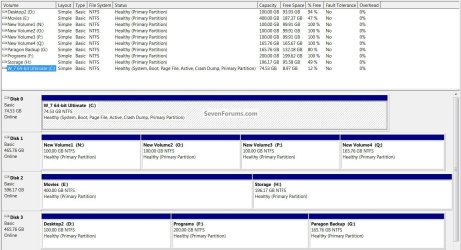
In the Windows start menu right click computer and click manage, in the left pane of the "Computer Management" window that opens click disk management and post a snip of that, it should look similar to this.

How to Post a Screenshot in Seven Forums
Disk25.jpg
 

My Computer

Computer Manufacturer/Model Number
* BFK Customs *
OS
W 7 64-bit Ultimate
CPU
Intel Q9550 Yorkfield
Motherboard
ASUS P5Q Pro
Memory
8GB Dominator 8500C5D
Graphics Card(s)
ATI : XFX 5870
Sound Card
Realtek HD Audio 7-1
Monitor(s) Displays
1x 47" LCD HDMI & 3x 26" LCD HDMI
Screen Resolution
1920x1080P & 1920x1200
Hard Drives
1x 80GB Intel X25-M G2 SSD : 1x 500GB & 1x 640GB WD Caviar Black(s)
PSU
Corsair 620HX
Case
Cooler Master RC-690
Cooling
Tuniq Tower 120, 2x 140mm and 3x 120mm case fans
Keyboard
Microsoft 500
Mouse
Razer Diamondback 3G
Internet Speed
14 Mb/s
Other Info
1x Koutech 3Gb/s SATA HDD Hot Swap Rack
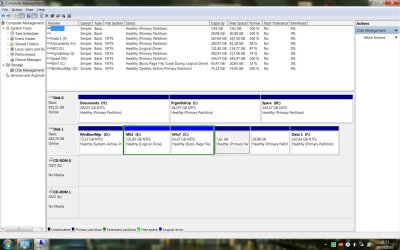
Well...I can't find the "mark as active" option by right clicking.
Does this mean it is impossible to change the partition to active.
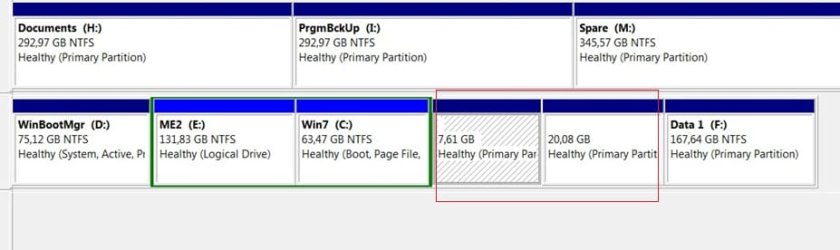
I used Vista first, then as after I got Mint 8, I have divided a partition into 2 partitions, and put Mint 8 on one of those newly divided partitions. Mint was on the now as ME2 labeled partition (specially labeled so it is easy to see), and after a while I got Win7 and put it on the current Win7 partition.
Mint 8 got killed several days ago...now this is my partitions lay out.
The 20GB+8GB is inhabited by Mint 9.
I still willing to kill Mint 9 + Grub if necessary to be able to rearrange the partitions.
 

Attachments

  • Partitions.jpg
    Partitions.jpg
    171.4 KB · Views: 24

My Computer

OS
Win 7 Pro x64
CPU
Q6600 @ 3GHz
Motherboard
P5E X38
Memory
4GB DDR2 1000 Mushkin CL5
Graphics Card(s)
HIS HD3850 512MB IceQ3
Sound Card
Onboard
Monitor(s) Displays
Res. 1680x1050
Hard Drives
Seagate 500GB 7200.11
Hitachi 1TB Desktar 7200 rpm 32MB
PSU
Corsair VX450
Case
Coolermaster 690
Cooling
Zalman CNPS9700LED
To answer 1 question, Windows will not boot (can't be marked as active) from an extended/logical partition.

And as you already have 4 "Primary's" on Disk 1 you may be limited in what you can do without some major re-arranging.


Will you please post another disk management without the right click menu present so we don't have to play 20 questions?
 

My Computer

Computer Manufacturer/Model Number
* BFK Customs *
OS
W 7 64-bit Ultimate
CPU
Intel Q9550 Yorkfield
Motherboard
ASUS P5Q Pro
Memory
8GB Dominator 8500C5D
Graphics Card(s)
ATI : XFX 5870
Sound Card
Realtek HD Audio 7-1
Monitor(s) Displays
1x 47" LCD HDMI & 3x 26" LCD HDMI
Screen Resolution
1920x1080P & 1920x1200
Hard Drives
1x 80GB Intel X25-M G2 SSD : 1x 500GB & 1x 640GB WD Caviar Black(s)
PSU
Corsair 620HX
Case
Cooler Master RC-690
Cooling
Tuniq Tower 120, 2x 140mm and 3x 120mm case fans
Keyboard
Microsoft 500
Mouse
Razer Diamondback 3G
Internet Speed
14 Mb/s
Other Info
1x Koutech 3Gb/s SATA HDD Hot Swap Rack
So...this is the screen shot without the right click ;p
 

Attachments

  • Partitions.jpg
    Partitions.jpg
    168.2 KB · Views: 21

My Computer

OS
Win 7 Pro x64
CPU
Q6600 @ 3GHz
Motherboard
P5E X38
Memory
4GB DDR2 1000 Mushkin CL5
Graphics Card(s)
HIS HD3850 512MB IceQ3
Sound Card
Onboard
Monitor(s) Displays
Res. 1680x1050
Hard Drives
Seagate 500GB 7200.11
Hitachi 1TB Desktar 7200 rpm 32MB
PSU
Corsair VX450
Case
Coolermaster 690
Cooling
Zalman CNPS9700LED
Can the stuff on these 2 be moved somewhere?


click to enlarge
These.jpg
 

My Computer

Computer Manufacturer/Model Number
* BFK Customs *
OS
W 7 64-bit Ultimate
CPU
Intel Q9550 Yorkfield
Motherboard
ASUS P5Q Pro
Memory
8GB Dominator 8500C5D
Graphics Card(s)
ATI : XFX 5870
Sound Card
Realtek HD Audio 7-1
Monitor(s) Displays
1x 47" LCD HDMI & 3x 26" LCD HDMI
Screen Resolution
1920x1080P & 1920x1200
Hard Drives
1x 80GB Intel X25-M G2 SSD : 1x 500GB & 1x 640GB WD Caviar Black(s)
PSU
Corsair 620HX
Case
Cooler Master RC-690
Cooling
Tuniq Tower 120, 2x 140mm and 3x 120mm case fans
Keyboard
Microsoft 500
Mouse
Razer Diamondback 3G
Internet Speed
14 Mb/s
Other Info
1x Koutech 3Gb/s SATA HDD Hot Swap Rack
The problem is that Win7 is on an extended Logical partition which cannot be marked Active.

Conveniently, Partition Wizard CD can also Convert to Primary on the same rightlclick Modify menu where you find Mark As Active if the partition isn't Logical.

Follow these steps to delete old Vista System partition, delete old Linux Logical partition, convert remaining Win7 Logical partition to Primary, then resize it into the deleted partition space to the left so that Win7 is in the preferred lower (left hand) HD address.

Boot PW CD, Select 1 for screen res, rightclick D former Vista partition to Delete, OK.

Next righclick E former Linux partition to Delete, OK.

Next rightclick C Windows 7>Modify>Convert to Primary, OK.

Again rightclick C>Modify>Set to Active, OK.

Then rightclick C>Resize, drag left grey border all the way to the left to take up deleted partitions space, OK. Apply all steps.

Now boot into Win7 DVD Repair console or Repair CD, accept offered repair. Win7 won't start up yet so boot back into Repair, click through to Recovery Tools list to run Startup Repair up to 3 separate times with reboots to write the MBR to Win7: http://www.sevenforums.com/tutorials/105541-startup-repair-run-3-separate-times.html
 
@Barefootkid : Linux Mint 9 is inside, but it is OK to terminate it, I haven't put anything inside.
 

My Computer

OS
Win 7 Pro x64
CPU
Q6600 @ 3GHz
Motherboard
P5E X38
Memory
4GB DDR2 1000 Mushkin CL5
Graphics Card(s)
HIS HD3850 512MB IceQ3
Sound Card
Onboard
Monitor(s) Displays
Res. 1680x1050
Hard Drives
Seagate 500GB 7200.11
Hitachi 1TB Desktar 7200 rpm 32MB
PSU
Corsair VX450
Case
Coolermaster 690
Cooling
Zalman CNPS9700LED
@Gregrocker: OK. I'll download PW CD first, and then try your post
 

My Computer

OS
Win 7 Pro x64
CPU
Q6600 @ 3GHz
Motherboard
P5E X38
Memory
4GB DDR2 1000 Mushkin CL5
Graphics Card(s)
HIS HD3850 512MB IceQ3
Sound Card
Onboard
Monitor(s) Displays
Res. 1680x1050
Hard Drives
Seagate 500GB 7200.11
Hitachi 1TB Desktar 7200 rpm 32MB
PSU
Corsair VX450
Case
Coolermaster 690
Cooling
Zalman CNPS9700LED
Barefootkid ran a virtual simulation of the E:Linux sub-partition delete within that Extended partition which also contains C:Windows 7. Once you delete E then it allows you to convert the rest of the Extended Logical partition to Primary which changes E to Unallocated space to match the deleted D:Vista partition.

So there should be no problem then resizing C into all of the space to its left if you follow the steps given.

Ask back any questions.
 
@Gregrocker: OK.
Nothing is inside all of the partitions except win7 boot manager and win7, I have moved all the data somewhere else.
I have also installed Mint 9 a few days ago, but not much is inside, and it is OK to be killed, destroying grub is also a piece of cake.
Basically, deleting any or all of those partition is OK since almost nothing is there.
It is just, I wanna keep my current Win 7 at this moment, that is all, beacuse I have many programs inside, and I don't want to do the from scratch re-installation at this point of time.
PW CD is already downloaded and burned to a CD, but I have to go to the office. I will do the steps tonight.
 

My Computer

OS
Win 7 Pro x64
CPU
Q6600 @ 3GHz
Motherboard
P5E X38
Memory
4GB DDR2 1000 Mushkin CL5
Graphics Card(s)
HIS HD3850 512MB IceQ3
Sound Card
Onboard
Monitor(s) Displays
Res. 1680x1050
Hard Drives
Seagate 500GB 7200.11
Hitachi 1TB Desktar 7200 rpm 32MB
PSU
Corsair VX450
Case
Coolermaster 690
Cooling
Zalman CNPS9700LED
I would suggest doing a wipe with PW of those partitions to over-write any old "Windows, Mint" code before you delete/resize them into Windows 7, the wipe process it outlined in Step Three of this tutorial at the link below.


Partition Wizard : Use the Bootable CD
 

My Computer

Computer Manufacturer/Model Number
* BFK Customs *
OS
W 7 64-bit Ultimate
CPU
Intel Q9550 Yorkfield
Motherboard
ASUS P5Q Pro
Memory
8GB Dominator 8500C5D
Graphics Card(s)
ATI : XFX 5870
Sound Card
Realtek HD Audio 7-1
Monitor(s) Displays
1x 47" LCD HDMI & 3x 26" LCD HDMI
Screen Resolution
1920x1080P & 1920x1200
Hard Drives
1x 80GB Intel X25-M G2 SSD : 1x 500GB & 1x 640GB WD Caviar Black(s)
PSU
Corsair 620HX
Case
Cooler Master RC-690
Cooling
Tuniq Tower 120, 2x 140mm and 3x 120mm case fans
Keyboard
Microsoft 500
Mouse
Razer Diamondback 3G
Internet Speed
14 Mb/s
Other Info
1x Koutech 3Gb/s SATA HDD Hot Swap Rack
Hmmm...wiping takes time......zzzzzzzzz...starting to get sleepy..... :D
 

My Computer

OS
Win 7 Pro x64
CPU
Q6600 @ 3GHz
Motherboard
P5E X38
Memory
4GB DDR2 1000 Mushkin CL5
Graphics Card(s)
HIS HD3850 512MB IceQ3
Sound Card
Onboard
Monitor(s) Displays
Res. 1680x1050
Hard Drives
Seagate 500GB 7200.11
Hitachi 1TB Desktar 7200 rpm 32MB
PSU
Corsair VX450
Case
Coolermaster 690
Cooling
Zalman CNPS9700LED
zzzzz...thank goodness, I still have a laptop....zzzzzz
:D
 

My Computer

OS
Win 7 Pro x64
CPU
Q6600 @ 3GHz
Motherboard
P5E X38
Memory
4GB DDR2 1000 Mushkin CL5
Graphics Card(s)
HIS HD3850 512MB IceQ3
Sound Card
Onboard
Monitor(s) Displays
Res. 1680x1050
Hard Drives
Seagate 500GB 7200.11
Hitachi 1TB Desktar 7200 rpm 32MB
PSU
Corsair VX450
Case
Coolermaster 690
Cooling
Zalman CNPS9700LED
It is a necessary evil though, it will eliminate any old code causing issues.
 

My Computer

Computer Manufacturer/Model Number
* BFK Customs *
OS
W 7 64-bit Ultimate
CPU
Intel Q9550 Yorkfield
Motherboard
ASUS P5Q Pro
Memory
8GB Dominator 8500C5D
Graphics Card(s)
ATI : XFX 5870
Sound Card
Realtek HD Audio 7-1
Monitor(s) Displays
1x 47" LCD HDMI & 3x 26" LCD HDMI
Screen Resolution
1920x1080P & 1920x1200
Hard Drives
1x 80GB Intel X25-M G2 SSD : 1x 500GB & 1x 640GB WD Caviar Black(s)
PSU
Corsair 620HX
Case
Cooler Master RC-690
Cooling
Tuniq Tower 120, 2x 140mm and 3x 120mm case fans
Keyboard
Microsoft 500
Mouse
Razer Diamondback 3G
Internet Speed
14 Mb/s
Other Info
1x Koutech 3Gb/s SATA HDD Hot Swap Rack
OK, Finished!! Thank you everyone!!
 

My Computer

OS
Win 7 Pro x64
CPU
Q6600 @ 3GHz
Motherboard
P5E X38
Memory
4GB DDR2 1000 Mushkin CL5
Graphics Card(s)
HIS HD3850 512MB IceQ3
Sound Card
Onboard
Monitor(s) Displays
Res. 1680x1050
Hard Drives
Seagate 500GB 7200.11
Hitachi 1TB Desktar 7200 rpm 32MB
PSU
Corsair VX450
Case
Coolermaster 690
Cooling
Zalman CNPS9700LED
Back
Top