partition C problem

sagarnikam123

New member
Local time
5:27 AM
Messages
6
Location
Bangalore
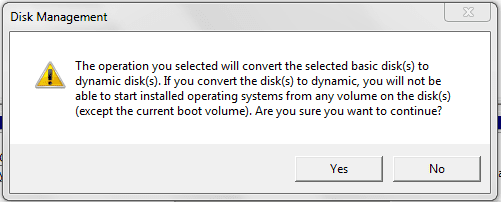
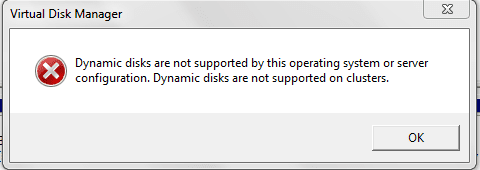
i want to partition my C drive,i tried with regular method,..go to computer management --->disk storage-->shrink volume,it creates unallotted space,but cant create new volume giving error of dynamic disc

i dont want to format my C drive & dont have windows-7 cd for booting(i dont want to change my os edition also)
i have mini tool partition software but it also giving error
 

My Computer

OS
64 bit
Please post back a screenshot of your maximized Disk Management drive map and listings:

1. Type Disk Management in Start Search box.
2. Open Disk Mgmt. window and maximize it.
3. Type Snipping Tool in Start Search box.
4. Open Snipping Tool, choose Rectangular Snip, draw a box around full map and all listings.
5, Save Snip, attach using paper clip in Reply Box.

Tell us what is on each partition and exactly what you want to do so we can give you the steps.
 
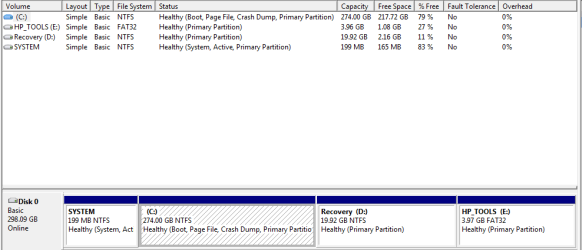
You apparently already have 4 primary partitions. You cannot proceed unless you convert one of the primaries into a logical partition. After you posted yor Disk Management picture, we'll tell you how to do that. But we first need to check your exact configuration.
 

My Computer

Computer Manufacturer/Model Number
HP, Dell, Gateway, Toshiba - 4 laptops and 2 desktops
OS
Vista, Windows7, Mint Mate, Zorin, Windows 8
CPU
from 1.6GHz Duo to i7
Monitor(s) Displays
2x HP w2207
Hard Drives
5x HDD, 7x SSD, 12x Externals
Keyboard
with trackball - no mices
Mouse
Trackball mice
Internet Speed
DSL 6000
i am sending paper clips,
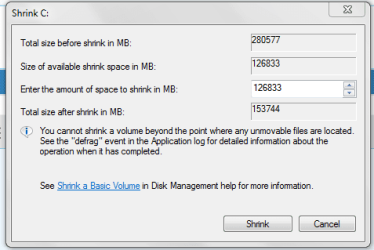
i want to reduce C drive to 90 GB only & create new volume from remaining


Computer Management_2012-10-13_11-03-11.png

shrinking details.png

unalloted_after_shrink.png

dynamic_disk_problem.png

dynamic_disk_problem-2.png

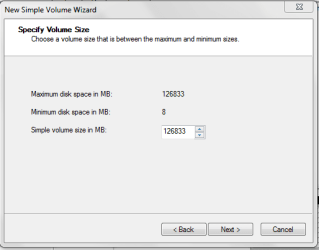
simple volume wizard.png
 

My Computer

OS
64 bit
The easiest way is to convert the C partition to logical and then shrink it as much as you want.

Then make a new partition from the space you saved.

You need to use Partition Wizard bootable disk. The last tool listed at this link:

Free download Magic Partition Manager Software, partition magic alternative, free partition magic, partition magic Windows 7 and server partition software - Partition Wizard Online


DON'T DON'T accept dynamic disks.

You are forced into logical partitions because HP shipped the PC with the maximum allowed 4 primary partitions.
 

My Computer

Computer type
PC/Desktop
Computer Manufacturer/Model Number
Ignatz Special; 4 speed manual gearbox; factory air conditioning; one of one
OS
Windows 7 Home Premium SP1, 64-bit
CPU
Intel Skylake i5-6600K, not overclocked
Motherboard
AsRock Z170M Extreme 4, micro ATX
Memory
8 GB HyperX DDR4-2666 (2 x 4 GB)
Graphics Card(s)
none; graphics are integrated on CPU
Sound Card
onboard: Realtek ALC1150; external: USB Behringer UF0-202
Monitor(s) Displays
Dell S2340M 23 inch IPS
Screen Resolution
1600 x 900
Hard Drives
System: Crucial MX100 series SSD, 128 GB;
Data: Samsung Spinpoint 103SJ, 1 TB;
Backup: WD Caviar Green WD30EZRX-00D8PB0, 3 TB
PSU
Rosewill SilentNight 500 watt fanless, semi-modular
Case
Antec Solo II
Cooling
Noctua NH-U12S; Noctua F12 intake, Noctua S12A exhaust
Keyboard
Microsoft 200 6JH-00001 USB
Mouse
Dell or Microsoft optical wired; USB
Antivirus
Microsoft Security Essentials and Malwarebytes Premium
Browser
Pale Moon
Other Info
All fans PWM; speeds at idle: CPU circa 500 rpm; intake circa 600 rpm; exhaust circa 600 rpm; CPU temps 27 idle and 47 C load in a warm room (27 C/81 F) when running Intel Extreme Tuning Utility stress test.
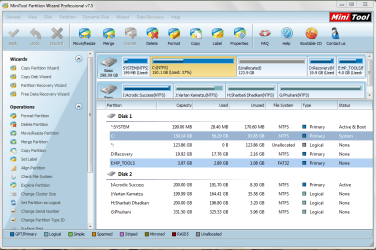
sir,i have mini tool partition wizard professional v.7.5,

i m selecting "C" drive ,then
"modify"-->"Set partition as logical"

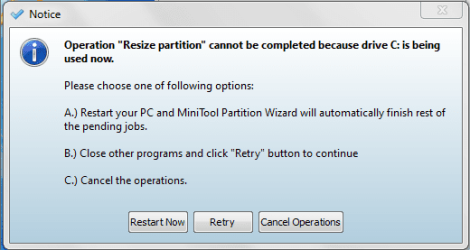
it says that operation may cause your system to be unbootable.
if i continue,they as that restart ur pc

i fear that my pc will run or not after partition as logical..should i proceed

mini toll partiton.png

partition warning.png

confused stage.png
 

My Computer

OS
64 bit
Yes, I would proceed.

You don't have any other choice if you want to keep all of the 4 partitions.

Your boot files are not on the C partition, so I would not expect any problem.
 
Last edited:

My Computer

Computer type
PC/Desktop
Computer Manufacturer/Model Number
Ignatz Special; 4 speed manual gearbox; factory air conditioning; one of one
OS
Windows 7 Home Premium SP1, 64-bit
CPU
Intel Skylake i5-6600K, not overclocked
Motherboard
AsRock Z170M Extreme 4, micro ATX
Memory
8 GB HyperX DDR4-2666 (2 x 4 GB)
Graphics Card(s)
none; graphics are integrated on CPU
Sound Card
onboard: Realtek ALC1150; external: USB Behringer UF0-202
Monitor(s) Displays
Dell S2340M 23 inch IPS
Screen Resolution
1600 x 900
Hard Drives
System: Crucial MX100 series SSD, 128 GB;
Data: Samsung Spinpoint 103SJ, 1 TB;
Backup: WD Caviar Green WD30EZRX-00D8PB0, 3 TB
PSU
Rosewill SilentNight 500 watt fanless, semi-modular
Case
Antec Solo II
Cooling
Noctua NH-U12S; Noctua F12 intake, Noctua S12A exhaust
Keyboard
Microsoft 200 6JH-00001 USB
Mouse
Dell or Microsoft optical wired; USB
Antivirus
Microsoft Security Essentials and Malwarebytes Premium
Browser
Pale Moon
Other Info
All fans PWM; speeds at idle: CPU circa 500 rpm; intake circa 600 rpm; exhaust circa 600 rpm; CPU temps 27 idle and 47 C load in a warm room (27 C/81 F) when running Intel Extreme Tuning Utility stress test.
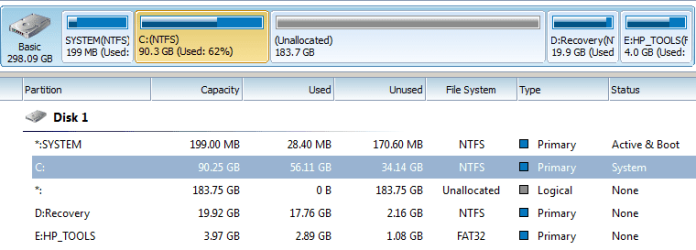
After making C logical,i make partition of C drive,it works fine,
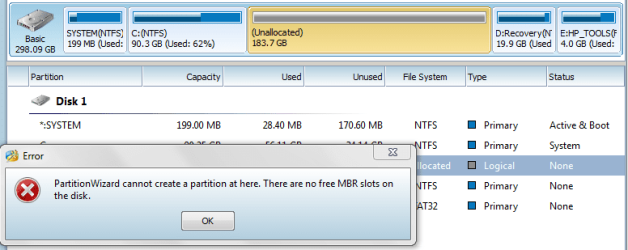
but when i m going to create new volume from allotted space, its showing problem ---> "no free MBR slots on disc",
if i gone to conventional way,i.e. through computer management-,again it give error which i posted earlier
what should i do ?

after_logical_partition.png

no_Free_mbr_slots_on_disk.png
 

My Computer

OS
64 bit
Looking at that picture, it shows C as still being primary, not logical. So I'm not sure what you did.

You can have only 4 primary partitions, but you can have nearly unlimited logical partitions.

Ultimately, you need to get both C and that 183.7 GB space as logical.

The 183.7 GB space appears to be a partition, but is still shown as unallocated. Try to format it with NTFS file system and see if that "unallocated" tag disappears. It should take a drive letter if you format it
 

My Computer

Computer type
PC/Desktop
Computer Manufacturer/Model Number
Ignatz Special; 4 speed manual gearbox; factory air conditioning; one of one
OS
Windows 7 Home Premium SP1, 64-bit
CPU
Intel Skylake i5-6600K, not overclocked
Motherboard
AsRock Z170M Extreme 4, micro ATX
Memory
8 GB HyperX DDR4-2666 (2 x 4 GB)
Graphics Card(s)
none; graphics are integrated on CPU
Sound Card
onboard: Realtek ALC1150; external: USB Behringer UF0-202
Monitor(s) Displays
Dell S2340M 23 inch IPS
Screen Resolution
1600 x 900
Hard Drives
System: Crucial MX100 series SSD, 128 GB;
Data: Samsung Spinpoint 103SJ, 1 TB;
Backup: WD Caviar Green WD30EZRX-00D8PB0, 3 TB
PSU
Rosewill SilentNight 500 watt fanless, semi-modular
Case
Antec Solo II
Cooling
Noctua NH-U12S; Noctua F12 intake, Noctua S12A exhaust
Keyboard
Microsoft 200 6JH-00001 USB
Mouse
Dell or Microsoft optical wired; USB
Antivirus
Microsoft Security Essentials and Malwarebytes Premium
Browser
Pale Moon
Other Info
All fans PWM; speeds at idle: CPU circa 500 rpm; intake circa 600 rpm; exhaust circa 600 rpm; CPU temps 27 idle and 47 C load in a warm room (27 C/81 F) when running Intel Extreme Tuning Utility stress test.
i first make all partition logical except C drive & make format of un-allotted space,
it works fine sir,i got sir.....

Thnx
 

My Computer

OS
64 bit
What? You were advised to convert C to Logical and you instead converted all other partitions to Logical except C? Why would you do such a reckless, random thing? The System Reserved partition cannot boot from a Logical partition.

With HP's in order to keep Recovery and OEM diagnostics tools partitions bootable you need to convert C to Logical then shrink it to add as many other adjacent Logicals as you want. This has worked in countless thousands of these we have helped with here since Win7 beta days.


You'd best post back another screenshot now before Win7 stops booting so we can help you sort out the mess you've made.


If it's too late, boot Partition Wizard bootable CD to convert System, Recovery and HP Tools partitions to Primary, then C and the new partition to Logical now. If it fails to boot click to highlight HD to
Rebuild MBR - Video Help.
 
Last edited:
  • Like
Reactions: whs
Back
Top