
two system reserved partitions

whatfor

New member
Member
Local time
2:15 AM
Messages
52
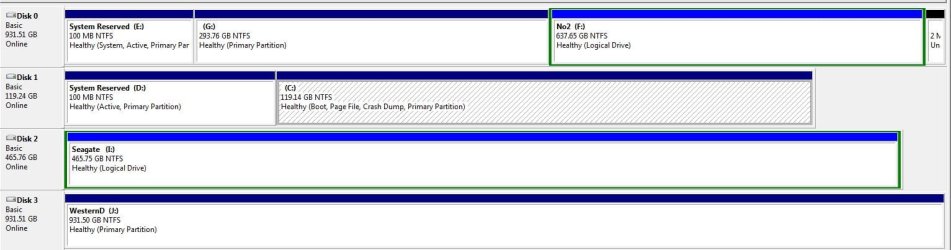
When I first had my desktop I had win 7 installed on a spinner. I then installed a SSD and installed the OS on that. I used disc cleanup to remove the old OS but I was left with the system reserved partition on the spinner. I tried to remove this partition using partition assistant but no go. So now I have two system reserve partitions and I think this may be messing with my backup software. How can I remove this unwanted partition.
Screenshot included of my disc management
 

Attachments
  • disc.JPG
    disc.JPG
    80.2 KB · Views: 24

My Computer

Computer Manufacturer/Model Number
dell/xps8300
OS
home premium 64 bit
CPU
3.30Ghz
Memory
8 gigs
Graphics Card(s)
NVIDIA Geforce GT 545
Sound Card
realtek onboard
This tutorial. Note that you need to remove it from disk 0 (the spinner) and not disk 1 (the SSD), according to what I see in the image you posted.

Might or might not need a startup repair afterwards (step 9 of that tutorial). If it doesn't boot do a startup repair up to 3 times in a row (if it keeps not booting).
 

My Computer

Computer type
PC/Desktop
Computer Manufacturer/Model Number
custom built
OS
Win 7 Pro 64-bit 7601
CPU
AMD Phenom 9650 QuadCore, revision DR-B3
Motherboard
ASUS M4A78
Memory
5 GB yes I run 2x 2GB and 1x 1GB, different brand, spank me.
Graphics Card(s)
NVIDIA GeForce 9800 GT 512 Mb, unknown manufacturer.
Sound Card
Crappy Realtek Integrated Audio
Monitor(s) Displays
Fujitsu Siemens P19-3P
Screen Resolution
1280 x 1024 x 32 bits @ 60 Hz Oh yeah, 4:3 rocks!
Hard Drives
(1) MAXTOR S TM3320613AS SATA Disk Device (2) STM35004 18AS SATA Disk Device (3) TOSHIBA USB 2.5"-HDD
PSU
whatever, around 450w
Case
Scavenged from old company PC, 10+ years old
Cooling
CPU fan, GPU fan, case fan, nothing fancy
Keyboard
Microsoft, PS/2, white.
Mouse
Optical, logitec.
Internet Speed
effective max speeds: 70-ish kB/s down 30-ish kB/s up
Antivirus
Avira, free edition.
Browser
Firefox with FXChrome to make it look like Google Chrome :P
Other Info
Was discarded by previous owner due to "horrible performance".
Was running Win Xp from a IDE drive. Yeah. Was a pain.
SATA II drive and Win7 and it zips away! Yay!
Also those sys reserved partitions should not be assigned drive letters and should be hidden when you open my computer
 

My Computer

Computer type
PC/Desktop
Computer Manufacturer/Model Number
Pauly Special
OS
Win7 Ultimate X64
CPU
Intel i5 3570K
Motherboard
Gigabyte Z77X-DS3H
Memory
8GB DDR3 1600
Graphics Card(s)
Onboard
Sound Card
Onboard
Screen Resolution
1280x1024
Hard Drives
Samsung 840 Evo SSD (OS)
1TB Spinner (Data)
PSU
800W Arctic
Case
Cooler Master
Cooling
3x120mm Fans
Keyboard
MS Wireless
Mouse
MS Wireless
Internet Speed
20M
This is what can happen if all other HD's are not unplugged during any install or repair. In this case Win7 is booting from the old HD as shown by the System flag on it's 100mb System Reserved partition.

To fix this unplug all other HD's to run http://www.sevenforums.com/tutorials/105541-startup-repair-run-3-separate-times.html until Win7 starts and the System flag is on the correct boot partition.

Then plug back in the other HD's making sure the SSD remains first to boot in BIOS setup, mark old System Reserved Inactive and then delete it in Disk Mgmt. http://www.sevenforums.com/tutorials/197157-partition-mark-inactive.html

The correct way to uninstall an OS is always to delete its partition in Disk Mgmt, not run Disk Cleanup. You likely still have OS files on the old Win7 partition so I'd move the data off and delete both the old System Reserved and the old C partition, the repartition them Logical so that boot files cannot accidentally be written to them during any repair or reinstall, since having them in Disk0 position makes the situation vulnerable. I'd want Logical partitions only on the HD to guard against this. This may not be practical but since you didn't include the disk listings we can't see how full those partitions on Disk0 are.
 
Back
Top