Solved Windows 7...why?

lehnerus2000, when I said the dials and knobs can be positioned anywhere, I meant that they are physically positioned anywhere before you buy...so if you drive one car, then get into another, everything aside from the wheel and pedals is different. Yes, it is a physical product, but it is still a user interface. The first thing you learn in a UI class is that UI's aren't only relegated to the digital world. We're going round and round and going off topic, though....even if it is an interesting debate.
 

My Computer

OS
Windows 7 Ultimate x64 SP1
CPU
Intel Core i7-2600
Motherboard
Gigabyte GA-P67A-UD3P-B3
Memory
12 GB Patriot Extreme DDR3-1333
Graphics Card(s)
Nvidia GTX 470
Monitor(s) Displays
Dell UltraSharp 2209WA
Hard Drives
OCZ Agility3 240 GB, WD5001AALS, WD7501AALS
PSU
OCZ ModStream 700W
Case
CoolerMaster HAF 912 Advanced
Cooling
CoolerMaster Hyper 212 Plus
Fair enough

lehnerus2000, when I said the dials and knobs can be positioned anywhere, I meant that they are physically positioned anywhere before you buy...so if you drive one car, then get into another, everything aside from the wheel and pedals is different. Yes, it is a physical product, but it is still a user interface. The first thing you learn in a UI class is that UI's aren't only relegated to the digital world. We're going round and round and going off topic, though....even if it is an interesting debate.

Fair enough.

I've never heard of a production car that allows you to reposition the accessories (not without visiting the workshop).
I have seen pictures of concept cars that are reconfigurable (to a limited extent).
Car analogies (almost always) fail when applied to computers. :D

I never meant to suggest that UIs were limited to electronic devices.

Dodgy UIs have contributed to various disasters (e.g. Three Mile Island).
From Wikipedia:
"The mechanical failures were compounded by the initial failure of plant operators to recognize the situation as a loss-of-coolant accident due to inadequate training and human factors, such as human-computer interaction design oversights relating to ambiguous control room indicators in the power plant's user interface. In particular, a hidden indicator light led to an operator manually overriding the automatic emergency cooling system of the reactor because the operator mistakenly believed that there was too much coolant water present in the reactor and causing the steam pressure release."
My point is that physical UIs are constrained (e.g. materials, space/volume, regulations, weight).
Virtual UIs (OS GUIs) have almost no restrictions (e.g. only host system performance matters - processing and storage capability).
These reasons are why airliners use computer displays, instead of (or in addition to) traditional gauges/lights.

Linux demonstrates that there are no real reasons why an OS can't support multiple UIs.
That causes other problems though. ;)

Since Linux GUIs aren't developed by multi-billion dollar companies (in general).
MS has no real excuses, for its inability to provide options, other than they think there will be no ROI.

Rewarding "Customer Loyalty", is considered "bad" business practice these days. :(
 

My Computer

Computer type
PC/Desktop
Computer Manufacturer/Model Number
n/a
OS
W7 Ultimate SP1, LM19.2 MATE, W10 Home 1703, W10 Pro 1703 VM, #All 64 bit
CPU
AMD Phenom II x6 1100T, 3.3 GHz
Motherboard
ASUS M4A88T-M/USB3 (AM3)
Memory
12GB DDR3 1333 G-Skill (4GB x 2), G-Skill (2GB x 2)
Graphics Card(s)
NVIDIA GeForce GTX 660
Sound Card
Realtek?
Monitor(s) Displays
Samsung S23B350
Screen Resolution
1920x1080
Hard Drives
WD Green 2TB (SATA), WD Green 3TB (SATA), WD Blue 4TB (SATA), WD Blue 6TB (SATA)
PSU
Cooler Master
Case
Antec GX300 Tower
Cooling
3x Antec TRICOOL 120mm Fans
Mouse
Wired Optical
Internet Speed
DSL
Antivirus
Avast
Browser
Pale Moon (64 bit)
Other Info
2018-12-27 Upgraded HDDs
2015-12-10 Upgraded case, graphics card, storage
2015-08-15 Upgraded motherboard & RAM
2015-07-15 Upgraded LM17.1 to LM17.2
Its blank because you have nothing plugged into the Microphone port.
Aka. Disconnected. Plug in a microphone and it should show up.

Ok yes the mike now works recording when plugged in

... but still nothing from online streaming like I used to with XP. It just gives me an
ongoing line with no data.. ie silence. I tried playing with the sound mapper settings - but nothing.

apogee07
 

My Computer

OS
W7
What program are you using for the online streaming?

For example, I have Firefox set to ask me, which program I want to use for listening to sound.
You could set it to use Audacity and see if Audacity will then record the sound.
 

My Computer

Computer type
PC/Desktop
Computer Manufacturer/Model Number
n/a
OS
W7 Ultimate SP1, LM19.2 MATE, W10 Home 1703, W10 Pro 1703 VM, #All 64 bit
CPU
AMD Phenom II x6 1100T, 3.3 GHz
Motherboard
ASUS M4A88T-M/USB3 (AM3)
Memory
12GB DDR3 1333 G-Skill (4GB x 2), G-Skill (2GB x 2)
Graphics Card(s)
NVIDIA GeForce GTX 660
Sound Card
Realtek?
Monitor(s) Displays
Samsung S23B350
Screen Resolution
1920x1080
Hard Drives
WD Green 2TB (SATA), WD Green 3TB (SATA), WD Blue 4TB (SATA), WD Blue 6TB (SATA)
PSU
Cooler Master
Case
Antec GX300 Tower
Cooling
3x Antec TRICOOL 120mm Fans
Mouse
Wired Optical
Internet Speed
DSL
Antivirus
Avast
Browser
Pale Moon (64 bit)
Other Info
2018-12-27 Upgraded HDDs
2015-12-10 Upgraded case, graphics card, storage
2015-08-15 Upgraded motherboard & RAM
2015-07-15 Upgraded LM17.1 to LM17.2
I use firefox and it invokes WMP for live streaming. The Menu:Tools/options/Applications window shows an "Action" list of 8 aplications that use WMP for "content" such as "Windows media audio/video file".

But also it appears that the only input device my system has is "microphone". It just does not "hear" any streaming or anything else like CD played through the system.

audacity-3.jpg


(below)When trying to stream the ony other option then "microphone" is "primary sound capture driver"

audacity-4.jpg


Went to "sound" in CP and ensured all devices were "enabled"

And I'm not the only one have troubles with Audacity/W7, just Google "audacity no input device windows 7"
 

My Computer

OS
W7
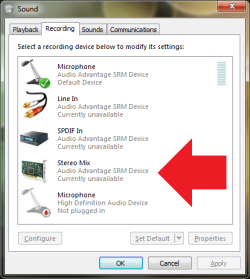
You are talking about "Stereo Mix" are you not? That completely depends on the sound card you have and whether the manufacture of that sound card has provided drivers with stereo mix capability. It appears you are using the generic HD Audio drivers which provides just basic features.

For example I have stereo mix on my computer because the drivers for my sound card support that capability.
 

Attachments

  • Untitled.png
    Untitled.png
    17.5 KB · Views: 1

My Computer

Computer type
PC/Desktop
Computer Manufacturer/Model Number
Alienware Aurora ALX R4
OS
Windows 10 Pro (x64)
CPU
Intel Core i7-3930K (3.2GHz - 4.5GHz)
Motherboard
Alienware Aurora-R4 x79
Memory
4x Samsung 4GB PC3-12800 DDR3 (16GB 1600MHz)
Graphics Card(s)
Nvidia Geforce GTX 690
Sound Card
SteelSeries Siberia Elite
Monitor(s) Displays
Dell UltraSharp U3011
Screen Resolution
2560x1600
Hard Drives
Samsung 850 Pro 256 GB, Seagate 1TB Desktop Hybrid HDD, 2x Western Digital 4TB Green HDD
PSU
875W Some Dell PSU <.<
Case
Alienware Aurora ALX
Cooling
Custom Liquid Cooling (EK CPU & GPU blocks) dual EK 480RAD
Keyboard
Logitech G710+ Mechanical
Mouse
Logitech G700s
Internet Speed
Verizon Fios (50 mbps average)
Other Info
Server: Intel NUC D54250WYK: i5-4250U, 16GB, 256 GB mSATA, Windows Server 2012 R2
Oh, it looks there's something missing on my system :rolleyes: You have all these devices and I only have the mikes!

But, I can hear the live streaming, CDs etc through the speakers and headphones, so there must be a "stereo mix" device/card in there somewhere. So we know it "works". It's that audacity can't hear it.
 

My Computer

OS
W7
You are missing the drivers for your sound card. Even then however it is not guaranteed they will support stereo mix. That feature is provided at the discretion of the manufacture of your sound card.

You'll probably need: http://www.abyssmedia.com/isound7/
 

My Computer

Computer type
PC/Desktop
Computer Manufacturer/Model Number
Alienware Aurora ALX R4
OS
Windows 10 Pro (x64)
CPU
Intel Core i7-3930K (3.2GHz - 4.5GHz)
Motherboard
Alienware Aurora-R4 x79
Memory
4x Samsung 4GB PC3-12800 DDR3 (16GB 1600MHz)
Graphics Card(s)
Nvidia Geforce GTX 690
Sound Card
SteelSeries Siberia Elite
Monitor(s) Displays
Dell UltraSharp U3011
Screen Resolution
2560x1600
Hard Drives
Samsung 850 Pro 256 GB, Seagate 1TB Desktop Hybrid HDD, 2x Western Digital 4TB Green HDD
PSU
875W Some Dell PSU <.<
Case
Alienware Aurora ALX
Cooling
Custom Liquid Cooling (EK CPU & GPU blocks) dual EK 480RAD
Keyboard
Logitech G710+ Mechanical
Mouse
Logitech G700s
Internet Speed
Verizon Fios (50 mbps average)
Other Info
Server: Intel NUC D54250WYK: i5-4250U, 16GB, 256 GB mSATA, Windows Server 2012 R2
Right click in the white area of recording tab of the sound control panel--like where logicearth has the red arrow.

Choose "show disable devices' and "show disconnected devices".

Does stereo mix then show up??

If it does, Audacity can find it.

If it does not, you have 2 choices:

1: Install any other driver you can find for your sound card---most likely Vista drivers. Try compatibility mode on existing drivers. Cuss a while. Search for more drivers. Cuss some more.

2: Buy a sound card known to provide Stereo Mix on Windows 7. They are not common, but they are out there.
 

My Computer

Computer type
PC/Desktop
Computer Manufacturer/Model Number
Ignatz Special; 4 speed manual gearbox; factory air conditioning; one of one
OS
Windows 7 Home Premium SP1, 64-bit
CPU
Intel Skylake i5-6600K, not overclocked
Motherboard
AsRock Z170M Extreme 4, micro ATX
Memory
8 GB HyperX DDR4-2666 (2 x 4 GB)
Graphics Card(s)
none; graphics are integrated on CPU
Sound Card
onboard: Realtek ALC1150; external: USB Behringer UF0-202
Monitor(s) Displays
Dell S2340M 23 inch IPS
Screen Resolution
1600 x 900
Hard Drives
System: Crucial MX100 series SSD, 128 GB;
Data: Samsung Spinpoint 103SJ, 1 TB;
Backup: WD Caviar Green WD30EZRX-00D8PB0, 3 TB
PSU
Rosewill SilentNight 500 watt fanless, semi-modular
Case
Antec Solo II
Cooling
Noctua NH-U12S; Noctua F12 intake, Noctua S12A exhaust
Keyboard
Microsoft 200 6JH-00001 USB
Mouse
Dell or Microsoft optical wired; USB
Antivirus
Microsoft Security Essentials and Malwarebytes Premium
Browser
Pale Moon
Other Info
All fans PWM; speeds at idle: CPU circa 500 rpm; intake circa 600 rpm; exhaust circa 600 rpm; CPU temps 27 idle and 47 C load in a warm room (27 C/81 F) when running Intel Extreme Tuning Utility stress test.
This is as far as i get with the recording device panel.... I tried update sound drivers option . No change. Any idea where to look for the ID of the sound card so to manually find potential drivers before I give in to something like isound7

audacity-5.jpg
 

My Computer

OS
W7
Go to Device Manager and look under "sound, video, and game controllers".

You should see your sound card listed.

Or you could go to your motherboard manufacturer's web site.

Or you could go to the system builder's web site and look for other drivers if you bought the PC from Dell or HP or somebody like that.
 

My Computer

Computer type
PC/Desktop
Computer Manufacturer/Model Number
Ignatz Special; 4 speed manual gearbox; factory air conditioning; one of one
OS
Windows 7 Home Premium SP1, 64-bit
CPU
Intel Skylake i5-6600K, not overclocked
Motherboard
AsRock Z170M Extreme 4, micro ATX
Memory
8 GB HyperX DDR4-2666 (2 x 4 GB)
Graphics Card(s)
none; graphics are integrated on CPU
Sound Card
onboard: Realtek ALC1150; external: USB Behringer UF0-202
Monitor(s) Displays
Dell S2340M 23 inch IPS
Screen Resolution
1600 x 900
Hard Drives
System: Crucial MX100 series SSD, 128 GB;
Data: Samsung Spinpoint 103SJ, 1 TB;
Backup: WD Caviar Green WD30EZRX-00D8PB0, 3 TB
PSU
Rosewill SilentNight 500 watt fanless, semi-modular
Case
Antec Solo II
Cooling
Noctua NH-U12S; Noctua F12 intake, Noctua S12A exhaust
Keyboard
Microsoft 200 6JH-00001 USB
Mouse
Dell or Microsoft optical wired; USB
Antivirus
Microsoft Security Essentials and Malwarebytes Premium
Browser
Pale Moon
Other Info
All fans PWM; speeds at idle: CPU circa 500 rpm; intake circa 600 rpm; exhaust circa 600 rpm; CPU temps 27 idle and 47 C load in a warm room (27 C/81 F) when running Intel Extreme Tuning Utility stress test.
The truth is that a lack of stereo mix is quite common on Windows 7.

It was not so common on Vista and much less common on XP.

I leave it to you to imagine why the powers that be might want to make it difficult for you to record sound on a PC.

Hmmm....................I wonder why they would do that?


Hmmmmmmmmmmmmmmmmmmmmmm.....................

Get a separate sound card.
 

My Computer

Computer type
PC/Desktop
Computer Manufacturer/Model Number
Ignatz Special; 4 speed manual gearbox; factory air conditioning; one of one
OS
Windows 7 Home Premium SP1, 64-bit
CPU
Intel Skylake i5-6600K, not overclocked
Motherboard
AsRock Z170M Extreme 4, micro ATX
Memory
8 GB HyperX DDR4-2666 (2 x 4 GB)
Graphics Card(s)
none; graphics are integrated on CPU
Sound Card
onboard: Realtek ALC1150; external: USB Behringer UF0-202
Monitor(s) Displays
Dell S2340M 23 inch IPS
Screen Resolution
1600 x 900
Hard Drives
System: Crucial MX100 series SSD, 128 GB;
Data: Samsung Spinpoint 103SJ, 1 TB;
Backup: WD Caviar Green WD30EZRX-00D8PB0, 3 TB
PSU
Rosewill SilentNight 500 watt fanless, semi-modular
Case
Antec Solo II
Cooling
Noctua NH-U12S; Noctua F12 intake, Noctua S12A exhaust
Keyboard
Microsoft 200 6JH-00001 USB
Mouse
Dell or Microsoft optical wired; USB
Antivirus
Microsoft Security Essentials and Malwarebytes Premium
Browser
Pale Moon
Other Info
All fans PWM; speeds at idle: CPU circa 500 rpm; intake circa 600 rpm; exhaust circa 600 rpm; CPU temps 27 idle and 47 C load in a warm room (27 C/81 F) when running Intel Extreme Tuning Utility stress test.
And BTW thank you all for persisting with your suggestions. W7 is an improvement in many ways and yes the designers "listened" to the the median in the bell-curve sample of users. But there are always us outliers who have specific requirements of our computing work that often get dropped out in the "improvements" of the upgrades.
 

My Computer

OS
W7
Back
Top