
From Win7, install EasyBCD 2.0 beta and add XP to Dual Boot menu. If it says it is added, then remove it and add again. It will ask to load boot files when you click Add OS, so say OK, then highlight XP above and Save. EasyBCD 2.0 Beta Builds - The NeoSmart Forums
Also i have to keep switching that thing in the bios for the bluescreen. FROM compatability to ATA ATA for 7 to work without bluescreen and Comp for xp to work with out bluescreen.
Did you install XP with your SATA controller in a different mode? If so, you may be able to get by with an XP repair install while the SATA controller is set to the same setting which is working for Win7.
Otherwise XP will need to be reinstalled.
This will afterward require adding Win7 back to the Dual Boot using EasyBCD which requires Net Framework 2.0 to run in XP.
How to Perform a Windows XP Repair Install
Is there a way you can get me another link to the EasyBCD 2.0 where I dont have to sign up to that forum?
My Computer
At a glance
windows 7 professional 64 bitintel core i7 920 (1366)Corsair Dominators (TR3X6G1600C8D)Sapphire 5970
- OS
- windows 7 professional 64 bit
- CPU
- intel core i7 920 (1366)
- Motherboard
- Asus P6T Deluxe V2
- Memory
- Corsair Dominators (TR3X6G1600C8D)
- Graphics Card(s)
- Sapphire 5970
- Sound Card
- on board / Asus Xonar D2
- Monitor(s) Displays
- lg flatron wide 22" 2x
- Hard Drives
- caviar black 1tb
caviar green 1tb
external western digital my book 1tb
external western my book digital 500gb
- PSU
- corsair 750w
- Case
- antec 1200
- Cooling
- sythek mugen - 2
- Keyboard
- flico maje
- Mouse
- g500
- Internet Speed
- comcast houstont x, 16mb down with boost. 2mb up

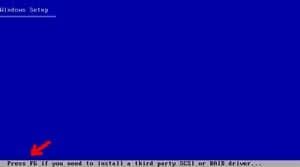


 or guide me that way as well so i will also know for future references.


