
CCleaner ccsetup504.exe: "...side-by-side configuration is incorrect"

Sent you a PM with a download link. Configure settings like this:

http://www.sevenforums.com/performa...-taking-all-my-rams-memory-3.html#post2952513

Then run a scan. Let us know if it finds any problems.

Re: Google Chrome cache. It looks big to me but if there are any Chrome users reading this thread would you please confirm if the cache size detected is normal? Thanks.

Will check back again tomorrow.

One last thing: When you've finished using your machine try opening an elevated command prompt and running chkdsk /r /f and type y to reboot. Be warned - the disk check will take some time.
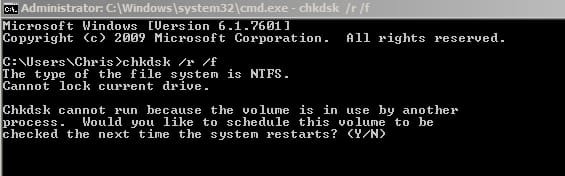
chkdsk _r _f.jpg
 

My Computer My Computer

Computer type
Laptop
Computer Manufacturer/Model Number
ASUS
OS
Microsoft Windows 7 Home Premium 64-bit 7601 Multiprocessor Free Service Pack 1
CPU
AMD C-60 APU with Radeon(tm) HD Graphics
Motherboard
ASUSTeK COMPUTER INC. X501U
Memory
4.00 GB
Graphics Card(s)
AMD Radeon HD 6290 Graphics
Sound Card
(1) AMD High Definition Audio Device (2) Realtek High Defi
Screen Resolution
1366 x 768 x 32 bits (4294967296 colors) @ 60 Hz
Hard Drives
Hitachi HTS545050A7E380 SATA Disk Device
Antivirus
Comodo CIS & FW, SecureAplus App Whitelisting, Threatfire
Browser
Cyberfox 64bit, Opera 64bit, Airfox
Other Info
Spy-The-Spy, HitmanPro.Alert, Norton Connect Safe, MJRegWatcher, BitDefender TrafficLight, Voodoo Shield, Zemana AntiMalware
Another thought. How about setting Ccleaner to ignore Chrome's cache just for one run and see what the cleanup time is like then?
 

My Computer My Computer

Computer type
Laptop
Computer Manufacturer/Model Number
ASUS
OS
Microsoft Windows 7 Home Premium 64-bit 7601 Multiprocessor Free Service Pack 1
CPU
AMD C-60 APU with Radeon(tm) HD Graphics
Motherboard
ASUSTeK COMPUTER INC. X501U
Memory
4.00 GB
Graphics Card(s)
AMD Radeon HD 6290 Graphics
Sound Card
(1) AMD High Definition Audio Device (2) Realtek High Defi
Screen Resolution
1366 x 768 x 32 bits (4294967296 colors) @ 60 Hz
Hard Drives
Hitachi HTS545050A7E380 SATA Disk Device
Antivirus
Comodo CIS & FW, SecureAplus App Whitelisting, Threatfire
Browser
Cyberfox 64bit, Opera 64bit, Airfox
Other Info
Spy-The-Spy, HitmanPro.Alert, Norton Connect Safe, MJRegWatcher, BitDefender TrafficLight, Voodoo Shield, Zemana AntiMalware
I've needed the laptop all day I'm afraid, so I've had to leave the elevated command prompt ChkDsk to tonight, overnight. I've done everything else, though.

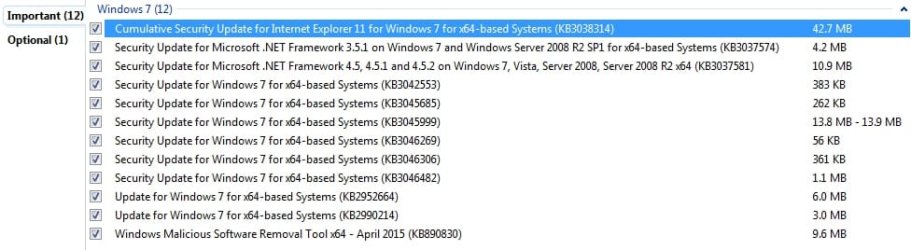
I installed these Windows Updates, firstly:
2015-04-16_142425.jpg

According to PSI, there aren't any missing patches of MS Visual C++, but I did update Adobe AIR and Flash and Java 32-bit and 64-bit.

The only thing is the MS XML Core Services 4.x, listed as out of date. Should I update it? I do have 3.x and 6.x (both 32 and 64), according to PSI.

I thought it best to list everthing Microsoft, plus Java and Chrome:
2015-04-16_184829_PSI Microsoft etc Programs.jpg

You may be correct about the suspiciously large Chrome cache and the time it takes to erase, as it took me an age to gather the same amount of files in IE11.
Analyse (ignoring all Chrome files): 21.549 secs
468 MB
20 - 30 secs to delete.
Maybe it's still slow for a basic deletion, but it would have been 30 mins if it was Chrome cache files.

I'll have to post separately about Chrome and and also the IE11 problems I have.
 

My Computer My Computer

Computer type
Laptop
Computer Manufacturer/Model Number
Acer Aspire 5741
OS
Windows 7 Home Premium 64bit
CPU
Core i3
Memory
8GB DDR3
Graphics Card(s)
Intel HD
Re: elevated command prompt

Command Prompt doesn't appear in my "Accessories" Start Menu, so I've downloaded and extracted the Elevated_Command_Prompt.zip and pinned it to the Start Menu. It's another bizarre fault.
 

My Computer My Computer

Computer type
Laptop
Computer Manufacturer/Model Number
Acer Aspire 5741
OS
Windows 7 Home Premium 64bit
CPU
Core i3
Memory
8GB DDR3
Graphics Card(s)
Intel HD
Re: Software updates:

MSXML 4 has been superceeded by MSXML 6 and as long as you have MSXML 6 installed I'd forget about that one. So your other software is all patched then. You can remove Secuina PSI or keep it and run a scan every few weeks. If you wish to remove it the best way is:

Start > Run

then type

services.msc

Stop the service (if it's running) - if it's stopped exit the window and open a command prompt then type:

sc delete “Secunia PSI Agent”

include the quotes.

Press Enter.

Then uninstall Secunia PSI via the usual method but if you kept Geek Uninstaller handy it's better to use that and let it scan for and delete any leftovers.

As for Chrome - I agree that you'd be better off getting help from someone who knows more about it and how it's cache works and possible reasons as to why it could become large.

Ccleaner performance seems fine (ignoring Chrome) so I guess it's fixed.

If I think of anything else I'll post here. Really the only other thing is to get a look at what's actully running on your machine but it's probably not really needed. If you want to download software that will scan and create a log that you can upload for examination let us know.
 

My Computer My Computer

Computer type
Laptop
Computer Manufacturer/Model Number
ASUS
OS
Microsoft Windows 7 Home Premium 64-bit 7601 Multiprocessor Free Service Pack 1
CPU
AMD C-60 APU with Radeon(tm) HD Graphics
Motherboard
ASUSTeK COMPUTER INC. X501U
Memory
4.00 GB
Graphics Card(s)
AMD Radeon HD 6290 Graphics
Sound Card
(1) AMD High Definition Audio Device (2) Realtek High Defi
Screen Resolution
1366 x 768 x 32 bits (4294967296 colors) @ 60 Hz
Hard Drives
Hitachi HTS545050A7E380 SATA Disk Device
Antivirus
Comodo CIS & FW, SecureAplus App Whitelisting, Threatfire
Browser
Cyberfox 64bit, Opera 64bit, Airfox
Other Info
Spy-The-Spy, HitmanPro.Alert, Norton Connect Safe, MJRegWatcher, BitDefender TrafficLight, Voodoo Shield, Zemana AntiMalware
Re Command Prompt missing: I think there's a way to fix that if I can find the download. I remember a while back helping someone to fix their Accessories folder.
 

My Computer My Computer

Computer type
Laptop
Computer Manufacturer/Model Number
ASUS
OS
Microsoft Windows 7 Home Premium 64-bit 7601 Multiprocessor Free Service Pack 1
CPU
AMD C-60 APU with Radeon(tm) HD Graphics
Motherboard
ASUSTeK COMPUTER INC. X501U
Memory
4.00 GB
Graphics Card(s)
AMD Radeon HD 6290 Graphics
Sound Card
(1) AMD High Definition Audio Device (2) Realtek High Defi
Screen Resolution
1366 x 768 x 32 bits (4294967296 colors) @ 60 Hz
Hard Drives
Hitachi HTS545050A7E380 SATA Disk Device
Antivirus
Comodo CIS & FW, SecureAplus App Whitelisting, Threatfire
Browser
Cyberfox 64bit, Opera 64bit, Airfox
Other Info
Spy-The-Spy, HitmanPro.Alert, Norton Connect Safe, MJRegWatcher, BitDefender TrafficLight, Voodoo Shield, Zemana AntiMalware
For now just take a look here:

C:\Users\Dad\AppData\Roaming\Microsoft\Windows\Start Menu\Programs\

Look in the Programs folder and see if Accessories is still there and if it is check if it looks faded.

If it's still there but faded - it means it's hidden and you just need to unhide it.
 

My Computer My Computer

Computer type
Laptop
Computer Manufacturer/Model Number
ASUS
OS
Microsoft Windows 7 Home Premium 64-bit 7601 Multiprocessor Free Service Pack 1
CPU
AMD C-60 APU with Radeon(tm) HD Graphics
Motherboard
ASUSTeK COMPUTER INC. X501U
Memory
4.00 GB
Graphics Card(s)
AMD Radeon HD 6290 Graphics
Sound Card
(1) AMD High Definition Audio Device (2) Realtek High Defi
Screen Resolution
1366 x 768 x 32 bits (4294967296 colors) @ 60 Hz
Hard Drives
Hitachi HTS545050A7E380 SATA Disk Device
Antivirus
Comodo CIS & FW, SecureAplus App Whitelisting, Threatfire
Browser
Cyberfox 64bit, Opera 64bit, Airfox
Other Info
Spy-The-Spy, HitmanPro.Alert, Norton Connect Safe, MJRegWatcher, BitDefender TrafficLight, Voodoo Shield, Zemana AntiMalware

My Computer My Computer

Computer type
Laptop
Computer Manufacturer/Model Number
ASUS
OS
Microsoft Windows 7 Home Premium 64-bit 7601 Multiprocessor Free Service Pack 1
CPU
AMD C-60 APU with Radeon(tm) HD Graphics
Motherboard
ASUSTeK COMPUTER INC. X501U
Memory
4.00 GB
Graphics Card(s)
AMD Radeon HD 6290 Graphics
Sound Card
(1) AMD High Definition Audio Device (2) Realtek High Defi
Screen Resolution
1366 x 768 x 32 bits (4294967296 colors) @ 60 Hz
Hard Drives
Hitachi HTS545050A7E380 SATA Disk Device
Antivirus
Comodo CIS & FW, SecureAplus App Whitelisting, Threatfire
Browser
Cyberfox 64bit, Opera 64bit, Airfox
Other Info
Spy-The-Spy, HitmanPro.Alert, Norton Connect Safe, MJRegWatcher, BitDefender TrafficLight, Voodoo Shield, Zemana AntiMalware
Command Prompt restored, thanks!

I'd love to check what's on my system, just to be sure, if you could PM me the link?

Re: CCleaner
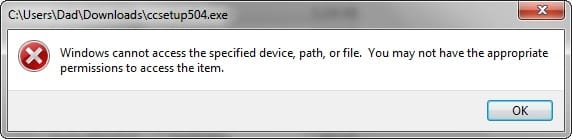
Although I now have the 'slim' version and it seems to work fine, I think the original problems remain, though I don't want to risk checking. Uninstall the slim version, try the 'full' version and discover I can't re-install the slim.

"Windows cannot access the specified device, path or file. You may not have the appropriate permissions to access them."

"The application has failed to start because its side-by-side configuration is incorrect. Please see the application event log or use the command-line sxstrace.exe tool for more detail."

I might still have the C++ problem and Winsxs folder problem, if these are indeed the causes.
 

My Computer My Computer

Computer type
Laptop
Computer Manufacturer/Model Number
Acer Aspire 5741
OS
Windows 7 Home Premium 64bit
CPU
Core i3
Memory
8GB DDR3
Graphics Card(s)
Intel HD
Well if System File Checker doesn't find any problems then I wouldn't worry too much about WINSXS folder. It's used to restore original copies of files and it's actually best to leave the contents of the folder alone although it is actually possible with caution to clean it up but it should in no way be the cause of your problems.

Re: C++ - there's something you can try. More later.

For now try downloading and installing this:

UVK - Ultra Virus Killer

You need the free version UVK Installer (exe)

If it won't install try the portable version instead. Ignore the name of the program - it has quite a few system repair features built in.


Once installed - right click the desktop shortcut and choose "Run as administrator" - Launch Chrome and leave it running.

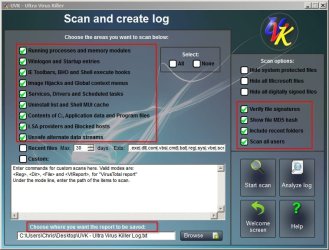
You will see a button in UVK's GUI labelled "Scan and create log"

Then apply the following settings and choose the file path to save the log to your desktop.

UVK Scan Setings.jpg

Run the scan and upload the results. Thanks.
 

My Computer My Computer

Computer type
Laptop
Computer Manufacturer/Model Number
ASUS
OS
Microsoft Windows 7 Home Premium 64-bit 7601 Multiprocessor Free Service Pack 1
CPU
AMD C-60 APU with Radeon(tm) HD Graphics
Motherboard
ASUSTeK COMPUTER INC. X501U
Memory
4.00 GB
Graphics Card(s)
AMD Radeon HD 6290 Graphics
Sound Card
(1) AMD High Definition Audio Device (2) Realtek High Defi
Screen Resolution
1366 x 768 x 32 bits (4294967296 colors) @ 60 Hz
Hard Drives
Hitachi HTS545050A7E380 SATA Disk Device
Antivirus
Comodo CIS & FW, SecureAplus App Whitelisting, Threatfire
Browser
Cyberfox 64bit, Opera 64bit, Airfox
Other Info
Spy-The-Spy, HitmanPro.Alert, Norton Connect Safe, MJRegWatcher, BitDefender TrafficLight, Voodoo Shield, Zemana AntiMalware
Okay I'll take a look at your log but it will take some time and it may not show any obvious problems but if I find anything I'll post details.

In the meantime you can try this repair script:

View attachment repair script.txt - save to desktop and rename it to repair script.uvk (replace .txt with .uvk)

Contents of the script:

Code:
<UVKCommandsScript>
This script will perform system repair. Please save all your work before continuing.

 <CreateRestorePoint>
 <CleanAllUsersTemp>
 <EmptyBrowsersCache>
 <CreateRestorePoint>
 <KillNonSystemProcesses>
 <StopNonMsServices>
 <FixIeAndWindowsShell>
 <FixInstallProblems>
 <ResetUserShellFolders>
 <ResetSecuritySettings>
 <FixGroupAccess>
 <ResetGroupPolicy>
 <CreateRestorePoint>
 <Reboot>

Instructions: Disconnect from the internet. Run UVK (right click and run as admin)

Disable Antivirus if possible. Usually you can right click on the system tray icon and suspend protection.

On the UVK welcome screen choose "Run Scripts"

Then "Import Commands From File"

Browse to repair script.uvk that you saved to your desktop and open it or double click it.

Choose "Run / Fix Listed"

Reboot if or when requested.

Just make sure that "System Restore" is enabled on your machine before running the script.
 

My Computer My Computer

Computer type
Laptop
Computer Manufacturer/Model Number
ASUS
OS
Microsoft Windows 7 Home Premium 64-bit 7601 Multiprocessor Free Service Pack 1
CPU
AMD C-60 APU with Radeon(tm) HD Graphics
Motherboard
ASUSTeK COMPUTER INC. X501U
Memory
4.00 GB
Graphics Card(s)
AMD Radeon HD 6290 Graphics
Sound Card
(1) AMD High Definition Audio Device (2) Realtek High Defi
Screen Resolution
1366 x 768 x 32 bits (4294967296 colors) @ 60 Hz
Hard Drives
Hitachi HTS545050A7E380 SATA Disk Device
Antivirus
Comodo CIS & FW, SecureAplus App Whitelisting, Threatfire
Browser
Cyberfox 64bit, Opera 64bit, Airfox
Other Info
Spy-The-Spy, HitmanPro.Alert, Norton Connect Safe, MJRegWatcher, BitDefender TrafficLight, Voodoo Shield, Zemana AntiMalware
Log looks okay - no sign of malware or any problem software other than jv16 PowerTools 2009 which can cause problems if you just let it scan and clean everything it finds. I've used it myself in the past.

Edit: Will check back later - in a couple of hours or so.
 
Last edited:

My Computer My Computer

Computer type
Laptop
Computer Manufacturer/Model Number
ASUS
OS
Microsoft Windows 7 Home Premium 64-bit 7601 Multiprocessor Free Service Pack 1
CPU
AMD C-60 APU with Radeon(tm) HD Graphics
Motherboard
ASUSTeK COMPUTER INC. X501U
Memory
4.00 GB
Graphics Card(s)
AMD Radeon HD 6290 Graphics
Sound Card
(1) AMD High Definition Audio Device (2) Realtek High Defi
Screen Resolution
1366 x 768 x 32 bits (4294967296 colors) @ 60 Hz
Hard Drives
Hitachi HTS545050A7E380 SATA Disk Device
Antivirus
Comodo CIS & FW, SecureAplus App Whitelisting, Threatfire
Browser
Cyberfox 64bit, Opera 64bit, Airfox
Other Info
Spy-The-Spy, HitmanPro.Alert, Norton Connect Safe, MJRegWatcher, BitDefender TrafficLight, Voodoo Shield, Zemana AntiMalware
View attachment UVKFixLog - Repair Script.txt


=========================== UVK - Ultra Virus Killer log ===========================

System Info:

UVK - Ultra Virus Killer version: 7.1.1.0
Windows version: Microsoft Windows 7 Home Premium X64 Build 7601 Service Pack 1
I.E. Version: 11.00.9600.16428 (winblue_gdr.131013-1700)
Time & date: 19:29 17/04/2015
System drive: C: 147.5 GB free of 283.9 GB.


=========================== UVK - Ultra Virus Killer Fix log ===========================

System Info:

UVK - Ultra Virus Killer version: 7.1.1.0
Windows version: Microsoft Windows 7 Home Premium X64 Build 7601 Service Pack 1
I.E. Version: 11.00.9600.16428 (winblue_gdr.131013-1700)
Time & date: 20:58 17/04/2015
System drive: C: 147.5 GB free of 283.9 GB.


2015/04/17 20:58:05 Creating a system restore point...
System restore point UVK - Ultra Virus Killer fix successfully created.

2015/04/17 20:58:46 Cleaning all users temp folders...
41.92 MB of HDD space gained.

2015/04/17 20:58:47 Emptying all browsers cache...
The browsers cache was successfully emptied.

2015/04/17 20:58:59 Creating a system restore point...
System restore point UVK - Ultra Virus Killer fix successfully created.

2015/04/17 20:59:40 Killng non system processes...

2015/04/17 20:59:58 Stopping non Microsoft services...
Operation completed. 4 services were stopped.

2015/04/17 21:01:31 Fixing IE and the Windows shell...
The IE and the windows shell fixes were successfully applyed.

2015/04/17 21:01:38 Fixing installation problems...
The fixes for installation problems were successfully aplied.

2015/04/17 21:01:53 Resetting the user shell folders...
The user shell folders were successfully reset.

2015/04/17 21:01:53 Resetting security settings...
The access to the registry and file system was successfully granted.

2015/04/17 21:04:53 Fixing the local group access permissions...
2 of 2 members successfully added.

2015/04/17 21:04:53 Resetting the group policy...
The group policies have been successfully reset.

2015/04/17 21:04:53 Creating a system restore point...
System restore point UVK - Ultra Virus Killer fix successfully created.

======================== End of the UVK - Ultra Virus Killer fix log =======================


I haven't tested anything, after everything has been reset.
 

My Computer My Computer

Computer type
Laptop
Computer Manufacturer/Model Number
Acer Aspire 5741
OS
Windows 7 Home Premium 64bit
CPU
Core i3
Memory
8GB DDR3
Graphics Card(s)
Intel HD
Okay so just check that your Anivirus has been re-enabled by right clicking the icon in the system tray and checking it's protection status (shields are enabled). If you are not noticing any problems:

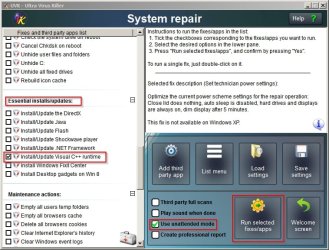
Run UVK once more (right click and run as administrator) then click the System Repair button. In the left pane scroll down to:

Install/Update Visual C++ Runtime and tick the box. Also select "Use unattended mode" and run the fix. It will take a minute or two and your screen might go blank. Reboot when finished.

UVK - Update.jpg

After that - it's take a deep breath time and maybe try to install a problem program.

As there are system restore points available it should be possible to undo any changes if something has screwed up (which shouldn't happen) but best to be on the safe side!
 
Last edited:

My Computer My Computer

Computer type
Laptop
Computer Manufacturer/Model Number
ASUS
OS
Microsoft Windows 7 Home Premium 64-bit 7601 Multiprocessor Free Service Pack 1
CPU
AMD C-60 APU with Radeon(tm) HD Graphics
Motherboard
ASUSTeK COMPUTER INC. X501U
Memory
4.00 GB
Graphics Card(s)
AMD Radeon HD 6290 Graphics
Sound Card
(1) AMD High Definition Audio Device (2) Realtek High Defi
Screen Resolution
1366 x 768 x 32 bits (4294967296 colors) @ 60 Hz
Hard Drives
Hitachi HTS545050A7E380 SATA Disk Device
Antivirus
Comodo CIS & FW, SecureAplus App Whitelisting, Threatfire
Browser
Cyberfox 64bit, Opera 64bit, Airfox
Other Info
Spy-The-Spy, HitmanPro.Alert, Norton Connect Safe, MJRegWatcher, BitDefender TrafficLight, Voodoo Shield, Zemana AntiMalware

My Computer My Computer

Computer type
Laptop
Computer Manufacturer/Model Number
ASUS
OS
Microsoft Windows 7 Home Premium 64-bit 7601 Multiprocessor Free Service Pack 1
CPU
AMD C-60 APU with Radeon(tm) HD Graphics
Motherboard
ASUSTeK COMPUTER INC. X501U
Memory
4.00 GB
Graphics Card(s)
AMD Radeon HD 6290 Graphics
Sound Card
(1) AMD High Definition Audio Device (2) Realtek High Defi
Screen Resolution
1366 x 768 x 32 bits (4294967296 colors) @ 60 Hz
Hard Drives
Hitachi HTS545050A7E380 SATA Disk Device
Antivirus
Comodo CIS & FW, SecureAplus App Whitelisting, Threatfire
Browser
Cyberfox 64bit, Opera 64bit, Airfox
Other Info
Spy-The-Spy, HitmanPro.Alert, Norton Connect Safe, MJRegWatcher, BitDefender TrafficLight, Voodoo Shield, Zemana AntiMalware
Installed the MS Visual C++ runtimes, but CCleaner (Standard) still won't install:

2015-04-18_032233.jpg

Thankfully, the 'slim' version re-installed.

Re: Chrome.

I don't have a 'Chrome' icon in the system tray that, according to the Google Support page, would be present if a background app was running and I don't want to turn off any background pages, even if I don't use any of the services at present.

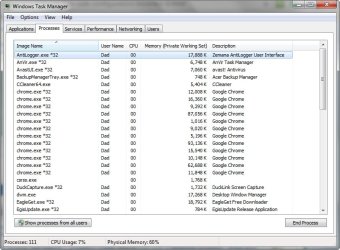
I think the Chrome problems are more severe, but maybe I shouldn't clutter this thread with a different problem, unless you know the solution! Even with only 1 Chrome window open (2 tabs), this is what Task Manager shows:

2015-04-18_033310.jpg
 

My Computer My Computer

Computer type
Laptop
Computer Manufacturer/Model Number
Acer Aspire 5741
OS
Windows 7 Home Premium 64bit
CPU
Core i3
Memory
8GB DDR3
Graphics Card(s)
Intel HD
Would you open an Explorer window and copy and paste the following into the address bar?

shell:UsersFilesFolder

Press Enter.

Look for the "Downloads" folder and right click it and choose "properties"

Can you post what you see in the "Location" tab please? Also when you open the folder does it show a list of your downloaded files?

As for Chrome - you are right. Best to get help from someone else with that!
 

My Computer My Computer

Computer type
Laptop
Computer Manufacturer/Model Number
ASUS
OS
Microsoft Windows 7 Home Premium 64-bit 7601 Multiprocessor Free Service Pack 1
CPU
AMD C-60 APU with Radeon(tm) HD Graphics
Motherboard
ASUSTeK COMPUTER INC. X501U
Memory
4.00 GB
Graphics Card(s)
AMD Radeon HD 6290 Graphics
Sound Card
(1) AMD High Definition Audio Device (2) Realtek High Defi
Screen Resolution
1366 x 768 x 32 bits (4294967296 colors) @ 60 Hz
Hard Drives
Hitachi HTS545050A7E380 SATA Disk Device
Antivirus
Comodo CIS & FW, SecureAplus App Whitelisting, Threatfire
Browser
Cyberfox 64bit, Opera 64bit, Airfox
Other Info
Spy-The-Spy, HitmanPro.Alert, Norton Connect Safe, MJRegWatcher, BitDefender TrafficLight, Voodoo Shield, Zemana AntiMalware
Hmm. Reading your error message with a little more care I see that it's different to the "side by side congiguration is incorrect" one.

Alternative method to the one in the above post:

Start > Run

then type:

shell:UsersFilesFolder

Press Enter.

Does your downloads folder show up and does it contain anything?
 

My Computer My Computer

Computer type
Laptop
Computer Manufacturer/Model Number
ASUS
OS
Microsoft Windows 7 Home Premium 64-bit 7601 Multiprocessor Free Service Pack 1
CPU
AMD C-60 APU with Radeon(tm) HD Graphics
Motherboard
ASUSTeK COMPUTER INC. X501U
Memory
4.00 GB
Graphics Card(s)
AMD Radeon HD 6290 Graphics
Sound Card
(1) AMD High Definition Audio Device (2) Realtek High Defi
Screen Resolution
1366 x 768 x 32 bits (4294967296 colors) @ 60 Hz
Hard Drives
Hitachi HTS545050A7E380 SATA Disk Device
Antivirus
Comodo CIS & FW, SecureAplus App Whitelisting, Threatfire
Browser
Cyberfox 64bit, Opera 64bit, Airfox
Other Info
Spy-The-Spy, HitmanPro.Alert, Norton Connect Safe, MJRegWatcher, BitDefender TrafficLight, Voodoo Shield, Zemana AntiMalware
First method:

Location: C:\Users\Dad\Downloads

Yes, when I open the folder, it shows all the downloaded files.

2nd method:

Results are the same.

The address bar shows this though:
2015-04-18_134725.jpg

"Arj" is the name of my user account, whereas "Dad" is the registered name of the laptop, if I have that correct. The name used, when the laptop was first set-up.

Is it a universal 'downloads' folder, or is it supposed to be specific to each user?

The thing is, I don't have a problem with any other file I've just tried. I've just opened a PDF, JPEG, .MOV and .txt file without incident. I haven't tried them all, as most are .exe files.
 
Last edited:

My Computer My Computer

Computer type
Laptop
Computer Manufacturer/Model Number
Acer Aspire 5741
OS
Windows 7 Home Premium 64bit
CPU
Core i3
Memory
8GB DDR3
Graphics Card(s)
Intel HD
Back
Top