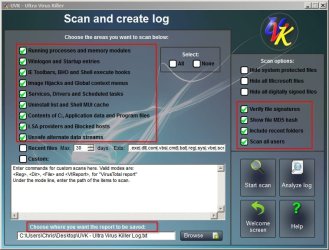
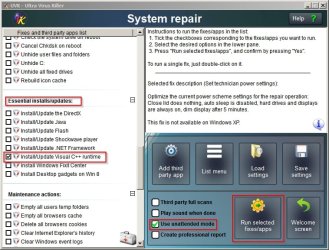
Sent you a PM with a download link. Configure settings like this:
http://www.sevenforums.com/performa...-taking-all-my-rams-memory-3.html#post2952513
Then run a scan. Let us know if it finds any problems.
Re: Google Chrome cache. It looks big to me but if there are any Chrome users reading this thread would you please confirm if the cache size detected is normal? Thanks.
Will check back again tomorrow.
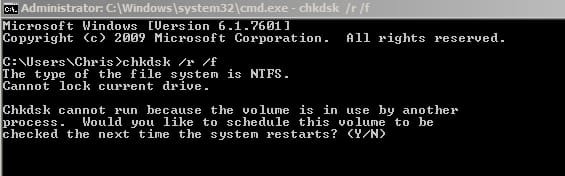
One last thing: When you've finished using your machine try opening an elevated command prompt and running chkdsk /r /f and type y to reboot. Be warned - the disk check will take some time.
http://www.sevenforums.com/performa...-taking-all-my-rams-memory-3.html#post2952513
Then run a scan. Let us know if it finds any problems.
Re: Google Chrome cache. It looks big to me but if there are any Chrome users reading this thread would you please confirm if the cache size detected is normal? Thanks.
Will check back again tomorrow.
One last thing: When you've finished using your machine try opening an elevated command prompt and running chkdsk /r /f and type y to reboot. Be warned - the disk check will take some time.
My Computer
- Computer type
- Laptop
- Computer Manufacturer/Model Number
- ASUS
- OS
- Microsoft Windows 7 Home Premium 64-bit 7601 Multiprocessor Free Service Pack 1
- CPU
- AMD C-60 APU with Radeon(tm) HD Graphics
- Motherboard
- ASUSTeK COMPUTER INC. X501U
- Memory
- 4.00 GB
- Graphics Card(s)
- AMD Radeon HD 6290 Graphics
- Sound Card
- (1) AMD High Definition Audio Device (2) Realtek High Defi
- Screen Resolution
- 1366 x 768 x 32 bits (4294967296 colors) @ 60 Hz
- Hard Drives
- Hitachi HTS545050A7E380 SATA Disk Device
- Antivirus
- Comodo CIS & FW, SecureAplus App Whitelisting, Threatfire
- Browser
- Cyberfox 64bit, Opera 64bit, Airfox
- Other Info
- Spy-The-Spy, HitmanPro.Alert, Norton Connect Safe, MJRegWatcher, BitDefender TrafficLight, Voodoo Shield, Zemana AntiMalware