Enable test mode to solve USB problems?

Should I still have the set restore points disabled?
 

My Computer

Computer type
PC/Desktop
Computer Manufacturer/Model Number
HP Pavilian DV7-7012 notebook
OS
Windows 7 Home Premium 64 bit
CPU
3rd generation Intel Core i7-3610QM Processor
Motherboard
2.30GHz
Memory
8GB DDR3 1600MHz RAM (2 DIMM); 750GB 7200RPM hard drive
Graphics Card(s)
2GB (2048MB) NVIDIA GeForce GT 650M GDDR5 Graphics
Hard Drives
750GB 7200RPM hard drive with HP ProtectSmart Hard Drive Protection
Antivirus
Microsoft
Browser
Firefox, Chrome, Microsoft
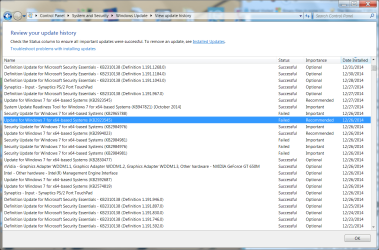
I think this update is already on my computer. Here is a screen shot I posted before. Looks like that update was installed in late December after I started having my USB problems.
 

Attachments

  • history of updates around dec 26 - jan 14 screenshot.png
    history of updates around dec 26 - jan 14 screenshot.png
    273.3 KB · Views: 2

My Computer

Computer type
PC/Desktop
Computer Manufacturer/Model Number
HP Pavilian DV7-7012 notebook
OS
Windows 7 Home Premium 64 bit
CPU
3rd generation Intel Core i7-3610QM Processor
Motherboard
2.30GHz
Memory
8GB DDR3 1600MHz RAM (2 DIMM); 750GB 7200RPM hard drive
Graphics Card(s)
2GB (2048MB) NVIDIA GeForce GT 650M GDDR5 Graphics
Hard Drives
750GB 7200RPM hard drive with HP ProtectSmart Hard Drive Protection
Antivirus
Microsoft
Browser
Firefox, Chrome, Microsoft
OH. Good catch.

Let's wait for Slarty. Restore points should be enabled before applying the Windows upate
 

My Computer

Computer type
PC/Desktop
Computer Manufacturer/Model Number
Dell Optiplex 360 and Optiplex 755
OS
Desk 1: Win 7 Pro x32; Desk 2: Windows 10 x64
Hard Drives
500GB Crucial SSD in both Desktops
Other Info
Buffalo 6TB NAS, Raid 1
Bill, you might double check with the OS experts on the forum, but I'm pretty sure (98%) that a Windows repair install doesn't affect installed apps. (It resets Windows options to defaults and replaces critical Windows OS files with original from repair disc)
.....

Good call Jerry - you can be 100% sure. I checked the Repair Install tutorial
   Information
This will show you how to do a repair install (aka: in-place upgrade install) to fix your currently installed Windows 7 and preserve your user accounts, data, programs, and system drivers.

On the other hand ... I'll still have to rule out a Repair Install because it won't affect the system drivers. I was really hoping I was wrong on the applications and that it would be a hail Mary, but alas ... no.

I have corrected the error of my ways (the post you quoted). That's what happens when you're in a hurry :o


Sheila,

Please follow these instructions - it creates a report that provides the big picture of you system devices.

There is nothing to install, this is a standalone application
  1. Download DevManView x64
    • Select Save (default location is your Downloads folder)
    • Select Open Folder on the download complete bar
      • devmanview-x64.zip should be highlighted/selected
        -if it is not, then select it
      • Press enter or double click the file to open it in Windows Explorer
      • Select extract all
      • Accept the defaults pre-staged in the extract window
      • A new Windows Explorer will open
      • Double click the DevManView application to launch it
      • Answer Yes to the UAC prompt if it appears

  2. In the DevManView application
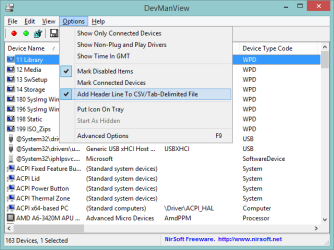
    • Select the Options menu
    • Select the Add Header Line To CSV/Tab-Delimited File option
      DMVopts.png
      [*]Click anywhere on the main DevManView window
      [*](Ctrl+A) Select all items in the main window
      [*](Ctrl+S) Save Selected Items
      File name: DMV_YourProfileName
      :tip: Example: DMV_Slarty
      :tip: Remember the save location
      Save as type: Comma Delimited Text File (*.csv)​


    [*]Place the CSV file in a zip folder and attach it on a post in your thread.


You can do this anytime, it's just a report.

Thanks,

Bill
.
 

My Computer

Computer type
Laptop
Computer Manufacturer/Model Number
HP Pavilion dv6-6c10us
OS
x64 (6.3.9600) Win8.1 Pro & soon dual boot x64 (6.1.7601) Win7_SP1 HomePrem
CPU
AMD A6-3420M APU with Radeon(tm) HD Graphics
Motherboard
Hewlett-Packard 1805
Memory
6.00 GB
Graphics Card(s)
AMD Radeon(TM) HD 6520G
Sound Card
(1) AMD High Definition Audio Device (2) IDT High Definiti
Monitor(s) Displays
HP W2072a 20" LCD (1600 x 900) @ 60 Hz
Screen Resolution
1366 x 768 x 32 bits (4294967296 colors) @ 60 Hz
Hard Drives
ST640LM0 00 HM641JI SATA Disk Device
Keyboard
Logitech k520 wireless KB
Mouse
Logitech m320 wireless mouse (bundled with KB)
Internet Speed
15/5 | 54 MB Wireless 'n'
Antivirus
Realtime: Defender or Avast | On-demand: Malwarebytes, ESET
Browser
IE 11 on Win8, IE 10 on win 7
Other Info
Media: [Gimp, Audacity, VLC] || Comm: [WEmail 2012, Skype] || Productivity: [OpenOffice,| Textpad] || Utils: [Sysinternals, cCleaner, Speccy, Defraggler]
You're right it's already applied. So skip that one.

fyi I noticed the MS Security bulletin I added in my EDIT updates the Usbehci.sys driver to 6.1.7601.18328, which is even newer. But I see Slarty asked for a DevManView.

Hold off applying the MS Security bulletin (or any other update). I'm guessing Slarty wants to check all the driver versions first :)
 

My Computer

Computer type
PC/Desktop
Computer Manufacturer/Model Number
Dell Optiplex 360 and Optiplex 755
OS
Desk 1: Win 7 Pro x32; Desk 2: Windows 10 x64
Hard Drives
500GB Crucial SSD in both Desktops
Other Info
Buffalo 6TB NAS, Raid 1
I think this update is already on my computer. Here is a screen shot I posted before. Looks like that update was installed in late December after I started having my USB problems.

Excellent Sheila,

I was jumping in and out writing a post and saw Jerry's suggestion. I was going to suggest that you look in the installed updates, but you thought of it before I finished writing my post.

I also looked at the other link Jerry posted, but need to read it all the way through. It talks about an issue with Signature Enforcement disabled - but that is one of the things we haven't tried yet. So it doesn't sound applicable at first glance. I'll read more....

I think that there is a little wording confusion - but I need to read (not skim) the recent posts. Jerry is pointing to specific stand alone updates and you asked about Windows Update (I think). Let me catch up some more.

As far as System Protection - I'd rather leave that off until all malware scanners are completed and your system is as clean as possible. This prevents accidentally restoring malware when (if) you roll back to a Restore Point. All of this presumes that there is more malware on your system. I suspect there is (524 found by Mbam) - but I don't think there's anything really malicious or harmful. I won't know until the other scanners finish (maybe you have already finished - nope didn't see anything about the scanners having been run).

Jerry, you're right again - let's see the big picture with DevManView.
You're only asking Sheila to run the msi, not Windows Update - right?

Bill
.
 

My Computer

Computer type
Laptop
Computer Manufacturer/Model Number
HP Pavilion dv6-6c10us
OS
x64 (6.3.9600) Win8.1 Pro & soon dual boot x64 (6.1.7601) Win7_SP1 HomePrem
CPU
AMD A6-3420M APU with Radeon(tm) HD Graphics
Motherboard
Hewlett-Packard 1805
Memory
6.00 GB
Graphics Card(s)
AMD Radeon(TM) HD 6520G
Sound Card
(1) AMD High Definition Audio Device (2) IDT High Definiti
Monitor(s) Displays
HP W2072a 20" LCD (1600 x 900) @ 60 Hz
Screen Resolution
1366 x 768 x 32 bits (4294967296 colors) @ 60 Hz
Hard Drives
ST640LM0 00 HM641JI SATA Disk Device
Keyboard
Logitech k520 wireless KB
Mouse
Logitech m320 wireless mouse (bundled with KB)
Internet Speed
15/5 | 54 MB Wireless 'n'
Antivirus
Realtime: Defender or Avast | On-demand: Malwarebytes, ESET
Browser
IE 11 on Win8, IE 10 on win 7
Other Info
Media: [Gimp, Audacity, VLC] || Comm: [WEmail 2012, Skype] || Productivity: [OpenOffice,| Textpad] || Utils: [Sysinternals, cCleaner, Speccy, Defraggler]
You're only asking Sheila to run the msi, not Windows Update - right?
1) Sheila can hold off applying the security bulletin or any windows update for now. We'll wait

2) Re: the thread i found titled about "Signature enforcement disabled": It's about the same problem. There's some interesting "fixes" some people posted. We wouldn't disable sig enforcement as one of the things we try

One of the fixes listed involves deleting files and forcing driver reinstall. This can fix a problem if the run-time files for the driver package don't match the set saved in the DriverStore.

Will have a look at that possibility tomorrow. G;nite all (Crabby: so just do Bill's request. You can put any of mine on hold for now)
 

My Computer

Computer type
PC/Desktop
Computer Manufacturer/Model Number
Dell Optiplex 360 and Optiplex 755
OS
Desk 1: Win 7 Pro x32; Desk 2: Windows 10 x64
Hard Drives
500GB Crucial SSD in both Desktops
Other Info
Buffalo 6TB NAS, Raid 1
I have to confess I got frustrated and decided to go ahead and disable the signature enforcement to see if I could get my mouse to work. Here is what happened. The computer installed drivers when I booted up. Mouse didn't work. Computer wanted to reboot, so I did. I went back in an disabled the signature enforcement again and booted it back up. Plugged mouse into one of the USB3 ports. The mouse worked! Then I plugged it into the USB2. Also worked. Then plugged into the USB3s and now none of them work again. But the USB2 is still working, so I do have a mouse at least until I reboot.

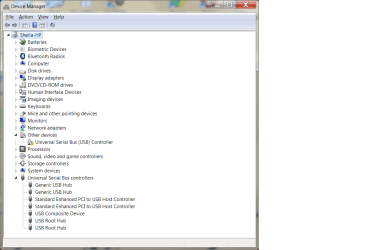
I am attaching screen shots of device manager so you can see what I see. Everything under Universal Serial Bus controllers is showing Microsoft drivers that are digitally signed by Microsoft. The one under other devices is showing code 28 and is digitally unsigned. I still don't know which of these is USB3 or USB2 despite your tutorial, ComputerGeek.

You can all yell at me now. I'm going to bed so I won't hear anyone until the morning. But damn it, at least I have a mouse.:p
 

Attachments

  • Got one mouse screenshot 1 jan. 17.png
    Got one mouse screenshot 1 jan. 17.png
    116.9 KB · Views: 1
  • Got one mouse screenshot 2 jan 17.png
    Got one mouse screenshot 2 jan 17.png
    68.1 KB · Views: 1

My Computer

Computer type
PC/Desktop
Computer Manufacturer/Model Number
HP Pavilian DV7-7012 notebook
OS
Windows 7 Home Premium 64 bit
CPU
3rd generation Intel Core i7-3610QM Processor
Motherboard
2.30GHz
Memory
8GB DDR3 1600MHz RAM (2 DIMM); 750GB 7200RPM hard drive
Graphics Card(s)
2GB (2048MB) NVIDIA GeForce GT 650M GDDR5 Graphics
Hard Drives
750GB 7200RPM hard drive with HP ProtectSmart Hard Drive Protection
Antivirus
Microsoft
Browser
Firefox, Chrome, Microsoft
You are beautiful!
G'nite and sleep well

We'll follow up in the morning to see if we can find a more permanent solution if needed.

You'll need to reinstall the USB 3.0 chipset from HP
reinstall USB chipset from C:\SwSetup\sp56164

I don't recall when I asked you to rename the SwSetup folder, so if it's not there, you can unpack the HP USB 3.0 driver again. The file name is still sp56164 but it's probably in your Downloads folder

If you can't find it on your machine, just download it again from HP
http://ftp.hp.com/pub/softpaq/sp56001-56500/sp56164.exe

go ahead an install that - the unknown device should move to the USB and your USB 3.0 ports should work. If you get the code 52 - you know the workaround.

Good work and thanks for getting frustrated :p

Bill
.
 
Last edited:

My Computer

Computer type
Laptop
Computer Manufacturer/Model Number
HP Pavilion dv6-6c10us
OS
x64 (6.3.9600) Win8.1 Pro & soon dual boot x64 (6.1.7601) Win7_SP1 HomePrem
CPU
AMD A6-3420M APU with Radeon(tm) HD Graphics
Motherboard
Hewlett-Packard 1805
Memory
6.00 GB
Graphics Card(s)
AMD Radeon(TM) HD 6520G
Sound Card
(1) AMD High Definition Audio Device (2) IDT High Definiti
Monitor(s) Displays
HP W2072a 20" LCD (1600 x 900) @ 60 Hz
Screen Resolution
1366 x 768 x 32 bits (4294967296 colors) @ 60 Hz
Hard Drives
ST640LM0 00 HM641JI SATA Disk Device
Keyboard
Logitech k520 wireless KB
Mouse
Logitech m320 wireless mouse (bundled with KB)
Internet Speed
15/5 | 54 MB Wireless 'n'
Antivirus
Realtime: Defender or Avast | On-demand: Malwarebytes, ESET
Browser
IE 11 on Win8, IE 10 on win 7
Other Info
Media: [Gimp, Audacity, VLC] || Comm: [WEmail 2012, Skype] || Productivity: [OpenOffice,| Textpad] || Utils: [Sysinternals, cCleaner, Speccy, Defraggler]
Checking back in.
I haven't done anything from post 217 onward except for disabling signature enforcement.
So I want to make sure everyone is on the same page as to what we do next and which prior steps I can skip.
I feel pretty good about things this morning given the ability to use a mouse.
 

My Computer

Computer type
PC/Desktop
Computer Manufacturer/Model Number
HP Pavilian DV7-7012 notebook
OS
Windows 7 Home Premium 64 bit
CPU
3rd generation Intel Core i7-3610QM Processor
Motherboard
2.30GHz
Memory
8GB DDR3 1600MHz RAM (2 DIMM); 750GB 7200RPM hard drive
Graphics Card(s)
2GB (2048MB) NVIDIA GeForce GT 650M GDDR5 Graphics
Hard Drives
750GB 7200RPM hard drive with HP ProtectSmart Hard Drive Protection
Antivirus
Microsoft
Browser
Firefox, Chrome, Microsoft
Whooopppeeeeeee! What great news to wake up to on Sunday morning!!! :D

As Slarty, pointed out, you've got your USB 2.0 drivers up and working!! Try installing USB 3.0 again and let's see what happens!!!
 

My Computer

Computer type
PC/Desktop
Computer Manufacturer/Model Number
Dell Optiplex 360 and Optiplex 755
OS
Desk 1: Win 7 Pro x32; Desk 2: Windows 10 x64
Hard Drives
500GB Crucial SSD in both Desktops
Other Info
Buffalo 6TB NAS, Raid 1
Great news. Lots of good hard work went into this thread. Great job all around. Lets hope to get everything squared away.
 

My Computer

Computer type
PC/Desktop
Computer Manufacturer/Model Number
Custom
OS
Dual Boot: Windows 8.1 & Server 2012r2 VMs: Kali Linux, Backbox, Matriux, Windows 8.1
CPU
A10 7700 Kavari SteamRoller
Motherboard
ASUS A88XM-PLUS (FM2+ )
Memory
8GB DDR3 SDRAM PC3-8500
Graphics Card(s)
1024MB ATI AMD Radeon R7 Graphics
Sound Card
Realtek High Definition Audio
Monitor(s) Displays
Samsung
Hard Drives
SSD Crucial 120gb
WD VelociRaptor 1tb
PSU
Rosewill Gaming 650w
Case
Rosewill Galaxy 2
Internet Speed
55/12
Antivirus
Malwarebytes, MSE, SAS
Browser
FireFox, Chrome
For the moment, please just do these in this order

USB 3.0 post# 229:
http://www.sevenforums.com/hardware...lve-usb-problems-post2986268.html#post2986268

DevManView post# 224:
http://www.sevenforums.com/hardware...lve-usb-problems-post2986230.html#post2986230

You will need to re-enable some of the things that were disabled. I'd like to review the Clean Startup items and not just re-enable everything. I run my system with everything off except the touchpad. I wrote a post not long ago with what recalled needed to be 'undone'.

For now, please just do the two above

Thanks


At some point in time you should complete the Malware guide. I think this can wait a day or two, I wouldn't wait a week though
Malware Guide post# 217:
http://www.sevenforums.com/hardware...lve-usb-problems-post2986167.html#post2986167
 

My Computer

Computer type
Laptop
Computer Manufacturer/Model Number
HP Pavilion dv6-6c10us
OS
x64 (6.3.9600) Win8.1 Pro & soon dual boot x64 (6.1.7601) Win7_SP1 HomePrem
CPU
AMD A6-3420M APU with Radeon(tm) HD Graphics
Motherboard
Hewlett-Packard 1805
Memory
6.00 GB
Graphics Card(s)
AMD Radeon(TM) HD 6520G
Sound Card
(1) AMD High Definition Audio Device (2) IDT High Definiti
Monitor(s) Displays
HP W2072a 20" LCD (1600 x 900) @ 60 Hz
Screen Resolution
1366 x 768 x 32 bits (4294967296 colors) @ 60 Hz
Hard Drives
ST640LM0 00 HM641JI SATA Disk Device
Keyboard
Logitech k520 wireless KB
Mouse
Logitech m320 wireless mouse (bundled with KB)
Internet Speed
15/5 | 54 MB Wireless 'n'
Antivirus
Realtime: Defender or Avast | On-demand: Malwarebytes, ESET
Browser
IE 11 on Win8, IE 10 on win 7
Other Info
Media: [Gimp, Audacity, VLC] || Comm: [WEmail 2012, Skype] || Productivity: [OpenOffice,| Textpad] || Utils: [Sysinternals, cCleaner, Speccy, Defraggler]
I'm going out shopping for a couple hours and will do this stuff when I get back.
I also think I'm going to order this portable hard drive from B&H photo. seagate backup plus | B&H Photo Video
 

My Computer

Computer type
PC/Desktop
Computer Manufacturer/Model Number
HP Pavilian DV7-7012 notebook
OS
Windows 7 Home Premium 64 bit
CPU
3rd generation Intel Core i7-3610QM Processor
Motherboard
2.30GHz
Memory
8GB DDR3 1600MHz RAM (2 DIMM); 750GB 7200RPM hard drive
Graphics Card(s)
2GB (2048MB) NVIDIA GeForce GT 650M GDDR5 Graphics
Hard Drives
750GB 7200RPM hard drive with HP ProtectSmart Hard Drive Protection
Antivirus
Microsoft
Browser
Firefox, Chrome, Microsoft
I'll be out most of the day. Talk with y'all later!
 

My Computer

Computer type
PC/Desktop
Computer Manufacturer/Model Number
Dell Optiplex 360 and Optiplex 755
OS
Desk 1: Win 7 Pro x32; Desk 2: Windows 10 x64
Hard Drives
500GB Crucial SSD in both Desktops
Other Info
Buffalo 6TB NAS, Raid 1
I'm going out shopping for a couple hours and will do this stuff when I get back.
I also think I'm going to order this portable hard drive from B&H photo. seagate backup plus | B&H Photo Video

B&H Photo is a great place. I've ordered some things from them, the prices are hard to beat.

If you're going to use this mostly as backup and cold storage (as opposed to portability) I think there are some better choices. Unfortunately I can't select the options on B&H for some reason.

Here are the things I'd look for and see if any are a comparable price. See if you can click the filters on the left.

Desktop drive (if you don't plan to carry it around very often or ever)

Capacity: not larger than 2GB 2TB (too many threads with issues re: larger capacity drives - there are lots of reasons) 2GB 2TB is a lot and you can always add another drive if you need more space.

Rotational Drive
Drive Speed: 7200 RPM
Connection: USB 3.0
Buffer: 16-32 MB ( both a cost and a performance issue - more is better, but it increases the price.)
Power: AC
Average Seek time: Under 5 ms (8-11 is ok, but above that, you'll feel your system drag down
Pre-Format: Windows NTFS

See what results you get with those choices and post a link. Any member can offer their opinion.
Basically, you want a decent spin rate (I feel that 10,000 is too high for an external) and fast seek time

Have fun today everyone, and thanks for great support on a tough issue.

I think I'll go out and play in the rain - just to get off my ..... chair.

Bill
.

 
Last edited:

My Computer

Computer type
Laptop
Computer Manufacturer/Model Number
HP Pavilion dv6-6c10us
OS
x64 (6.3.9600) Win8.1 Pro & soon dual boot x64 (6.1.7601) Win7_SP1 HomePrem
CPU
AMD A6-3420M APU with Radeon(tm) HD Graphics
Motherboard
Hewlett-Packard 1805
Memory
6.00 GB
Graphics Card(s)
AMD Radeon(TM) HD 6520G
Sound Card
(1) AMD High Definition Audio Device (2) IDT High Definiti
Monitor(s) Displays
HP W2072a 20" LCD (1600 x 900) @ 60 Hz
Screen Resolution
1366 x 768 x 32 bits (4294967296 colors) @ 60 Hz
Hard Drives
ST640LM0 00 HM641JI SATA Disk Device
Keyboard
Logitech k520 wireless KB
Mouse
Logitech m320 wireless mouse (bundled with KB)
Internet Speed
15/5 | 54 MB Wireless 'n'
Antivirus
Realtime: Defender or Avast | On-demand: Malwarebytes, ESET
Browser
IE 11 on Win8, IE 10 on win 7
Other Info
Media: [Gimp, Audacity, VLC] || Comm: [WEmail 2012, Skype] || Productivity: [OpenOffice,| Textpad] || Utils: [Sysinternals, cCleaner, Speccy, Defraggler]
I need a portable drive to take back and forth from Michigan to Florida.
Did you really mean 2 gigabytes? I have close to 500 GB on my hard drive right now that I need to back up. I take a lot of photos and videos. I need at least a terabyte.
 

My Computer

Computer type
PC/Desktop
Computer Manufacturer/Model Number
HP Pavilian DV7-7012 notebook
OS
Windows 7 Home Premium 64 bit
CPU
3rd generation Intel Core i7-3610QM Processor
Motherboard
2.30GHz
Memory
8GB DDR3 1600MHz RAM (2 DIMM); 750GB 7200RPM hard drive
Graphics Card(s)
2GB (2048MB) NVIDIA GeForce GT 650M GDDR5 Graphics
Hard Drives
750GB 7200RPM hard drive with HP ProtectSmart Hard Drive Protection
Antivirus
Microsoft
Browser
Firefox, Chrome, Microsoft
I am sure he meant 2TB
 

My Computer

Computer type
PC/Desktop
Computer Manufacturer/Model Number
Custom Built
OS
Windows 10 Pro
CPU
AMD Ryzen 5 2400G Processor with Radeon RX Vega 11 Graphics
Motherboard
ASRock X470 Master SLI/AC AM4 AMD Promontory X470 SATA 6Gb/s
Memory
G.SKILL Ripjaws V Series 16GB (2 x 8GB) 288-Pin DDR4 SDRAM D
Graphics Card(s)
2047MB NVIDIA GeForce GTX 1060 6GB (EVGA)
Sound Card
Motherboard Built in
Monitor(s) Displays
Acer R240HY bidx 23.8-Inch IPS HDMI DVI VGA (1920 x 1080) Wi
Screen Resolution
1920 x 1080
Hard Drives
1TB Sandisk SSD PLUS (Main drive)
500 GB Seagate 7200 RPM (Games)
500 GB Western Digital 7200 RPM (Virtual Machines)
PSU
CORSAIR TX Series TX650M 650W 80+ Gold Modular Power Supply
Case
CORSAIR CARBIDE SPEC-02 Mid-Tower Gaming Case, Red LED Fan
Cooling
220mm, two 120mm, and four 60mm fans
Keyboard
Wired Dell keyboard
Mouse
Wireless Logitech mouse
Internet Speed
250mb down, 30mb up
Antivirus
Panda Cloud Antivirus
Browser
Chrome-ish x64
Other Info
Your awesome for reading this.
Trying to get the USBs to work with sp56164 didn't work. There seem to be two of them on my computer. Maybe I need to try to get rid of one of them. I'm not sure it's going to help. Maybe try an older version?

Here are some screen shots of what I saw when drivers were being installed and the current device driver view. Why did we see so many more hubs before?
 

Attachments

  • device manager 3 pm jan 17.png
    device manager 3 pm jan 17.png
    119 KB · Views: 1
  • device not succ. installed jan 17.png
    device not succ. installed jan 17.png
    77 KB · Views: 29

My Computer

Computer type
PC/Desktop
Computer Manufacturer/Model Number
HP Pavilian DV7-7012 notebook
OS
Windows 7 Home Premium 64 bit
CPU
3rd generation Intel Core i7-3610QM Processor
Motherboard
2.30GHz
Memory
8GB DDR3 1600MHz RAM (2 DIMM); 750GB 7200RPM hard drive
Graphics Card(s)
2GB (2048MB) NVIDIA GeForce GT 650M GDDR5 Graphics
Hard Drives
750GB 7200RPM hard drive with HP ProtectSmart Hard Drive Protection
Antivirus
Microsoft
Browser
Firefox, Chrome, Microsoft
I still have USB2. USB3s still don't work. Don't know why they worked last night before I plugged mouse into USB2. A clue?
 

My Computer

Computer type
PC/Desktop
Computer Manufacturer/Model Number
HP Pavilian DV7-7012 notebook
OS
Windows 7 Home Premium 64 bit
CPU
3rd generation Intel Core i7-3610QM Processor
Motherboard
2.30GHz
Memory
8GB DDR3 1600MHz RAM (2 DIMM); 750GB 7200RPM hard drive
Graphics Card(s)
2GB (2048MB) NVIDIA GeForce GT 650M GDDR5 Graphics
Hard Drives
750GB 7200RPM hard drive with HP ProtectSmart Hard Drive Protection
Antivirus
Microsoft
Browser
Firefox, Chrome, Microsoft
Back
Top