May 12th 2015 Windows Updates Security Bulletin Details

In a normal update world the updates would either load at 2am or during inactivity
The issue I hate is when I want to shut down and run and there might be a update shield and so I have to wait and see if the update errors out.... causing a unwanted delay in leaving.


The only problem with a 2am update or install my computer is turned off and unplugged.
 

My Computer My Computer

At a glance

W10 32 bit, XUbuntu 18.xx 64 bitIntel(R) Celeron(R) CPU G1620T @ 2.40GHz, 240...4GBIntel HD graphics
Computer type
PC/Desktop
Computer Manufacturer/Model Number
Dell All in one Inspiron 2020
OS
W10 32 bit, XUbuntu 18.xx 64 bit
CPU
Intel(R) Celeron(R) CPU G1620T @ 2.40GHz, 2400 Mhz
Motherboard
Dell
Memory
4GB
Graphics Card(s)
Intel HD graphics
Sound Card
High Definition Audio Device
Monitor(s) Displays
20 inch Screen
Screen Resolution
W7=1280 x 720 & Linux Mint Xfce=1360 x 768
Hard Drives
500 GB hard drive
Keyboard
Usb
Mouse
Usb
Internet Speed
High-Speed
Antivirus
MSE
Browser
Main Browser Firefox
Other Info
I have done a clean install of Windows 7 using Dell re-installation disk (Dell sent me one). I also use Free Macrium reflect backup and restore.
Agreed I shut down every night too
10 has it's scheduled maintenance crud so it's just another annoyance to deal with
But you can alter the updating in group policy in win-10tp last I checked giving local admin the choice to take control of the when and what to download and install.

Will it work it's anyone's guess at this early stage :)
 

My Computer My Computer

At a glance

Win-7-Pro64bit 7-H-Prem-64biti7-5930K 2nd i9-9940x both water blocked VRM'...Trident-z 3200C14 2nd Trident-z 3600C16EVGA 1080ti ftw3 2nd Titan Xp both water blocked
Computer type
PC/Desktop
Computer Manufacturer/Model Number
Custom assembled by me :}
OS
Win-7-Pro64bit 7-H-Prem-64bit
CPU
i7-5930K 2nd i9-9940x both water blocked VRM's too
Motherboard
ASUS SABERTOOTH X99 2nd ASUS x299 Apex
Memory
Trident-z 3200C14 2nd Trident-z 3600C16
Graphics Card(s)
EVGA 1080ti ftw3 2nd Titan Xp both water blocked
Sound Card
Built-in Realtek
Monitor(s) Displays
1-AOC G2460PG 24"G-Sync 144Hz/ 2nd 1-ASUS VG248QE 24" 144Hz
Screen Resolution
1920 x 1080 144Hz
Hard Drives
2-Samsung M.2 Evo & Evo Plus
2-Samsung 850 EVO 500GB SSD's/ 3-2.5 W.D. Black 1tb-&3-1tb/3-3.5 WD Black 1tb hdd's
PSU
EVGA SuperNOVA 1000-P2 2nd 1200-P2
Case
2-Corsair Obsidian Series 450D Black ATX Mid Tower
Cooling
Custom water loops
Keyboard
Logitech G710+/ 2nd Logitech G910
Mouse
2-RedDragon M901 Perdition 16400 dpi Gaming mouse = wired
Internet Speed
Comcast Ping 19ms 89.31mbps download speed 6.12mbps upload
Antivirus
Malwarebytes Pro/ Superantispyware Pro
Browser
FireFox & Pale moon
Other Info
2nd ASUS X299 Apex/Intel i9-9940x with Custom water loop/7H-Prem-x64/Corsair 450D case/Ram Trident-z 3600C16 4x8gb / Samsung970Evo plus 500gb SSD/Dual ssd EZ swap evo/PSU EVGA SuperNova 1200w-P2 80+Platinum/GPU Titan Xp /8-ML-140 on push-pull on 2-280GTX rads
Sounds like you have this box checked in update settings,
Correct. But it still shows "Important".
This just highlights the confusion. I previously would still go with important/recommended on an equal footing by default and maybe consider optional on merit. My strategy now is make a system image before update and do not just rely on a restore point. This must make the average PC user very frustrated and consider a MAC alternative (not me mind you).

I shut off System Restore a long time ago because I never could get it to work in Win 7. I depend on Imaging instead; it's always been reliable for me. I always make an image before and after installing updates or making any other major changes, such as installing new software or changing settings. It's cheap insurance.

I also stopped using System Restore to revert software/update changes a while ago and just use the Windows Image backup weekly instead, it's never let me down.

The only reason I keep System Restore turned on is it's handy to see which software has changed since the last system image. I can open SR and quickly see the list of what has changed, so I'll know what to update after the restore. But I keep it set to 1% so that it takes up minimal space on my HDD.

I always make an image before installing MS updates.
 

My Computer My Computer

At a glance

Win 7 Ultimate, Win 8.1 Pro, Linux Mint 19 Ci...Intel i5 4690KCorsair Vengeance LP 32GB DDR3MSI GTX 1060 GAMING X 6GB
Computer type
PC/Desktop
Computer Manufacturer/Model Number
Custom Build
OS
Win 7 Ultimate, Win 8.1 Pro, Linux Mint 19 Cinnamon (All 64-Bit)
CPU
Intel i5 4690K
Motherboard
Gigabyte Z97X-UD3H
Memory
Corsair Vengeance LP 32GB DDR3
Graphics Card(s)
MSI GTX 1060 GAMING X 6GB
Sound Card
Onboard
Hard Drives
Samsung 850 EVO 250GB SSD (x2)
Samsung 860 EVO 1TB SSD (x2)
Crucial MX300 525GB SSD
WD Blue 2TB 5400rpm Intellipark Disabled (x2)
PSU
Corsair HX750i
Case
Phanteks Enthoo Pro
Cooling
CM Hyper 212 EVO on CPU, Noctua Redux NF-P14S 1500rpm (x6)
Keyboard
Corsair K70 RGB LUX
Mouse
Corsair Sabre RGB
Antivirus
Avast Free, MalwareBytes, SAS & CryptoPrevent
Browser
Chrome
Other Info
StarTech PEXESAT322I 2 Port PCI-E SATA Card
ASUS PCE-AC56 Dual-band AC1300 Wireless Card
Akasa FC.Six Manual Fan Controller
And a Partridge in a Pear Tree!
I manually install all my updates so knowing which ones need reupdating after an image restore isn't a problem for me. Besides, I have software—Glary Utilities and Avast free—that will tell me what software needs updating after a restore.
 

My Computer My Computer

At a glance

Win 7 Ultimate 64 bitIntel i7-3930KKingston HyperX Genesis 32GB Kit (8x4GB Modul...MSI R7850 Twin Frozr 2GD5/OC Radeon HD 7850 2...
Computer type
PC/Desktop
Computer Manufacturer/Model Number
Custom Build
OS
Win 7 Ultimate 64 bit
CPU
Intel i7-3930K
Motherboard
ASUS P9X79 WS
Memory
Kingston HyperX Genesis 32GB Kit (8x4GB Modules) 1600MHz DDR
Graphics Card(s)
MSI R7850 Twin Frozr 2GD5/OC Radeon HD 7850 2GB 256-bit GDDR
Sound Card
Asus Xonar Essence STX
Monitor(s) Displays
3x Asus VG248QE 24", Vizio 32" TV
Screen Resolution
1920 x 1080, ?
Hard Drives
Samsung 128GB 840 Pro SSD (1),
Samsung 4TB 850 EVO SSDs (4)
Samsung 4TB 850 EVO SSDs (16) external backup drives used in 2.5" hot swap bays in the computer.
PSU
Corsair HX750w
Case
Antec Two Hundred v2 (modified)
Cooling
Cooler Master GeminII S524 120mm (fan replaced with a 140mm)
Keyboard
Logitech G510s
Mouse
Logitech M525 (two in use)
Internet Speed
=< 32Mbps down, 8Mbps up
Antivirus
AVAST!, MBAM, SAS, Spybot S&D (all but MBAM free) Glary Util
Browser
IE11
Other Info
LSI 9211-8i HBA card (8 SATA III ports), 2.5" & 3.5" Hot Swap Bays, HooToo HT-CR001 PCI-E to USB 3.0 Internal Hub + 6 Slot Card Reader, and LG Model CH12LS28 BD-ROM Optical Drive. Also, ScanSnap S1500 ADF duplexing scanner, Canon 9000F flat bed scanner, Corsair SP2500 2.1 speakers, Samsung CLP 415nw laser color printer, Cyberpower PP2200SW UPS
Keeping files after rolling back system.

I agree that updating software after rolling back to a system image backup isn't a problem at all. As for System Restore - it's disabled.

My method for comparison of personal files that might be lost when rolling back.

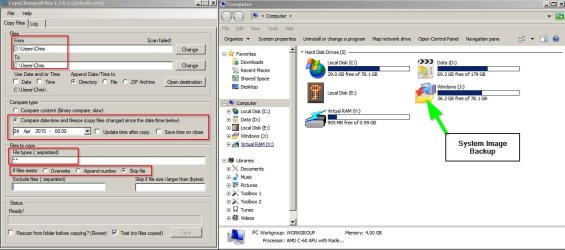
Mount the system image backup. Copy contents of system image backup user folder on system image backup, example: (Drive Letter)\Users\Username to another non-windows drive - on my machine I'd use Drive D.

Restore the image.

Use Copy Changed Files to copy only files that are missing or have changed from (Drive Letter)\Users\Username backup that was created on drive D to current drive (Windows Drive)\Users\Username

Copy Changed Files.jpg

Sounds complicated but it isn't once you get used to it!
 
Last edited:

My Computer My Computer

At a glance

Microsoft Windows 7 Home Premium 64-bit 7601 ...AMD C-60 APU with Radeon(tm) HD Graphics4.00 GBAMD Radeon HD 6290 Graphics
Computer type
Laptop
Computer Manufacturer/Model Number
ASUS
OS
Microsoft Windows 7 Home Premium 64-bit 7601 Multiprocessor Free Service Pack 1
CPU
AMD C-60 APU with Radeon(tm) HD Graphics
Motherboard
ASUSTeK COMPUTER INC. X501U
Memory
4.00 GB
Graphics Card(s)
AMD Radeon HD 6290 Graphics
Sound Card
(1) AMD High Definition Audio Device (2) Realtek High Defi
Screen Resolution
1366 x 768 x 32 bits (4294967296 colors) @ 60 Hz
Hard Drives
Hitachi HTS545050A7E380 SATA Disk Device
Antivirus
Comodo CIS & FW, SecureAplus App Whitelisting, Threatfire
Browser
Cyberfox 64bit, Opera 64bit, Airfox
Other Info
Spy-The-Spy, HitmanPro.Alert, Norton Connect Safe, MJRegWatcher, BitDefender TrafficLight, Voodoo Shield, Zemana AntiMalware
I manually install all my updates so knowing which ones need reupdating after an image restore isn't a problem for me. Besides, I have software—Glary Utilities and Avast free—that will tell me what software needs updating after a restore.

Never used Glary, I'll have to take a look at that. As for Avast I find it only has about 10 apps I use in it's list of outdated software, so I never really use it.
Windows SR lists every bit of software that's changed.

I use a different backup system (Clone) for my D: (Data) partition. I don't include anything from that in my system image so never need to restore anything on my Data drive after restoring an image. Plus, it keeps my image sizes and times down.
 

My Computer My Computer

At a glance

Win 7 Ultimate, Win 8.1 Pro, Linux Mint 19 Ci...Intel i5 4690KCorsair Vengeance LP 32GB DDR3MSI GTX 1060 GAMING X 6GB
Computer type
PC/Desktop
Computer Manufacturer/Model Number
Custom Build
OS
Win 7 Ultimate, Win 8.1 Pro, Linux Mint 19 Cinnamon (All 64-Bit)
CPU
Intel i5 4690K
Motherboard
Gigabyte Z97X-UD3H
Memory
Corsair Vengeance LP 32GB DDR3
Graphics Card(s)
MSI GTX 1060 GAMING X 6GB
Sound Card
Onboard
Hard Drives
Samsung 850 EVO 250GB SSD (x2)
Samsung 860 EVO 1TB SSD (x2)
Crucial MX300 525GB SSD
WD Blue 2TB 5400rpm Intellipark Disabled (x2)
PSU
Corsair HX750i
Case
Phanteks Enthoo Pro
Cooling
CM Hyper 212 EVO on CPU, Noctua Redux NF-P14S 1500rpm (x6)
Keyboard
Corsair K70 RGB LUX
Mouse
Corsair Sabre RGB
Antivirus
Avast Free, MalwareBytes, SAS & CryptoPrevent
Browser
Chrome
Other Info
StarTech PEXESAT322I 2 Port PCI-E SATA Card
ASUS PCE-AC56 Dual-band AC1300 Wireless Card
Akasa FC.Six Manual Fan Controller
And a Partridge in a Pear Tree!
Hmm, I guess I'm different as I don't do entire system images though as I don't have the time to. I only do a backup of my files when I change them as usually I only use the computer to surf the web. Also, I have never had a problem with System Restore yet except with a program that got reinstalled incorrectly through the restore which I fixed.
 

My Computer My Computer

At a glance

Windows 7 Professional 32-bit/Windows 8 64-bi...Intel Core 2 Quad Q6600/Intel Core i7 4790/In...2GB/16GB/4GBIntel G33/G31 Express(Vostro)/NVIDIA GeForce ...
Computer type
PC/Desktop
Computer Manufacturer/Model Number
Dell Vostro 400/Dell XPS 8700(Slightly Customized for me by Dell)/Toshiba Satellite T135
OS
Windows 7 Professional 32-bit/Windows 8 64-bit/Win7 Pro64-bit
CPU
Intel Core 2 Quad Q6600/Intel Core i7 4790/Intel Pentium
Memory
2GB/16GB/4GB
Graphics Card(s)
Intel G33/G31 Express(Vostro)/NVIDIA GeForce GTX 745(XPS)
Monitor(s) Displays
HP 2009m(Vostro)/ViewSonic VX2250wm-LED(XPS)
Screen Resolution
1600x900(Vostro)/1920x1080(XPS)
Hard Drives
Seagate ST3160815AS(Vostro)/Western Digital Blue(Satellite)
External:
Western Digital My Passport 0748
Samsung HM121HC
Keyboard
Dell L100)(Vostro)/Dell KB2133p(XPS)
Mouse
Dell M-UAV-DEL8(XPS)
Internet Speed
100 Mbit/s(Only when IPTV is plugged out)
Antivirus
Avast, Malwarebytes PRO
Browser
Internet Explorer 11
Other Info
Note: Names with slashes between two different parts mean that the left is my old desktop and the right is my old laptop and the middle is my new desktop.(Unless specified)
Ping is horrible for servers overseas in US and Europe.
New laptop:LG Gram(Not available in US) Processor:Intel Core i3 4th Gen Ultra Low Power RAM:4GB Hard Drive:SK Hynix OEM MSATA or M.2 Graphics:Intel HD
I manually install all my updates so knowing which ones need reupdating after an image restore isn't a problem for me. Besides, I have software—Glary Utilities and Avast free—that will tell me what software needs updating after a restore.

Never used Glary, I'll have to take a look at that. As for Avast I find it only has about 10 apps I use in it's list of outdated software, so I never really use it.
Windows SR lists every bit of software that's changed.

I use a different backup system (Clone) for my D: (Data) partition. I don't include anything from that in my system image so never need to restore anything on my Data drive after restoring an image. Plus, it keeps my image sizes and times down.

I used to use Secunia PSI to check for outdated programs but it became as slow as a dead turtle so I gave up on it.
 

My Computer My Computer

At a glance

Win 7 Ultimate 64 bitIntel i7-3930KKingston HyperX Genesis 32GB Kit (8x4GB Modul...MSI R7850 Twin Frozr 2GD5/OC Radeon HD 7850 2...
Computer type
PC/Desktop
Computer Manufacturer/Model Number
Custom Build
OS
Win 7 Ultimate 64 bit
CPU
Intel i7-3930K
Motherboard
ASUS P9X79 WS
Memory
Kingston HyperX Genesis 32GB Kit (8x4GB Modules) 1600MHz DDR
Graphics Card(s)
MSI R7850 Twin Frozr 2GD5/OC Radeon HD 7850 2GB 256-bit GDDR
Sound Card
Asus Xonar Essence STX
Monitor(s) Displays
3x Asus VG248QE 24", Vizio 32" TV
Screen Resolution
1920 x 1080, ?
Hard Drives
Samsung 128GB 840 Pro SSD (1),
Samsung 4TB 850 EVO SSDs (4)
Samsung 4TB 850 EVO SSDs (16) external backup drives used in 2.5" hot swap bays in the computer.
PSU
Corsair HX750w
Case
Antec Two Hundred v2 (modified)
Cooling
Cooler Master GeminII S524 120mm (fan replaced with a 140mm)
Keyboard
Logitech G510s
Mouse
Logitech M525 (two in use)
Internet Speed
=< 32Mbps down, 8Mbps up
Antivirus
AVAST!, MBAM, SAS, Spybot S&D (all but MBAM free) Glary Util
Browser
IE11
Other Info
LSI 9211-8i HBA card (8 SATA III ports), 2.5" & 3.5" Hot Swap Bays, HooToo HT-CR001 PCI-E to USB 3.0 Internal Hub + 6 Slot Card Reader, and LG Model CH12LS28 BD-ROM Optical Drive. Also, ScanSnap S1500 ADF duplexing scanner, Canon 9000F flat bed scanner, Corsair SP2500 2.1 speakers, Samsung CLP 415nw laser color printer, Cyberpower PP2200SW UPS
I used to use Secunia PSI to check for outdated programs but it became as slow as a dead turtle so I gave up on it.

What is slow as a dead turtle? How many minutes, hours ???

PSI is not really a program update checker.
It checks for missing security patches and out of date end of life programs.
I run it occasionally to see what it finds, runs in a matter of minutes for me, on old hardware with OS's installed years ago.

I never tried Glary, I'll have to check that out.

If you want to try the most comprehensive update checker I've found, check out SUMo.
There is a learning curve to use and understand it.
It may report more than you want to know about.
There is a SUMo portable version, so no install needed.
 
Last edited:

My Computer My Computer

At a glance

Multi-Boot W7_Pro_x64 W8.1_Pro_x64 W10_Pro_x6...AMD Athlon II x4 6206GB GSkill DDR2 800AMD 4670 GPU + AMD 4200 IGP
Computer type
PC/Desktop
Computer Manufacturer/Model Number
home built
OS
Multi-Boot W7_Pro_x64 W8.1_Pro_x64 W10_Pro_x64 +Linux_VMs +Chromium_VM
CPU
AMD Athlon II x4 620
Motherboard
Gigabyte GA-MA785G-UD3H
Memory
6GB GSkill DDR2 800
Graphics Card(s)
AMD 4670 GPU + AMD 4200 IGP
Sound Card
on board Realtek ALC889A
Monitor(s) Displays
RCA 40" LCD TV, Insignia 32" LCD TV, HP 15" LCD monitor
Screen Resolution
1680 x 1050
Hard Drives
OCZ Vertex 3 120GB,
Samsung F3 1TB (3),
Several others - WD, Seagate, Hitachi, ...
PSU
Corsair 500 W
Case
Rosewill mid tower
Cooling
CM 90mm rifle
Keyboard
Gyration wireless, Logitech wireless, Dell USB wired
Mouse
Gyration wireless, Logitech wireless, V7 USB wired
Internet Speed
Spectrum - 100Mbps D / 10Mbps U
Antivirus
Avast, MBAM3, EMET, WinPatrol
Browser
Pale Moon, Firefox, IE
Other Info
2 multi-boot PC's
Mainly HTPC/Office/Gen purpose (no gaming).
Trendnet USB KVM.
LG DVD burner/Blue Ray Player.
Tray system for removable SATA backup drives.

Not currently OCd, under-volted.
I use Hybrid sleep, rarely re-boot or shutdown.

Hauppauge HD-PVR, Avermedia PCIe TV Tuner, Hauppauge PCI TV Tuner.
Ditto on SUMO if you can get the clean version. :)

Still using the old PSI v2.0 for a check every few weeks. Usually a scan takes a couple of minutes.
 

My Computer My Computer

At a glance

Microsoft Windows 7 Home Premium 64-bit 7601 ...AMD C-60 APU with Radeon(tm) HD Graphics4.00 GBAMD Radeon HD 6290 Graphics
Computer type
Laptop
Computer Manufacturer/Model Number
ASUS
OS
Microsoft Windows 7 Home Premium 64-bit 7601 Multiprocessor Free Service Pack 1
CPU
AMD C-60 APU with Radeon(tm) HD Graphics
Motherboard
ASUSTeK COMPUTER INC. X501U
Memory
4.00 GB
Graphics Card(s)
AMD Radeon HD 6290 Graphics
Sound Card
(1) AMD High Definition Audio Device (2) Realtek High Defi
Screen Resolution
1366 x 768 x 32 bits (4294967296 colors) @ 60 Hz
Hard Drives
Hitachi HTS545050A7E380 SATA Disk Device
Antivirus
Comodo CIS & FW, SecureAplus App Whitelisting, Threatfire
Browser
Cyberfox 64bit, Opera 64bit, Airfox
Other Info
Spy-The-Spy, HitmanPro.Alert, Norton Connect Safe, MJRegWatcher, BitDefender TrafficLight, Voodoo Shield, Zemana AntiMalware
I used to use Secunia PSI to check for outdated programs but it became as slow as a dead turtle so I gave up on it.

What is slow as a dead turtle? How many minutes, hours ???

PSI is not really a program update checker.
It checks for missing security patches and out of date end of life programs.
I run it occasionally to see what it finds, runs in a matter of minutes for me, on old hardware with OS's installed years ago.

I never tried Glary, I'll have to check that out.

If you want to try the most comprehensive update checker I've found, check out SUMo.
There is a learning curve to use and understand it.
It may report more than you want to know about.
There is a SUMo portable version, so no install needed.

It was taking as long as 10-15 minutes to scan. I do have a lot of programs on my desktop machine (over 100).
 

My Computer My Computer

At a glance

Win 7 Ultimate 64 bitIntel i7-3930KKingston HyperX Genesis 32GB Kit (8x4GB Modul...MSI R7850 Twin Frozr 2GD5/OC Radeon HD 7850 2...
Computer type
PC/Desktop
Computer Manufacturer/Model Number
Custom Build
OS
Win 7 Ultimate 64 bit
CPU
Intel i7-3930K
Motherboard
ASUS P9X79 WS
Memory
Kingston HyperX Genesis 32GB Kit (8x4GB Modules) 1600MHz DDR
Graphics Card(s)
MSI R7850 Twin Frozr 2GD5/OC Radeon HD 7850 2GB 256-bit GDDR
Sound Card
Asus Xonar Essence STX
Monitor(s) Displays
3x Asus VG248QE 24", Vizio 32" TV
Screen Resolution
1920 x 1080, ?
Hard Drives
Samsung 128GB 840 Pro SSD (1),
Samsung 4TB 850 EVO SSDs (4)
Samsung 4TB 850 EVO SSDs (16) external backup drives used in 2.5" hot swap bays in the computer.
PSU
Corsair HX750w
Case
Antec Two Hundred v2 (modified)
Cooling
Cooler Master GeminII S524 120mm (fan replaced with a 140mm)
Keyboard
Logitech G510s
Mouse
Logitech M525 (two in use)
Internet Speed
=< 32Mbps down, 8Mbps up
Antivirus
AVAST!, MBAM, SAS, Spybot S&D (all but MBAM free) Glary Util
Browser
IE11
Other Info
LSI 9211-8i HBA card (8 SATA III ports), 2.5" & 3.5" Hot Swap Bays, HooToo HT-CR001 PCI-E to USB 3.0 Internal Hub + 6 Slot Card Reader, and LG Model CH12LS28 BD-ROM Optical Drive. Also, ScanSnap S1500 ADF duplexing scanner, Canon 9000F flat bed scanner, Corsair SP2500 2.1 speakers, Samsung CLP 415nw laser color printer, Cyberpower PP2200SW UPS
Yea I used Secunia too it was good for alerting but I usually just uninstalled and re-installed the out of date doo-da instead of letting Secunia do it for me because it was a slow bugger.
 

My Computer My Computer

At a glance

Win-7-Pro64bit 7-H-Prem-64biti7-5930K 2nd i9-9940x both water blocked VRM'...Trident-z 3200C14 2nd Trident-z 3600C16EVGA 1080ti ftw3 2nd Titan Xp both water blocked
Computer type
PC/Desktop
Computer Manufacturer/Model Number
Custom assembled by me :}
OS
Win-7-Pro64bit 7-H-Prem-64bit
CPU
i7-5930K 2nd i9-9940x both water blocked VRM's too
Motherboard
ASUS SABERTOOTH X99 2nd ASUS x299 Apex
Memory
Trident-z 3200C14 2nd Trident-z 3600C16
Graphics Card(s)
EVGA 1080ti ftw3 2nd Titan Xp both water blocked
Sound Card
Built-in Realtek
Monitor(s) Displays
1-AOC G2460PG 24"G-Sync 144Hz/ 2nd 1-ASUS VG248QE 24" 144Hz
Screen Resolution
1920 x 1080 144Hz
Hard Drives
2-Samsung M.2 Evo & Evo Plus
2-Samsung 850 EVO 500GB SSD's/ 3-2.5 W.D. Black 1tb-&3-1tb/3-3.5 WD Black 1tb hdd's
PSU
EVGA SuperNOVA 1000-P2 2nd 1200-P2
Case
2-Corsair Obsidian Series 450D Black ATX Mid Tower
Cooling
Custom water loops
Keyboard
Logitech G710+/ 2nd Logitech G910
Mouse
2-RedDragon M901 Perdition 16400 dpi Gaming mouse = wired
Internet Speed
Comcast Ping 19ms 89.31mbps download speed 6.12mbps upload
Antivirus
Malwarebytes Pro/ Superantispyware Pro
Browser
FireFox & Pale moon
Other Info
2nd ASUS X299 Apex/Intel i9-9940x with Custom water loop/7H-Prem-x64/Corsair 450D case/Ram Trident-z 3600C16 4x8gb / Samsung970Evo plus 500gb SSD/Dual ssd EZ swap evo/PSU EVGA SuperNova 1200w-P2 80+Platinum/GPU Titan Xp /8-ML-140 on push-pull on 2-280GTX rads
Yea I used Secunia too it was good for alerting but I usually just uninstalled and re-installed the out of date doo-da instead of letting Secunia do it for me because it was a slow bugger.

I did the same because it would take forever to do the updates for me.
 

My Computer My Computer

At a glance

Win 7 Ultimate 64 bitIntel i7-3930KKingston HyperX Genesis 32GB Kit (8x4GB Modul...MSI R7850 Twin Frozr 2GD5/OC Radeon HD 7850 2...
Computer type
PC/Desktop
Computer Manufacturer/Model Number
Custom Build
OS
Win 7 Ultimate 64 bit
CPU
Intel i7-3930K
Motherboard
ASUS P9X79 WS
Memory
Kingston HyperX Genesis 32GB Kit (8x4GB Modules) 1600MHz DDR
Graphics Card(s)
MSI R7850 Twin Frozr 2GD5/OC Radeon HD 7850 2GB 256-bit GDDR
Sound Card
Asus Xonar Essence STX
Monitor(s) Displays
3x Asus VG248QE 24", Vizio 32" TV
Screen Resolution
1920 x 1080, ?
Hard Drives
Samsung 128GB 840 Pro SSD (1),
Samsung 4TB 850 EVO SSDs (4)
Samsung 4TB 850 EVO SSDs (16) external backup drives used in 2.5" hot swap bays in the computer.
PSU
Corsair HX750w
Case
Antec Two Hundred v2 (modified)
Cooling
Cooler Master GeminII S524 120mm (fan replaced with a 140mm)
Keyboard
Logitech G510s
Mouse
Logitech M525 (two in use)
Internet Speed
=< 32Mbps down, 8Mbps up
Antivirus
AVAST!, MBAM, SAS, Spybot S&D (all but MBAM free) Glary Util
Browser
IE11
Other Info
LSI 9211-8i HBA card (8 SATA III ports), 2.5" & 3.5" Hot Swap Bays, HooToo HT-CR001 PCI-E to USB 3.0 Internal Hub + 6 Slot Card Reader, and LG Model CH12LS28 BD-ROM Optical Drive. Also, ScanSnap S1500 ADF duplexing scanner, Canon 9000F flat bed scanner, Corsair SP2500 2.1 speakers, Samsung CLP 415nw laser color printer, Cyberpower PP2200SW UPS
Yea I used Secunia too it was good for alerting but I usually just uninstalled and re-installed the out of date doo-da instead of letting Secunia do it for me because it was a slow bugger.

I did the same because it would take forever to do the updates for me.

I remember version 2 was a great piece of software. Then they released version 3 and I didn't like it as much, so uninstalled it. It's one of those programs I only used occasionally anyway.
I check for most software updates myself now, the only two I leave to check automatically are Java and Flash.
 

My Computer My Computer

At a glance

Win 7 Ultimate, Win 8.1 Pro, Linux Mint 19 Ci...Intel i5 4690KCorsair Vengeance LP 32GB DDR3MSI GTX 1060 GAMING X 6GB
Computer type
PC/Desktop
Computer Manufacturer/Model Number
Custom Build
OS
Win 7 Ultimate, Win 8.1 Pro, Linux Mint 19 Cinnamon (All 64-Bit)
CPU
Intel i5 4690K
Motherboard
Gigabyte Z97X-UD3H
Memory
Corsair Vengeance LP 32GB DDR3
Graphics Card(s)
MSI GTX 1060 GAMING X 6GB
Sound Card
Onboard
Hard Drives
Samsung 850 EVO 250GB SSD (x2)
Samsung 860 EVO 1TB SSD (x2)
Crucial MX300 525GB SSD
WD Blue 2TB 5400rpm Intellipark Disabled (x2)
PSU
Corsair HX750i
Case
Phanteks Enthoo Pro
Cooling
CM Hyper 212 EVO on CPU, Noctua Redux NF-P14S 1500rpm (x6)
Keyboard
Corsair K70 RGB LUX
Mouse
Corsair Sabre RGB
Antivirus
Avast Free, MalwareBytes, SAS & CryptoPrevent
Browser
Chrome
Other Info
StarTech PEXESAT322I 2 Port PCI-E SATA Card
ASUS PCE-AC56 Dual-band AC1300 Wireless Card
Akasa FC.Six Manual Fan Controller
And a Partridge in a Pear Tree!
I don't use PSI to do updates, i just use it to see the report.
I like PSI 2.0 much better than 3.0.
Sadly, 2.0 is not compatible with Win 8.x, so i use 3.0 with 8.1.
 

My Computer My Computer

At a glance

Multi-Boot W7_Pro_x64 W8.1_Pro_x64 W10_Pro_x6...AMD Athlon II x4 6206GB GSkill DDR2 800AMD 4670 GPU + AMD 4200 IGP
Computer type
PC/Desktop
Computer Manufacturer/Model Number
home built
OS
Multi-Boot W7_Pro_x64 W8.1_Pro_x64 W10_Pro_x64 +Linux_VMs +Chromium_VM
CPU
AMD Athlon II x4 620
Motherboard
Gigabyte GA-MA785G-UD3H
Memory
6GB GSkill DDR2 800
Graphics Card(s)
AMD 4670 GPU + AMD 4200 IGP
Sound Card
on board Realtek ALC889A
Monitor(s) Displays
RCA 40" LCD TV, Insignia 32" LCD TV, HP 15" LCD monitor
Screen Resolution
1680 x 1050
Hard Drives
OCZ Vertex 3 120GB,
Samsung F3 1TB (3),
Several others - WD, Seagate, Hitachi, ...
PSU
Corsair 500 W
Case
Rosewill mid tower
Cooling
CM 90mm rifle
Keyboard
Gyration wireless, Logitech wireless, Dell USB wired
Mouse
Gyration wireless, Logitech wireless, V7 USB wired
Internet Speed
Spectrum - 100Mbps D / 10Mbps U
Antivirus
Avast, MBAM3, EMET, WinPatrol
Browser
Pale Moon, Firefox, IE
Other Info
2 multi-boot PC's
Mainly HTPC/Office/Gen purpose (no gaming).
Trendnet USB KVM.
LG DVD burner/Blue Ray Player.
Tray system for removable SATA backup drives.

Not currently OCd, under-volted.
I use Hybrid sleep, rarely re-boot or shutdown.

Hauppauge HD-PVR, Avermedia PCIe TV Tuner, Hauppauge PCI TV Tuner.
I create backup images prior to installing any "Patch Tuesday" Updates.
I've been doing this for 6 years (since I first got a free imaging program).

This sort of fiasco is why I don't have much confidence in MS' new plan of pushing out updates "every few seconds" for W10.
MS had better restore the ability to turn off auto-updating (once W10 is released) unless they want constant bad publicity.

If they don't, people are going to have to unplug their network cables to protect themselves.
I don't want to have to image my PC prior to plugging in the network cable everyday. :mad:

I guess my options will be, stick with W7 and/or use Linux Mint every time I want to use the Internet.

I agree. I've been reading about W10 for a while and that is one of my 2 main questions. The other one is the talk about "secure boot" locking (user possibly not allowed to unlock to BIOS/legacy to boot to utility media (tool/rescue media, etc). It should be interesting to see what happens when the W10 general release is here and we begin to receive feedback about it.
Here is Dedoimedo's take:
Windows 10, alt OS lockout? Doomsday?
 

My Computer My Computer

At a glance

W7 Ultimate SP1, LM19.2 MATE, W10 Home 1703, ...AMD Phenom II x6 1100T, 3.3 GHz12GB DDR3 1333 G-Skill (4GB x 2), G-Skill (2G...NVIDIA GeForce GTX 660
Computer type
PC/Desktop
Computer Manufacturer/Model Number
n/a
OS
W7 Ultimate SP1, LM19.2 MATE, W10 Home 1703, W10 Pro 1703 VM, #All 64 bit
CPU
AMD Phenom II x6 1100T, 3.3 GHz
Motherboard
ASUS M4A88T-M/USB3 (AM3)
Memory
12GB DDR3 1333 G-Skill (4GB x 2), G-Skill (2GB x 2)
Graphics Card(s)
NVIDIA GeForce GTX 660
Sound Card
Realtek?
Monitor(s) Displays
Samsung S23B350
Screen Resolution
1920x1080
Hard Drives
WD Green 2TB (SATA), WD Green 3TB (SATA), WD Blue 4TB (SATA), WD Blue 6TB (SATA)
PSU
Cooler Master
Case
Antec GX300 Tower
Cooling
3x Antec TRICOOL 120mm Fans
Mouse
Wired Optical
Internet Speed
DSL
Antivirus
Avast
Browser
Pale Moon (64 bit)
Other Info
2018-12-27 Upgraded HDDs
2015-12-10 Upgraded case, graphics card, storage
2015-08-15 Upgraded motherboard & RAM
2015-07-15 Upgraded LM17.1 to LM17.2
Guess what showed up in the Optional Update list on Thursday the 14th?

You guessed it - KB3035583.

"This update enables additional capabilities for Windows Update notifications when new updates are available to the user. It applies to a computer that is running Windows 8.1 or Windows 7 Service Pack 1 (SP1)."

MS never gives up...

Regards,
GEWB
 

My Computer My Computer

At a glance

Linux Mint / XP / Win7 Home, Pro, Ultimate / ...
Computer type
PC/Desktop
Computer Manufacturer/Model Number
(7 different computers booting up to 10 systems)
OS
Linux Mint / XP / Win7 Home, Pro, Ultimate / Win8.1 / Win10
Other Info
Four desktops, two laptops, one notebook and one tablet
elevated mode

I am the only one using this computer. I have created an administrator and a user account.
Even if I sign on to the administrator account, it does not accept the "sfc /verifyonly" instructiion
in the DOS window. Error message is you must be in the elevated mode to use this command.
On this computer I have no way to right click on SFC and click on run as administrator.
Please help.....
 

My Computer My Computer

At a glance

windows 7 Pro 64 bitmini tower4gnvidia geforce gt730 graphics card
Computer type
PC/Desktop
Computer Manufacturer/Model Number
had the system built by PCsandParts
OS
windows 7 Pro 64 bit
CPU
mini tower
Motherboard
h110m-k (lga1151)
Memory
4g
Graphics Card(s)
nvidia geforce gt730 graphics card
Sound Card
high definition audio device
Monitor(s) Displays
19" dell ultra sharp
Screen Resolution
1280 x 800
Hard Drives
Kingston SSD
PSU
?
Case
?
Cooling
?
Keyboard
standard ps/2 keyboard
Mouse
ps/2 compatible optical
Internet Speed
fiber optics
Antivirus
ESET Smart Security
Browser
IE11
Other Info
no Wifi. Bose speakers, optical drive tsstcorp dvd+-RW
I am the only one using this computer. I have created an administrator and a user account.
Even if I sign on to the administrator account, it does not accept the "sfc /verifyonly" instructiion
in the DOS window. Error message is you must be in the elevated mode to use this command.
On this computer I have no way to right click on SFC and click on run as administrator.
Please help.....

Start > All Programs > Accessories

RIGHT click on Command Prompt.
Select and click on Run as administrator.

Enter command line per instructions.

Regards,
GEWB
 

My Computer My Computer

At a glance

Linux Mint / XP / Win7 Home, Pro, Ultimate / ...
Computer type
PC/Desktop
Computer Manufacturer/Model Number
(7 different computers booting up to 10 systems)
OS
Linux Mint / XP / Win7 Home, Pro, Ultimate / Win8.1 / Win10
Other Info
Four desktops, two laptops, one notebook and one tablet
Are you running CMD in Admin mode?

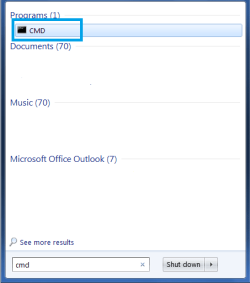
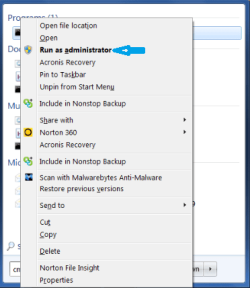
Enter CMD in the Start search field box. Then right-click on the CMD icon and select "Run as Admin" from the pull-down menu.

Here are some screencaps. (just saw GEWB's post after posting this).
 

Attachments

  • cmd start menu 1.png
    cmd start menu 1.png
    6.8 KB · Views: 26
  • cmd start menu.png
    cmd start menu.png
    17.2 KB · Views: 26

My Computer My Computer

At a glance

Windows 7 Home Premium 64 bitIntel i5 650 Dual Core 3.20 GHz Cache 4MB Thr...Corsair 16GB DDR3 1600MHz 9-9-9-24 P/N: CMZ8G...ZOTAC GeFORCE 9500 ZT-95TEK2M-FSL 1GB GDDR2
Computer type
PC/Desktop
Computer Manufacturer/Model Number
Built at Micro Center Richardson, TX
OS
Windows 7 Home Premium 64 bit
CPU
Intel i5 650 Dual Core 3.20 GHz Cache 4MB Threads: 4
Motherboard
ASUS PRO P7P55D-E
Memory
Corsair 16GB DDR3 1600MHz 9-9-9-24 P/N: CMZ8GX3M2A1600C
Graphics Card(s)
ZOTAC GeFORCE 9500 ZT-95TEK2M-FSL 1GB GDDR2
Sound Card
Mother Bd
Monitor(s) Displays
ASUS V228H 21.5” Diag
Screen Resolution
1440 x 900
Hard Drives
SEAGATE BARRACUDA (2ea) 3.5” INTERNAL 1Tb 16 MB SATA ST1000DM003-9YN162 7200RPM, 64MB, SATA 6Gb/s ** 2 Sata Hot-Swap Racks installed in Tower
PSU
Thermaltake Model TR2 RX 750W
Cooling
2 Tower Fans
Keyboard
Dell Quietkey PS/2 Windows 104 P/N 0463CD
Mouse
Kensington Mechanical Trackball USB Model 64217
Internet Speed
35/35
Antivirus
Norton 360 & MBAM Pro
Browser
IE10
Other Info
Printer: HP DeskJet 3520 USB 2.0 **
Speakers: ALTEC Model VS4621 2.1 28 W/Channel w/Sub-woofer **
IOGEAR HDMI Monitor Switcher Swx3 MODEL GHDSW3 ** Addonics ZDRWESU3 eSata/USB 3.0 external DVD Read/Write DVD Drive** SEAGATE GoFlex USB 2.0 Portable HD 500GB 5400 RPM P/N: 9ZF2A2-570
Back
Top