Convert MBR Disk to GPT Disk

How to Convert a MBR Disk to a GPT Disk

   Information
A disk is a separate physical hard drive. This will show you how to convert a MBR (Master Boot Record) disk to a GPT (GUID - Globally Unique Identifer) disk in Windows Disk Manager or in a command prompt. By default Windows uses MBR disks.

While all Windows can boot from a MBR disk, you can only boot from a GPT disk if your motherboard has an enabled UEFI BIOS and you have an operating system (Windows 7 or Windows 8) that supports booting to GPT that is installed with UEFI.

You can still have a separate GPT disk as a data disk if your operating system (see below) supports reading a GPT disk, even if your system disk that Windows is installed on is still a MBR disk.


   Note
Differences Between MBR and GPT Disks:
  • MBR disks are supported (readable) by all Windows operating systems.
    • GPT disks are only supported (readable) by Windows server 2003 SP1 +, XP 64-bit, Vista, Windows 7, Windows Server 2008, Windows 8, and above.
  • MBR disks use the standard BIOS partition table.
    • GPT disks use UEFI.
  • MBR disks supports up to 2TB per single partition.
    • GPT disks supports up to 256TB per single partition in Windows.
  • MBR disks supports up to 4 Primary partitions or 3 Primary partitions and 1 Extended partition with up to 128 logical volumes in the extended partition.
    • GPT disks supports up to 128 Primary partitions.
  • Removable disks are MBR disks by default.
    • Removable disks cannot be converted into a GPT disk.
   Warning

  • You must be an administrator to do this in Windows.
  • Before you convert a disk, close any programs that are running on or from that disk.
  • Before you convert a disk, be sure to backup anything that you do not want to lose on that disk to a separate physical disk location first. Converting the disk requires that all partitions and volumes are deleted on the disk.
  • If you disable the Disk Defragmenter service, then you will get the error below when you try to do anything in Disk Management. If you get this error, then make sure that the Disk Defragmenter service is set to only Manual.
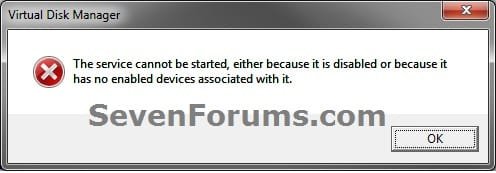
Error.jpg
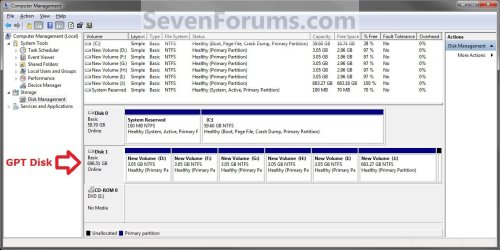
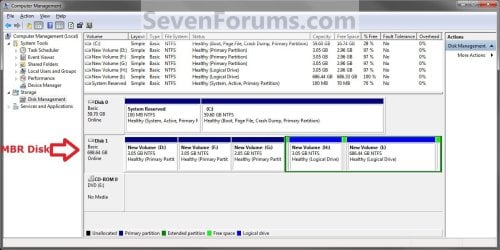
EXAMPLE: GPT disk vs MBR disk in Disk Management
GPT_Disk_Example.jpg

MBR_Disk_Example.jpg


OPTION ONE

In Disk Management


1. Open the Control Panel (icons view), and click on the Administrative Tools icon, then close the Control Panel window.

2. Click on Computer Management in Administrative Tools, then close the Administrative Tools window.

3. If prompted by UAC, click on Yes.

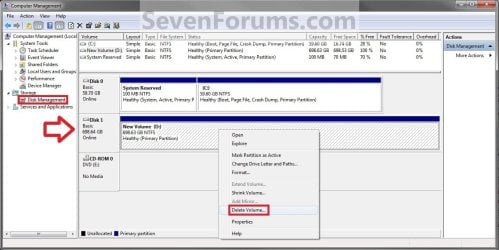
4. In the left pane under Storage, click on Disk Management. (See screenshot below)
Step1.jpg
5. In the disk (ex: Disk 1) that you want to convert to a GPT disk, right click on each partition and volume on the disk and click on Delete Volume until the whole disk is unallocated space. (See screenshot above)

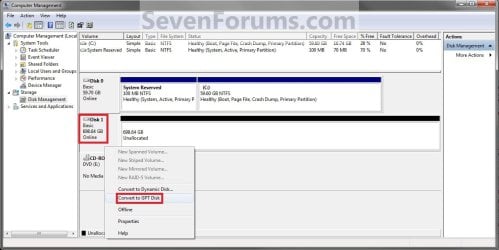
6. Right click on the disk (ex: Disk 1) that you want to convert to a GPT disk, and click on Convert to GPT Disk. (See screenshot below)
Step2.jpg
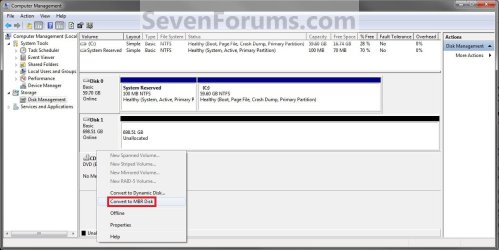
7. When finished shortly, you can confirm that the disk is a GPT disk if you right click on the disk and it has Convert to MPR Disk instead now. (See screenshot below)
Step3.jpg
8. You can now create partitions on the now GPT disk if you like.

9. When done, close Disk Management.


OPTION TWO

In a Command Prompt


1. Open an elevated command prompt, and go to step 3 below.

OR

2. Open a command prompt at boot, and go to step 3 below.
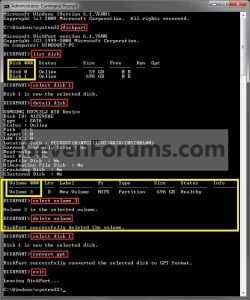
Command_GPT.jpg
3. In the command prompt, type diskpart and press enter. (See screenshot above)

4. Type list disk and press enter.
NOTE: Make note of the disk number (ex: Disk 1) that you want to convert to a GPT disk.

5. Type select disk # and press enter.
NOTE: Substitute # with the actual disk number that you want to convert to a GPT disk. For example, select disk 1.

6. Do step 7 or 8 below for what you would like to do.

7. To Use the "Clean" Command to make Disk Unallocated
NOTE: This is the easiest method. It will wipe the disk clean all at once leaving it as unallocated space afterwards.
A) In the command prompt, type clean and press enter.

B) Go to step 9 below.
8. To Manually make Disk Unallocated
NOTE: This method has you manually delete each volume on the disk before converting the disk to GPT.
A) Type detail disk and press enter. If the disk does not have any volumes listed, then you can go to step 8E below.
NOTE: This will give you a list of all the volume numbers on the selected disk number that you will need to delete in steps 7 and 8 below.

B) Type select volume # and press enter.
NOTE: Substitute # with a volume number listed in step 8A. For example, select volume 3.

C) Type delete volume and press enter.

D) Repeat steps 8B and 8C for each volume # listed in step 8A until you have deleted all volume #'s.

E) When done, type select disk # and press enter.
NOTE: You would use the same one from step 5 above. For example, select disk 1.
9. Type convert gpt and press enter.

10. When done, type exit and press enter.

11. Close the command prompt.

12. You can now create partitions on the now GPT disk if you like for a data disk, or start installing the supported Windows if you like. (See information box at the top of the tutorial.).
NOTE: Restart the computer if you did step 2 instead.
That's it,
Shawn


Last edited:
Interesting.
 

My Computer

Computer type
PC/Desktop
Computer Manufacturer/Model Number
Self built custom
OS
64-bit Windows 11 Pro for Workstations
CPU
Intel i7-8700K OC'd to 5 GHz
Motherboard
ASUS ROG Maximus XI Formula Z390
Memory
64 GB (4x16GB) G.SKILL TridentZ RGB DDR4 3600 MHz
Graphics Card(s)
ASUS ROG-STRIX-GTX1080TI-O11G-GAMING
Sound Card
Integrated
Monitor(s) Displays
2 x Samsung Odyssey G7 27"
Screen Resolution
2560x1440
Hard Drives
1TB Samsung 990 PRO M.2,
4TB Samsung 990 PRO PRO M.2,
TerraMaster F8 SSD Plus NAS
PSU
Seasonic Prime Titanium 850W
Case
Thermaltake Core P3
Cooling
Corsair Hydro H115i
Keyboard
Logitech wireless K800
Mouse
Logitech MX Master 4
Internet Speed
2 Gb/s Download and 100 Mb/s Upload
Antivirus
Malwarebyte Anti-Malware Premium
Browser
Google Chrome
Other Info
Logitech Z625 speaker system,
Logitech BRIO 4K Pro webcam,
HP Color LaserJet Pro MFP M477fdn,
APC SMART-UPS RT 1000 XL - SURT1000XLI,
Galaxy S23 Plus phone
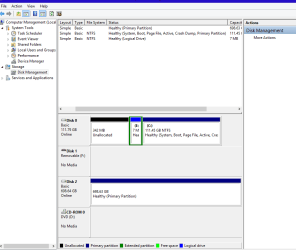
Hello Shawn I was trying to get this new 750GB drive ready for use as a clone to and have ended up with a drive that is just not going to do anything.

have I wrecked it somehow as other programs report it as read only - am really confused as I have never come across this before.
 

Attachments

  • 750GB 3.PNG
    750GB 3.PNG
    60.7 KB · Views: 438

My Computer

Computer type
PC/Desktop
Computer Manufacturer/Model Number
Own build (new) Desk1 / Asus ROG Win 7 / Desk2 1st build
OS
Desk1 7 Home Prem / Desk2 10 Pro / Main lap Asus ROG 10 Pro 2 laptop Toshiba 7 Pro Asus P2520 7 & 10
CPU
Desk1 i5 3750K / Laptop i7 GTX 860M / Desk2 i5 2500
Motherboard
Desk1 Asus P877-V / Desk2 Gigabyte H67 UD3H / Laptop ?
Memory
Desk1 8GB (1866) / Desk2 16GB (1333) / Laptop 8Gb DDR3
Graphics Card(s)
Desk 1& 2NVidia GTX 650 & Laptops on board Intel
Sound Card
Desk 1 & 2 -XONAR DG Realtek High Def audio Laptop
Monitor(s) Displays
Desk 1 Benq HD 2450 / Desk2 Philips 24" / Laptop 17.5"
Screen Resolution
1920x1080 D1 & D2 & Laptop 1
Hard Drives
Desk1 Samsung 120GB 830 SSD
Asus ROG 256GB 850 Pro SSD
Desk2 Samsung 840 256 SSD
Toshiba 120GB EVO
PSU
Desk 1 Corsair HX 1050/ Laptop ? / Desk 2 Corsair HX 650
Case
Desk 1 Cooler HAF XM ? Toshiba laptop / Desk2 Coolermaster
Cooling
Fans on all Desk1 -2 Desk2 - all Coolermasters 5 Laptop ?
Keyboard
Desk 1 MS Sidewinder X6 Desk 2 MS Sidewinder X 4
Mouse
Desk 1&2 - Gigabyte MS 900 gamer - laptop - Logitec wireless
Internet Speed
ADSL2+
Other Info
One other Desktop (tester) and spare Toshba laptop both with SSD's
Running Kaspersky 2016 ISS on all machines config'd identically
Logitec audio stereo systems on each machine (x3)
Canon MG5250MFC
Router/modem TP-Link running WPA2SK
I take it you have formatted it. did you go into device manager and see if it was there? sometimes it won't do anything to the drive until it loads the driver for it. what programs have you tried? have you tried "clean" or "clean all" in diskpart? what is your OS? are you trying to format it ready for cloning in MBR; GPT is for HDD over 2TB. what cloning program are you using? did you use the cloning program to see if it "sees" the HDD

sorry to jump in Brink
 

My Computer

Computer type
PC/Desktop
Computer Manufacturer/Model Number
custom build
OS
Windows 7 x64 Ultimate
CPU
i5 [email protected]
Motherboard
Asus P8Z68-V Pro/Gen 3
Memory
2x4GB Low profile Corsair Vengence
Graphics Card(s)
Sapphire 7970 OC v2@1180/1480
Sound Card
ASUS Zonar DSX
Monitor(s) Displays
27" Black Tune by Crossover & 22" Viewsonic
Screen Resolution
2560x1440 & 1680x1050
Hard Drives
1x 128GB Samsung 840 Pro
1x 640GB WD Black
3x 3TB Seagate Barracuda
PSU
XFX 850W Black Edition
Case
NZXT Phantom 820
Cooling
Noctua NH-D15
Keyboard
Razor Tarantula
Mouse
Logitech G500s
Internet Speed
5.5Mb/s down via satellite
Antivirus
Bitdefender Total Security 2014
Browser
Firefox
Well I tried using the diskpart to format it and create a primary partition etc etc in my partners 7 machine and then in my 8.1 and no change.

I even tried using Partition Wizard to do something with this drive but it just comes up nothing as I said the thing is there albeit something less than the 750Gb I bought and in 7 says read only so I ma completely lost as to what the darn thing is now.
What I really don't understand is the not initialised and unallocated as in my pic:confused:
 

My Computer

Computer type
PC/Desktop
Computer Manufacturer/Model Number
Own build (new) Desk1 / Asus ROG Win 7 / Desk2 1st build
OS
Desk1 7 Home Prem / Desk2 10 Pro / Main lap Asus ROG 10 Pro 2 laptop Toshiba 7 Pro Asus P2520 7 & 10
CPU
Desk1 i5 3750K / Laptop i7 GTX 860M / Desk2 i5 2500
Motherboard
Desk1 Asus P877-V / Desk2 Gigabyte H67 UD3H / Laptop ?
Memory
Desk1 8GB (1866) / Desk2 16GB (1333) / Laptop 8Gb DDR3
Graphics Card(s)
Desk 1& 2NVidia GTX 650 & Laptops on board Intel
Sound Card
Desk 1 & 2 -XONAR DG Realtek High Def audio Laptop
Monitor(s) Displays
Desk 1 Benq HD 2450 / Desk2 Philips 24" / Laptop 17.5"
Screen Resolution
1920x1080 D1 & D2 & Laptop 1
Hard Drives
Desk1 Samsung 120GB 830 SSD
Asus ROG 256GB 850 Pro SSD
Desk2 Samsung 840 256 SSD
Toshiba 120GB EVO
PSU
Desk 1 Corsair HX 1050/ Laptop ? / Desk 2 Corsair HX 650
Case
Desk 1 Cooler HAF XM ? Toshiba laptop / Desk2 Coolermaster
Cooling
Fans on all Desk1 -2 Desk2 - all Coolermasters 5 Laptop ?
Keyboard
Desk 1 MS Sidewinder X6 Desk 2 MS Sidewinder X 4
Mouse
Desk 1&2 - Gigabyte MS 900 gamer - laptop - Logitec wireless
Internet Speed
ADSL2+
Other Info
One other Desktop (tester) and spare Toshba laptop both with SSD's
Running Kaspersky 2016 ISS on all machines config'd identically
Logitec audio stereo systems on each machine (x3)
Canon MG5250MFC
Router/modem TP-Link running WPA2SK
in disk management what does the HDD say when you right click it? does it show a dailogue to format the HDD? I can't remember what part you have to right click it thou, the left or right part of the diagram.

what sort of HDD is it? how old is the HDD?

does the HDD show up in device manager?

cheers
 

My Computer

Computer type
PC/Desktop
Computer Manufacturer/Model Number
custom build
OS
Windows 7 x64 Ultimate
CPU
i5 [email protected]
Motherboard
Asus P8Z68-V Pro/Gen 3
Memory
2x4GB Low profile Corsair Vengence
Graphics Card(s)
Sapphire 7970 OC v2@1180/1480
Sound Card
ASUS Zonar DSX
Monitor(s) Displays
27" Black Tune by Crossover & 22" Viewsonic
Screen Resolution
2560x1440 & 1680x1050
Hard Drives
1x 128GB Samsung 840 Pro
1x 640GB WD Black
3x 3TB Seagate Barracuda
PSU
XFX 850W Black Edition
Case
NZXT Phantom 820
Cooling
Noctua NH-D15
Keyboard
Razor Tarantula
Mouse
Logitech G500s
Internet Speed
5.5Mb/s down via satellite
Antivirus
Bitdefender Total Security 2014
Browser
Firefox
Have you tried getting into that disk in diskpart and then
ATTRIBUTES DISK CLEAR READONLY
ATTRIBUTES VOLUME CLEAR READONLY

And what is the message you get when you try to initialise it?

You may also try this:

Open the disk properties and goto the Drivers tab
Uninstall the driver
Reboot your PC
When it starts up again, Log in and it should say that the device has been installed successfuly.
Reboot again (if windows doesnt tell you to)

http://answers.microsoft.com/en-us/...ead-only/d2642d40-cd65-4cc7-8146-627345dfe0e6
 
Last edited:

My Computer

OS
Windows 7 Home Premium 32 bit
bear the drive is brand new as I said first up and right clicking does nothing apart form the Properties and such and really nothing of anyhelp.

Hey jumanji I'll give that a burl as it is driving me nuts mate. First I'll give the drivers option a go.
 

My Computer

Computer type
PC/Desktop
Computer Manufacturer/Model Number
Own build (new) Desk1 / Asus ROG Win 7 / Desk2 1st build
OS
Desk1 7 Home Prem / Desk2 10 Pro / Main lap Asus ROG 10 Pro 2 laptop Toshiba 7 Pro Asus P2520 7 & 10
CPU
Desk1 i5 3750K / Laptop i7 GTX 860M / Desk2 i5 2500
Motherboard
Desk1 Asus P877-V / Desk2 Gigabyte H67 UD3H / Laptop ?
Memory
Desk1 8GB (1866) / Desk2 16GB (1333) / Laptop 8Gb DDR3
Graphics Card(s)
Desk 1& 2NVidia GTX 650 & Laptops on board Intel
Sound Card
Desk 1 & 2 -XONAR DG Realtek High Def audio Laptop
Monitor(s) Displays
Desk 1 Benq HD 2450 / Desk2 Philips 24" / Laptop 17.5"
Screen Resolution
1920x1080 D1 & D2 & Laptop 1
Hard Drives
Desk1 Samsung 120GB 830 SSD
Asus ROG 256GB 850 Pro SSD
Desk2 Samsung 840 256 SSD
Toshiba 120GB EVO
PSU
Desk 1 Corsair HX 1050/ Laptop ? / Desk 2 Corsair HX 650
Case
Desk 1 Cooler HAF XM ? Toshiba laptop / Desk2 Coolermaster
Cooling
Fans on all Desk1 -2 Desk2 - all Coolermasters 5 Laptop ?
Keyboard
Desk 1 MS Sidewinder X6 Desk 2 MS Sidewinder X 4
Mouse
Desk 1&2 - Gigabyte MS 900 gamer - laptop - Logitec wireless
Internet Speed
ADSL2+
Other Info
One other Desktop (tester) and spare Toshba laptop both with SSD's
Running Kaspersky 2016 ISS on all machines config'd identically
Logitec audio stereo systems on each machine (x3)
Canon MG5250MFC
Router/modem TP-Link running WPA2SK
Ok Jumnaji mate I did the first option and updated the driver but it said that the best driver was already installed so it must have happened real quick. But in any case the partition if that what it is in now healthy and the Not initialised has gone.
What is still bothering me is that it was bought and it states on it 750GB and the admin window shows it is 698.83GB?? that is at least 50GB short of what the device says it is.

So anyway does this mean I have to format the drive again? Sorry mate but drive stuff like this is very convoluted for me.
 

Attachments

  • 750GB 4.PNG
    750GB 4.PNG
    49.1 KB · Views: 311

My Computer

Computer type
PC/Desktop
Computer Manufacturer/Model Number
Own build (new) Desk1 / Asus ROG Win 7 / Desk2 1st build
OS
Desk1 7 Home Prem / Desk2 10 Pro / Main lap Asus ROG 10 Pro 2 laptop Toshiba 7 Pro Asus P2520 7 & 10
CPU
Desk1 i5 3750K / Laptop i7 GTX 860M / Desk2 i5 2500
Motherboard
Desk1 Asus P877-V / Desk2 Gigabyte H67 UD3H / Laptop ?
Memory
Desk1 8GB (1866) / Desk2 16GB (1333) / Laptop 8Gb DDR3
Graphics Card(s)
Desk 1& 2NVidia GTX 650 & Laptops on board Intel
Sound Card
Desk 1 & 2 -XONAR DG Realtek High Def audio Laptop
Monitor(s) Displays
Desk 1 Benq HD 2450 / Desk2 Philips 24" / Laptop 17.5"
Screen Resolution
1920x1080 D1 & D2 & Laptop 1
Hard Drives
Desk1 Samsung 120GB 830 SSD
Asus ROG 256GB 850 Pro SSD
Desk2 Samsung 840 256 SSD
Toshiba 120GB EVO
PSU
Desk 1 Corsair HX 1050/ Laptop ? / Desk 2 Corsair HX 650
Case
Desk 1 Cooler HAF XM ? Toshiba laptop / Desk2 Coolermaster
Cooling
Fans on all Desk1 -2 Desk2 - all Coolermasters 5 Laptop ?
Keyboard
Desk 1 MS Sidewinder X6 Desk 2 MS Sidewinder X 4
Mouse
Desk 1&2 - Gigabyte MS 900 gamer - laptop - Logitec wireless
Internet Speed
ADSL2+
Other Info
One other Desktop (tester) and spare Toshba laptop both with SSD's
Running Kaspersky 2016 ISS on all machines config'd identically
Logitec audio stereo systems on each machine (x3)
Canon MG5250MFC
Router/modem TP-Link running WPA2SK
I was going to answer this but he seems to like u Jumnaji & not a fellow Aussie (even thou he can't write the native language), u can explain the 1024 & 1000 thingy

cheers
 

My Computer

Computer type
PC/Desktop
Computer Manufacturer/Model Number
custom build
OS
Windows 7 x64 Ultimate
CPU
i5 [email protected]
Motherboard
Asus P8Z68-V Pro/Gen 3
Memory
2x4GB Low profile Corsair Vengence
Graphics Card(s)
Sapphire 7970 OC v2@1180/1480
Sound Card
ASUS Zonar DSX
Monitor(s) Displays
27" Black Tune by Crossover & 22" Viewsonic
Screen Resolution
2560x1440 & 1680x1050
Hard Drives
1x 128GB Samsung 840 Pro
1x 640GB WD Black
3x 3TB Seagate Barracuda
PSU
XFX 850W Black Edition
Case
NZXT Phantom 820
Cooling
Noctua NH-D15
Keyboard
Razor Tarantula
Mouse
Logitech G500s
Internet Speed
5.5Mb/s down via satellite
Antivirus
Bitdefender Total Security 2014
Browser
Firefox
I was going to answer this but he seems to like u Jumnaji & not a fellow Aussie (even thou he can't write the native language), u can explain the 1024 & 1000 thingy

cheers

I really can't understand your aboriginal language :D.( just pulling a fast one. :))

Anyway I don't want to explain 1024 and 1000. ICit2 can find it out.:)

@ICit2, everything seems to be fine with the disk now.

To make you sleep well, here is a screenshot of my 750GB Seagate Goflex external drive (Disk 1).

07-08-2014 15-53-53.jpg

Hope you sleep well. Good night.:)

( You may run Partition Recovery Wizard to check whether it can find whatever you have done.)
 

My Computer

OS
Windows 7 Home Premium 32 bit
Thanks Jumanji the driver fix worked out just right and I am now cloning the drive for the boss:)

Such a simple thing but to be honest as I said the stuff involving drives is overly convoluted for silly old fellows like me.
 

My Computer

Computer type
PC/Desktop
Computer Manufacturer/Model Number
Own build (new) Desk1 / Asus ROG Win 7 / Desk2 1st build
OS
Desk1 7 Home Prem / Desk2 10 Pro / Main lap Asus ROG 10 Pro 2 laptop Toshiba 7 Pro Asus P2520 7 & 10
CPU
Desk1 i5 3750K / Laptop i7 GTX 860M / Desk2 i5 2500
Motherboard
Desk1 Asus P877-V / Desk2 Gigabyte H67 UD3H / Laptop ?
Memory
Desk1 8GB (1866) / Desk2 16GB (1333) / Laptop 8Gb DDR3
Graphics Card(s)
Desk 1& 2NVidia GTX 650 & Laptops on board Intel
Sound Card
Desk 1 & 2 -XONAR DG Realtek High Def audio Laptop
Monitor(s) Displays
Desk 1 Benq HD 2450 / Desk2 Philips 24" / Laptop 17.5"
Screen Resolution
1920x1080 D1 & D2 & Laptop 1
Hard Drives
Desk1 Samsung 120GB 830 SSD
Asus ROG 256GB 850 Pro SSD
Desk2 Samsung 840 256 SSD
Toshiba 120GB EVO
PSU
Desk 1 Corsair HX 1050/ Laptop ? / Desk 2 Corsair HX 650
Case
Desk 1 Cooler HAF XM ? Toshiba laptop / Desk2 Coolermaster
Cooling
Fans on all Desk1 -2 Desk2 - all Coolermasters 5 Laptop ?
Keyboard
Desk 1 MS Sidewinder X6 Desk 2 MS Sidewinder X 4
Mouse
Desk 1&2 - Gigabyte MS 900 gamer - laptop - Logitec wireless
Internet Speed
ADSL2+
Other Info
One other Desktop (tester) and spare Toshba laptop both with SSD's
Running Kaspersky 2016 ISS on all machines config'd identically
Logitec audio stereo systems on each machine (x3)
Canon MG5250MFC
Router/modem TP-Link running WPA2SK
I was going to answer this but he seems to like u Jumnaji & not a fellow Aussie (even thou he can't write the native language), u can explain the 1024 & 1000 thingy

cheers
Actually a naturalised Pom mate and yep I do understand the basic alignment and formatting stuff it is the other run arounds that that throws me:p
by the by what is the native language as I don't use the new stuff young fellas like "u" use;)
 

My Computer

Computer type
PC/Desktop
Computer Manufacturer/Model Number
Own build (new) Desk1 / Asus ROG Win 7 / Desk2 1st build
OS
Desk1 7 Home Prem / Desk2 10 Pro / Main lap Asus ROG 10 Pro 2 laptop Toshiba 7 Pro Asus P2520 7 & 10
CPU
Desk1 i5 3750K / Laptop i7 GTX 860M / Desk2 i5 2500
Motherboard
Desk1 Asus P877-V / Desk2 Gigabyte H67 UD3H / Laptop ?
Memory
Desk1 8GB (1866) / Desk2 16GB (1333) / Laptop 8Gb DDR3
Graphics Card(s)
Desk 1& 2NVidia GTX 650 & Laptops on board Intel
Sound Card
Desk 1 & 2 -XONAR DG Realtek High Def audio Laptop
Monitor(s) Displays
Desk 1 Benq HD 2450 / Desk2 Philips 24" / Laptop 17.5"
Screen Resolution
1920x1080 D1 & D2 & Laptop 1
Hard Drives
Desk1 Samsung 120GB 830 SSD
Asus ROG 256GB 850 Pro SSD
Desk2 Samsung 840 256 SSD
Toshiba 120GB EVO
PSU
Desk 1 Corsair HX 1050/ Laptop ? / Desk 2 Corsair HX 650
Case
Desk 1 Cooler HAF XM ? Toshiba laptop / Desk2 Coolermaster
Cooling
Fans on all Desk1 -2 Desk2 - all Coolermasters 5 Laptop ?
Keyboard
Desk 1 MS Sidewinder X6 Desk 2 MS Sidewinder X 4
Mouse
Desk 1&2 - Gigabyte MS 900 gamer - laptop - Logitec wireless
Internet Speed
ADSL2+
Other Info
One other Desktop (tester) and spare Toshba laptop both with SSD's
Running Kaspersky 2016 ISS on all machines config'd identically
Logitec audio stereo systems on each machine (x3)
Canon MG5250MFC
Router/modem TP-Link running WPA2SK
Ok Jumnaji mate I did the first option and updated the driver but it said that the best driver was already installed so it must have happened real quick. But in any case the partition if that what it is in now healthy and the Not initialised has gone.
What is still bothering me is that it was bought and it states on it 750GB and the admin window shows it is 698.83GB?? that is at least 50GB short of what the device says it is.

So anyway does this mean I have to format the drive again? Sorry mate but drive stuff like this is very convoluted for me.

Glad you got it sorted John. :)

Just out of curiosity, did you try right clicking on the smaller Disk 2 box you have circled in red in your Disk Management screenshot, and click on Initialize?

Here's more information on why your HDD is not be the size as advertised:

HDD's - the Advertized size vs the Actual size.
 

My Computer

Computer type
PC/Desktop
Computer Manufacturer/Model Number
Self built custom
OS
64-bit Windows 11 Pro for Workstations
CPU
Intel i7-8700K OC'd to 5 GHz
Motherboard
ASUS ROG Maximus XI Formula Z390
Memory
64 GB (4x16GB) G.SKILL TridentZ RGB DDR4 3600 MHz
Graphics Card(s)
ASUS ROG-STRIX-GTX1080TI-O11G-GAMING
Sound Card
Integrated
Monitor(s) Displays
2 x Samsung Odyssey G7 27"
Screen Resolution
2560x1440
Hard Drives
1TB Samsung 990 PRO M.2,
4TB Samsung 990 PRO PRO M.2,
TerraMaster F8 SSD Plus NAS
PSU
Seasonic Prime Titanium 850W
Case
Thermaltake Core P3
Cooling
Corsair Hydro H115i
Keyboard
Logitech wireless K800
Mouse
Logitech MX Master 4
Internet Speed
2 Gb/s Download and 100 Mb/s Upload
Antivirus
Malwarebyte Anti-Malware Premium
Browser
Google Chrome
Other Info
Logitech Z625 speaker system,
Logitech BRIO 4K Pro webcam,
HP Color LaserJet Pro MFP M477fdn,
APC SMART-UPS RT 1000 XL - SURT1000XLI,
Galaxy S23 Plus phone
Hello Shawn well I could do that mate because that option was greyed out or I would have done just that why it was so is a mystery. Anyway jumanji was right on the money with the answer with that uninstall driver option.

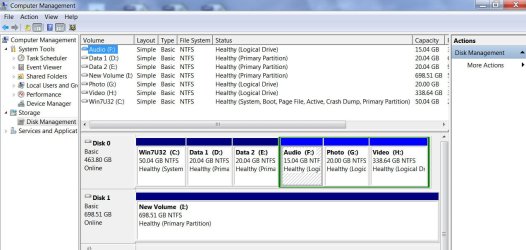
I am as I said to him and the others not good at understanding how to get hard drives ready for use and all that partitioning stuff as you can se my pic of the C: drive - I have no idea of how to put that right even though it makes no difference to how the SSD performs.

Thanks for the link mate I know that most drive sizes are not really what they are stated to be but I did think 50GB out was a little bit rude. Mind you I really am not a fan of WD preferring Seagate myself.
Having said that the clone is definitely quicker between programs on the taskbar and booting up.
 

My Computer

Computer type
PC/Desktop
Computer Manufacturer/Model Number
Own build (new) Desk1 / Asus ROG Win 7 / Desk2 1st build
OS
Desk1 7 Home Prem / Desk2 10 Pro / Main lap Asus ROG 10 Pro 2 laptop Toshiba 7 Pro Asus P2520 7 & 10
CPU
Desk1 i5 3750K / Laptop i7 GTX 860M / Desk2 i5 2500
Motherboard
Desk1 Asus P877-V / Desk2 Gigabyte H67 UD3H / Laptop ?
Memory
Desk1 8GB (1866) / Desk2 16GB (1333) / Laptop 8Gb DDR3
Graphics Card(s)
Desk 1& 2NVidia GTX 650 & Laptops on board Intel
Sound Card
Desk 1 & 2 -XONAR DG Realtek High Def audio Laptop
Monitor(s) Displays
Desk 1 Benq HD 2450 / Desk2 Philips 24" / Laptop 17.5"
Screen Resolution
1920x1080 D1 & D2 & Laptop 1
Hard Drives
Desk1 Samsung 120GB 830 SSD
Asus ROG 256GB 850 Pro SSD
Desk2 Samsung 840 256 SSD
Toshiba 120GB EVO
PSU
Desk 1 Corsair HX 1050/ Laptop ? / Desk 2 Corsair HX 650
Case
Desk 1 Cooler HAF XM ? Toshiba laptop / Desk2 Coolermaster
Cooling
Fans on all Desk1 -2 Desk2 - all Coolermasters 5 Laptop ?
Keyboard
Desk 1 MS Sidewinder X6 Desk 2 MS Sidewinder X 4
Mouse
Desk 1&2 - Gigabyte MS 900 gamer - laptop - Logitec wireless
Internet Speed
ADSL2+
Other Info
One other Desktop (tester) and spare Toshba laptop both with SSD's
Running Kaspersky 2016 ISS on all machines config'd identically
Logitec audio stereo systems on each machine (x3)
Canon MG5250MFC
Router/modem TP-Link running WPA2SK
Personally I like to start an installation with an unallocated drive to help avoid funky partitioning like that, then partition afterwards how I like.
 

My Computer

Computer type
PC/Desktop
Computer Manufacturer/Model Number
Self built custom
OS
64-bit Windows 11 Pro for Workstations
CPU
Intel i7-8700K OC'd to 5 GHz
Motherboard
ASUS ROG Maximus XI Formula Z390
Memory
64 GB (4x16GB) G.SKILL TridentZ RGB DDR4 3600 MHz
Graphics Card(s)
ASUS ROG-STRIX-GTX1080TI-O11G-GAMING
Sound Card
Integrated
Monitor(s) Displays
2 x Samsung Odyssey G7 27"
Screen Resolution
2560x1440
Hard Drives
1TB Samsung 990 PRO M.2,
4TB Samsung 990 PRO PRO M.2,
TerraMaster F8 SSD Plus NAS
PSU
Seasonic Prime Titanium 850W
Case
Thermaltake Core P3
Cooling
Corsair Hydro H115i
Keyboard
Logitech wireless K800
Mouse
Logitech MX Master 4
Internet Speed
2 Gb/s Download and 100 Mb/s Upload
Antivirus
Malwarebyte Anti-Malware Premium
Browser
Google Chrome
Other Info
Logitech Z625 speaker system,
Logitech BRIO 4K Pro webcam,
HP Color LaserJet Pro MFP M477fdn,
APC SMART-UPS RT 1000 XL - SURT1000XLI,
Galaxy S23 Plus phone
Shawn I shall have to do some researching on the matter as I thought being unallocated was or meant the drive was unusable as is:o
 

My Computer

Computer type
PC/Desktop
Computer Manufacturer/Model Number
Own build (new) Desk1 / Asus ROG Win 7 / Desk2 1st build
OS
Desk1 7 Home Prem / Desk2 10 Pro / Main lap Asus ROG 10 Pro 2 laptop Toshiba 7 Pro Asus P2520 7 & 10
CPU
Desk1 i5 3750K / Laptop i7 GTX 860M / Desk2 i5 2500
Motherboard
Desk1 Asus P877-V / Desk2 Gigabyte H67 UD3H / Laptop ?
Memory
Desk1 8GB (1866) / Desk2 16GB (1333) / Laptop 8Gb DDR3
Graphics Card(s)
Desk 1& 2NVidia GTX 650 & Laptops on board Intel
Sound Card
Desk 1 & 2 -XONAR DG Realtek High Def audio Laptop
Monitor(s) Displays
Desk 1 Benq HD 2450 / Desk2 Philips 24" / Laptop 17.5"
Screen Resolution
1920x1080 D1 & D2 & Laptop 1
Hard Drives
Desk1 Samsung 120GB 830 SSD
Asus ROG 256GB 850 Pro SSD
Desk2 Samsung 840 256 SSD
Toshiba 120GB EVO
PSU
Desk 1 Corsair HX 1050/ Laptop ? / Desk 2 Corsair HX 650
Case
Desk 1 Cooler HAF XM ? Toshiba laptop / Desk2 Coolermaster
Cooling
Fans on all Desk1 -2 Desk2 - all Coolermasters 5 Laptop ?
Keyboard
Desk 1 MS Sidewinder X6 Desk 2 MS Sidewinder X 4
Mouse
Desk 1&2 - Gigabyte MS 900 gamer - laptop - Logitec wireless
Internet Speed
ADSL2+
Other Info
One other Desktop (tester) and spare Toshba laptop both with SSD's
Running Kaspersky 2016 ISS on all machines config'd identically
Logitec audio stereo systems on each machine (x3)
Canon MG5250MFC
Router/modem TP-Link running WPA2SK

My Computer

Computer type
PC/Desktop
Computer Manufacturer/Model Number
Self built custom
OS
64-bit Windows 11 Pro for Workstations
CPU
Intel i7-8700K OC'd to 5 GHz
Motherboard
ASUS ROG Maximus XI Formula Z390
Memory
64 GB (4x16GB) G.SKILL TridentZ RGB DDR4 3600 MHz
Graphics Card(s)
ASUS ROG-STRIX-GTX1080TI-O11G-GAMING
Sound Card
Integrated
Monitor(s) Displays
2 x Samsung Odyssey G7 27"
Screen Resolution
2560x1440
Hard Drives
1TB Samsung 990 PRO M.2,
4TB Samsung 990 PRO PRO M.2,
TerraMaster F8 SSD Plus NAS
PSU
Seasonic Prime Titanium 850W
Case
Thermaltake Core P3
Cooling
Corsair Hydro H115i
Keyboard
Logitech wireless K800
Mouse
Logitech MX Master 4
Internet Speed
2 Gb/s Download and 100 Mb/s Upload
Antivirus
Malwarebyte Anti-Malware Premium
Browser
Google Chrome
Other Info
Logitech Z625 speaker system,
Logitech BRIO 4K Pro webcam,
HP Color LaserJet Pro MFP M477fdn,
APC SMART-UPS RT 1000 XL - SURT1000XLI,
Galaxy S23 Plus phone
Got that Shawn but just out of curiosity is that 100MB space the same sort of aligning method as in Wolfgang's tutorial on SSD's? so to just make it neat and "tidy" so to speak?
 

My Computer

Computer type
PC/Desktop
Computer Manufacturer/Model Number
Own build (new) Desk1 / Asus ROG Win 7 / Desk2 1st build
OS
Desk1 7 Home Prem / Desk2 10 Pro / Main lap Asus ROG 10 Pro 2 laptop Toshiba 7 Pro Asus P2520 7 & 10
CPU
Desk1 i5 3750K / Laptop i7 GTX 860M / Desk2 i5 2500
Motherboard
Desk1 Asus P877-V / Desk2 Gigabyte H67 UD3H / Laptop ?
Memory
Desk1 8GB (1866) / Desk2 16GB (1333) / Laptop 8Gb DDR3
Graphics Card(s)
Desk 1& 2NVidia GTX 650 & Laptops on board Intel
Sound Card
Desk 1 & 2 -XONAR DG Realtek High Def audio Laptop
Monitor(s) Displays
Desk 1 Benq HD 2450 / Desk2 Philips 24" / Laptop 17.5"
Screen Resolution
1920x1080 D1 & D2 & Laptop 1
Hard Drives
Desk1 Samsung 120GB 830 SSD
Asus ROG 256GB 850 Pro SSD
Desk2 Samsung 840 256 SSD
Toshiba 120GB EVO
PSU
Desk 1 Corsair HX 1050/ Laptop ? / Desk 2 Corsair HX 650
Case
Desk 1 Cooler HAF XM ? Toshiba laptop / Desk2 Coolermaster
Cooling
Fans on all Desk1 -2 Desk2 - all Coolermasters 5 Laptop ?
Keyboard
Desk 1 MS Sidewinder X6 Desk 2 MS Sidewinder X 4
Mouse
Desk 1&2 - Gigabyte MS 900 gamer - laptop - Logitec wireless
Internet Speed
ADSL2+
Other Info
One other Desktop (tester) and spare Toshba laptop both with SSD's
Running Kaspersky 2016 ISS on all machines config'd identically
Logitec audio stereo systems on each machine (x3)
Canon MG5250MFC
Router/modem TP-Link running WPA2SK
I don't remember which tutorial is the one for Wolfgang that you mentioned. :o

The 100 MB partition is the System Reserved partition created during installation to be able to use WinRE without the need of a system repair disc or installation media.
 

My Computer

Computer type
PC/Desktop
Computer Manufacturer/Model Number
Self built custom
OS
64-bit Windows 11 Pro for Workstations
CPU
Intel i7-8700K OC'd to 5 GHz
Motherboard
ASUS ROG Maximus XI Formula Z390
Memory
64 GB (4x16GB) G.SKILL TridentZ RGB DDR4 3600 MHz
Graphics Card(s)
ASUS ROG-STRIX-GTX1080TI-O11G-GAMING
Sound Card
Integrated
Monitor(s) Displays
2 x Samsung Odyssey G7 27"
Screen Resolution
2560x1440
Hard Drives
1TB Samsung 990 PRO M.2,
4TB Samsung 990 PRO PRO M.2,
TerraMaster F8 SSD Plus NAS
PSU
Seasonic Prime Titanium 850W
Case
Thermaltake Core P3
Cooling
Corsair Hydro H115i
Keyboard
Logitech wireless K800
Mouse
Logitech MX Master 4
Internet Speed
2 Gb/s Download and 100 Mb/s Upload
Antivirus
Malwarebyte Anti-Malware Premium
Browser
Google Chrome
Other Info
Logitech Z625 speaker system,
Logitech BRIO 4K Pro webcam,
HP Color LaserJet Pro MFP M477fdn,
APC SMART-UPS RT 1000 XL - SURT1000XLI,
Galaxy S23 Plus phone
Hello...

(VERY) infrequent poster, here, but I figured this might be the place to straighten me out about this. I recently bought a 2TB Western Digital MyBook hard drive. to use as an additional data drive for my laptop. Although since it's only 2TB (a bit less than that being usable, of course) I *could* just format it as an MBR drive, but I thought I'd like to format it as GPT, for a couple of not-absolutely-essential reasons.

When looking through this tutorial, I noticed that at the very start of it you've provided a little section contrasting the differences between MBR and GPT formatted drives. The very last thing mentioned is "Removable disks cannot be converted into a GPT disk."

Eeeeek!! :eek: Would my external USB-connected hard drive be considered a "removable drive"? I vaguely think I remember reading that "removable drive" as defined by Windows would mean a USB thumb drive, or optical media like a DVD drive, but would NOT apply to an external hard disk such as what I have. Could someone tell me (definitively) whether external USB hard drives can be formatted as GPT?

Thanks so much, in advance...
 

My Computer

Computer type
Laptop
Computer Manufacturer/Model Number
Samsung RV511 Laptop
OS
Win 7 Home Premium 64-bit
CPU
Core i3 M380 @ 2.53GHz
Memory
4GB
Back
Top